MagicMirror Forum
    • Recent
    • Tags
    • Unsolved
    • Solved
    • MagicMirror² Repository
    • Documentation
    • 3rd-Party-Modules
    • Donate
    • Discord
    • Register
    • Login
    A New Chapter for MagicMirror: The Community Takes the Lead
    Read the statement by Michael Teeuw here.

    MMM-Scrobbler CSS

    Scheduled Pinned Locked Moved Development
    16 Posts 5 Posters 10.6k Views 6 Watching
    Loading More Posts
    • Oldest to Newest
    • Newest to Oldest
    • Most Votes
    Reply
    • Reply as topic
    Log in to reply
    This topic has been deleted. Only users with topic management privileges can see it.
    • S Offline
      spwood100
      last edited by

      That would help wouldnt it :-)

      How it currently displays:
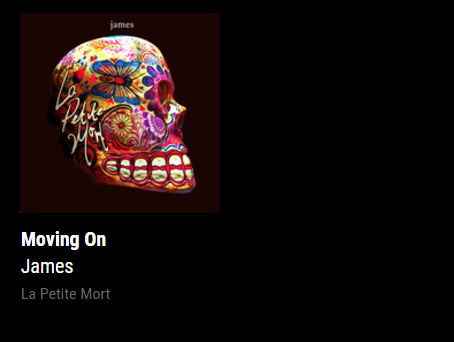
      0_1505307491080_3ca44576-12f0-4bb5-b708-80647a17a129-image.png

      How it would be useful to have the option to diplay
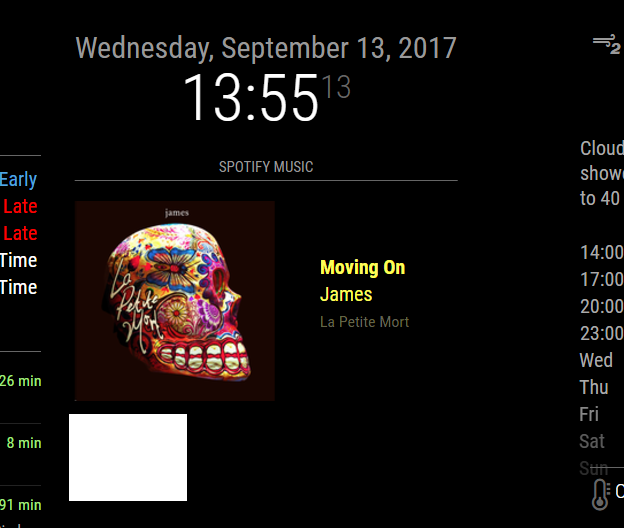
      0_1505307428514_ef87113d-87fd-4a60-97ef-aae1dbff51eb-image.png

      I have seen other examples where this has been achieved but not sure how its done. If its possible to have different display options in the app settings that would be awesome !

      Thanks for your help

      S 1 Reply Last reply Reply Quote 0
      • P Offline
        PtrBld Module Developer
        last edited by PtrBld

        Ok, now it is clear.
        I just updated the module and you should now be able to use the key “alignment” in your config.

        {
        			
        	module: 'MMM-Scrobbler',
        	
        	position: 'top_right',
        	config: {
        		username: 'Last.fm username',
        	        apikey: 'Last.fm api key',
        		//time interval to search for new song (every 15 seconds)
        		updateInterval: 15 * 1000,
        		//how often should we try to retrieve a song if not listening
        		delayCount: 5,
        		//time interval to search for new song if the 5 times not listening is received.
        		//set this to the same number as updateInterval to ignore this option	
        		delayInterval: 120*1000,
        		animationSpeed: 1000,
        		showAlbumArt: true,
        	    	showMetaData: true,
        		//Determines the position of the meta text. Possible values: top, bottom, left, right
        		alignment: "bottom", 
        		}
        	
        }
        

        This is not tested since I do not have a mirror atm but it should work ;)

        1 Reply Last reply Reply Quote 0
        • S Offline
          spwood100
          last edited by

          You are an absolute legend, let me pull the latest version and I will test and let you know

          1 Reply Last reply Reply Quote 0
          • P Offline
            PtrBld Module Developer
            last edited by

            if you want the meta text centered you need to add

            .right > .meta {
                /* margin-left: 16px; */
                margin: auto 16px;
            }
            

            to your css.

            J 1 Reply Last reply Reply Quote 0
            • S Offline
              spwood100
              last edited by

              Works like a dream with just a few “nuances” such as if you have it on the right side of the screen with the meta data to the right of the image, the meta data disappears off the screen and I suspect the same with the left. Otherwise its really good … thanks so mch!!!

              1 Reply Last reply Reply Quote 0
              • J Offline
                j.e.f.f Project Sponsor Module Developer @PtrBld
                last edited by

                @PtrBld said in MMM-Scrobbler CSS:

                if you want the meta text centered you need to add
                .right > .meta {
                /* margin-left: 16px; */
                margin: auto 16px;
                }

                to your css.

                It’s a good idea to add the module’s name to this rule so that it does not accidentally affect another module that coincidentally happens to use the same class names. Something like this:

                .module.MMM-Scrobbler .right > .meta {
                    /* margin-left: 16px; */
                    margin: auto 16px;
                }
                
                1 Reply Last reply Reply Quote 0
                • S Offline
                  spwood100
                  last edited by

                  Thanks @PtrBld for you lightning quick turn around of this one and to @j-e-f-f for the extra advice, much appreciated

                  1 Reply Last reply Reply Quote 0
                  • S Offline
                    SoleLo @spwood100
                    last edited by

                    @spwood100 how did you get the “Spotify Music” header at the top of it?

                    yawnsY 1 Reply Last reply Reply Quote 0
                    • yawnsY Offline
                      yawns Moderator @SoleLo
                      last edited by yawns

                      @solelo said in MMM-Scrobbler CSS:

                      @spwood100 how did you get the “Spotify Music” header at the top of it?

                      Please try this:

                      {
                      			
                      	module: 'MMM-Scrobbler',
                      	header: 'Spotify Music', // <<<<<<
                      	position: 'top_right',
                      	config: {
                      
                      		username: 'Last.fm username',
                      	
                      		apikey: 'Last.fm api key',
                      	
                      		//time interval to search for new song (every 15 seconds)
                      		updateInterval: 15 * 1000,
                      		//how often should we try to retrieve a song if not listening
                      		delayCount: 5,
                      		//time interval to search for new song if the 5 times not listening is received.
                      		//set this to the same number as updateInterval to ignore this option	
                      		delayInterval: 120*1000,
                      		animationSpeed: 1000,
                      		showAlbumArt: true,
                      	    	showMetaData: true,
                      		//Determines the position of the meta text. Possible values: top, bottom, left, right
                      		alignment: "bottom", 
                      		}
                      	
                      }
                      
                      S 1 Reply Last reply Reply Quote 0
                      • S Offline
                        SoleLo @yawns
                        last edited by

                        @yawns that worked perfect. Now it’s blocking the bottom MyCommute module, any ideas how to get that fixed?
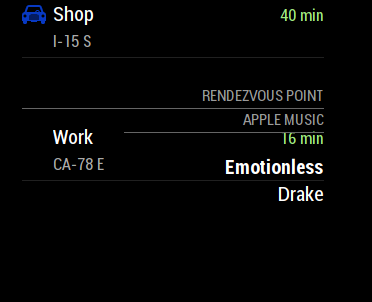
                        0_1530732002100_1de39f6e-2620-4867-860e-8175f194ba74-Screen Shot 2018-07-04 at 12.18.22 PM 🌚.png
                        Screen Shot 2018-07-04 at 12.18.22 PM 🌚

                        1 Reply Last reply Reply Quote 0
                        • S Offline
                          spwood100
                          last edited by

                          @SoleLo , add the following into the module config

                          header:

                          So for example

                          module: ‘MMM-Scrobbler’,

                          position: 'top_right',
                          header: 'insert your text here'
                            config: {
                          

                          Should work, let me know if it doesnt

                          S 1 Reply Last reply Reply Quote 0
                          • S Offline
                            SoleLo @spwood100
                            last edited by

                            @spwood100 I got it to work but it shows up over the MyCommute module…

                            1 Reply Last reply Reply Quote 0
                            • S Offline
                              spwood100
                              last edited by

                              @SoleLo , that would be something to do with the relative sizes of the modules. You would probably need to play about with some custom css to get these to not overlap, something I am still struggling with on my screen from time to time.

                              Some excellent posts in the forum on css though:

                              https://forum.magicmirror.builders/topic/6808/css-101-getting-started-with-css-and-understanding-how-css-works.

                              You could also post in the CSS help section?

                              https://forum.magicmirror.builders/category/31/development

                              Cheers

                              S 1 Reply Last reply Reply Quote 0
                              • S Offline
                                SoleLo @spwood100
                                last edited by

                                @spwood100 thanks I actually just did some trial and error and figured it out, It was much simpler than I thought.

                                1 Reply Last reply Reply Quote 0

                                Hello! It looks like you're interested in this conversation, but you don't have an account yet.

                                Getting fed up of having to scroll through the same posts each visit? When you register for an account, you'll always come back to exactly where you were before, and choose to be notified of new replies (either via email, or push notification). You'll also be able to save bookmarks and upvote posts to show your appreciation to other community members.

                                With your input, this post could be even better 💗

                                Register Login

                                • 1 / 1
                                • First post
                                  Last post
                                Enjoying MagicMirror? Please consider a donation!
                                MagicMirror created by Michael Teeuw.
                                Forum managed by Sam, technical setup by Karsten.
                                This forum is using NodeBB as its core | Contributors
                                Contact | Privacy Policy