Read the statement by Michael Teeuw here.
Facial Recognition - customize your mirror for every user!
-
I’ve tried to capture an image from my pi camera with :
pi@pi:~ $ raspistill -o output.jpg
the raspistill tool hang…
The pi camera might be broken ? someone got the same issue ?
Do you have any good usb webcam compatible with raspberry pi 3 and opencv ? I would like to use the MMM Face recognition module…
Thanks
-
After retrying couple of times to make it work, it looks like the issue was coming the raspbian distribution or python package issue.
After reflashing my sd card with a fresh raspbian image, my camera works…
-
This post is deleted! -
It checks every second or so but you can configure the interval.You can buy longer cables for the Pi cam :)
-
This post is deleted! -
i am having a problem that the screen remains blank after i am logged in
(

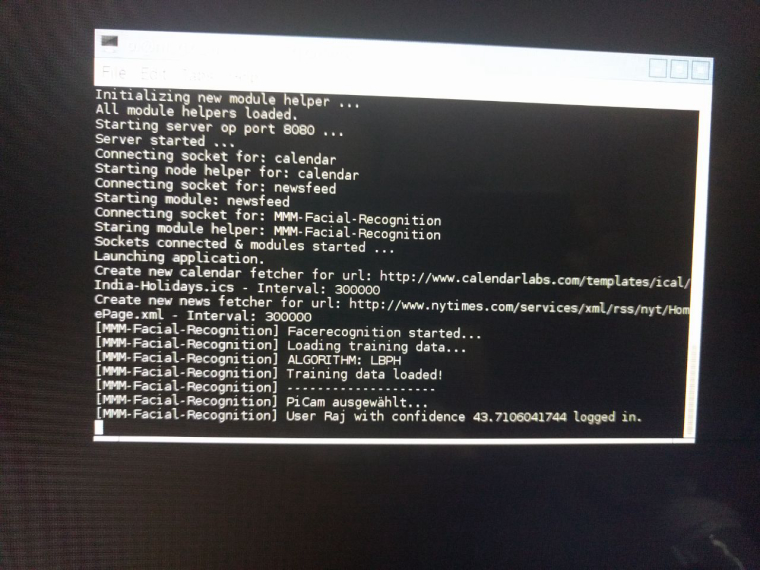 image url)
Thanks
-
Very nice module.
However I keep ruinning into the same error when I try capture.py to convert them to pgm files:
Could not detect single face!I’ve taken ‘selfies’ with different camera’s in different lighting conditions, but not even one is good enough to convert into a pgm file…
Can you please give me some clues on what conditions my pictures have to meet?
Am I doing something wrong?
All help and advice appreciated! -
@rajbadri Have you added the classes: (with a value) to all the other modules in the config.js? If you get a plain black screen without errors it might be that no modules were loaded.
-
@rvdgeer OK, replying to my own post for future reference:
I got it working by doing the following:
- cropped the pictures to only show my face;
- copied the cropped pictures and transformed them to greyscale;
- copied the grey pictures and upped the contact;
- moved all pictures (originals and copies) to a direct sub folder of the facetrainer folder;
- started the capture.py, pressed 2, entered my name, entered the name of the sub folder (only the sub folder, not the entire path) and waited.
This way I got it to recognize about 10 of the pictures…
Not bad!Getting it to recognize me is still not easy, but that because of the lighting conditions in my ManCave where I’m putting it together.
-
@paviro Hi,
I am getting this error while running facerecognition.py
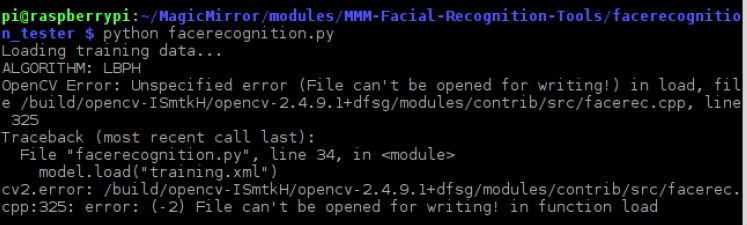
and also need to know in //Facerecognition Test Tool Readme
Intools/facerecognition_tester/lib/config.pyadd add your training labels fromtools/facetrainerunderpersonen = []( what need to enter in this personen= []) -
@shashank If you run the facetrainer (capture.py and train.py) first, you should know what to enter here…
-
@rvdgeer hi,
After running capture.py a folder created by name ‘sasi’ in the
/home/pi/MagicMirror/modules/MMM-Facial-Recognition-Tools/facetrainer/training_datathen by running train.py a training.xml created in the path
/home/pi/MagicMirror/modules/MMM-Facial-Recognition-Tools/facetrainerand also in
/home/pi/MagicMirror/modules/MMM-Facial-Recognition-Tools/facerecognition_tester/libi mentioned name inpersonen = ["sasi"]my config.js file as below
{
    module: 'MMM-Facial-Recognition',
    position: 'top_left',
    config: {
        // 1=LBPH | 2=Fisher | 3=Eigen
        recognitionAlgorithm: 1,
        // Threshold for the confidence of a recognized face before it's considered a
        // positive match.  Confidence values below this threshold will be considered
        // a positive match because the lower the confidence value, or distance, the
        // more confident the algorithm is that the face was correctly detected.
        lbphThreshold: 50,
        fisherThreshold: 250,
        eigenThreshold: 3000,
        // force the use of a usb webcam on raspberry pi (on other platforms this is always true automatically)
        useUSBCam: false,
        // Path to your training xml
        trainingFile: 'modules/MMM-Facial-Recognition/training.xml',
        // recognition intervall in seconds (smaller number = faster but CPU intens!)
        interval: 2,
        // Logout delay after last recognition so that a user does not get instantly logged out if he turns away from the mirror for a few seconds
        logoutDelay: 15,
        // Array with usernames (copy and paste from training script)
        users: ['sasi'],
        //Module set used for strangers and if no user is detected
        defaultClass: "default",
        //Set of modules which should be shown for every user
        forAllClass: "for_all"
    }
},

{
    module: 'clock',
    position: 'top_left',
    //Set your classes here seperated by a space.
    //Shown for all users
    classes: 'for_all'
},
when i run pm2 start mm i am struck at below message
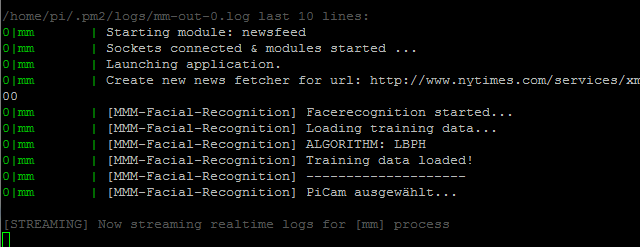
can someone help me on this error
-
Potentially stupid question here, apologies in advance if I’ve missed something obvious. I have the mirror and the face recognition working (Yay!) but when it’s running, on the left side of the screen it shows “MMM-Facial-Recognition” and module-10-mmm-facial-recognition underneath. I though about removing the position tag, but that’s there in the readme version so did not. How do I remove the text showing the running facial recognition module?
Thanks!Zach -
-
This post is deleted! -
yes , i copied the training file from //MMM-Facial-Recognition-Tools/facetrainer
to // Path to your training xml
trainingFile: ‘modules/MMM-Facial-Recognition/training.xml’, -
Hello, First of all thanks a lot for building this great module!
I am trying to get it to work, I’ve installed the module and it looks like It doens’t start:
Output when I start the NPM:
`pi@raspberrypi:~/MagicMirror $ npm start

magicmirror@2.0.0 start /home/pi/MagicMirror
electron js/electron.js
Loading config ...
Loading module helpers ...
Initializing new module helper ...
Initializing new module helper ...
All module helpers loaded.
Starting server op port 8080 ...
Server started ...
Connecting socket for: camera
camera helper started ...
Connecting socket for: MMM-Facial-Recognition
Staring module helper: MMM-Facial-Recognition
Sockets connected & modules started ...
Launching application.
initializing nodemailer
`
It looks like its installed fine, because of the starting module helper: MMM-Facial-Recognition.
But I am not getting the normal output like I see by other people:
[MMM-Facial-Recognition] Facerecognition started...
[MMM-Facial-Recognition] Loading training data...

My Config.json file:
`/* Magic Mirror Config Sample
*

By Tom & Joey
MIT Licensed.
*/
var config = {
port: 8080,

language: 'nl',
timeFormat: 24,
units: 'metric',

modules: [


	{
            module: 'camera',
	    position: 'top_center',
	    config: {
		selfieInterval: 3,  // Time interval in seconds before the photo will be taken.
	        emailConfig: {
	            service: 'Hotmail', // Email provider to use to send email with a photo.
	            auth: {
	                user: '<s1084836@hotmail.com>', // Your email account
	                pass: '<test12345>'        // Your password for email account
	            }
	        }
	}
	},

	{
	    module: 'MMM-Facial-Recognition',
	    position: 'top_left',
	    config: {
		        // 1=LBPH | 2=Fisher | 3=Eigen
			recognitionAlgorithm: 1,
			// Threshold for the confidence of a recognized face before it's considered a
			// positive match.  Confidence values below this threshold will be considered
			// a positive match because the lower the confidence value, or distance, the
			// more confident the algorithm is that the face was correctly detected.
			lbphThreshold: 50,
			fisherThreshold: 250,
			eigenThreshold: 3000,
			// force the use of a usb webcam on raspberry pi (on other platforms this is always true automatically)
			useUSBCam: true,
			// Path to your training xml
			trainingFile: 'modules/MMM-Facial-Recognition/training.xml',
			// recognition intervall in seconds (smaller number = faster but CPU intens!)
			interval: 2,
			// Logout delay after last recognition so that a user does not get instantly logged out if he turns away from the mirror for a few seconds
			logoutDelay: 15,
			// Array with usernames (copy and paste from training script)
			users: ['Tom'],
			//Module set used for strangers and if no user is detected
			defaultClass: "default",
			//Set of modules which should be shown for every user
			everyoneClass: "everyone"
                        }
				},

	]
};

/*************** DO NOT EDIT THE LINE BELOW ***************/
if (typeof module !== 'undefined') {module.exports = config;}
Is there anything I’m doing wrong ? :D
Note from admin: Please use Markdown on code snippets for easier reading!
-
@paviro thanks creating such a cool module!
I have followed the instructions to capture the training images and have successfully created a training.xml file :)When I add the MMM-Facial-Recognition module to my Magic Mirror config.js file I get “WARNING! Could not validate config file. Please correct syntax errors. Starting with default configuration” in the terminal and the Magic Mirror shows an error page saying config.js not found.
My config.js is:
var config = {
	port: 8080,

	language: 'en',
	timeFormat: 12,
	units: 'metric',

	modules: [

//-------------------------------------------------
		{
			module: 'clock',
			position: 'top_left'
			classes: 'everyone'
		},
//-------------------------------------------------
		{
			module: 'compliments',
			position: 'lower_third'
			classes: 'andy'
		},
//-------------------------------------------------
		{
			module: 'MMM-Facial-Recognition',
			config: {
				recognitionAlgorithm: 1,
				lbphThreshold: 50,
				fisherThreshold: 250,
				eigenThreshold: 3000,
				useUSBCam: false,
				trainingFile: '/home/pi/MagicMirror/modules/MMM-Facial-Recognition/training.xml',
				interval: 3,
				logoutDelay: 15,
				users: ['andy'],
				defaultClass: "default",
				everyoneClass: "everyone"
			}
		},
//-------------------------------------------------
	]

};

/*************** DO NOT EDIT THE LINE BELOW ***************/
if (typeof module !== 'undefined') {module.exports = config;}
If I comment out " classes: ‘everyone’ " and " classes: ‘andy’ " in the other modules the MagicMirror loads with no errors but blank black screen.
Any ideas what’s causing this ?
Thanks -
@awarrington It seems like you’ve missed the comma’s at the end of the line where the position is for the clock and compliments module here:
{ module: 'clock', position: 'top_left', <-- classes: 'everyone' }, -
@rvdgeer Thank you! All works perfectly now

Hello! It looks like you're interested in this conversation, but you don't have an account yet.
Getting fed up of having to scroll through the same posts each visit? When you register for an account, you'll always come back to exactly where you were before, and choose to be notified of new replies (either via email, or push notification). You'll also be able to save bookmarks and upvote posts to show your appreciation to other community members.
With your input, this post could be even better 💗
Register Login