Read the statement by Michael Teeuw here.
[MMM-AlexaOnOff] Simple Mirror Control from External Home Assistant (Alexa/Google Home/HASS.io)
-
@shbatm Hey thank you for your reply and happy new year.
I am convinced that my config.js entry (i use MMM-RemoteControl) are ok following your example.
however i do not see anyFauxMo service started. Listening on 192.168.1.xxx:21900And when i run the
netstat -tulpn | grep electroncommand i do not see a net service listening under the port 21900 either
I have unistalled and installed the MMM-AlexaOnOff module a couple of times and made sure that i have run npm install inside the cloned module folder but for some reason it is not doing what it is supposed to be doing not installing right
what do you think may be causing it??
D -
@richland007 it sounds like something simple has to be missing and the module isn’t loading, otherwise you would be seeing an error.
- Please post your config anyways (or send to me in a chat if you prefer). It may be something simple missing.
- Confirm you are using a Raspberry Pi, on WiFi, using IPv4 (not IPv6 or ethernet–those are supported but require additional config options).
- Confirm there are no errors from the module in the logs. You can run
pm2 restart mm && pm2 logsto follow the logs through the whole restart process. - You can also add some
console.log(...)statements in theinitializefunction innode_helper.jsto see if you can diagnose any issues with it loading. Again, if it was making it that far and not loading you should have seen an error.
-
@shbatm Here is my config.js entry
{
    module: 'MMM-AlexaOnOff',
    config: {
        devices: [{
              name: "Horoscope Module",
              on: {
                notification: "REMOTE_ACTION",
                payload: { action: "SHOW", module: "MMM-horoscope" }
              },
              off: {
                notification: "REMOTE_ACTION",
                payload: { action: "HIDE", module: "MMM-horoscope" }
              },
        }]
    }
},
and there is the pm2 logs
(the forum wont allow me to add a picture for some reason) but its all green when it comes to MMM-AlexaOnOff
I am on wifi on the same network as the echo, i am using IPv4 and of course on Rpi
I wish i could send you the picture of the pm2 logs… it says:
Connecting socket for: AlexaOnOff
Module helper started for module AlexaOnOff
Sockets connected & Module startedWhat do you think?? i do not see any errors
D
-
@richland007 said in [MMM-AlexaOnOff] Simple Mirror Control from External Home Assistant (Alexa/Google Home/HASS.io):
What do you think?? i do not see any errors
I’m at a loss. I ran the install on a fresh install of MagicMirror (v2.7.0-dev) on the latest version of Raspbian with Desktop (Nov’18) and I got the output shown in this Gist: https://gist.github.com/shbatm/886fc811d314d136ccedeaf5663e5881. Notice the
FauxMo service started. Listening on 192.168.10.92:21900on the third to last line.When I copy and paste your config section into my config it works fine. I run Discover Devices on Alexa and she finds “Horoscope Module” as a Wemo Switch.
What version of MagicMirror, node, and Raspbian are you using? Is it the most recent?
Try running FauxMo by itself and see if you can find the “fake” devices it creates:
cd ~/MagicMirror/modules/MMM-AlexaOnOff/node_modules/fauxmojs/example
node example.js
You should see:
started..and then be able to discover ‘office light’ and ‘office fan’Edit: I did notice one thing: unless you’re using my fork of MMM-Remote-Control, the SHOW/HIDE functions require the module identifier, not the module name. The identifier will be something of the form
module_4_MMM-horoscopeand is the HTML ID of the module’s container (you can find this by using DevTools or digging into MMM-Remote-Control further. -
@shbatm When i try to run the FauxMo example i see that it says: started …
but there is no service running on port 21900 when i do “netstat -tulpn”
I get a bunch of services running but none on that port.
And when i try to discover devices, Alexa comes up saying that no new ones were found agian… so no Office Lamp and no Office FanI am running Magic Mirror M 2.4.1
Node version is: v6.13.0
Rasbian Stretch 9.6 release (it is updated and upgraded as of today but i do not know if it is the lates release since i have been playing with it for a while)one more time with some more explanation on the MMM-Remote-Control names please… i did not quite get it where would i find the names again and are they numbered by MMM-Remote-Control according to their place that they have on my congfig.js list ??
thank you for your help
Denis -
The example runs on different ports (10000, 10001 I think) but I don’t know why Alexa wouldn’t find the devices. There must be something with your network or firewall causing an issue.
The module may not be starting properly because it has a minimum MM version of 2.5.0. If you don’t want to upgrade, you can try changing line 21 in MMM-AlexaOnOff.js to match your version.
About MMM-Remote-Control: see https://github.com/Jopyth/MMM-Remote-Control#list-of-actions for more details. The IDs are created by MM when it starts, and yes it should match the order in your config. The easiest way I’ve found to get these is to open the
remote.htmlpage on your computer, go to Edit View, and right-click > Inspect Element on one of the menu items. You’ll get something like this:
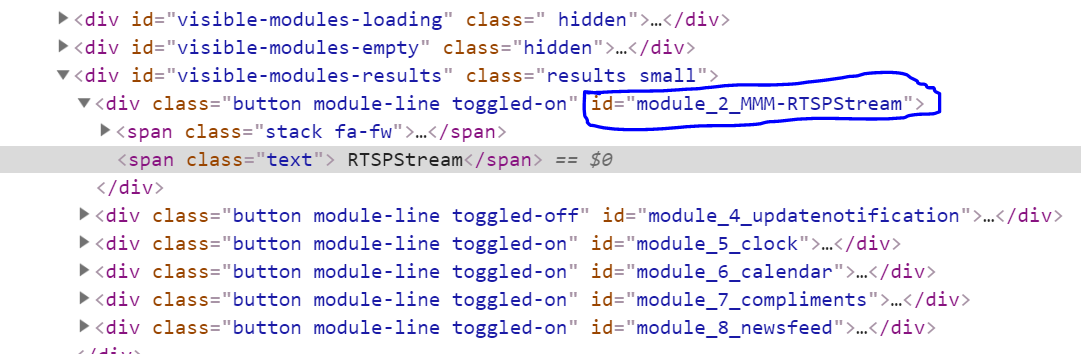
I have a Pull Request for MMM-Remote-Control pending that will let you use the names directly, but it hasn’t been incorporated yet.
-
@shbatm All right so i got it to work :) i have not fully tested yet with all my modules (i have 37 of them) but i did it with one and it works.
So this is what i did:
- I ran the FauxMo example just like you said and it activates on ports 11000 and 11001
I than went on alexa.amazon.com from my desktop and that is where i did the device discovery that found those sample devices… from my local echo it would not find anything. - I went on the MMM-AlexaOnOff.js file and changed the minimum required version to 2.4.1 which is what i have (others if they happen to look into this forum thread should change it according to theirs)
- I activated my sample 1 module on/off on my config.js and Alexa did find it but it did not do anything until i changed the name of the module to “module_6_MMM-horoscope” again just like you said above and than it worked :)
One last question: Through MMM-AlexaOnOff i want to create another on/off device called “Mirror” utilizing MMM-Remote-Control, that on On will send the command MONITORON and on Off with send the command MONITOROFF So will this work…I have no clue but just by dissecting your code???
{
              name: "Mirror",
              on: {
                notification: "REMOTE_ACTION",
                payload: { action: "MONITORON"}
              },
              off: {
                notification: "REMOTE_ACTION",
                payload: { action: "MONITOROFF"}
              },
Do you think i will have any issues with 37 modules??
I want to add them all on my config. js file before i run discovery on AlexaThank you
Denis - I ran the FauxMo example just like you said and it activates on ports 11000 and 11001
-
@richland007 said in [MMM-AlexaOnOff] Simple Mirror Control from External Home Assistant (Alexa/Google Home/HASS.io):
from my local echo it would not find anything.
I just found this setting up some smart plugs last week – is your echo on a different account in your “Amazon Household” by any chance?
“Mirror” utilizing MMM-Remote-Control, that on On will send the command MONITORON and on Off with send the command MONITOROFF So will this work…I have no clue but just by dissecting your code???
Yes, that should work. Here’s mine verbatim:
        {
            module: 'MMM-AlexaOnOff',
            config: {
                devices: [{
                    name: "Bookcase Screen",
                    on: {
                        notification: "REMOTE_ACTION",
                        payload: { action: 'MONITORON' }
                    },
                    off: {
                        notification: "REMOTE_ACTION",
                        payload: { action: 'MONITOROFF' }
                    },
                },
                //{ add your other devices here },
                ]
            }
        },
Do you think i will have any issues with 37 modules??
I haven’t stress tested it like that yet. You can certainly try it… From the FauxMo notes, you may have to run Discover a few times to find them all. Just make sure you don’t have anything running on the block of 37 ports.
You can also try doing them in groups (you can send multiple notifications for each device’s on and off command, see earlier in this thread). Or use Profile Switcher or MMM-Carousel w/ Navigation (shbatm fork) to use “slides” of modules.
-
Hi!
Sounds like a perfect alexa module. Perhaps someone can help. Alexa can’t find my device. I followed the instructions - it’s not the first module I installed. I have to say, that I’m using ubuntu mate, because I have a mini-itx board with a Intel G4600, but that shouldn’t be the problem.
I already deleted my devices and added them again - a few times. But there is no virtual Magic Mirror device.
I corrected the netInterface variable to “enp3s0”, because I’m using LAN. In the newer ubuntu versions, there is no eth0.
Here is my config:
        {
            module: 'MMM-OnScreenMenu',
        },
        {
            module: 'MMM-AlexaOnOff',
            config: {
                netInterface: "enp3s0",
                devices: [{
                      name: "Magic Mirror",
                      on: {
                        notification: "ONSCREENMENU_PROCESS_ACTION",
                        payload: { actionName:'monitorOn' }
                      },
                      off: {
                        notification: "ONSCREENMENU_PROCESS_ACTION",
                        payload: { actionName:'monitorOff' }
                      },
                }]
            }
        },
Ideas?
Best regards
Maurice -
Please check the same things:
- Check your MagicMirror version, if it’s lower than v2.5.0 and you don’t want to upgrade, you can try changing line 21 in MMM-AlexaOnOff.js to match your version.
- You should see
FauxMo service started. Listening on 192.168.x.x:21900in your log file if the service started. - You can try testing with the example:
    cd ~/MagicMirror/modules/MMM-AlexaOnOff/node_modules/fauxmojs/example
    node example.js
You should see:
started..and then be able to discover ‘office light’ and ‘office fan’ on your Alexa.
4. Make sure you try discovery from alexa.amazon.com, not just your Echo. -
@shbatm Thank you for responding!
- I have the newest version 2.6
- Yes, I can see that line while starting the mirror.
- I also can see this in my command line with the example.
- No devices found. With echo, Alexa app and web interface. Also no test “office light” or “office fan”.
Weird?! Perhaps the netInterface problem?! Or should it work with “enp3s0”?
-
@djsunrise19 said in [MMM-AlexaOnOff] Simple Mirror Control from External Home Assistant (Alexa/Google Home/HASS.io):
Or should it work with “enp3s0”?
As long as the line in the log is returning your computers’ correct IP Address,
enp3s0appears to be working…Check
netstat tulpn | grep 21900and make sure the port is open. Otherwise check that your Alexa is on the same network/WiFi/account as you expect. If you’re getting the port open, then it’s something with the network or Alexa causing the problems. -
@shbatm Ok so it works BUT it is only finding the last device on my list of the config.js file module entry when there are 36 others there. I tried discovery like 20 times from the website.
Should i try adding them one by one from the bottom up by commenting them out and adding them one by one …unless you got any other ideas :)D
-
@richland007 in the log is it showing all of the ports in the range open? (e.g. 21900-21936)?
-
@shbatm Where do i see the logs??
When i usenetstat -tulpn | grep electronIt only show that 1 one port 0.0.0.0:21900 Listen
D
-
@shbatm said in [MMM-AlexaOnOff] Simple Mirror Control from External Home Assistant (Alexa/Google Home/HASS.io):
netstat tulpn | grep 21900
Yes, IP-Adress is correct. From console everything looks like it should. Alexa is in the same network - wlan, mirror lan. I also have hue in here and the hue module on my mirror. Everything looks fine there. But actually, Alexa finds nothing.
Ich checked your command. After that, with
sudo netstat -tulpnI see this:

Do I need the wemo skill or something like that?
-
@djsunrise19 said in [MMM-AlexaOnOff] Simple Mirror Control from External Home Assistant (Alexa/Google Home/HASS.io):
wemo skill
You shouldn’t need a separate skill with it. It looks like everything is working from the mirror side so I’m not sure what else to try…
-
@richland007 said in [MMM-AlexaOnOff] Simple Mirror Control from External Home Assistant (Alexa/Google Home/HASS.io):
It only show that 1 one port 0.0.0.0:21900
It would be in
pm2 logs mmor~/.pm2/logsfolder. I’ll check when I get a chance why it’s not opening more than 1 port. -
@shbatm I don not see anything out of the ordinary in my logs when i do
pm2 logs mmdefinitely not 36 ports open in addition to 29100 when i go to location~/.pm2/logsthe log files are there in the directory but empty. -
So I was looking at the Fauxmojs project–what this module uses to handle the “devices”–and it looks like there are some issues with Gen 2 Echos not discovering the devices–but for most, the alexa.amazon.com website was working. I’ll keep an eye on that project–but at the moment, I don’t have anything else I can do from my end.
If you want to see some more detailed logs–start the MM manually with the following:
cd ~/MagicMirror export DEBUG=sstp-server,deviceEndpoints,discoveryService npm start@richland007 - I just tested my installation with 3 devices and, while it wasn’t showing all of the ports on the log line due to a bug, it was opening the ports (visible with
netstat -tulpn | grep electron– see below). Just in case anyone is wondering–port 1900 is the discovery port.tcp 0 0 0.0.0.0:21900 0.0.0.0:* LISTEN 15738/electron.js tcp 0 0 0.0.0.0:21901 0.0.0.0:* LISTEN 15738/electron.js tcp 0 0 0.0.0.0:21902 0.0.0.0:* LISTEN 15738/electron.js tcp 0 0 0.0.0.0:8080 0.0.0.0:* LISTEN 15738/electron.js udp 0 0 0.0.0.0:1900 0.0.0.0:* 15738/electron.js

Hello! It looks like you're interested in this conversation, but you don't have an account yet.
Getting fed up of having to scroll through the same posts each visit? When you register for an account, you'll always come back to exactly where you were before, and choose to be notified of new replies (either via email, or push notification). You'll also be able to save bookmarks and upvote posts to show your appreciation to other community members.
With your input, this post could be even better 💗
Register Login