MagicMirror Forum
    • Recent
    • Tags
    • Unsolved
    • Solved
    • MagicMirror² Repository
    • Documentation
    • 3rd-Party-Modules
    • Donate
    • Discord
    • Register
    • Login
    A New Chapter for MagicMirror: The Community Takes the Lead
    Read the statement by Michael Teeuw here.

    [octomirror-module] Monitor & Control an OctoPrint 3D Printer Server

    Scheduled Pinned Locked Moved Productivity
    47 Posts 17 Posters 42.1k Views 18 Watching
    Loading More Posts
    • Oldest to Newest
    • Newest to Oldest
    • Most Votes
    Reply
    • Reply as topic
    Log in to reply
    This topic has been deleted. Only users with topic management privileges can see it.
    • B
      barnosch
      last edited by

      Great. Good idea, since it is “only” a img tag, it is pretty easy.
      i was thinking to complicated. Now it fits nicely.
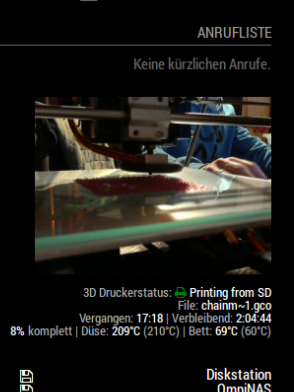
      0_1516814531991_005afc39-fe57-4c77-9773-6427357fe7f1-grafik.png

      Looking forward for the “hide camera window when not printing” feature.
      But no hurry.

      Great work!

      1 Reply Last reply
      Reply Quote 0
      • michael24hM
        michael24h
        last edited by

        My stream showing upside down. any idea ?

        1 Reply Last reply
        Reply Quote 0
        • michael24hM
          michael24h
          last edited by

          this works for me:
          div.octomirror-module img {
          transform: rotate(180deg);

          1 Reply Last reply
          Reply Quote 0
          • D
            d3r
            last edited by

            Installed this on my pi3 for the Mp select mini today. This is great!

            1 Reply Last reply
            Reply Quote 0
            • citizendevpiC
              citizendevpi
              last edited by

              I can not seam to get the informatin to show up all items say n/a but my video shows no problem, would realy apricate any help

              1 Reply Last reply
              Reply Quote 0
              • S
                shbatm Module Developer
                last edited by

                Can you please post your config section? Have you enabled the API and provided an API key?

                citizendevpiC 2 Replies Last reply
                Reply Quote 0
                • michael24hM
                  michael24h
                  last edited by

                  @shbatm said in [octomirror-module] Monitor & Control an OctoPrint 3D Printer Server:
                  please post your config section

                  1 Reply Last reply
                  Reply Quote 0
                  • citizendevpiC
                    citizendevpi @shbatm
                    last edited by yawns

                    @shbatm

                    }, {
                            module: "octomirror-module",
                            position: "bottom_left",
                            config: {
                                url: "http://192.168.2.141",
                                api_key: "B7ACF3C4BDD04D61BF5176C75778661E",
                            }
                        },
                    

                    so i obviously cannot figure out how to copy paste my config i feel like i have some issues

                    1 Reply Last reply
                    Reply Quote 0
                    • citizendevpiC
                      citizendevpi @shbatm
                      last edited by

                      @shbatm yes I have enabled the API as you can c it is in my config

                      S 1 Reply Last reply
                      Reply Quote 0
                      • S
                        shbatm Module Developer @citizendevpi
                        last edited by

                        @citizendevpi Try adding debugMode: true, to the config and see if you get any useful information in the logs. I can’t remember if they’ll show up in the console or DevTools. Also, it’s been a while since I’ve used the module, but it will only show data when it’s actually printing too.

                        1 Reply Last reply
                        Reply Quote 0
                        • michael24hM
                          michael24h
                          last edited by sdetweil

                          @citizendevpi said in [octomirror-module] Monitor & Control an OctoPrint 3D Printer Server:

                          url: “http://192.168.2.141”
                          Looks like link isn’t complete. Should looks like this http://ip_address/webcam/?action=stream

                          {
                                  module: 'MMM-MotionEye',
                                  position: 'top_right',
                                      config:  {
                                      width: "460px",
                                      autoHide: false,
                                      url: "http://octoprint IP address/webcam/?action=stream",
                                      debug: false,    
                                      user: "pi"  
                                  }
                              },   
                          

                          I hope this will help you

                          S 1 Reply Last reply
                          Reply Quote 0
                          • michael24hM
                            michael24h
                            last edited by

                            Try open octoprint > go to webcam > then open image in new tab. and copy http address from web browser to your config file in octomirror-module.

                            1 Reply Last reply
                            Reply Quote 0
                            • S
                              shbatm Module Developer @michael24h
                              last edited by

                              @michael24h said in [octomirror-module] Monitor & Control an OctoPrint 3D Printer Server:

                              Looks like link isn’t complete. Should looks like this http://ip_address/webcam/?action=stream

                              Nope, that shouldn’t be it. He said his stream was working and the url parameter is just for the octopi instance, not the stream. The module assumes it needs to add /webcam/?action=stream” unless streamUrl is provided.

                              1 Reply Last reply
                              Reply Quote 0
                              • S
                                shbatm Module Developer
                                last edited by

                                @citizendevpi

                                Just confirming: you are using my version https://github.com/shbatm/octomirror-module not the original, correct?

                                citizendevpiC 2 Replies Last reply
                                Reply Quote 0
                                • citizendevpiC
                                  citizendevpi @shbatm
                                  last edited by

                                  @shbatm let me check and yes u are correct I do have my stream no problem but no info and I would only expect it to give me stats when printing

                                  1 Reply Last reply
                                  Reply Quote 0
                                  • citizendevpiC
                                    citizendevpi @shbatm
                                    last edited by

                                    @shbatm yes shbatm/octomirror-module

                                    1 Reply Last reply
                                    Reply Quote 0
                                    • citizendevpiC
                                      citizendevpi
                                      last edited by

                                      This post is deleted!
                                      1 Reply Last reply
                                      Reply Quote 0
                                      • citizendevpiC
                                        citizendevpi
                                        last edited by

                                        Any help

                                        S 1 Reply Last reply
                                        Reply Quote 0
                                        • S
                                          shbatm Module Developer @citizendevpi
                                          last edited by

                                          @citizendevpi said in [octomirror-module] Monitor & Control an OctoPrint 3D Printer Server:

                                          Any help

                                          Sorry, I haven’t had a chance to fire up my printer and take a look yet. Going to try in the next few days. They’ve probably updated something in Octoprint that broke it.

                                          One thing I did think of to have you check on: make sure you have Allow CORS turned on in your Octoprint settings.

                                          1 Reply Last reply
                                          Reply Quote 0
                                          • S
                                            shbatm Module Developer
                                            last edited by

                                            @michael24h @citizendevpi Please update the module to the latest version and give it a try.

                                            Short version: OctoPrint changed the way the API login works.
                                            Long version: The new bundled OctoPrint plugin ForceLogin now requires the API to get a session ID and send it back to the socket before it will send any detailed messages. Detailed here and here.


                                            citizendevpiC 1 Reply Last reply
                                            Reply Quote 0

                                            Hello! It looks like you're interested in this conversation, but you don't have an account yet.

                                            Getting fed up of having to scroll through the same posts each visit? When you register for an account, you'll always come back to exactly where you were before, and choose to be notified of new replies (either via email, or push notification). You'll also be able to save bookmarks and upvote posts to show your appreciation to other community members.

                                            With your input, this post could be even better 💗

                                            Register Login

                                            • 1
                                            • 2
                                            • 3
                                            • 1 / 3
                                            • First post
                                              Last post
                                            Enjoying MagicMirror? Please consider a donation!
                                            MagicMirror created by Michael Teeuw.
                                            Forum managed by Sam, technical setup by Karsten.
                                            This forum is using NodeBB as its core | Contributors
                                            Contact | Privacy Policy