MagicMirror Forum
    • Recent
    • Tags
    • Unsolved
    • Solved
    • MagicMirror² Repository
    • Documentation
    • 3rd-Party-Modules
    • Donate
    • Discord
    • Register
    • Login
    A New Chapter for MagicMirror: The Community Takes the Lead
    Read the statement by Michael Teeuw here.

    MMM-AlarmClock

    Scheduled Pinned Locked Moved Utilities
    alarm clock
    29 Posts 9 Posters 19.9k Views 10 Watching
    Loading More Posts
    • Oldest to Newest
    • Newest to Oldest
    • Most Votes
    Reply
    • Reply as topic
    Log in to reply
    This topic has been deleted. Only users with topic management privileges can see it.
    • strawberry 3.141S Offline
      strawberry 3.141 Project Sponsor Module Developer
      last edited by

      v1.1.0 Changelog

      • Volume fade in (see config options fade, fadeTimer and fadeStep). (thanks to @mjtice)
      • French translations (thanks to Plosxh)
      • Indonesian translations (thanks to @slametps)

      [card:fewieden/MMM-AlarmClock]

      Please create a github issue if you need help, so I can keep track

      N 1 Reply Last reply Reply Quote 1
      • N Offline
        nobita @strawberry 3.141
        last edited by

        @strawberry-3.141 , Because I adjust so big font display (in css of alert module) but the border around display alarm font not expand (It’s fix), I would like to know how to expand border?
        Thanks for all help

        strawberry 3.141S 1 Reply Last reply Reply Quote 0
        • strawberry 3.141S Offline
          strawberry 3.141 Project Sponsor Module Developer @nobita
          last edited by

          @nobita the .ns-alert class makes use of a fixed with of 40% so you have to change the value of this class in the custom.css

          Please create a github issue if you need help, so I can keep track

          N 1 Reply Last reply Reply Quote 0
          • N Offline
            nobita @strawberry 3.141
            last edited by

            @strawberry-3.141 OK,IT work Thanks for your hint

            1 Reply Last reply Reply Quote 0
            • axellejamousA Offline
              axellejamous
              last edited by

              Thank you so much for this module, it’s amazing and really easy to use!

              I was wondering however, if I would want to let’s say set the alarm through some buttons attached to my pi, would it be best to try and inject lines into the config file (which seems sloppy to me) or can I set it through the js file directly? Or do I just make a second setnextalarm function?

              strawberry 3.141S 1 Reply Last reply Reply Quote 0
              • strawberry 3.141S Offline
                strawberry 3.141 Project Sponsor Module Developer @axellejamous
                last edited by

                @axellejamous you cannot do that via the config. I suggest you to create a module which is handling your buttons and sending a SET_ALARM notification. Then you need to enhance the alarm module by listening to that notification and set the alarm accordingly.

                Please create a github issue if you need help, so I can keep track

                axellejamousA 1 Reply Last reply Reply Quote 1
                • axellejamousA Offline
                  axellejamous @strawberry 3.141
                  last edited by

                  @strawberry-3.141 I understand, that’s actually really useful thank you! Can I pass parameters with a socketnotification?

                  strawberry 3.141S 1 Reply Last reply Reply Quote 0
                  • strawberry 3.141S Offline
                    strawberry 3.141 Project Sponsor Module Developer @axellejamous
                    last edited by

                    @axellejamous yes additional data gets passed in the payload, see documentation https://github.com/MichMich/MagicMirror/blob/master/modules/README.md#thissendnotificationnotification-payload

                    Please create a github issue if you need help, so I can keep track

                    1 Reply Last reply Reply Quote 1
                    • strawberry 3.141S Offline
                      strawberry 3.141 Project Sponsor Module Developer
                      last edited by

                      I refactored the module and switched to nunjuck templates.

                      I’m looking for people who are willing to test it:

                      • combinations of config options
                      • new config option popup

                      how to test:

                      • if not already done, clone the repository to your modules cd ~/MagicMirror/modules/ && git clone https://github.com/fewieden/MMM-AlarmClock.git
                      • go to the module cd ~/MagicMirror/modules/MMM-AlarmClock
                      • run git checkout develop
                      • test various config options

                      [card:fewieden/MMM-AlarmClock]

                      Please create a github issue if you need help, so I can keep track

                      1 Reply Last reply Reply Quote 1
                      • N Offline
                        nobita @strawberry 3.141
                        last edited by

                        @fewieden

                        If I would like to add repeat time again like as
                        1st alarm alert at 8:00 am
                        2nd alarm alert at 12:00 pm
                        3rd alarm alart at 5:00 pm

                        How can i config
                        Thanks

                        1 Reply Last reply Reply Quote 0
                        • yawnsY Offline
                          yawns Moderator
                          last edited by yawns

                          {
                              module: 'MMM-AlarmClock',
                              position: 'top_right',
                              config: {
                                  alarms: [
                                      {time: "08:30", days: [0,1,2,3,4,5,6], title: "1st Alarm", message: "This is your first alarm", sound: "alarm.mp3"},
                                      {time: "00:00", days: [0,1,2,3,4,5,6], title: "2nd Alarm", message: "This is your second alarm", sound: "alarm.mp3"},
                                      {time: "17:00", days: [0,1,2,3,4,5,6], title: "3rd Alarm", message: "This is your third alarm", sound: "alarm.mp3"}
                                  ]
                              }
                          }
                          

                          Currently these 3 alarms are active for all seven days of the week, where Sunday is 0 !

                          N 1 Reply Last reply Reply Quote 1
                          • N Offline
                            nobita @yawns
                            last edited by

                            to anyone

                            how to develop Alarmclock can adjust time and message in MMM-Remote-Control like as
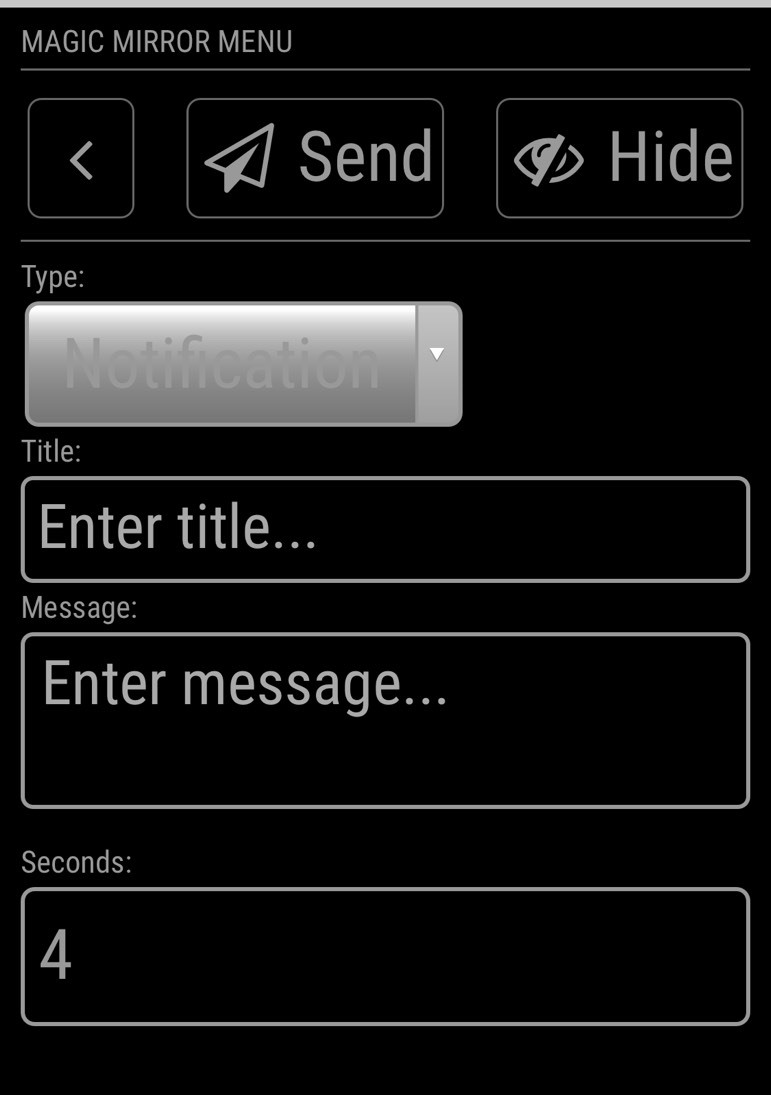
                            0_1547171875122_S__1589256.jpg

                            replace set in config.js
                            Thanks

                            1 Reply Last reply Reply Quote 0
                            • strawberry 3.141S Offline
                              strawberry 3.141 Project Sponsor Module Developer
                              last edited by

                              Just released version 2.0.1

                              • Fixed sound fading for alerts
                              • Added Korean translations

                              https://github.com/fewieden/MMM-AlarmClock

                              [card:fewieden/MMM-AlarmClock]

                              Please create a github issue if you need help, so I can keep track

                              1 Reply Last reply Reply Quote 2
                              • G Offline
                                gaudouy
                                last edited by

                                Hello strawberry 3.141,
                                Thanks for the update 🙂
                                Do you think you will add a functionality for add/delete/update alarm from the Magic Mirror(with touch screen) ?
                                Thanks for advance
                                Gaudouy

                                strawberry 3.141S 1 Reply Last reply Reply Quote 0
                                • strawberry 3.141S Offline
                                  strawberry 3.141 Project Sponsor Module Developer @gaudouy
                                  last edited by

                                  @gaudouy this would be a huge change. It would be easier to have a module like remote control sending a notification with an alert, as there the whole UI component exists already. then in this module, you would merge the alert with the config alerts. See comments above.

                                  Please create a github issue if you need help, so I can keep track

                                  1 Reply Last reply Reply Quote 0
                                  • I Offline
                                    innovation
                                    last edited by

                                    Hello! I have configured the module and it is working very well. However the alarm doesn’t stop. I want it to ring and display for only 5 seconds. How do I do that?

                                    And is there a way to hide the “Work: Wed, 12:41pm” on the left top?
                                    Would really appreciate the help.

                                    strawberry 3.141S 1 Reply Last reply Reply Quote 0
                                    • strawberry 3.141S Offline
                                      strawberry 3.141 Project Sponsor Module Developer @innovation
                                      last edited by

                                      @innovation with the following config it stops after 5 seconds.

                                      {
                                        module: "MMM-AlarmClock",
                                        position: "top_left",
                                        config: {
                                          alarms: [
                                            {
                                              time: "16:15",
                                              days: [0,1,2,3,4,5,6],
                                              title: "Test",
                                              message: "some alarm message"
                                            }
                                          ],
                                          timer: 5000
                                        }
                                      },
                                      

                                      If you add the following to the custom.css file it will hide the module from the screen, but still, show the alert:

                                      .MMM-AlarmClock {
                                        display: none;
                                      }
                                      

                                      Please create a github issue if you need help, so I can keep track

                                      1 Reply Last reply Reply Quote 0
                                      • I Offline
                                        innovation
                                        last edited by

                                        @strawberry-3-141 Thank you! Works perfectly

                                        1 Reply Last reply Reply Quote 0
                                        • strawberry 3.141S Offline
                                          strawberry 3.141 Project Sponsor Module Developer
                                          last edited by

                                          2.0.2

                                          Fixed

                                          • Timing of alert click handler registration

                                          Link to module https://github.com/fewieden/MMM-AlarmClock

                                          Please create a github issue if you need help, so I can keep track

                                          1 Reply Last reply Reply Quote 0

                                          Hello! It looks like you're interested in this conversation, but you don't have an account yet.

                                          Getting fed up of having to scroll through the same posts each visit? When you register for an account, you'll always come back to exactly where you were before, and choose to be notified of new replies (either via email, or push notification). You'll also be able to save bookmarks and upvote posts to show your appreciation to other community members.

                                          With your input, this post could be even better 💗

                                          Register Login

                                          • 1
                                          • 2
                                          • 1 / 2
                                          • First post
                                            Last post
                                          Enjoying MagicMirror? Please consider a donation!
                                          MagicMirror created by Michael Teeuw.
                                          Forum managed by Sam, technical setup by Karsten.
                                          This forum is using NodeBB as its core | Contributors
                                          Contact | Privacy Policy