MagicMirror Forum
    • Recent
    • Tags
    • Unsolved
    • Solved
    • MagicMirror² Repository
    • Documentation
    • 3rd-Party-Modules
    • Donate
    • Discord
    • Register
    • Login
    A New Chapter for MagicMirror: The Community Takes the Lead
    Read the statement by Michael Teeuw here.

    MMM-Image-On-Notification

    Scheduled Pinned Locked Moved Solved Requests
    16 Posts 4 Posters 6.4k Views 5 Watching
    Loading More Posts
    • Oldest to Newest
    • Newest to Oldest
    • Most Votes
    Reply
    • Reply as topic
    Log in to reply
    This topic has been deleted. Only users with topic management privileges can see it.
    • ejay-ibmE Offline
      ejay-ibm Project Sponsor Module Developer
      last edited by ejay-ibm

      Hello all,

      I’d like some help to develop a module to display particular local images depending on a notification received.

      I have developed a few gif images to display an AI face with different attitudes.
      1- Standby ( Mouth closed, head move, eyes looking here -and there…)
      https://drive.google.com/open?id=1zff5H4RN9azpUpuUj_9scDhCgeMgZI73
      2- Talk ( Mouth talking, with other face animations )
      3- (why not) Sing/dance ( head banging) ( Still working on that one as it needs more facial expression )

      well, that’s my idea but any images from a sequential given list could be sync with any notification received to the user choice.

      I walked around a few image modules but couldn’t find one that handles notifications.

      Is someone interested in developing it?

      Thank you

      Ejay

      strawberry 3.141S 1 Reply Last reply Reply Quote 0
      • strawberry 3.141S Offline
        strawberry 3.141 Project Sponsor Module Developer @ejay-ibm
        last edited by

        @ejay-ibm I’m not sure which modules you checked out, but there are a lot of modules listening on notifications from other modules.

        Basically the elements you need are:

        • a module variable that stores the image name
        this.image = 'talking.gif'
        
        • a notification handler that changes the current image
        notificationReceived(notification, payload) {
          if (notification === 'SOME NOTIFICATION') {
            this.image = 'looking.gif';
          }
        }
        
        • a render function that displays the image
        getDom() {
          const wrapper = document.createElement('div');
          const image = document.createElement('img');
          image.src = 'somepath' + this.image;
          wrapper.appendChild(image);
          return wrapper;
        }
        

        I think this should give you an idea how to solve it

        Please create a github issue if you need help, so I can keep track

        1 Reply Last reply Reply Quote 1
        • ? Offline
          A Former User
          last edited by A Former User

          Making new module is somewhat not difficult and clear thing.
          But I think how it could be done with existing modules by combination

          1. MMM-HTMLBox (https://github.com/eouia/MMM-HTMLBox)
            It can insert static HTML on MM surface.
            So, it can show image also;
          {
            module: "MMM-HTMLBox",
            position:"top_left",
            config: {
              width: "200px",
              height: "200px",
              refresh_interval_sec: 0, // you should not refresh, because content will be back to default value.
              content: `< img id="MY_ANIMATION" src="default.gif" />`,
            }
          },
          
          1. MMM-notificationTrigger (https://github.com/eouia/MMM-NotificationTrigger)
            Well, this module is not designed for this purpose, However I found it could be possible.
          {
            module: 'MMM-NotificationTrigger',
            config: {
              triggers:[
                {
                  trigger: "CHANGE_IMG_1",
                  fires: [
                    {
                      fire:"DUMMY", 
                      payload: (payload) => {
                        var img = document.getElementById("MY_ANIMATION")
                        img.src = "img1.gif"
                        return payload
                      },
                    },
                  ],
                },
                {
                  trigger: "CHANGE_IMG_2",
                  fires: [
                    {
                      fire:"DUMMY", 
                      payload: (payload) => {
                        var img = document.getElementById("MY_ANIMATION")
                        img.src = "img2.gif"
                        return payload
                      },
                    },
                  ],
                },
              ]
            },
          }
          

          When CHANGE_IMG_1 (or anything you want) notification is received, this will emit DUMMY notification, but this is not important.
          In payload callback function(it will be evaluated when the notification DUMMY be bursted), src of img will be changed.

          I didn’t test. :D just thinking.

          ejay-ibmE 1 Reply Last reply Reply Quote 1
          • ejay-ibmE Offline
            ejay-ibm Project Sponsor Module Developer @Guest
            last edited by

            @sean Thank ( Again Sean)
            I’m getting the following error :

            config.js:40 Uncaught TypeError: Cannot set property 'src' of null
                at Object.payload (config.js:40)
                at Class.notificationReceived (MMM-NotificationTrigger.js:62)
                at sendNotification (main.js:95)
                at Object.sendNotification (main.js:498)
                at Class.sendNotification (module.js:368)
                at Class.socketNotificationReceived (MMM-Hotword.js:85)
                at module.js:246
                at r.<anonymous> (socketclient.js:25)
                at r.emit (index.js:83)
                at r.onevent (index.js:83)
            

            config.js 40 is :

            38           payload: (payload) => {
            39            var img = document.getElementById("MY_ANIMATION")
            40              img.src = "/home/pi/MagicMirror/jarvis-standby2.gif"
            41              return payload
            

            Any Idea ? Let me know if you need me to report this directly in git issues.

            Thanks

            ? 1 Reply Last reply Reply Quote 0
            • ? Offline
              A Former User @ejay-ibm
              last edited by

              @ejay-ibm
              Where is your default.gif?(#MY_ANIMATION)?

              ejay-ibmE 1 Reply Last reply Reply Quote 0
              • ejay-ibmE Offline
                ejay-ibm Project Sponsor Module Developer @Guest
                last edited by

                @sean
                Right I was missing the first module .
                Now this is what I’m getting
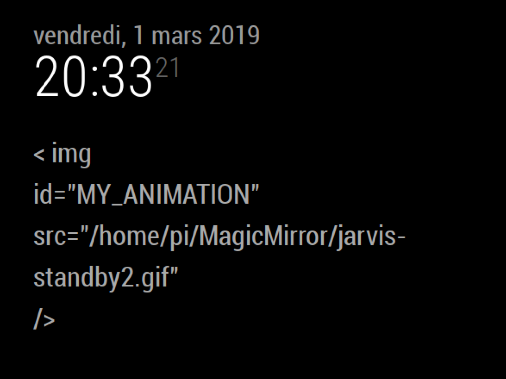
                0_1551468834882_Capture d’écran 2019-03-01 à 20.33.12.png

                I feel stupid to not be able to debug such simple thing, but I’m sure you will figure out the error faster than me …

                S 1 Reply Last reply Reply Quote 0
                • S Do not disturb
                  sdetweil @ejay-ibm
                  last edited by sdetweil

                  @ejay-ibm its ok, this is a tricky one… the forum has a problem with content that starts with the '< ’ symbol,
                  so to make it show, we have to put a space after it… so… in your content:, take the space out after that < symbol

                  Sam

                  How to add modules

                  learning how to use browser developers window for css changes

                  1 Reply Last reply Reply Quote 0
                  • ejay-ibmE Offline
                    ejay-ibm Project Sponsor Module Developer
                    last edited by

                    Thank you @sdetweil That look better

                    Now I think it’s my last issue . The path …
                    I’m getting :
                    jarvis-standby2.gif:1 GET http://localhost:8080/jarvis-standby2.gif 404 (Not Found)
                    If the images is placed in /home/pi/MagicMirror/jarvis-standby2.gif

                    not sure what’s wrong and what is the “expectation” with the path …
                    Thanks

                    S 1 Reply Last reply Reply Quote 0
                    • S Do not disturb
                      sdetweil @ejay-ibm
                      last edited by

                      @ejay-ibm the default path for the localhost server is /home/pi/MagicMirror,

                      if you do

                      ls /home/pi/MagicMirror/jarvis-standby2.gif -laF
                      ```
                      
                      do you get a proper display out? 
                      
                      linux/pi is case sensitive..

                      Sam

                      How to add modules

                      learning how to use browser developers window for css changes

                      ejay-ibmE 1 Reply Last reply Reply Quote 0
                      • ejay-ibmE Offline
                        ejay-ibm Project Sponsor Module Developer @sdetweil
                        last edited by

                        @sdetweil said in MMM-Image-On-Notification:

                        ls /home/pi/MagicMirror/jarvis-standby2.gif -laF

                        yup

                        i@ejaypi:~/MagicMirror$ ls /home/pi/MagicMirror/jarvis-standby2.gif -laF
                        -rw-r–r-- 1 pi pi 8735111 mars 1 19:58 /home/pi/MagicMirror/jarvis-standby2.gif

                        S 1 Reply Last reply Reply Quote 0
                        • ejay-ibmE Offline
                          ejay-ibm Project Sponsor Module Developer
                          last edited by

                          I found

                          src=“modules/MMM-HTMLBox/jarvis-standby2.gif”

                          that works …

                          thank you

                          1 Reply Last reply Reply Quote 0
                          • S Do not disturb
                            sdetweil @ejay-ibm
                            last edited by

                            @ejay-ibm actually looks like the base is

                            /home/pi/MagicMirror/modules
                            

                            code in app/server.js

                            var directories = ["/config", "/css", "/fonts", "/modules", "/vendor", "/translations", "/tests/configs"];
                            

                            sets up listening on those folders

                            Sam

                            How to add modules

                            learning how to use browser developers window for css changes

                            ejay-ibmE 1 Reply Last reply Reply Quote 0
                            • ejay-ibmE Offline
                              ejay-ibm Project Sponsor Module Developer
                              last edited by

                              Thank you @Sean & @sdetweil
                              This is the draft result. I still have to work on the talking image. that one is a quick test.

                              https://drive.google.com/open?id=1G34tJ-1trMCK1yEJK0C6gIw3Nx3O8X8Q

                              As you can see the animation is triggered a bit early.
                              As I discussed with you Sean This is why I would need an additional notification between HOTWORD_PAUSE & ASSISTANT_ACTIVATE (I’ll use this notification as well to turn down the volume when user command is given in case any music is played on the mirror )

                              thank you again

                              Ejay

                              1 Reply Last reply Reply Quote 0
                              • ejay-ibmE Offline
                                ejay-ibm Project Sponsor Module Developer @sdetweil
                                last edited by

                                @sdetweil I didn’t know that . Thanks I learnt something
                                I’ll use config folder then

                                Ejay

                                S 1 Reply Last reply Reply Quote 0
                                • S Do not disturb
                                  sdetweil @ejay-ibm
                                  last edited by

                                  @ejay-ibm i would try to stay away from MM folders… create another under modules for your own content

                                  Sam

                                  How to add modules

                                  learning how to use browser developers window for css changes

                                  ejay-ibmE 1 Reply Last reply Reply Quote 1
                                  • ejay-ibmE Offline
                                    ejay-ibm Project Sponsor Module Developer @sdetweil
                                    last edited by ejay-ibm

                                    @sdetweil Yes config/images or modules/images
                                    Both would be ok since not overwritten in case of an update.
                                    Good Idea.

                                    1 Reply Last reply Reply Quote 0

                                    Hello! It looks like you're interested in this conversation, but you don't have an account yet.

                                    Getting fed up of having to scroll through the same posts each visit? When you register for an account, you'll always come back to exactly where you were before, and choose to be notified of new replies (either via email, or push notification). You'll also be able to save bookmarks and upvote posts to show your appreciation to other community members.

                                    With your input, this post could be even better 💗

                                    Register Login

                                    • 1 / 1
                                    • First post
                                      Last post
                                    Enjoying MagicMirror? Please consider a donation!
                                    MagicMirror created by Michael Teeuw.
                                    Forum managed by Sam, technical setup by Karsten.
                                    This forum is using NodeBB as its core | Contributors
                                    Contact | Privacy Policy