Read the statement by Michael Teeuw here.
How to add modules. For absolute beginners.
-
How to add modules. For absolute beginners.
I’m going to walk you through this. Why? Well, someone always helped me when I was new.
What better way to repay them? By helping others, that’s how.Are there other ways of intalling modules?
Yes, there are, but the aim of this walkthrough is to make things as clear, and as easy,
and as explicit as possible for the absolute beginner. Why? When I was a beginner, a guide
such as this would have saved me a lot time and mental anguish. You know exactly what I mean.First things first!
This guide assumes that you have your Pi up and running and that you have installed
the MagicMirror software AND that you have successfully gotten your mirror to work.
Now you want to add some cool modules? Well, lets get to it!Follow me . . .
Lets use my MMM-JEOPARDY module for this guide. The procedure is the same for any module
that you want to add to your mirror.-
Go to this page of modules:
-
https://github.com/MichMich/MagicMirror/wiki/3rd-Party-Modules
-
Scroll down the page until you see MMM-JEOPARDY by Mykle1.
-
Click on it.
-
Now you’re at my repository for the MMM-JEOPARDY module.
-
Click on the green
Clone or downloadbutton on the right side of the page. -
That shows you the url to get the module.
-
Copy that url. (click on the clipboard icon)
So far, so good! Stay with me . . .
-
Now open a terminal (cltr-alt-t on the desktop) and type
cd MagicMirror/modulesand pressEnter. -
Now you’re in the
~/MagicMirror/modules $directory. -
Now type
git cloneAND one space and paste the url that you copied from my repo for the module. -
It should look like this:
git clone https://github.com/mykle1/MMM-JEOPARDY.git -
Press your
Enterkey. This will download the module into the MagicMirror/modules folder creating a new folder with the name of the module (in this case MMM-JEOPARDY) -
You’re done with the terminal! (for now) Close it. We’ll get back to it.
Note about dependencies
Some modules require dependencies. MMM-JEOPARDY does NOT. Each module folder should have
a README file that tells you if you need to install them, in which case you would navigate to
the folder of the module that you just installed (via the terminal) and typenpm install.
But we don’t have to do that in this case, so HOORAY FOR US!Go to your Pi desktop
-
Click the File Manager folder. (Top menu bar, 3rd from the left, in Raspbian Jessie)
-
Double click the MagicMirror folder.
-
Double click the config folder.
-
Double click the config.js file. (Not the sample! The config.js file you made during setup)
-
Your config.js file is now open in a text editor. If not, open it in your text editor.
-
You have to add an entry for the module you just downloaded so that MM knows to load it.
-
Lets put the entry for MMM-JEOPARDY under your calendar module entry.
-
Modules that occupy the same
positiondisplay in the order they appear in the config.js file. -
Scroll down to the calendar entry in the config.js file.
-
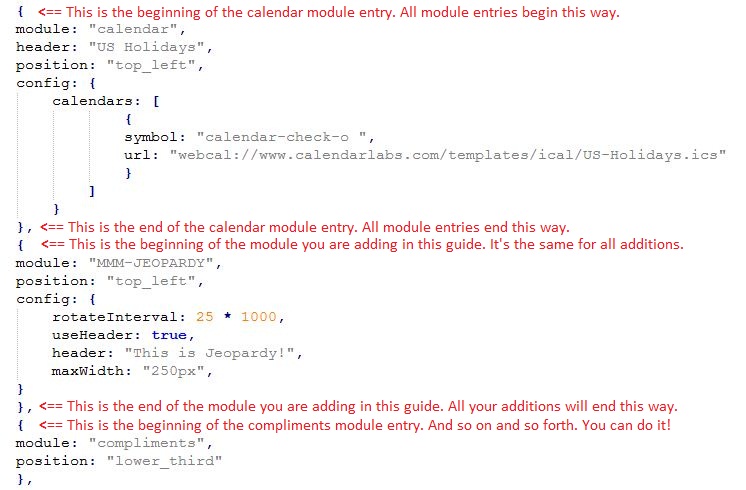
The calendar entry “ends” at the last
},and the compliments module entry begins with a{.
So, all module entries in the config.js file begin with a{and end with a},
Look at the way the modules are entered. What I just described should be evident. -
Copy and paste the following “between” the ending of the calendar module entry -
}, -
And the beginning of the compliments module entry -
{
Copy and paste ALL of this
{
	module: "MMM-JEOPARDY",
	position: "top_left",
	config: {
		useHeader: false,                  // true if you want a header
		header: "This is Jeopardy!",
		maxWidth: "250px",
		animationSpeed: 3000,              // Fades to next clue
	}
},
Does it look the same as the other entries?
- It should look like this:
-
Go to the file menu and choose SAVE. You can close your text editor window now.
-
Open a new terminal and type
cd MagicMirrorand press yourEnterkey. -
Now you’re in the
~/MagicMirror $directory. -
Type
npm startand press your Enter key to launch MagicMirror with your new module installed.
From now on
- You’ll find the entry you need to make in the config.js file in the README file of each module.
If the module requires an API key
- You’ll have to get that BEFORE you attempt to load the module. It simply will NOT work without it. The README file for the module should contain a URL to the site where you’ll need to acquire you’re API key. These are usually free and only require you to sign up with your email address. Once you have the API key you’ll have to add it to the config.js module entry.
Backup your config.js file
-
Every time you make a successful addition to your config.js file you should back it up.
-
Why? If something goes wrong you have a backup. Who wants to start from the beginning?
-
-
still having problems figuring it out. this is what i have.
}, { module: "MMM-JEOPARDY", position: "top_left", config: { useHeader: false, // true if you want a header header: "This is Jeopardy!", maxWidth: "250px", animationSpeed: 3000, // Fades to next clue } },[ { module: 'MMM-forecast-io', position: 'top_right', // This can be any of the regions. config: { // See 'Configuration options' for more information. apiKey: 'xxxxxxxxxxxxxxxxxxxxxxxxxxxxxxxxxxxxx', // Dark Sky API key. // Only required if geolocation doesn't work: latitude: 16.77532, longitude: -3.008265 } } ] { module: "compliments", position: "lower_third" }, { module: "currentweather", position: "top_right", config: { location: "New York", locationID: "", //ID from http://www.openweathermap.org/help/city_list.txt appid: "xxxxxxxxxxxxzxxxxxxxxxxxxxxxxxxxxxx } }, { module: "weatherforecast", position: "top_right", header: "Weather Forecast", config: { location: "New York", locationID: "5128581", //ID from http://www.openweathermap.org/help/city_list.txt appid: "xxxxxxxxxxxxxxxxxxxxxxxxx" } }, { module: "newsfeed", position: "bottom_bar", config: { feeds: [ { title: "New York Times", url: "http://www.nytimes.com/services/xml/rss/nyt/HomePage.xml" } ], showSourceTitle: true, showPublishDate: true } }, ] -
At first glance (I didn’t look any further) you have an open bracket
[that doesn’t belong after the closing},of the Jeopardy entry. -
It looks like you made an error pasting the code into the </> code block with only one line inside.
Beside the open bracket I also see missing quotes.
(On a side note, it would be nice to see everything with tabs/indentation.) What editor do you use? -
@doubleT not exactly sure what you’re talking about and don’t know what editor.
-
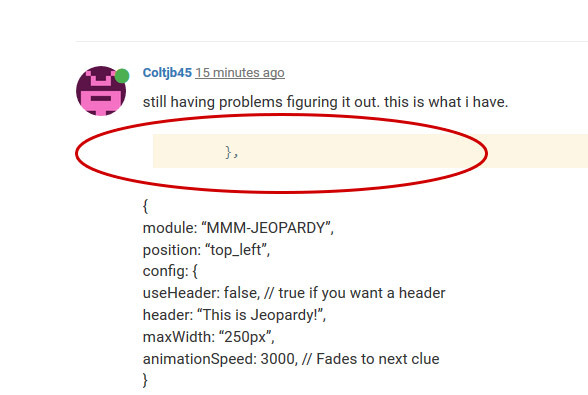
^ This looks like you only pasted one line into the code block instead of the whole code.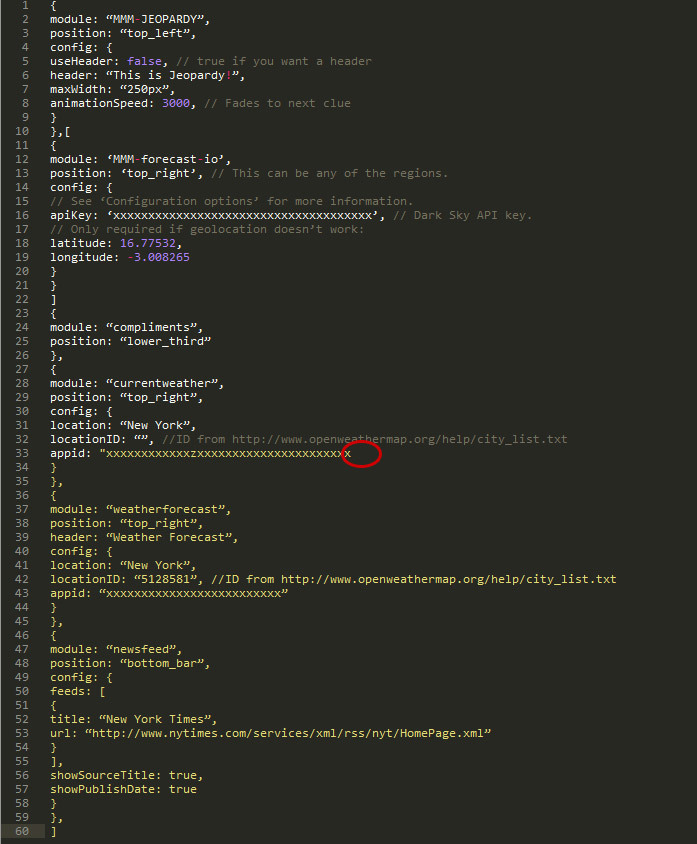
^ There are editors that can show you where your code is wrong while you type, for example, here you can point out where a closing quote is missing. You can edit in the standard windows/mac text editor, but it’ll give you a hard time. There are good editors like Sublime Text, Notepad++, Atom …Do you mind telling us what you’re using?
With indentation (the original files have that, but pasting the code here destroys indentation) you can also easily count opening and closing brackets and spot the one bracket that is too much or the missing comma.
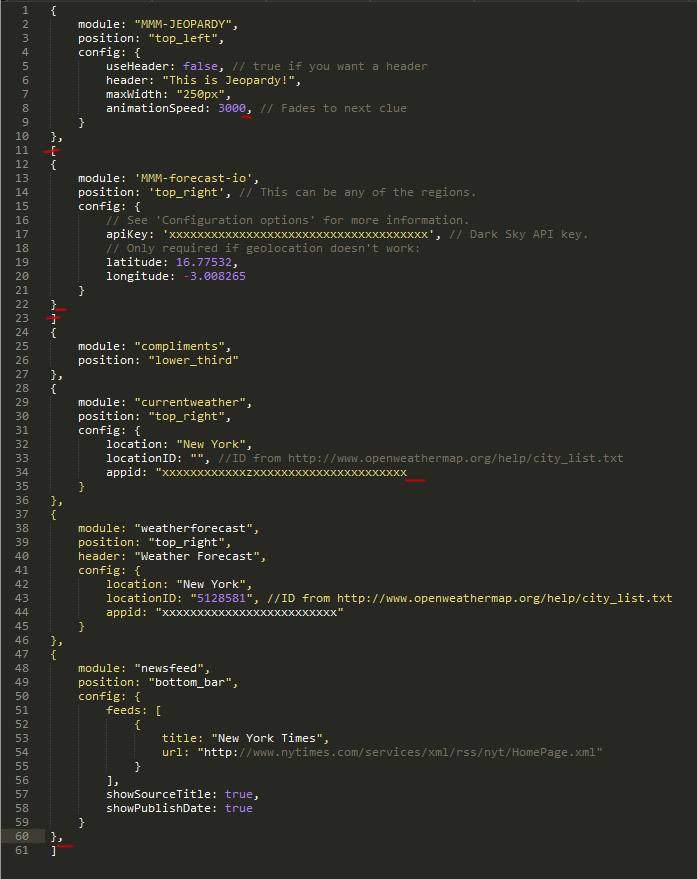
The last property value of an object or array is not followed by a comma – although that shouldn’t give you any errors. What is probably causing an error is
a) the missing comma after the second object (before the compliments module) and
b) the square brackets around the second object.And you should check the quotes. Maybe a language and editor problem, but to me, all the quotes looked wrong. And you should only use one version of quotes, it’s not wise to mix > " < double quotation marks and > ’ < single quotation marks.
This should work:
modules: [ { module: "MMM-JEOPARDY", position: "top_left", config: { useHeader: false, // true if you want a header header: "This is Jeopardy!", maxWidth: "250px", animationSpeed: 3000 // Fades to next clue } }, { module: "MMM-forecast-io", position: "top_right", // This can be any of the regions. config: { // See "Configuration options" for more information. apiKey: "xxxxxxxxxxxxxxxxxxxxxxxxxxxxxxxxxxxxx", // Dark Sky API key. // Only required if geolocation doesn"t work: latitude: 16.77532, longitude: -3.008265 } }, { module: "compliments", position: "lower_third" }, { module: "currentweather", position: "top_right", config: { location: "New York", locationID: "", //ID from http://www.openweathermap.org/help/city_list.txt appid: "xxxxxxxxxxxxzxxxxxxxxxxxxxxxxxxxxxx" } }, { module: "weatherforecast", position: "top_right", header: "Weather Forecast", config: { location: "New York", locationID: "5128581", //ID from http://www.openweathermap.org/help/city_list.txt appid: "xxxxxxxxxxxxxxxxxxxxxxxxx" } }, { module: "newsfeed", position: "bottom_bar", config: { feeds: [ { title: "New York Times", url: "http://www.nytimes.com/services/xml/rss/nyt/HomePage.xml" } ], showSourceTitle: true, showPublishDate: true } } ] -
By the way, if you start the mirror with npm start dev instead of just npm start, it’ll start up with a console at the side where it will show you errors that often point you to the line of code that has an error.
For example, if I remove one of the commas between the { settings objects }, it’ll show:
Uncaught SyntaxError: Unexpected token { config.js:68The opening bracket in line 68 of config.js is unexpected because a comma after the closing bracket in line 67 is missing. (This is just an example, it’s probably a different line in your code.)
EDIT
I think this thread should have stayed clean and we should have done this in your already existing thread about these same issues.But to bring some more value to this helpful thread, here’s a good and easy text on objects and arrays in JavaScript (that’s what the setting in config.js is made of): https://eloquentjavascript.net/04_data.html
Please consider reading and consulting this before moving on or asking the same question in yet another thread. -
@doubleT thanks for everything, I got it working. Now some other hiccups to work on.
-
@doubleT said in How to add modules. For absolute beginners.:
Sublime Text
what text editor is that?
-
A good one. :) www.sublimetext.com
-
@Mykle1 said in How to add modules. For absolute beginners.:
-
Go to this page of modules:
-
https://github.com/MichMich/MagicMirror/wiki/MagicMirror²-Modules#3rd-party-modules
Hey up Amigo… You may want to update the modules page url - https://github.com/MichMich/MagicMirror/wiki/3rd-Party-Modules
-
-
@johnnyboy said in How to add modules. For absolute beginners.:
Hey up Amigo…
Not much, you? I hope all is well with you and yours.
I corrected the url, I think. :-)
-
Yeah, all good here thanks. …Still lurking here as you can see.
I’ve been looking around for a good (Similar) alternative to Wunderground… Looked at our other Amigo’s one - NOAA3 - and liked the layout of that, although yet to download and see if it will work okay here in Scotland?Any other ones you could say that are pretty neat, that are also worth considering?
-
Yes, I like and use NOAA3 still. Jeff’s weather module seems to be pretty popular. Have a look at that one. I use my own weather module mostly, MMM-BMW-DS. It uses the DarkSky API. I wanted something completely different in layout and appearance. Take a look if you like.


-
So @Mykle1 how do you add modules?
-
@cowboysdude said in How to add modules. For absolute beginners.:
So @Mykle1 how do you add modules?
You take a module and then you take another module and then add them together. You should now have 2 modules. ;-)
-
@Mykle1 said in How to add modules. For absolute beginners.:
Yes, I like and use NOAA3 still. Jeff’s weather module seems to be pretty popular. Have a look at that one. I use my own weather module mostly, MMM-BMW-DS. It uses the DarkSky API. I wanted something completely different in layout and appearance. Take a look if you like.
Thanks, Yeah, I like the look and layout of your one, but, I need to fill in the left hand side void, so will go with NOAA3 and see if that works across the pond.
I’ve not used a weather Mod since WunderGround stopped, and have been using several other Mod’s over time, but miss having the weather there as before.
I tried doing a search on here for 3rd party modules to see what is new, and which one’s members are looking at the most, and this thread came up in the search… (possibly because you have a link for 3rd party modules within?) clicked on your3rd party module link, and that is when I noticed it was an old one.
—Just a thought you may consider?.. Seeing as your ‘‘How To’’ threads are popular amongst the new members, would it be an idea to have a pinned post of all your ‘‘How To’s’’ ? One pinned post, with named links to all your tutorials? " How to Tutorials - For absolute beginners"
1/ How to add modules - < insert link >
2/ How to install MM on PC - < insert link >
3/ How to post code on the forum - < insert link >
4/ How to create a working config - < insert link >Then lock the post so it does not become cluttered with questions? … Just a thought.
So @Mykle1 how do you add modules?
Hey up Amigo… How the hell are you? This place would be awfully quiet without your banter. … I’m sure your NOAA3 will be a good fit in my void :-D
-
@johnnyboy said in How to add modules. For absolute beginners.:
—Just a thought you may consider?.. Seeing as your ‘‘How To’’ threads are popular amongst the new members, would it be an idea to have a pinned post of all your ‘‘How To’s’’ ? One pinned post, with named links to all your tutorials? " How to Tutorials - For absolute beginners"
1/ How to add modules - < insert link >
2/ How to install MM on PC - < insert link >
3/ How to post code on the forum - < insert link >
4/ How to create a working config - < insert link >
Then lock the post so it does not become cluttered with questions? … Just a thought.That would be up to the administration of the forum. However, thank you for your vote of confidence, bro. :thumbsup:
-
Where do I find the Windows version of what needs to be done here?
https://forum.magicmirror.builders/topic/4231/how-to-add-modules-for-absolute-beginners/2
@Mykle1 said in How to add modules. For absolute beginners.:
Go to your Pi desktop
Click the File Manager folder. (Top menu bar, 3rd from the left, in Raspbian Jessie)
Double click the MagicMirror folder.
Double click the config folder.
Double click the config.js file. (Not the sample! The config.js file you made during setup)
Your config.js file is now open in a text editor. If not, open it in your text editor.
You have to add an entry for the module you just downloaded so that MM knows to load it.
Lets put the entry for MMM-JEOPARDY under your calendar module entry.
Modules that occupy the same postition display in the order they appear in the config.js file.
Scroll down to the calendar entry in the config.js file.
The calendar entry “ends” at the last }, and the compliments module entry begins with a {.
So, all module entries in the config.js file begin with a { and end with a },
Look at the way the modules are entered. What I just described should be evident.Copy and paste the following “between” the ending of the calendar module entry - },
And the beginning of the compliments module entry - {
-
There isn’t one because the only difference is the path to your config folder. So, navigate to your config folder (inside the MagicMirror folder) and open it. If you don’t find a config.js file there then you need to copy and paste the config.js.sample file and rename the copy to config.js. Once you have made or found a config.js file then you can just follow the tutorial from there.



Hello! It looks like you're interested in this conversation, but you don't have an account yet.
Getting fed up of having to scroll through the same posts each visit? When you register for an account, you'll always come back to exactly where you were before, and choose to be notified of new replies (either via email, or push notification). You'll also be able to save bookmarks and upvote posts to show your appreciation to other community members.
With your input, this post could be even better 💗
Register Login