Read the statement by Michael Teeuw here.
The mirror that wasn't a mirror
-
Hey guys! I just made some finishing touches on my “mirror” and wanted to show it off. I’m displaying my setup on a TV that’s mounted to the wall in my office. We use it to display calendar events, email notifications, drive times, and current weather. Unfortunately, due to the amount of business-specific, as well as local area information, I’ve had to remove fairly large chunks of the mirror display. However, the basic idea can still be seen. Check it out!
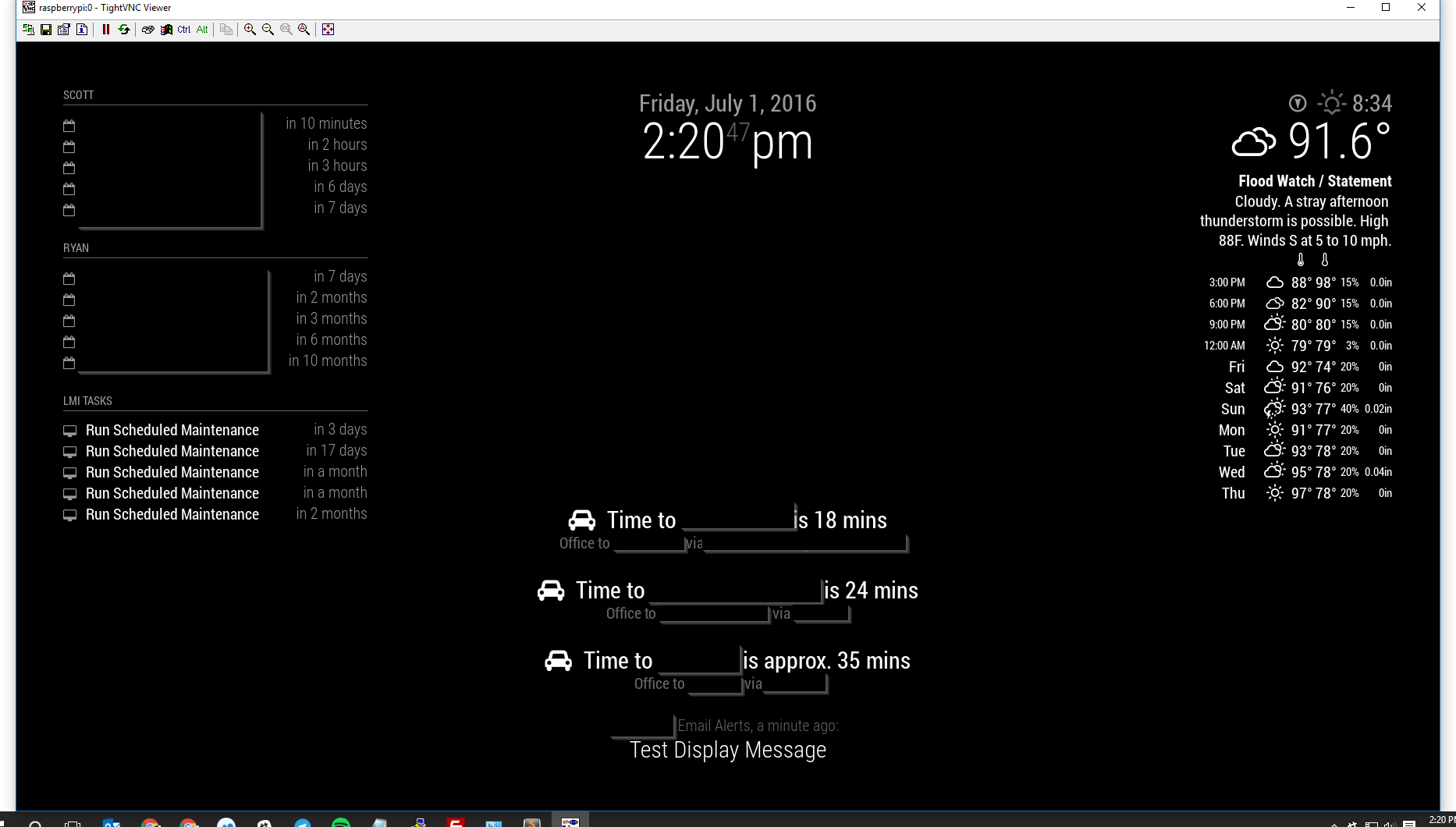
Also, here is my config file as well as my auto-start file. I made a slight change to the default startup script, which is the inclusion of when-changed to automatically restart my display when I update configuration. I hope you enjoy!
-
@RB14060
LIKE! Will copy/cannibalize
Thanks for sharing -
Hi!
EDIT: It probably has to do with vendor.js… The mm prefers the stock wind icons (older set, lacking some icons) over the ones bundled with the module… looking into a fix for that…
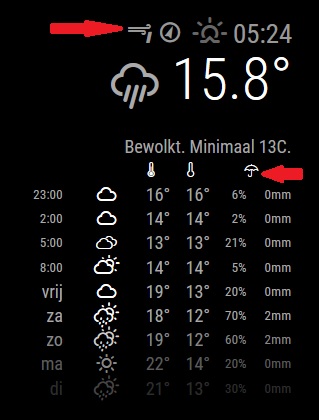
Is that the most recent MMM-Wunderground module? There are a few icons missing from the display…
There should be a wind-force icon at the top and an umbrella over the percipiation chance/amount:
-
Should be fixed now… Just git pull to update the module
-
@RedNax Confirmed working! Thanks for the quick fix.
-
-
Yeah! Please send me a pull request (including an updated changeling).
Thanks in advance! -
@RB14060 This is too cool. Good Job.
-
Thanks for charing the config.js. It helps to understand how things works.
Sebastian
-
Where can i find the Module you are using for your time to arrive somwhere (“MMM-Traffic”)? That is quite cool.
-
Ok, found it.
-
For anyone else looking, you can get it here - https://github.com/SamLewis0602/MMM-Traffic
-
I just installed the Module as decripted and and set config file options but when I start Serveronly Mode of MM I get the following error Message:
Whoops! There was an uncaught exception…
TypeError: Cannot read property ‘legs’ of undefined
at Request._callback (…/MagicMirror/modules/MMM-Traffic/node_helper.js:47:55)
at Request.self.callback (…/MagicMirror/modules/MMM-Traffic/node_modules/request/request.js:187:22)
at emitTwo (events.js:106:13)
at Request.emit (events.js:191:7)
at Request. (…/MagicMirror/modules/MMM-Traffic/node_modules/request/request.js:1048:10)
at emitOne (events.js:96:13)
at Request.emit (events.js:188:7)
at IncomingMessage. (…/MagicMirror/modules/MMM-Traffic/node_modules/request/request.js:969:12)
at emitNone (events.js:91:20)
at IncomingMessage.emit (events.js:185:7)Any Idea what causes the Problem and how to solve it?
-
@DazDavid Please post the relevant portion of your config.js file. That is a good place to start. Also please use the markdown commands to make your code easier for us to read.
-
@bhepler
Yes you are right, sorry my fault.So I copied the example from the github Page and just entered my Api Key to make sure the Module is working with basic Informations.
This is the appropriate part of my config:
{
    module: 'MMM-Traffic',
    position: 'bottom_bar',
    classes: 'dimmed medium', //optional, default is 'bright medium', only applies to commute info not route_name
    config: {
        api_key: '******',
        mode: 'driving',
        origin: '4 Pennsylvania Plaza, New York, NY 10001',
        destination: '1 MetLife Stadium Dr, East Rutherford, NJ 07073',
        arrival_time: '0800', //optional, but needs to be in 24 hour time if used.
        route_name: 'Home to Work',
        changeColor: true,
        showGreen: false,
        limitYellow: 5, //Greater than 5% of journey time due to traffic
        limitRed: 20, //Greater than 20% of journey time due to traffic
        traffic_model: 'pessimistic',
        interval: 120000 //2 minutes
    }
},
Edit: Like this the mirror stucks on “Loading Commute” and the mentioned error is shown on console output continuously. Any idea what could be the Problem?
-
@Notumlord had a similar issue, and when they changed the locations it worked fine
Not sure if they’ve made any progress with is - https://forum.magicmirror.builders/topic/446/trafficmaps/36
-
@Mitchfarino thanks for the hint but I´m not sure how exactly to enter the locations. Does anybody have an example for germany? I assume it would be street & no, postalcodd city. So for example Hauptstraße 15, 99090 Erfurt.
Is that correct? -
@DazDavid how do you do it usually in Google maps? In the UK I can just put in the postcode and it works.
Go to Google maps, place a pin on your destination and copy the address that it generates.
See if that works
-
@Mitchfarino i copied from Maps before and now I tryied only with postalcode and Postalcode + City name but still get the same error as written above. I think I have to contact the developer of the module.
-

Hello! It looks like you're interested in this conversation, but you don't have an account yet.
Getting fed up of having to scroll through the same posts each visit? When you register for an account, you'll always come back to exactly where you were before, and choose to be notified of new replies (either via email, or push notification). You'll also be able to save bookmarks and upvote posts to show your appreciation to other community members.
With your input, this post could be even better 💗
Register Login