MagicMirror Forum
    • Recent
    • Tags
    • Unsolved
    • Solved
    • MagicMirror² Repository
    • Documentation
    • 3rd-Party-Modules
    • Donate
    • Discord
    • Register
    • Login
    A New Chapter for MagicMirror: The Community Takes the Lead
    Read the statement by Michael Teeuw here.

    ENOENT yet the file exists within the Magic Mirror folder

    Scheduled Pinned Locked Moved Solved Bug Hunt
    15 Posts 4 Posters 5.0k Views 4 Watching
    Loading More Posts
    • Oldest to Newest
    • Newest to Oldest
    • Most Votes
    Reply
    • Reply as topic
    Log in to reply
    This topic has been deleted. Only users with topic management privileges can see it.
    • C Offline
      Chrisflex
      last edited by

      Dell Server@DellServer MINGW64 ~
      $ npm start
      npm ERR! code ENOENT
      npm ERR! syscall open
      npm ERR! path C:\Users\Dell Server\package.json
      npm ERR! errno -4058
      npm ERR! enoent ENOENT: no such file or directory, open ‘C:\Users\Dell Server\package.json’
      npm ERR! enoent This is related to npm not being able to find a file.
      npm ERR! enoent

      npm ERR! A complete log of this run can be found in:
      npm ERR! C:\Users\Dell Server\AppData\Roaming\npm-cache_logs\2020-04-29T05_59_08_412Z-debug.log

      lavolp3L 1 Reply Last reply Reply Quote 0
      • lavolp3L Offline
        lavolp3 Module Developer @Chrisflex
        last edited by

        @Chrisflex Have you looked into the log file? Should be more specific. Maybe a permission problem?

        How to troubleshoot modules
        MMM-soccer v2, MMM-AVStock

        1 Reply Last reply Reply Quote 0
        • C Offline
          Chrisflex
          last edited by

          Hi this is what I find there

          0 info it worked if it ends with ok
          1 verbose cli [
          1 verbose cli ‘C:\Program Files\nodejs\node.exe’,
          1 verbose cli ‘C:\Program Files\nodejs\node_modules\npm\bin\npm-cli.js’,
          1 verbose cli ‘start’
          1 verbose cli ]
          2 info using npm@6.14.4
          3 info using node@v12.16.3
          4 verbose config Skipping project config: C:\Users\Dell Server/.npmrc. (matches userconfig)
          5 verbose stack Error: ENOENT: no such file or directory, open ‘C:\Users\Dell Server\package.json’
          6 verbose cwd C:\Users\Dell Server
          7 verbose Windows_NT 10.0.18363
          8 verbose argv “C:\Program Files\nodejs\node.exe” “C:\Program Files\nodejs\node_modules\npm\bin\npm-cli.js” “start”
          9 verbose node v12.16.3
          10 verbose npm v6.14.4
          11 error code ENOENT
          12 error syscall open
          13 error path C:\Users\Dell Server\package.json
          14 error errno -4058
          15 error enoent ENOENT: no such file or directory, open ‘C:\Users\Dell Server\package.json’
          16 error enoent This is related to npm not being able to find a file.
          17 verbose exit [ -4058, true ]

          lavolp3L 1 Reply Last reply Reply Quote 0
          • lavolp3L Offline
            lavolp3 Module Developer @Chrisflex
            last edited by

            @Chrisflex YOu seem to be in the wrong directory.
            when you type in npm start, npm is looking for a package.json file in the directory you are running it.
            When there is no package.json, npm does not know what to do.

            How to troubleshoot modules
            MMM-soccer v2, MMM-AVStock

            1 Reply Last reply Reply Quote 0
            • C Offline
              Chrisflex
              last edited by

              thanks how do I access that directory?

              lavolp3L 1 Reply Last reply Reply Quote 0
              • lavolp3L Offline
                lavolp3 Module Developer @Chrisflex
                last edited by lavolp3

                @Chrisflex
                Well… What have you done until now?
                Have you installed MagicMirror on your dellserver?
                Where have you done the git clone command?
                You need to enter that directory before doing npm start

                cd MagicMirror
                npm start
                

                Maybe have a look at the documentation again?
                https://docs.magicmirror.builders/getting-started/installation.html#manual-installation

                How to troubleshoot modules
                MMM-soccer v2, MMM-AVStock

                1 Reply Last reply Reply Quote 0
                • C Offline
                  Chrisflex
                  last edited by Chrisflex

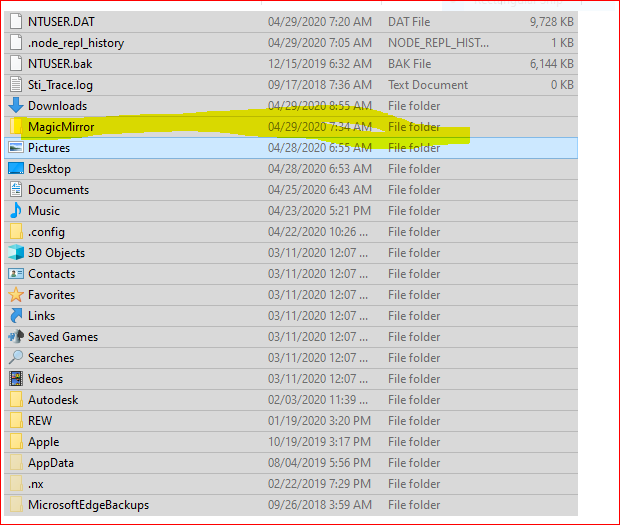
                  thanks I have used this since I am trying to do this on a Windows PC.

                  https://forum.magicmirror.builders/topic/4089/complete-walkthrough-install-magicmirror-on-a-pc-windows-7-10

                  It is installed on my Dell Server.

                  I have not done git clone yet

                  It asks that I clone a repository

                  Not sure which depository it wants me to clone and how do I point it to that repository.

                  C:\Users\Dell Server\

                  1 Reply Last reply Reply Quote 0
                  • C Offline
                    Chrisflex
                    last edited by

                    3032ace6-0aee-4ecc-b482-954319e14b4d-image.png

                    C 1 Reply Last reply Reply Quote 0
                    • C Offline
                      Chrisflex @Chrisflex
                      last edited by

                      Got this now I read somewhere that this is what needs to change for the display to work.

                      `DISPLAY=“${DISPLAY:=:0}” ./node_modules/.bin/electron js/electron.js

                      needs to be removed, I just can’t remember where to access this setting.

                      $ npm start

                      magicmirror@2.11.0 start C:\Users\Dell Server\MagicMirror
                      DISPLAY=“${DISPLAY:=:0}” ./node_modules/.bin/electron js/electron.js

                      ‘DISPLAY’ is not recognized as an internal or external command,
                      operable program or batch file.
                      npm ERR! code ELIFECYCLE
                      npm ERR! errno 1
                      npm ERR! magicmirror@2.11.0 start: DISPLAY="${DISPLAY:=:0}" ./node_modules/.bin/electron js/electron.js
                      npm ERR! Exit status 1
                      npm ERR!
                      npm ERR! Failed at the magicmirror@2.11.0 start script.
                      npm ERR! This is probably not a problem with npm. There is likely additional logging output above.

                      npm ERR! A complete log of this run can be found in:
                      npm ERR! C:\Users\Dell Server\AppData\Roaming\npm-cache_logs\2020-04-29T08_02_47_846Z-debug.log

                      1 Reply Last reply Reply Quote 0
                      • C Offline
                        Chrisflex
                        last edited by

                        Found and sorted !

                        Now to load custom modules for news weather quote of the day etc.

                        S 1 Reply Last reply Reply Quote 0
                        • S Do not disturb
                          sdetweil @Chrisflex
                          last edited by

                          @Chrisflex also, check , the install process is written for linux…

                          the two last steps need to be done manually

                          cd MagicMirror
                          cd vendor
                          npm install
                          cd ..\fonts
                          npm install
                          

                          Sam

                          How to add modules

                          learning how to use browser developers window for css changes

                          1 Reply Last reply Reply Quote 0
                          • bheplerB Offline
                            bhepler Module Developer
                            last edited by

                            @Chrisflex - Please use the markdown features of the forum when posting logs and code.

                            That aside, I’m glad you got it sorted out.

                            1 Reply Last reply Reply Quote 0
                            • C Offline
                              Chrisflex
                              last edited by

                              Thanks

                              Now to add modules…

                              https://forum.magicmirror.builders/topic/4231/how-to-add-modules-for-absolute-beginners/2

                              The link shows instructions for the Pi and not Windows.

                              bheplerB 1 Reply Last reply Reply Quote 0
                              • bheplerB Offline
                                bhepler Module Developer @Chrisflex
                                last edited by

                                @Chrisflex - They’re pretty much one and the same. You already have git installed. Open a terminal in the modules folder, clone the module repository into it, follow the module’s instructions on installing & configuring.

                                1 Reply Last reply Reply Quote 2
                                • C Offline
                                  Chrisflex
                                  last edited by

                                  @bhepler said in ENOENT yet the file exists within the Magic Mirror folder:

                                  They’re pretty much one and the same. You already have git installed. Open a terminal in the modules folder, clone the module repository into it, follow the module’s instructions on installing & configuring.

                                  Thank for the advice.

                                  1 Reply Last reply Reply Quote 0

                                  Hello! It looks like you're interested in this conversation, but you don't have an account yet.

                                  Getting fed up of having to scroll through the same posts each visit? When you register for an account, you'll always come back to exactly where you were before, and choose to be notified of new replies (either via email, or push notification). You'll also be able to save bookmarks and upvote posts to show your appreciation to other community members.

                                  With your input, this post could be even better 💗

                                  Register Login

                                  • 1 / 1
                                  • First post
                                    Last post
                                  Enjoying MagicMirror? Please consider a donation!
                                  MagicMirror created by Michael Teeuw.
                                  Forum managed by Sam, technical setup by Karsten.
                                  This forum is using NodeBB as its core | Contributors
                                  Contact | Privacy Policy