Read the statement by Michael Teeuw here.
I can't get mmm-screencast to work
-
@JerryP so tried unplugging the shield when I hit the cast button it says no devices found.
module: 'MMM-Screencast', position: 'bottom_right', config: { position: 'center', castName: 'Mirror', height: 300, width: 500, }}, -
@jste84 did u check to see if there are any errors, pm2 logs or dev window. sounds like the listen for incoming requests is not setup
u will have to have adresss:“0.0.0.0”, and ipWhitelist:[]
to allow machines (phone table laptop…) to connect to the mm server running the module
-
@sdetweil how do I check for those?
The address and ipWhitelist are both set this way.
-
@jste84 so tried unplugging the shield when I hit the cast button it says no devices found.
I’m thinking that you want something that’s not possible. Or I’m confused.
The Shield is a different device. so unplug the power of it.
Than take a phone whits is on the seem wifi network as the mirror
Then use your phone en pick a movie on YouTube.com
and hit the cast button.Your config looks oke.
The pull is als don
so I don’t know why it’s not working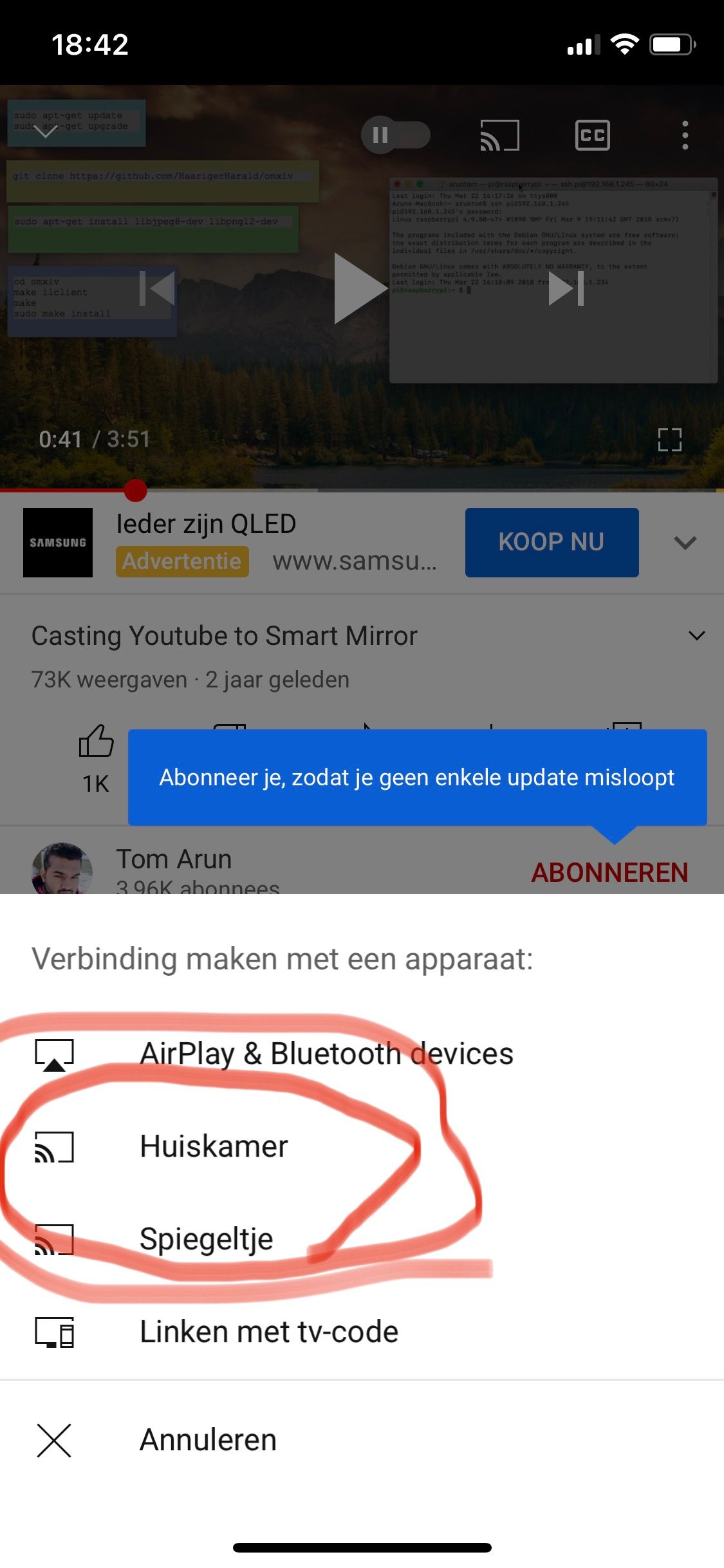
In the picture you can see my 2 mirrors.
“Huiskamer”
“Spiegeltje” -
var config = {
	address: "0.0.0.0"
	port: 8080,
	ipWhitelist: ["127.0.0.1", "::ffff:127.0.0.1", "::1"],
	useHttps: false,
	httpsPrivateKey: "",
	httpsCertificate: "",

	language: "nl",
	timeFormat: 24,
	units: "metric",
modules:
This is my part of de var (ip handeling)
-
-
@sdetweil i removed the ip adres of the laptop an tv.
But for the mmm-screencast module is That no problem -
@JerryP why cant u start allowing everything, and tighten it up later.
-
@JerryP the only difference between your config and mine is ipWhitelist for me is [] and language is English.
-
I unplugged the shield as that is what you asked me to try.
I then used my phone to try and cast… But had no joy. It didn’t find any devices. I rebooted the mirror and it still didn’t find it
-
@jste84 can u remote-control into the mirror?
for debug, ive posted at least a couple hundred times,
open the developers window, ctrl-shift-i on mirror keyboard,
select the tab labeled console and scroll upu can filter messages by module by putting part of the module name in the filter field
also look in thr console where u start mm. if using pm2 then
pm2 logs --lines=100
-
@sdetweil sorry I’m not sure what I’m looking at.
I’m in the console tab… and getting lots of notifications…
Tried using filter to search for the things that you’ve mentioned but no results. I must be doing something wrong
-
@jste84 cast in filter field
-
@jste84 then look in the place where u start mm
npm start or.pm2 logs
-
@sdetweil when I put those into filter nothing comes up?
-
@jste84 ok, then look in the startup logs,
… do you know how any.of this works? -
@sdetweil nope I’m a newbie to this…😓
-
Would really appreciate anyone who has the time to help me make this work
-
@jste84
I think this module died, mine stopped and never came back …

Hello! It looks like you're interested in this conversation, but you don't have an account yet.
Getting fed up of having to scroll through the same posts each visit? When you register for an account, you'll always come back to exactly where you were before, and choose to be notified of new replies (either via email, or push notification). You'll also be able to save bookmarks and upvote posts to show your appreciation to other community members.
With your input, this post could be even better 💗
Register Login