MagicMirror Forum
    • Recent
    • Tags
    • Unsolved
    • Solved
    • MagicMirror² Repository
    • Documentation
    • 3rd-Party-Modules
    • Donate
    • Discord
    • Register
    • Login
    A New Chapter for MagicMirror: The Community Takes the Lead
    Read the statement by Michael Teeuw here.

    MMM-MercedesMe

    Scheduled Pinned Locked Moved Transport
    53 Posts 10 Posters 29.4k Views 9 Watching
    Loading More Posts
    • Oldest to Newest
    • Newest to Oldest
    • Most Votes
    Reply
    • Reply as topic
    Log in to reply
    This topic has been deleted. Only users with topic management privileges can see it.
    • A Offline
      ashishtank Module Developer @kar1507
      last edited by

      @kar1507 Good to know that issues is solved, may be it was temporary issue from Mercedes Api, they have some downtime every now and then. Also I noticed that you have not included offline_access scope in config ? if you do not include that then refresh token will not be generated and thus you will need to re login again and again once the access token is expirers.

      1 Reply Last reply Reply Quote 0
      • JerryPJ Offline
        JerryP @kar1507
        last edited by

        @kar1507
        cen you post a picture of the screen???

        1 Reply Last reply Reply Quote 0
        • K Offline
          kar1507
          last edited by

          @ashishtank
          That explains why I always had Authenticate there. I’ve added it now. Thank you very much.
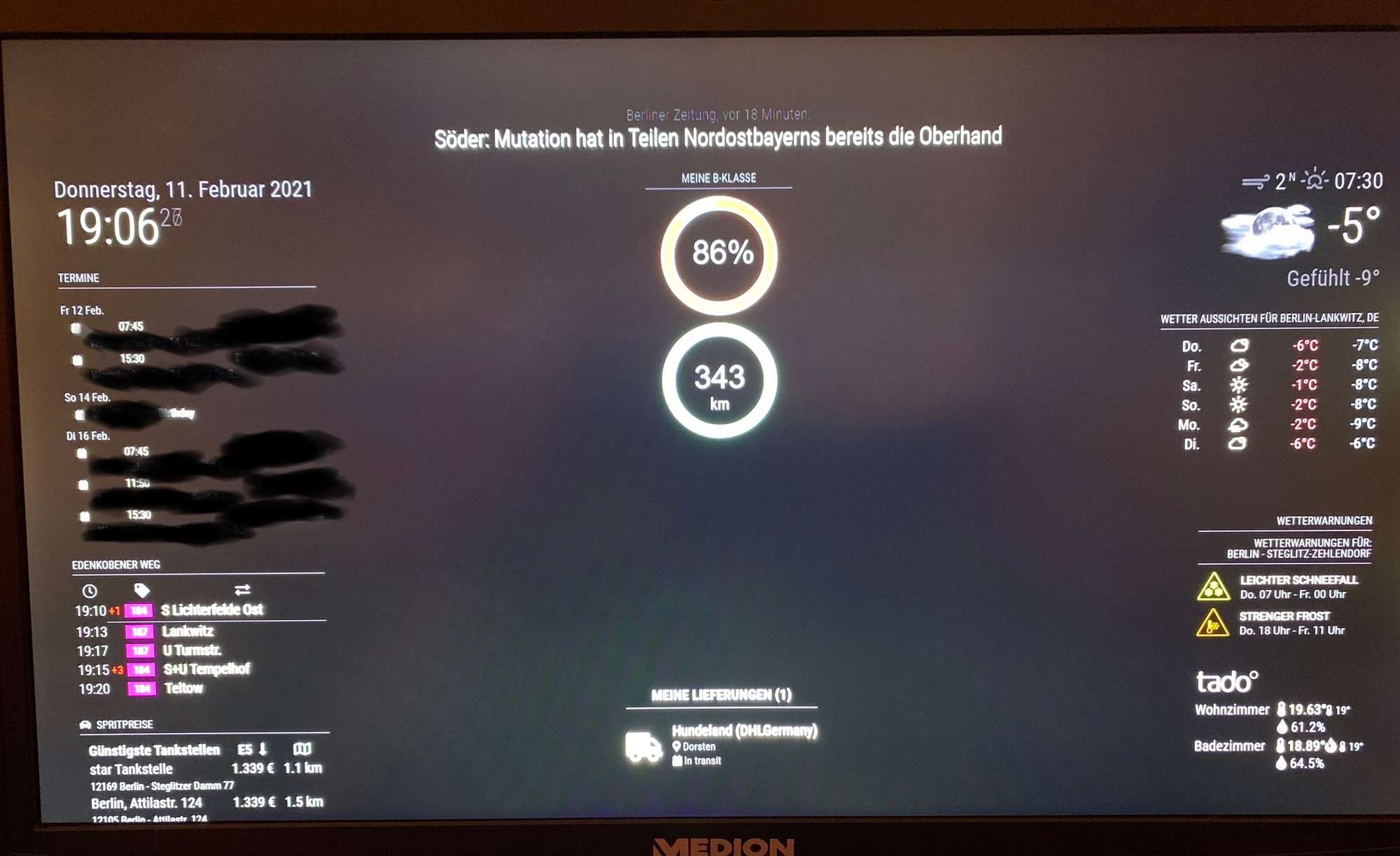
          @JerryP

          DECBA413-E560-431A-BE7B-633B952DF5B5.jpeg

          JerryPJ 1 Reply Last reply Reply Quote 0
          • JerryPJ Offline
            JerryP @kar1507
            last edited by

            @kar1507 Nice. that is the same as over her white the electric car.
            Thanks for the screen view

            1 Reply Last reply Reply Quote 0
            • P Offline
              pyrophoenix
              last edited by pyrophoenix

              Hi,

              First of all Thank you for this module. I followed the full setup and unfortunately I have no update.

              Here is my setup:

              {
                module: 'MMM-MercedesMe',
                position: 'bottom_left',
                header: 'Mercedes Fuel',
                config: {
                        client_id: '**********************************************',
                        client_secret: '**************************************************',
                        vehicleType: 'Petrol',
                    scope: 'mb:vehicle:mbdata:vehiclestatus offline_access',
                        vehicleId: 'W*****************************9',
                        displayStyle: 'twodial',
                        updateInterval: 300000,
                    debug: true,
                        maxRange: 520
                }
              

              },

              On the log I do have this error:

              [05.04.2021 23:33.58.329] [LOG] Vehicle data url https://api.mercedes-benz.com/vehicledata/v2/vehicles/W**************9/containers/electricvehicle
              [05.04.2021 23:33.58.575] [LOG] 403 - Forbidden

              Despite it says electricvehicule the setup on MercedesMe Dev is exactly as per the instruction.

              I’m a bit lost at this point.

              Thank you in advance for any help!

              1 Reply Last reply Reply Quote 0
              • P Offline
                pyrophoenix
                last edited by

                dsiplay.PNG

                A 1 Reply Last reply Reply Quote 0
                • A Offline
                  ashishtank Module Developer @pyrophoenix
                  last edited by

                  @pyrophoenix can you please restart the mirror and check if it works ? did you login to get the token ?

                  P 1 Reply Last reply Reply Quote 0
                  • P Offline
                    pyrophoenix @ashishtank
                    last edited by

                    Hi @ashishtank

                    Yes I did reboot and it ask to authenticate everytime that I reboot it. I have to click on it then it goes blank page and the picture I’ve sent appear

                    A 1 Reply Last reply Reply Quote 0
                    • A Offline
                      ashishtank Module Developer @pyrophoenix
                      last edited by

                      @pyrophoenix can you delete the tokens.json file in MercedesMe directory and then restart the mirror ? it should show you login button and then you should be able to login and get token. after that check if tokens.json file is created or not…

                      P 2 Replies Last reply Reply Quote 0
                      • P Offline
                        pyrophoenix @ashishtank
                        last edited by

                        @ashishtank Thanks for your reply!

                        I think I was looking the finger instead of the sky…I found the issue but couldn’t resolve it. It request EV while I have a petrol (But my config as you saw earlier was correct). On the logs I have that part saying:

                        [07.04.2021 22:13.34.301] [LOG]   Vehicle data url https://api.mercedes-benz.com/vehicledata/v2/vehicles/W1************9/containers/electricvehicle
                        

                        Then I missed that part (That I thought was for another modules):

                        [07.04.2021 22:13.34.785] [LOG]   403 - Forbidden
                        

                        On request it says:

                        [07.04.2021 21:53.39.767] [LOG]   Handle OAuth request
                        [07.04.2021 21:53.39.784] [LOG]   https://id.mercedes-benz.com/as/authorization.oauth2?response_type=code&client_id=d***********eb&&redirect_uri=http://localhost:8080/MMM-MercedesMe/callback&scope=mb:vehicle:mbdata:vehiclestatus offline_access&state=7********************************f
                        [07.04.2021 21:53.41.314] [LOG]   Handle OAuth callback
                        [07.04.2021 21:53.41.844] [LOG]   OAuth callback Success
                        

                        Meaning that now the token is indeed good but it request EV status rather then the rangeliquid and tankvalue (as mentioned here: https://developer.mercedes-benz.com/products/fuel_status/docs). M’I missing something?

                        1 Reply Last reply Reply Quote 0
                        • P Offline
                          pyrophoenix @ashishtank
                          last edited by

                          @ashishtank Just one thing that I saw…Step 7 has your Client ID and Secret uncovered. I highly recommend to blur it if it’s still an active account :/

                          A 1 Reply Last reply Reply Quote 0
                          • A Offline
                            ashishtank Module Developer @pyrophoenix
                            last edited by

                            @pyrophoenix Hi Looks like you found the issue for me :) the vehicle type right now i am checking is only Electric (default) and Diesel. I will improve the code to check for petrol as well but you can have a work around and can configure your vehicle type as 'diesel' and it will work as api is same for diesel and petrol !

                            getVehicleDataUrl: function (config) {
                            ......
                              var vehicleStatus = 'electricvehicle';
                              switch (config.vehicleType.toLowerCase()) {
                                case 'diesel': <-----------------------------------------------------------------------------
                                  vehicleStatus = 'fuelstatus'; 
                            ......
                            

                            About my sample client id and secret in guide they are fine as I do not have a Car :D and also that account and app are throw away account with out any real car linked to it.

                            Let me know if changing the config to diesel and restarting mirror solves the issue.

                            P 1 Reply Last reply Reply Quote 0
                            • P Offline
                              pyrophoenix @ashishtank
                              last edited by

                              @ashishtank Thanks for the reply!

                              I have erased token and reboot it with Diesel…Still the same issue but this time it goes to the correct URL

                              [08.04.2021 13:38.22.939] [LOG]   Handle OAuth request
                              [08.04.2021 13:38.22.946] [LOG]   https://id.mercedes-benz.com/as/authorization.oauth2?response_type=code&client_id=c****************4a&&redirect_uri=http://localhost:8080/MMM-MercedesMe/callback&scope=mb:vehicle:mbdata:vehiclestatus offline_access&state=d*************************e
                              [08.04.2021 13:38.25.124] [INFO]  Newsfeed-Fetcher: Broadcasting 66 items.
                              [08.04.2021 13:38.26.049] [LOG]   Handle OAuth callback
                              [08.04.2021 13:38.26.982] [LOG]   OAuth callback Success
                              [08.04.2021 13:38.34.388] [LOG]   Vehicle data url https://api.mercedes-benz.com/vehicledata/v2/vehicles/W1****************9/containers/fuelstatus
                              [08.04.2021 13:38.35.647] [LOG]   403 - Forbidden
                              

                              It is still saying error 403

                              A 1 Reply Last reply Reply Quote 0
                              • A Offline
                                ashishtank Module Developer @pyrophoenix
                                last edited by

                                @pyrophoenix did you followed the step 3 correctly ? did you linked fuel status scope with app ? as shown in image below you should see
                                Fuel Status BYOCAR
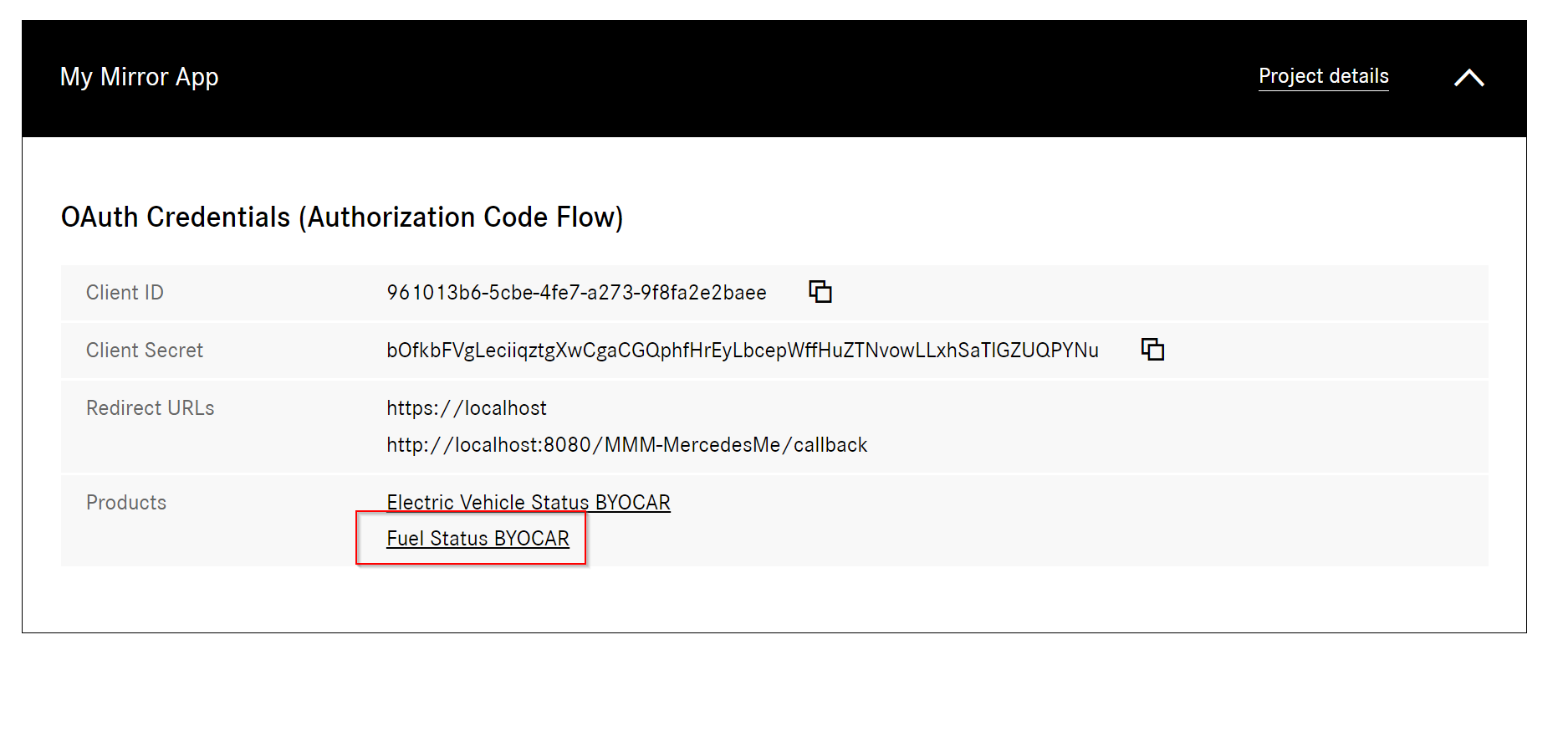
                                12999928-2260-4d66-98d6-d9334b7d61d8-image.png

                                1 Reply Last reply Reply Quote 0
                                • P Offline
                                  pyrophoenix
                                  last edited by

                                  Thanks! Great that YOU point it out! I cheated a bit and directly put the “fuel” on the URL as so

                                  https://developer.mercedes-benz.com/products/fuel_status/get_access?pm=free

                                  I just added it and I’ll try now.

                                  1 Reply Last reply Reply Quote 0
                                  • P Offline
                                    pyrophoenix
                                    last edited by

                                    Not working…But it seems that the Bearer is not generated properly. If I try the test curl provided by the Mercedes Dev, it does work…

                                    A 1 Reply Last reply Reply Quote 0
                                    • A Offline
                                      ashishtank Module Developer @pyrophoenix
                                      last edited by

                                      @pyrophoenix Can you delete the app in Mercedes dev portal and create new one with correct scope ? also delete tokens.json file and restart the mirror. I think it is some caching issue.

                                      P 1 Reply Last reply Reply Quote 0
                                      • P Offline
                                        pyrophoenix @ashishtank
                                        last edited by

                                        @ashishtank Remove and did a brand new app on console. Removed tokens.json and reboot…Same problem

                                        There is one thing that is on your step (Right from step 1) saying:

                                        AUTH CALLBACK URL: http://localhost

                                        Where that needs to be introduced?

                                        1 Reply Last reply Reply Quote 0
                                        • P Offline
                                          pyrophoenix
                                          last edited by

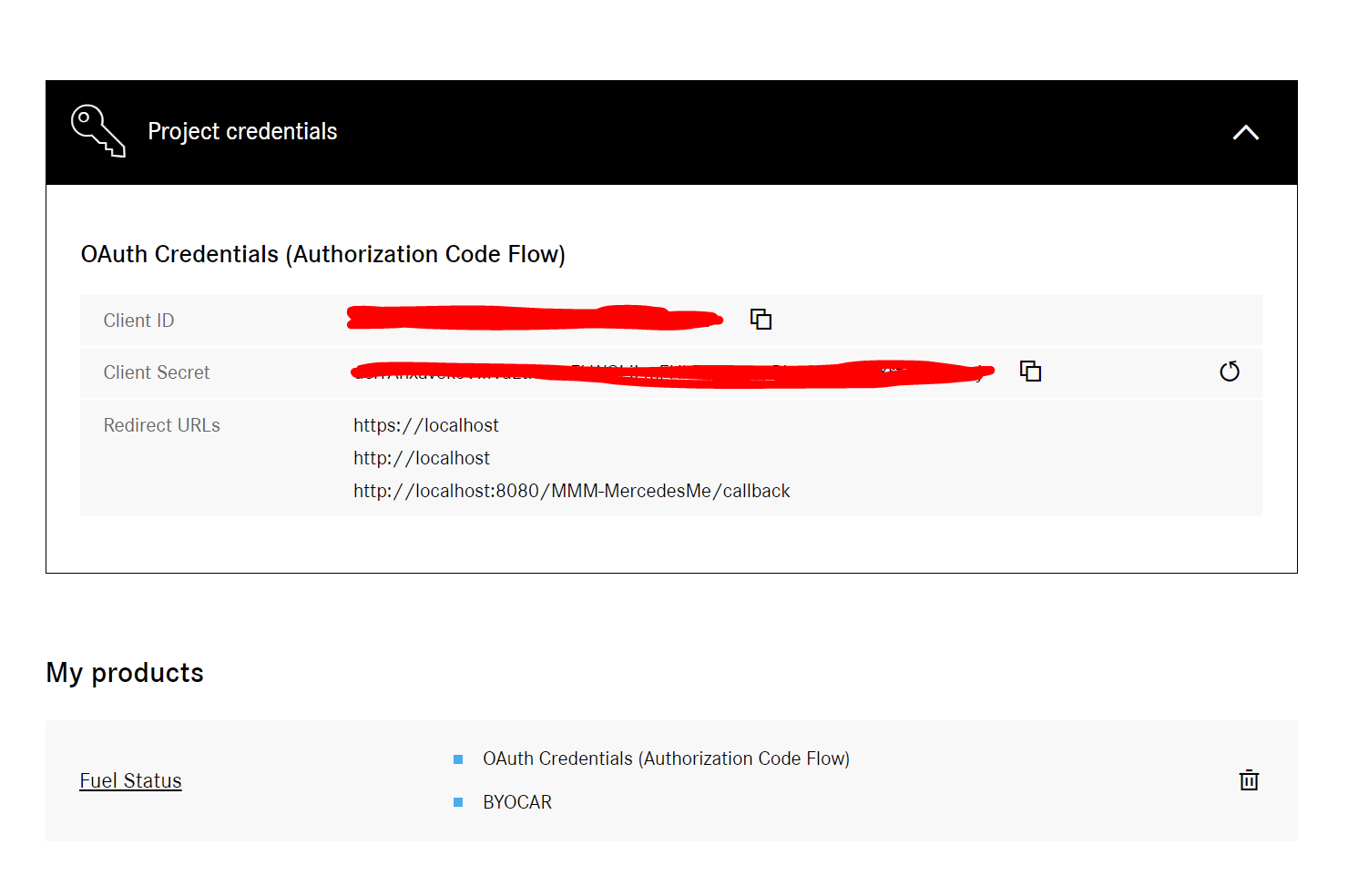
                                          Details.PNG image url)

                                          A 2 Replies Last reply Reply Quote 0
                                          • A Offline
                                            ashishtank Module Developer @pyrophoenix
                                            last edited by

                                            @pyrophoenix things looks correct, http://localhost:8080/MMM_MercedesMe/callback is important other localhost urls in callback are optional. I have sent you PM what we can do next.

                                            1 Reply Last reply Reply Quote 0

                                            Hello! It looks like you're interested in this conversation, but you don't have an account yet.

                                            Getting fed up of having to scroll through the same posts each visit? When you register for an account, you'll always come back to exactly where you were before, and choose to be notified of new replies (either via email, or push notification). You'll also be able to save bookmarks and upvote posts to show your appreciation to other community members.

                                            With your input, this post could be even better 💗

                                            Register Login

                                            • 1
                                            • 2
                                            • 3
                                            • 2 / 3
                                            • First post
                                              Last post
                                            Enjoying MagicMirror? Please consider a donation!
                                            MagicMirror created by Michael Teeuw.
                                            Forum managed by Sam, technical setup by Karsten.
                                            This forum is using NodeBB as its core | Contributors
                                            Contact | Privacy Policy