MagicMirror Forum
    • Recent
    • Tags
    • Unsolved
    • Solved
    • MagicMirror² Repository
    • Documentation
    • 3rd-Party-Modules
    • Donate
    • Discord
    • Register
    • Login
    A New Chapter for MagicMirror: The Community Takes the Lead
    Read the statement by Michael Teeuw here.

    Calendar events showing on wrong day.

    Scheduled Pinned Locked Moved Unsolved Troubleshooting
    66 Posts 3 Posters 28.5k Views 3 Watching
    Loading More Posts
    • Oldest to Newest
    • Newest to Oldest
    • Most Votes
    Reply
    • Reply as topic
    Log in to reply
    This topic has been deleted. Only users with topic management privileges can see it.
    • S Do not disturb
      sdetweil @Coolie1101
      last edited by

      @coolie1101 unless u didn’t stop pm2 running instance

      Sam

      How to add modules

      learning how to use browser developers window for css changes

      Coolie1101C 2 Replies Last reply Reply Quote 0
      • Coolie1101C Offline
        Coolie1101 @sdetweil
        last edited by

        @sdetweil said in Calendar events showing on wrong day.:

        unless u didn’t stop pm2 running instance

        I did, “pm2 stop all”, then “npm start file_name.txt”

        @sdetweil said in Calendar events showing on wrong day.:

        u did add the “DEBUG”, right

        Yes.
        ```
        language: “en”,
        locale: “en-US”,
        logLevel: [“INFO”, “LOG”, “WARN”,“ERROR”,“DEBUG”], // Add “DEBUG” for even more logging
        timeFormat: 24,
        units: “imperial”,

        S 2 Replies Last reply Reply Quote 0
        • S Do not disturb
          sdetweil @Coolie1101
          last edited by

          @coolie1101 said in Calendar events showing on wrong day.:

          “npm start file_name.txt”

          and with the > symbol

          npm start > file_name.txt

          Sam

          How to add modules

          learning how to use browser developers window for css changes

          1 Reply Last reply Reply Quote 0
          • Coolie1101C Offline
            Coolie1101 @sdetweil
            last edited by

            @sdetweil So I deleted the entry for that day and added back just for that day, it shows up correct in the display but the following events still shows a day late.

            S 1 Reply Last reply Reply Quote 0
            • S Do not disturb
              sdetweil @Coolie1101
              last edited by

              @coolie1101 said in Calendar events showing on wrong day.:

              but the following events still shows a day late.

              so, I need to see THAT vevent

              Sam

              How to add modules

              learning how to use browser developers window for css changes

              Coolie1101C 1 Reply Last reply Reply Quote 0
              • S Do not disturb
                sdetweil @Coolie1101
                last edited by

                @coolie1101 if you just do

                in the MagicMirror folder

                npm start

                you should have a stream of stuff so fast u can’t read

                Sam

                How to add modules

                learning how to use browser developers window for css changes

                1 Reply Last reply Reply Quote 0
                • Coolie1101C Offline
                  Coolie1101 @sdetweil
                  last edited by Coolie1101

                  @sdetweil said in Calendar events showing on wrong day.:

                  so, I need to see THAT vevent

                  BEGIN:VEVENT
                  DTSTART:20211123T100000Z
                  DTEND:20211123T150000Z
                  DTSTAMP:20211119T151956Z
                  UID:0g4190e8en06vs************@google.com
                  CREATED:20211119T151237Z
                  DESCRIPTION:
                  LAST-MODIFIED:20211119T151237Z
                  LOCATION:
                  SEQUENCE:0
                  STATUS:CONFIRMED
                  SUMMARY:YARD WASTE
                  TRANSP:OPAQUE
                  END:VEVENT
                  

                  @sdetweil said in Calendar events showing on wrong day.:

                  you should have a stream of stuff so fast u can’t read

                  There’s no output in the ssh window except for the following.

                  pi@magicmirror:~/MagicMirror $ npm start >cal_test_debug_log.txt
                  [19.11.2021 10:25.12.563] [WARN]  (electron) Security Warning: A WebContents was just created with both webviewTag and contextIsolation enabled.  This combination is fundamentally less secure and effectively bypasses the protections of contextIsolation.  We strongly recommend you move away from webviews to OOPIF or BrowserView in order for your app to be more secure
                  [19.11.2021 10:25.13.777] [ERROR] ERROR! Could not find main module js file for MMM-GABackground
                  
                  S 1 Reply Last reply Reply Quote 0
                  • S Do not disturb
                    sdetweil @Coolie1101
                    last edited by sdetweil

                    @coolie1101 correct, you are sending all the output to the file (except the stuff to stderr)

                    if you remove everything from the > on you’ll get the output to the ssh window, BUT it will be so big, the top will scroll off and be lost… (which is why we are sending to a file)

                    Sam

                    How to add modules

                    learning how to use browser developers window for css changes

                    Coolie1101C 1 Reply Last reply Reply Quote 0
                    • Coolie1101C Offline
                      Coolie1101 @sdetweil
                      last edited by

                      @sdetweil Got it, I didn’t realize the file continued on, it’s 2,486kb, which part do you need?

                      S 1 Reply Last reply Reply Quote 0
                      • S Do not disturb
                        sdetweil @Coolie1101
                        last edited by

                        @coolie1101 see this post

                        https://forum.magicmirror.builders/topic/15878/calendar-events-showing-on-wrong-day/28?_=1636916667651

                        from processing entry thru saving for the vevent that is the problem

                        maybe 20-30 lines

                        Sam

                        How to add modules

                        learning how to use browser developers window for css changes

                        Coolie1101C 1 Reply Last reply Reply Quote 0
                        • Coolie1101C Offline
                          Coolie1101 @sdetweil
                          last edited by Coolie1101

                          @sdetweil

                          Event: {"type":"VEVENT","params":[],"start":"2021-11-23T10:00:00.000Z","datetype":"date-time","end":"2021-11-23T15:00:00.000Z","dtstamp":"2021-11-19T15:25:46.000Z","uid":"0g4190e8en06vs************@google.com","created":"2021-11-19T15:12:37.000Z","description":"","lastmodified":"2021-11-19T15:12:37.000Z","location":"","sequence":"0","status":"CONFIRMED","summary":"YARD WASTE","transparency":"OPAQUE"}
                          [19.11.2021 10:26.06.439] [DEBUG] startDate (local): Tue Nov 23 2021 05:00:00 GMT-0500 (Eastern Standard Time)
                          [19.11.2021 10:26.06.440] [DEBUG] endDate (local): Tue Nov 23 2021 10:00:00 GMT-0500 (Eastern Standard Time)
                          [19.11.2021 10:26.06.442] [DEBUG] duration: 18000000
                          [19.11.2021 10:26.06.443] [DEBUG] title: YARD WASTE
                          [19.11.2021 10:26.06.465] [DEBUG] initial tz=Etc/UTC
                          [19.11.2021 10:26.06.474] [DEBUG] corrected tz=Etc/UTC
                          [19.11.2021 10:26.06.478] [DEBUG] start date/time=Tue Nov 23 2021 05:00:00 GMT-0500 (Eastern Standard Time)
                          [19.11.2021 10:26.06.492] [DEBUG] start offset=0
                          [19.11.2021 10:26.06.495] [DEBUG] start date/time w tz =Tue Nov 23 2021 05:00:00 GMT-0500 (Eastern Standard Time)
                          [19.11.2021 10:26.06.498] [DEBUG] event date=Tue Nov 23 2021 05:00:00 GMT-0500 (Eastern Standard Time)
                          [19.11.2021 10:26.06.500] [DEBUG] event offset=0 hour=10 event date=Tue Nov 23 2021 05:00:00 GMT-0500 (Eastern Standard Time)
                          [19.11.2021 10:26.06.514] [DEBUG] adjustHours=0
                          [19.11.2021 10:26.06.523] [DEBUG] Processing entry...
                          [19.11.2021 10:26.06.527] [DEBUG]
                          
                          [19.11.2021 10:26.08.304] [DEBUG] Title: YARD WASTE, with dates: ["2021-11-23T09:00:00.000Z","2021-11-30T09:00:00.000Z","2021-12-07T09:00:00.000Z","2021-12-14T09:00:00.000Z","2021-12-21T09:00:00.000Z","2021-12-28T09:00:00.000Z"]
                          

                          The one in question at the moment is ““2021-11-30T09:00:00.000Z”” which display’s as 2021-12-01

                          S 2 Replies Last reply Reply Quote 0
                          • S Do not disturb
                            sdetweil @Coolie1101
                            last edited by

                            @coolie1101 yes that’s what the correction should enable

                            05:00 ny, +4 (now est) =09:00 utc time

                            Sam

                            How to add modules

                            learning how to use browser developers window for css changes

                            1 Reply Last reply Reply Quote 0
                            • S Do not disturb
                              sdetweil @Coolie1101
                              last edited by

                              @coolie1101 but there is no time zone set in the appointment

                              Sam

                              How to add modules

                              learning how to use browser developers window for css changes

                              Coolie1101C 1 Reply Last reply Reply Quote 0
                              • Coolie1101C Offline
                                Coolie1101 @sdetweil
                                last edited by

                                @sdetweil said in Calendar events showing on wrong day.:

                                but there is no time zone set in the appointment

                                It shows as set in the calendar itself?

                                58c72fe2-b130-4c7d-8dea-3a0b6d3bef9a-image.png

                                S 1 Reply Last reply Reply Quote 0
                                • S Do not disturb
                                  sdetweil @Coolie1101
                                  last edited by

                                  @coolie1101 yes, BUT it doesn’t show in the ics file…

                                  anyhow…

                                  show me the next entry from the debug output

                                  or send me the debug output file via email

                                  same userid at gmail

                                  Sam

                                  How to add modules

                                  learning how to use browser developers window for css changes

                                  Coolie1101C 1 Reply Last reply Reply Quote 0
                                  • Coolie1101C Offline
                                    Coolie1101 @sdetweil
                                    last edited by

                                    @sdetweil

                                    Event: {"type":"VEVENT","params":[],"start":"2022-01-26T10:00:00.000Z","datetype":"date-time","end":"2022-01-26T15:00:00.000Z","dtstamp":"2021-11-19T16:07:10.000Z","uid":"0idffl8ue0gac*************@google.com","created":"2021-11-19T13:18:54.000Z","description":"Recycling Bottles, Cans, and Plastic.","lastmodified":"2021-11-19T13:18:54.000Z","location":"","sequence":"0","status":"CONFIRMED","summary":"RECYCLING (BOTTLES, CANS and PLASTIC) ","transparency":"TRANSPARENT"}
                                    [19.11.2021 11:07.22.130] [DEBUG] startDate (local): Wed Jan 26 2022 05:00:00 GMT-0500 (Eastern Standard Time)
                                    [19.11.2021 11:07.22.135] [DEBUG] endDate (local): Wed Jan 26 2022 10:00:00 GMT-0500 (Eastern Standard Time)
                                    [19.11.2021 11:07.22.141] [DEBUG] duration: 18000000
                                    [19.11.2021 11:07.22.146] [DEBUG] title: RECYCLING (BOTTLES, CANS and PLASTIC) 
                                    [19.11.2021 11:07.22.160] [DEBUG] initial tz=Etc/UTC
                                    [19.11.2021 11:07.22.169] [DEBUG] corrected tz=Etc/UTC
                                    [19.11.2021 11:07.22.174] [DEBUG] start date/time=Wed Jan 26 2022 05:00:00 GMT-0500 (Eastern Standard Time)
                                    [19.11.2021 11:07.22.178] [DEBUG] start offset=0
                                    [19.11.2021 11:07.22.182] [DEBUG] start date/time w tz =Wed Jan 26 2022 05:00:00 GMT-0500 (Eastern Standard Time)
                                    [19.11.2021 11:07.22.189] [DEBUG] event date=Wed Jan 26 2022 05:00:00 GMT-0500 (Eastern Standard Time)
                                    [19.11.2021 11:07.22.195] [DEBUG] event offset=0 hour=10 event date=Wed Jan 26 2022 05:00:00 GMT-0500 (Eastern Standard Time)
                                    [19.11.2021 11:07.22.202] [DEBUG] adjustHours=0
                                    [19.11.2021 11:07.22.209] [DEBUG] Processing entry...
                                    [19.11.2021 11:07.22.217] [DEBUG] 
                                    

                                    This is the Calendar Event I believe we should be looking at

                                    BEGIN:VEVENT
                                    DTSTART;TZID=America/New_York:20210406T050000
                                    DTEND;TZID=America/New_York:20210406T100000
                                    RRULE:FREQ=WEEKLY;WKST=SU;UNTIL=20211230T045959Z;BYDAY=TU
                                    EXDATE;TZID=America/New_York:20211123T050000
                                    DTSTAMP:20211119T165604Z
                                    UID:0v89h5cit8nq6m************@google.com
                                    CREATED:20211026T075843Z
                                    DESCRIPTION:
                                    LAST-MODIFIED:20211026T080254Z
                                    LOCATION:
                                    SEQUENCE:1
                                    STATUS:CONFIRMED
                                    SUMMARY:YARD WASTE
                                    TRANSP:OPAQUE
                                    END:VEVENT
                                    

                                    This last event listed as “UNTIL=20211230T045959Z”, displays as Dec 1st.

                                    S 1 Reply Last reply Reply Quote 0
                                    • S Do not disturb
                                      sdetweil @Coolie1101
                                      last edited by

                                      @coolie1101 I added 2 to the end, Yard Waste 2, and see this, with my system set to eastern time. I didn’t delete the prior ics entries
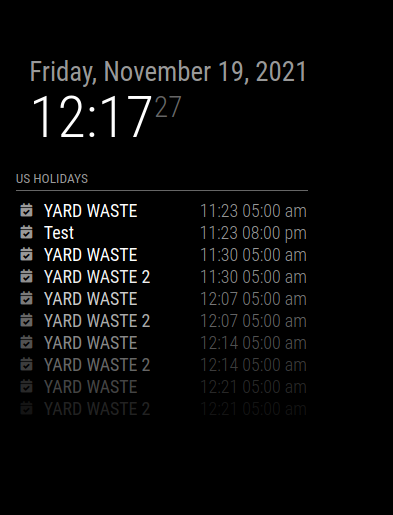
                                      Screenshot at 2021-11-19 12-17-27.png

                                      Sam

                                      How to add modules

                                      learning how to use browser developers window for css changes

                                      Coolie1101C 1 Reply Last reply Reply Quote 0
                                      • Coolie1101C Offline
                                        Coolie1101 @sdetweil
                                        last edited by

                                        @sdetweil I understand that it works, and it is indeed working, but why is it showing a day later is what I am trying to figure out, what about the entries for 11/23-12/6?

                                        S 1 Reply Last reply Reply Quote 0
                                        • S Do not disturb
                                          sdetweil @Coolie1101
                                          last edited by sdetweil

                                          @coolie1101 I don’t see a day late… the event is Tuesdays, weekly, 11/23 is tuesday, 11/30 is tuesday, 12/7 is tuesday

                                          I am looking for the 11/23 entry…

                                          DUH, it says exclude 11/23

                                          EXDATE;TZID=America/New_York:20211123T050000

                                          Sam

                                          How to add modules

                                          learning how to use browser developers window for css changes

                                          Coolie1101C 1 Reply Last reply Reply Quote 0
                                          • Coolie1101C Offline
                                            Coolie1101 @sdetweil
                                            last edited by

                                            @sdetweil said in Calendar events showing on wrong day.:

                                            11/23 is tuesday, 11/30 is tuesday, 12/7 is tuesday

                                            Those dates are correct, the 11/23 entry was deleted and re-added, so it’s not part of the yearly schedule anymore.

                                            For me the entry for 11/30 displays on the monitor as Dec 1st.

                                            S 1 Reply Last reply Reply Quote 0

                                            Hello! It looks like you're interested in this conversation, but you don't have an account yet.

                                            Getting fed up of having to scroll through the same posts each visit? When you register for an account, you'll always come back to exactly where you were before, and choose to be notified of new replies (either via email, or push notification). You'll also be able to save bookmarks and upvote posts to show your appreciation to other community members.

                                            With your input, this post could be even better 💗

                                            Register Login

                                            • 1
                                            • 2
                                            • 3
                                            • 4
                                            • 3 / 4
                                            • First post
                                              Last post
                                            Enjoying MagicMirror? Please consider a donation!
                                            MagicMirror created by Michael Teeuw.
                                            Forum managed by Sam, technical setup by Karsten.
                                            This forum is using NodeBB as its core | Contributors
                                            Contact | Privacy Policy