Read the statement by Michael Teeuw here.
MMM-Spotify
-
MMM-Spotify
Spotify controller for MagicMirror
Screenshot
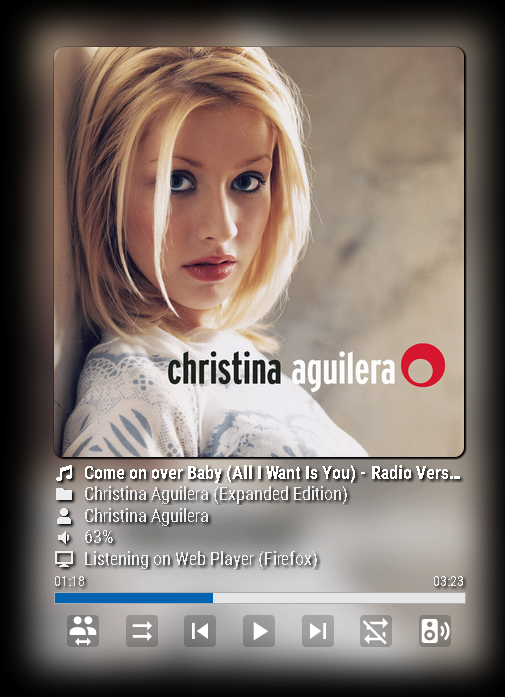
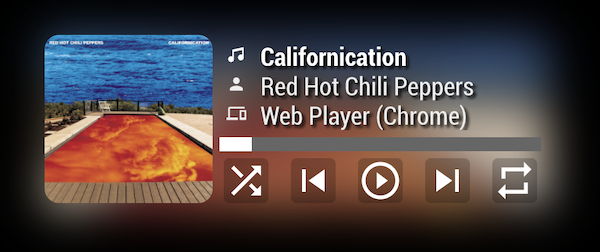
Main Features
- Showing Current playback of any devices
- Playing Controllable by Notification (Play, pause, next, previous, volume)
- Spotify Controllable by Notification (change device, search and play)
[card:eouia/MMM-Spotify]
My MBP was gone a few weeks ago with 12,000 mp3s which I was collecting for my whole life… :(
I’ve never used any streaming service, but now have to.
So I consider to use Spotify. I know there is already some modules about it. Anyway, I need something different. I was playing with Spotify API for my private purpose.Just at that moment , @ejay-ibm wanted to control Spotify with voice command through MMM-AssistantMk2. He asked sometimes and I answered. I asked also sometimes he replied…
And then, Wow, Suddenly This module is born.
Special Thanks to @ejay-ibm. He gave me great inspiration and motivation to complete this (and real coworking also).TODO
I’ll add touch interface to control Spotify. (somedays)
-
Looks nice and touch interface sounds promising
-
Really nice. Do you know if Google Play is possible to have such a module?
-
@teitlebot
As far as I know,Kodicould work on Raspberry Pi. But I cannot find API or data which could be used.
Google Player Music has no official API currently.
There are some unofficial implements but I’m not sure whether it will work on RPI easily or not. -
@Sean It was a real pleasure to work with you on this project.
We have a real good Spotify module now that do all in one!
Fantastic! -
@Sean @ejay-ibm nice release guys.
Only could you please replace the plain white Spotify logo with a darker one (like in MMM-NowPlayingOnSpotify)? :grimacing_face:Also Is this a stand-alone Spotify module?
And if yes is it mandatory then to have a (Spotify) Premium account?In addition:
I noticed that the module doesn’t go into ‘standby’ view once I end playing music until I restart MagicMirror. -
@Cr4z33
Thanks for using- You can replace image file by yourself (It is under
resourcesdirectory). Feel free to change it as your wish. - This is not stand-alone player. Originally, I was developing stand-alone player with new Web Playback API but unfortunately, current Electron/Chromium on RPI miss core feature about that. Somedays, when Electron/Chromium on RPI has that feature, I’ll implement. Currently you need RASPOTIFY to play spotify on RPI. (Or any other spotify-enable device like smartTV, smartphone, or smartspeakers)
- You could not controll playback or not use some features without premium account.
- Eh, last song cover is better than spotify icon, isn’t it? :D
spotify icon will be appeared when there is no possible playback or device. But not sure. I didn’t test about it. If you need that feature absolutely, I’ll consider it on next update.
- You can replace image file by yourself (It is under
-
@Sean said in MMM-Spotify:
spotify icon will be appeared when there is no possible playback or device. But not sure. I didn’t test about it.
Yes that is correct . When nothing is played and all players are disconnected the white spotify icon appear.
We place that one here just to not have nothing.
As Sean said this is customizable , you just need to change the png file under the resources directory .Enjoy you new module.
Ejay
-
@Sean @ejay-ibm alright thanks to both of you.
-
Hello,
i installed this module today. Works perfect, thanks for this great work :-) I just overwrited the css a little bit, hope this is ok for you!
And now my question: is it possible to show this module only on my mirror when i play music on it? Because when i am not at home i think my music selection isnt very interessting for my girlfriend :-D
Thank you
Kwaeksler -
@kwaeksler
Frankly said, I didn’t test, but module would work only under same network. But I might be wrong. I hope there be who can explain it clearly. Or i’ll test it on monday by myself. -
@Sean @kwaeksler
Spotify is account linked, so actually, the module will display what is currently played on any devices linked to the same account ( same client ID/secret) even out of your network. I tested with a Spotify family , even different email are linked to the main account. So I can not think of a solution right now.Ejay
-
@kwaeksler I think I can add device limitation to display or control. I’ll consider it on updates.
-
@Sean That sounds great :-) Thank you!
-
some more testing . With Spotify Familly. You can have 1 device set per email account .
ejay
-
updated
1.1.0 (2019-03-25)
- Added: touch(click) interface
- Device Limitation : Now you can allow or limit devices to display its playing on MM.
- Some CSS structure is changed.
- Now this module can emit
SPOTIFY_*notifications for other module.

-
Need the same for DEEZER :disappointed_face: :loudly_crying_face:
-
@thymon said in MMM-Spotify:
Need the same for DEEZER :disappointed_face: :loudly_crying_face:
Never got it working, but here it is.
-
@Sean @ejay-ibm I’ve got a Spotify Premium account now so I was giving MMM-Spotify another shot, but I am stuck at instructions step #4.
I am logged in however I get
INVALID_CLIENT: Invalid redirect URIin the webpage once I click the generated URL. :confused_face:Any thoughts?
-
@Cr4z33
Your two values of “REDIRCT_URI” should be the same; Your spotify App setup and yourspotify.config.json. Check again.




Hello! It looks like you're interested in this conversation, but you don't have an account yet.
Getting fed up of having to scroll through the same posts each visit? When you register for an account, you'll always come back to exactly where you were before, and choose to be notified of new replies (either via email, or push notification). You'll also be able to save bookmarks and upvote posts to show your appreciation to other community members.
With your input, this post could be even better 💗
Register Login