Read the statement by Michael Teeuw here.
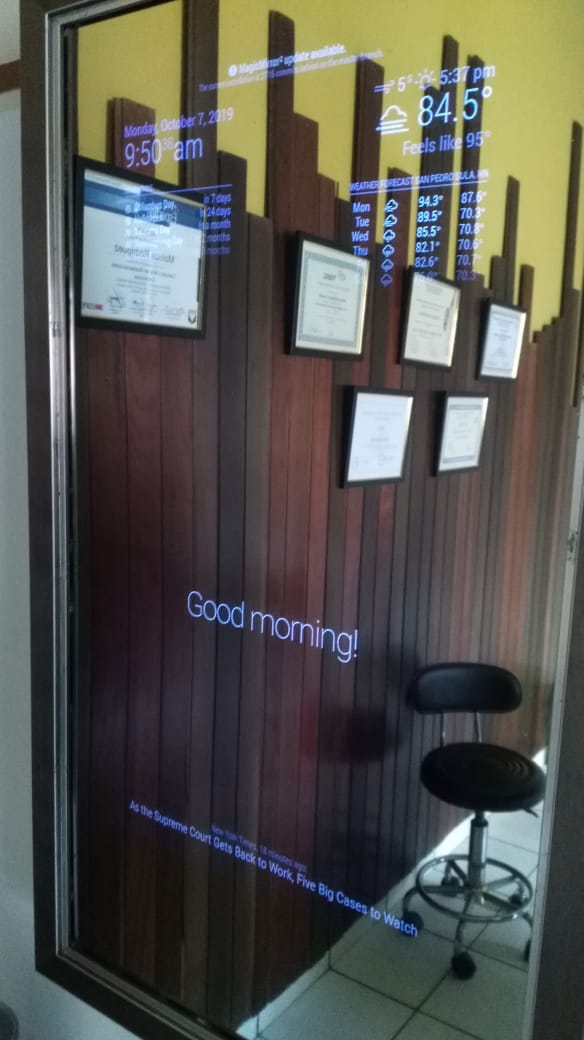
how do i update my magic mirror
-
how i can update this?
on my magic mirror appears on top one new update, but i dont know how to do it.
-
cd ~\MagicMirror git pull -
@Stoffbeuteluwe THANKS but dont work :
cd ~\MagicMirror
git pullthanks dude, i have another problem, i want to install a command voice but idont know whats is the error…
i check the config
Checking file… /home/pi/MagicMirror/config/config.js
Line 117 col 10 Expected ‘}’ to match ‘{’ from line 102 and instead saw ‘]’.
Line 118 col 6 Expected ‘]’ to match ‘[’ from line 28 and instead saw ‘;’.
Line 121 col 1 Expected ‘}’ to match ‘{’ from line 11 and instead saw ‘if’.
Line 121 col 4 Bad invocation.
Line 121 col 35 Missing semicolon.AND this are the line:
{ module: "MMM-Snow", position: "fullscreen_above", config: { // See 'Configuration options' for more information. flakeCount: 100, theme: "winter", } }, { module: "MMM-Voice-Commands", config: { debug: false, //Displays end results and errors from annyang in the Log autoStart: true, //Adds annyang commands when it first starts activateCommand: "hello mirror", //Command to active all other commands deactivateCommand: "goodbye mirror", //Command to deactivate all other commands alertHeard: false, //Whether an alert should be shown when annyang hears a phrase (mostly for debug) commands: { "command statement :variable (optional statement)": "SOCKET_NOTIFICATION_NAME", //The payload of the socket notification will be whatever is said in the :variable "command statement *variable": function(param){ < ---- start alert("Whatever is said in the *variable space is given as the "+param); //These function's 'this' are bound to the module's 'this' so you can do stuff like: this.sendNotification("PAGE_SELECT", "2"); } } ] }; /*************** DO NOT EDIT THE LINE BELOW ***************/ if (typeof module !== "undefined") {module.exports = config;} -
@bjjsoul said in how do i update my magic mirror:
> { > module: "MMM-Snow", > position: "fullscreen_above", > config: { // See 'Configuration options' for more information. > flakeCount: 100, > theme: "winter", > } > }, > { < ---- start module > module: "MMM-Voice-Commands", > config: { < ---- start config > debug: false, //Displays end results and errors from annyang in the Log > autoStart: true, //Adds annyang commands when it first starts > activateCommand: "hello mirror", //Command to active all other commands > deactivateCommand: "goodbye mirror", //Command to deactivate all other commands > alertHeard: false, //Whether an alert should be shown when annyang hears a phrase (mostly for debug) > commands: { < --- start command > "command statement :variable (optional statement)": "SOCKET_NOTIFICATION_NAME", > //The payload of the socket notification will be whatever is said in the :variable > "command statement *variable": function(param){ < ---- start > alert("Whatever is said in the *variable space is given as the "+param); > //These function's 'this' are bound to the module's 'this' so you can do stuff like: > this.sendNotification("PAGE_SELECT", "2"); > } < --- end command > } < ---- end config > ] ???????? > }; > > /*************** DO NOT EDIT THE LINE BELOW ***************/ > if (typeof module !== "undefined") {module.exports = config;} -
@Stoffbeuteluwe please refer people to the new update script for updating the base.
https://forum.magicmirror.builders/topic/10859/new-update-upgrade-script-ready-for-testing
-
ERROR???¿?¿?? :( :(
magicmirror@2.8.0 start /home/pi/MagicMirror
sh run-start.shStarting MagicMirror: v2.8.0
Loading config …
WARNING! Could not validate config file. Starting with default configuration. Please correct syntax errors at or above this line: /home/pi/MagicMirror/config/config.js:111
“command statement *variable”: function(param){ < ---- start
^SyntaxError: Unexpected token <
at new Script (vm.js:74:7)
at createScript (vm.js:246:10)
at Object.runInThisContext (vm.js:298:10)
at Module._compile (internal/modules/cjs/loader.js:678:28)
at Object.Module._extensions…js (internal/modules/cjs/loader.js:722:10)
at Module.load (internal/modules/cjs/loader.js:620:32)
at tryModuleLoad (internal/modules/cjs/loader.js:559:12)
at Function.Module._load (internal/modules/cjs/loader.js:551:3)
at Module.require (internal/modules/cjs/loader.js:658:17)
at require (internal/modules/cjs/helpers.js:20:18) -
@bjjsoul U cannot just paste the code in. I am trying to teach you how to solve the problems.
All {} and [] must be matched in order
-
thank bro for your time, but i am copying and paste in the last line in the config file, but i dont know whats is my error
in this moment its looks like this:{ module: "MMM-Voice-Commands", config: { debug: false, //Displays end results and errors from annyang in the Log autoStart: true, //Adds annyang commands when it first starts activateCommand: "hello mirror", //Command to active all other commands deactivateCommand: "goodbye mirror", //Command to deactivate all other commands alertHeard: false, //Whether an alert should be shown when annyang hears a phrase (mostly for debug) commands: { "command statement :variable (optional statement)": "SOCKET_NOTIFICATION_NAME", //The payload of the socket notification will be whatever is said in the :variable "command statement *variable": function(param){ alert("Whatever is said in the *variable space is given as the "+param); //These function's 'this' are bound to the module's 'this' so you can do stuff like: this.sendNotification("PAGE_SELECT", "2"); } } }; /*************** DO NOT EDIT THE LINE BELOW ***************/ if (typeof module !== "undefined") {module.exports = config;} -
now is this faaak :(
Starting MagicMirror: v2.8.0
Loading config …
WARNING! Could not validate config file. Starting with default configuration. Please correct syntax errors at or above this line: /home/pi/MagicMirror/config/config.js:121
if (typeof module !== “undefined”) {module.exports = config;}
^^SyntaxError: Unexpected token if
at new Script (vm.js:74:7)
at createScript (vm.js:246:10)
at Object.runInThisContext (vm.js:298:10)
at Module._compile (internal/modules/cjs/loader.js:678:28)
at Object.Module._extensions…js (internal/modules/cjs/loader.js:722:10)
at Module.load (internal/modules/cjs/loader.js:620:32)
at tryModuleLoad (internal/modules/cjs/loader.js:559:12)
at Function.Module._load (internal/modules/cjs/loader.js:551:3)
at Module.require (internal/modules/cjs/loader.js:658:17)
at require (internal/modules/cjs/helpers.js:20:18)i dont know how find the line 121
i am very noob in this -
@bjjsoul, can you copy/past in here your entire config.js?
also when posting the code please click on the “</>” button to put in the code block.that way the code will be in a box like this one. -
@bjjsoul said in how do i update my magic mirror:
but i am copying and paste in the last line in the config file
come on man… you are missing a close brace } and a close bracket ]
start at the top of the new module you are adding and find the open braces { and match then with a close brace }
and then make sure that the confg.js modules section starts with a [ and ends with a ]


Hello! It looks like you're interested in this conversation, but you don't have an account yet.
Getting fed up of having to scroll through the same posts each visit? When you register for an account, you'll always come back to exactly where you were before, and choose to be notified of new replies (either via email, or push notification). You'll also be able to save bookmarks and upvote posts to show your appreciation to other community members.
With your input, this post could be even better 💗
Register Login