MagicMirror Forum
    • Recent
    • Tags
    • Unsolved
    • Solved
    • MagicMirror² Repository
    • Documentation
    • 3rd-Party-Modules
    • Donate
    • Discord
    • Register
    • Login
    A New Chapter for MagicMirror: The Community Takes the Lead
    Read the statement by Michael Teeuw here.

    UPDATE: Replaced my PIR-Sensor with a Doppler Microwave Sensor.

    Scheduled Pinned Locked Moved Tutorials
    103 Posts 17 Posters 108.7k Views 25 Watching
    Loading More Posts
    • Oldest to Newest
    • Newest to Oldest
    • Most Votes
    Reply
    • Reply as topic
    Log in to reply
    This topic has been deleted. Only users with topic management privileges can see it.
    • cowboysdudeC Offline
      cowboysdude Module Developer @uros76
      last edited by cowboysdude

      @uros76 said in UPDATE: Replaced my PIR-Sensor with a Doppler Microwave Sensor.:

      @cowboysdude scripts works fine with my pi3.

      It seems pi4 has different way of putting a monitor to sleep, I never figured out how to do it on pi4.
      Instead, I tested lubuntu on pi4 and managed to put it to sleep with this mouse click script linked to PIR motion:

      xdotool click 1
      

      I can share more details on lubuntu setup if needed.

      Yes it works great on a Pi3… :) I am still using it for that…

      Yes please… I’d like to update the script for Pi4 but haven’t been able to get it working…
      Thank you!

      1 Reply Last reply Reply Quote 0
      • uros76U Offline
        uros76
        last edited by

        Ok.
        So, for a pi4 I managed to get PIR waking up MM screen with these steps:

        • Install latest Lubuntu with gdm3 environment
        • Edit /etd/gdm3/custom.conf. This will set autologin so that desktop environment loads every reboot
        # Enabling automatic login
          AutomaticLoginEnable = true
          AutomaticLogin = yourusername
        
        • Follow these steps to create wakeup script https://www.ketzler.de/2017/12/exit-screensaver-on-raspberry-pi-with-motion-sensor/
        • Create file “/etc/xdg/autostart/motion.desktop” with the following contents. This runs PIR sensing in the background after every reboot
        [Desktop Entry]
        Name=motion
        Exec=sudo gpio-watch -e rising 4
        
        • Set screensaver blank screen to desired timeout, 1min in my case. Lubutu knows how to handle pi4 blanking and puts to sleep my hdmi monitor

        This way I got pi4 waking up with PIR sensing. Not ideal setup but it works.
        I spent too much time trying to get pi4 work properly with Rapsberian, I simply had too many issues with it.
        At the end I am using pi3 for my first production MM and the pi4 is waiting for the next project.

        My magicmirror projects: https://forum.magicmirror.builders/post/79889, https://forum.magicmirror.builders/post/93241 and https://forum.magicmirror.builders/post/94586

        cowboysdudeC 1 Reply Last reply Reply Quote 1
        • cowboysdudeC Offline
          cowboysdude Module Developer @uros76
          last edited by

          @uros76 same here. I tried the Pi4 and had issues so I went back to the 3 and all the issues went away… so mine also sits waiting for the next project ;)

          Thank you for the info!!!

          1 Reply Last reply Reply Quote 1
          • uros76U Offline
            uros76
            last edited by

            Update on my MM setup. I finally took the time and now I have a working microwave sensor using the MMM-NewPIR module to automatically turn off and on LCD screen. For testing, I set the trimpot to 160ohms and it works ok through the normal glass. And this is all working on pi4 (2GB ram) using Rapsberrian. I have no clue why now all the sudden pi4 works just fine. Last week when I was testing I gave up :).

            Anyway, so far good and happy with the setup. Now waiting for mirror glass and then setting up the sensor sensitivity and assembly.

            My magicmirror projects: https://forum.magicmirror.builders/post/79889, https://forum.magicmirror.builders/post/93241 and https://forum.magicmirror.builders/post/94586

            FoziF 1 Reply Last reply Reply Quote 0
            • FoziF Offline
              Fozi Project Sponsor @uros76
              last edited by

              @uros76 Great to hear that it’s working now!

              HowTo: Replace PIR Sensor with a RCWL-0516 Microwave Sensor

              1 Reply Last reply Reply Quote 0
              • P Offline
                Philly @Fozi
                last edited by

                @Fozi Hi I was following the steps and everything is working fine I’m using the same pir module as you with the same configuration. But TV when I launch the mirror the screen is blank and at first it meant that the mirror was working and started moving my hand in front of the sensor and nothing. Is it necessary to solder the pins to the sensor for it to activate? If so then that must be my problem. I haven’t seen many other sources of a microwave sensor with raspberry pi only PIR and I would be greatly appreciate for your input.

                uros76U FoziF 2 Replies Last reply Reply Quote 0
                • uros76U Offline
                  uros76 @Philly
                  last edited by

                  @Philly I gave up on PIR as it was giving me too many false-positive reads no matter which type or brand I tried. Simply too unreliable for my taste. And you need to position it in front of mirror glass which doesn’t look good on my slim smart mirror design.
                  The microwave sensor mentioned in this thread works perfectly for my mirror so far. I had to set the trimmer value a bit higher (close to 180ohm) to get an ideal sensing range. But as you see on the link above, my design has a sensor behind glass.

                  My magicmirror projects: https://forum.magicmirror.builders/post/79889, https://forum.magicmirror.builders/post/93241 and https://forum.magicmirror.builders/post/94586

                  1 Reply Last reply Reply Quote 0
                  • FoziF Offline
                    Fozi Project Sponsor @Philly
                    last edited by

                    @Philly Sorry for coming back somewhat late, was ill the last few days. Yes you need to solder the pins to the sensor, as they are then connected with Dupont cables to the GPIO on the RPi. Probably the pins are not soldered cleanly and don’t provide electrical contact.

                    HowTo: Replace PIR Sensor with a RCWL-0516 Microwave Sensor

                    1 Reply Last reply Reply Quote 0
                    • P Offline
                      Philly
                      last edited by

                      This post is deleted!
                      1 Reply Last reply Reply Quote 0
                      • P Offline
                        Philly
                        last edited by

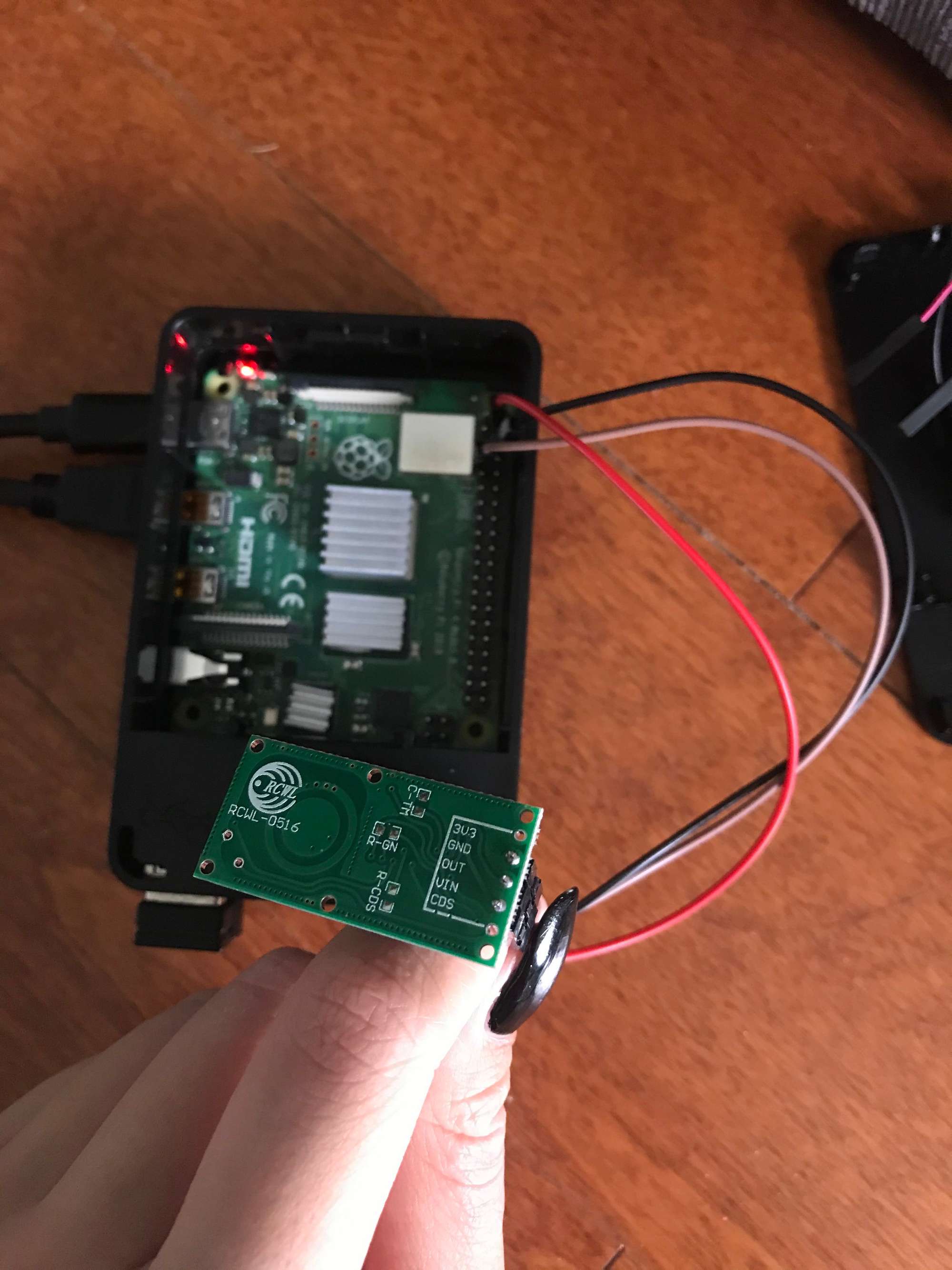
                        IMG_9326.jpg
                        Hi thank you for responding, I recently bought a soldering iron and soldered the pins to the sensor and I’m still having trouble having it turn on the smart mirror. I’ve attached a picture, I don’t think the module is the problem and made sure the cables are attached to the right pins, could it be the soldering? Sorry to bother I’m new at this.

                        FoziF 1 Reply Last reply Reply Quote 1
                        • FoziF Offline
                          Fozi Project Sponsor @Philly
                          last edited by Fozi

                          @Philly From what I see in the picture the soldering seems to be OK, but I’m not sure you wired it correctly on the GPIO. The picture is somewhat blurry, so I can’t recognize it well enough.

                          The red wire should go to the first right pin, which provides +5V. From the picture it seems to go to the first left pin, which provides only 3.3V.
                          The black wire seems to go to the second right pin, which also provides +5V. It should go to the third right pin for GND.
                          Finally, the brown wire appears to go to the third left pin, which is provides a SCL signal (serial clock) and is reserved for I2C. Don’t use that, but the forth left pin, which is a digital I/O.
                          Please check the wireing again according to my description and adjust also the config.js accordingly.

                          {
                          			module: 'MMM-PIR-Sensor',
                          			disabled: false,
                          			config: {
                          				sensorPin: 4,
                          				powerSavingDelay: 30, // (seconds) how long the monitor will be turned on
                          
                          			}
                          		},
                          

                          HowTo: Replace PIR Sensor with a RCWL-0516 Microwave Sensor

                          P 1 Reply Last reply Reply Quote 0
                          • P Offline
                            Philly @Fozi
                            last edited by

                            @Fozi I rechecked my wires and confirmed they were wired on the correct pins although the picture I sent does look off, the red wire is on the 5v, black is on gnd, and the brown wire is on GPIO pin 7. The config.js is also configured accordingly but when I npm start the Magic Mirror a blank screen continues to show. So I tried using the MMM_PIR module instead and got the same results, a blank screen. Not sure why the sensor’s not working

                            1 Reply Last reply Reply Quote 0
                            • G Offline
                              Ghost2000
                              last edited by

                              @Fozi
                              You wrote that you are using a double sensor is that this one?

                              zerodis-HB100-Mikrowelle-Sensor-Modul-Doppler-detecor

                              FoziF 1 Reply Last reply Reply Quote 0
                              • FoziF Offline
                                Fozi Project Sponsor @Ghost2000
                                last edited by

                                @Ghost2000 I use this one https://amzn.to/35SEYd3

                                HowTo: Replace PIR Sensor with a RCWL-0516 Microwave Sensor

                                G 1 Reply Last reply Reply Quote 0
                                • G Offline
                                  Ghost2000 @Fozi
                                  last edited by

                                  @Fozi
                                  then did you connect two?

                                  FoziF 1 Reply Last reply Reply Quote 0
                                  • FoziF Offline
                                    Fozi Project Sponsor @Ghost2000
                                    last edited by Fozi

                                    @Ghost2000 no, it is a single sensor. You probably got irritated by the noun „Doppler“. This has nothing to do with double or to similar. The sensor uses an effect which was discovered by the physicist Christian Doppler. See also https://en.m.wikipedia.org/wiki/Doppler_effect

                                    HowTo: Replace PIR Sensor with a RCWL-0516 Microwave Sensor

                                    1 Reply Last reply Reply Quote 0
                                    • G Offline
                                      Ghost2000
                                      last edited by

                                      eah right, now I see

                                      1 Reply Last reply Reply Quote 0
                                      • M Offline
                                        MajorC Project Sponsor
                                        last edited by

                                        Hi @Fozi ,

                                        just to make sure that I am on the right way:

                                        • Buy a RCWL-0516 module
                                        • Wire the module to my Raspberry Pi 4
                                        • Install @Bugsounet MMM-NewPIR on my MM

                                        That’s it? Or did I miss something?
                                        My MM is not a mirror, more a wall-mounted picture frame with some nice to have information on it. I would like to have the monitor turned off, if nobody is in the room.

                                        Thank you,

                                        Christian

                                        FoziF 1 Reply Last reply Reply Quote 0
                                        • FoziF Offline
                                          Fozi Project Sponsor @MajorC
                                          last edited by

                                          @MajorC yeah, that are the steps to go. The RCWL-0516 module is a 1:1 replacement of the common IR sensors usually used. MAke sure to follow also the instructions I wrote (see link in my signature).

                                          HowTo: Replace PIR Sensor with a RCWL-0516 Microwave Sensor

                                          M 1 Reply Last reply Reply Quote 0
                                          • M Offline
                                            MickyVi @Fozi
                                            last edited by MickyVi

                                            @fozi

                                            Good morning,

                                            I also used a PIR sensor and obviously, behind the glass it does not work (the glass is 6 mm thick and the back of wood 3 mm), also I do not want it visible as the mirror will be positioned in the bathroom and behind I the power supply, so no wires remain in sight.

                                            At the end of the story I found this topic and I also wanted to change the presence sensor.

                                            I made my purchases as instructed and started testing.

                                            The first test I did without modifying anything, simply connected, installed the MMM-Pir Paviro configured and it immediately started to work.
                                            But I noticed one thing, my sensor is not so sensitive (indeed) I think it depends on those 9 mm total between the size of the mirror and the wooden board, if I move from behind and if I leave it too attached to the tablet wood does not detect anything (it detects only on the back or by moving the mirror from the wall).
                                            I will also try to build a box to keep the sensor a little detached from the wood and let’s see what happens.

                                            Any suggestions on this?

                                            In the meantime, thanks to everyone for the advice and good construction with your MM.

                                            Hello

                                            uros76U FoziF 2 Replies Last reply Reply Quote 0

                                            Hello! It looks like you're interested in this conversation, but you don't have an account yet.

                                            Getting fed up of having to scroll through the same posts each visit? When you register for an account, you'll always come back to exactly where you were before, and choose to be notified of new replies (either via email, or push notification). You'll also be able to save bookmarks and upvote posts to show your appreciation to other community members.

                                            With your input, this post could be even better 💗

                                            Register Login

                                            • 1
                                            • 2
                                            • 3
                                            • 4
                                            • 5
                                            • 6
                                            • 4 / 6
                                            • First post
                                              Last post
                                            Enjoying MagicMirror? Please consider a donation!
                                            MagicMirror created by Michael Teeuw.
                                            Forum managed by Sam, technical setup by Karsten.
                                            This forum is using NodeBB as its core | Contributors
                                            Contact | Privacy Policy