Read the statement by Michael Teeuw here.
MMM-Multimonth
-
Hi,
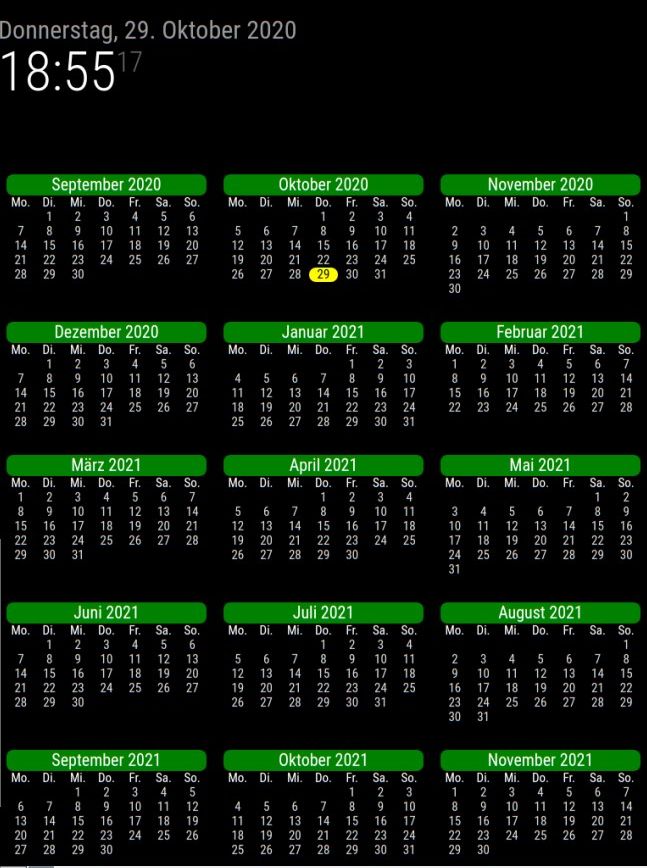
i like this module. i have a double display and show the whole year on 1 screen.
My question:
Is it possible to highlight the school holidays for my wife :-) ?greetings and thanks for this module !
-
This post is deleted! -
I’m attempting to add that kind of functionality - notification support. The main problem I’m having right now, is that I’m not understanding how notifications are supposed to be working, and can’t seem to get it working in a test module.
-
Thank you very much. This is very nice to see the weekends better.
But what i´m looking for is that the childs holidays (summer, winter,…) are highlited in another color to see it very quick when the child has no school. That´s good for planning holidays.Other way is like you wrote to do this in a list but if there is a way to include it in your calendar that would be great !
-
This post is deleted! -
Update on pending requests.
Due to insufficient documentation on the core, I’m abandoning attempts to highlight anything other than the current day at this time. I may pick it up at another time, I may not.
I can’t get anything to work in a test module, I’m frustrated, confused, and lost.
I officially give up on any sort of highlighting at this time. I may pick it up later, may not.
-
This post is deleted! -
I just found this and wanted to say thank you, exactly what I was looking for :-)
-
@nibblerrick Thank you for the comment. :)
-
@hango My main problem now is how to tear down the arrays issued by the default calendar app - I’m not understanding that part of JS.
-
@BKeyport issued? u mean notification ?
each event looks like this
title: recurrenceTitle,
startDate: startDate.format("x"),
endDate: endDate.format("x"),
fullDayEvent: true/false,
recurringEvent: true/false,
class: event.class,
firstYear: event.start.getFullYear(),
location: location,
geo: geo,
description: description
code
for(let event of payload){ event.title ... ... } -
I’ve now added the ability to highlight weekends, per request of a user.
-
Thanks very much for this it works great. One thing i can’t work out though is how to change the start of the week to Monday? Any tips on how the moment.js works.
-
@welby Sorry for the long wait for a response.
The start of week is tied to your default language and defaults for your locale. If you have it set to German, for instance, it’ll switch to Monday start.
I haven’t thought about a manual start of week adjustment, I might add it when I have time.
-
Great module @BKeyport , thanks a lot! I changed my custom.css a bit to match my other modules and ended up with a rather minimalist look:
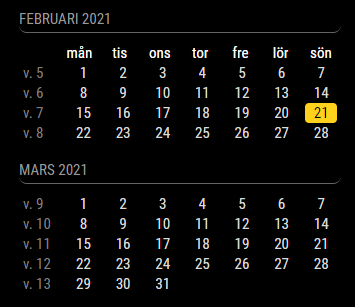
Here’s the css if anyone’s interested:
.MMM-Multimonth .month { padding-left: 0px; padding-right: 0px; } .MMM-Multimonth .month-header { background-color: #000000; text-transform: uppercase; font-size: 15px; font-family: "Roboto Condensed", Arial, Helvetica, sans-serif; font-weight: 400; border-bottom: 1px solid #666; line-height: 15px; padding-bottom: 5px; margin-bottom: 10px; color: #999; border-radius: 0px; } .MMM-Multimonth .days-header { color: #808080; text-align: center; } .MMM-Multimonth .weeknumber:before { content: "v. "; } .MMM-Multimonth .weeknumber { background-color: #000000; color: #808080; padding-right: 9px; } .MMM-Multimonth .day { text-align: center; } .MMM-Multimonth .current_day { background-color: #FFD11C; text-align: center; border-radius: 4px; padding-left: 0px; padding-right: 0px; margin-left: 4px; margin-right: 4px; } -
@retroflex Nice!
-
new product released!
Added:
Language and calendar modification unlinked. The module now has startWeek variable to set the start of the weekYou now can shorten the day names to the shortest available for your language. (for english, instead of “Sun Mon Tue Wed Thu Fri Sat” it will be “S M T W T F S”
Removed:
All references and use of Moment. It’s now native code completely.Other:
There’s a bug - Week numbers are in the system, but it will generate an additional line. I am going to re-do the module more (enough to create a MultiMonth2), so in that process I’ll sure I’ll find the cause.As a reminder, internationalization is based on the mirror as a whole, so if you have your mirror set to French, it will have French month and day names.
Read the Readme for instructions.
Thanks to MMRize for the inspiration to do this!
-
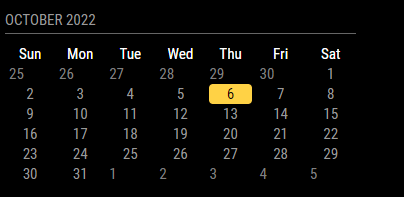
I only want to display a single month, how do I remove the beginning and ending dates from the current month calendar? Also seems like the alignment is off.
-
add this to your
custom.cssfile. It will clear it out. As for the malformed space, I’ll have to look into that, it appears something’s minorly wrong with the CSS, which I didn’t touch from previous version..MMM-Multimonth .daydim {
color: var(–color-background);
} -
@BKeyport great work!
Thanks.

Hello! It looks like you're interested in this conversation, but you don't have an account yet.
Getting fed up of having to scroll through the same posts each visit? When you register for an account, you'll always come back to exactly where you were before, and choose to be notified of new replies (either via email, or push notification). You'll also be able to save bookmarks and upvote posts to show your appreciation to other community members.
With your input, this post could be even better 💗
Register Login