Read the statement by Michael Teeuw here.
MMM-Multimonth
-
I find it even after setting the config for monthsVertical: true it is still not showing vertical,
Whay could be the problem. Please advice. -
@Spinster Indeed. Something seems to have broken. I’ll fix it today.
Edit:
It appears I deleted it’s CSS. Backed off to fix - Repull the files, in the module folder do
git pulland relaunch your mirror, it’ll work now.
Starting to recode the project to incorporate the “Undocumented feature” I mentioned in previous git pushes - as well as make it easier to read and do in the future, and I guess I missed that when I redid the CSS.
-
Hi,
any idea on how I can achieve full background transparency with this module ?
Currently this is it:
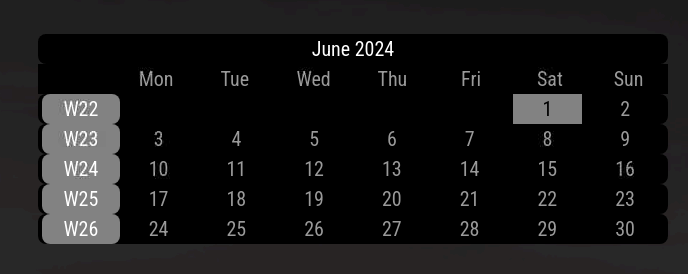
Furthermore I’d like the day marking to have the same rounded edges as the week numbers.
How do I achieve that ?Unfortunately I am not very experienced with css, so I most likely do not now how to ask the correct question - sorry for that.
-
@p1lspeda looks like I’ve got some work to do on the CSS - in looking up the solution, I found bugs.
In your custom.css (~/MagicMirror/css typically) paste the code below:
.MMM-Multimonth .settings {
  --background-dimmed: var(--color-background);
  --background-weekday: var(--color-background);
  --background-weekend: cornflowerblue;
  --background-current: Yellow;
  --background-header: Green;
  --background-weekno: grey;
  --background-dow: var(--color-background);
  --color-weekday: var(--color-text);
  --color-weekend: var(--color-background);
  --color-current: var(--color-background);
  --color-dimmed: var(--color-text-dimmed);
  --color-header: var(--color-text-bright);
  --color-weekno: var(--color-text-bright);
  --color-dow: var(--color-text);
  --color-event: Red;
  --back-rounding: 8px;
  --alignment: center;
  --fontsize: var(--font-size-xsmall);
}
any line that includes “–background” can be set to
rgba(255, 255, 255, 0)for transparent.example:
---background-weekday: rgba(255,255,255,0);See: https://www.w3schools.com/html/html_colors_rgb.asp for details.
(Note: the rest of the variables can also be set as you like, “back-rounding” for example, adjusts the rounded edges globally [except for current until below is added])
For the current day to round the edges properly paste:
.MMM-Multimonth .current { border-style: hidden; border-radius: var(--back-rounding); border-color: var(--background-current); background-color: var(--background-current); color: var(--color-current); } -
@BKeyport said in MMM-Multimonth:
rgba(255,255,255,0);
You are a star!
Thanks - I got the rounded edges working.
As for full transparency - we’re not quite there yet.CSS:
.MMM-Multimonth .settings {
 /*  --background-color: transparent; */
  --background-dimmed: rgba(255,255,255,0); /* var(--color-background);     /* For dimmed (previous/next month in current grid), use the global background color */
  --background-weekday: rgba(255,255,255,0); /*var(--color-background);    /* For normal days, use global background */
  --background-weekend: rgba(255,255,255,0); /*var(--color-background);    /* For the days defined as your weekend, change the background to cornflowerblue */
  --background-current: Grey;                       /* for the current day, change the background to yellow */
  --background-header: rgba(255,255,255,0); /*var(--color-background);     /* for the month and year line, use green background */
  --background-weekno: Grey;                        /* for the week number, use a grey background */
  --background-dow: rgba(255,255,255,0); /* var(--color-background);        /* For the days of the week, use global background */
  --color-weekday: var(--color-text);               /* For normal days, use global normal text */
  --color-weekend: var(--color-background);         /* For the days defined as your weekend, change the text to the background color */
  --color-current: var(--color-background);         /* for the current day, change the text to the background color */
  --color-dimmed: var(--color-text-dimmed);         /* For dimmed (previous/next month in current grid), use the global dimmed text color */
  --color-header: var(--color-text-bright);         /* for the header lines, use the global bright text color */
  --color-weekno: var(--color-text-bright);         /* for the week numbers, use the global bright text color */
  --color-dow: var(--color-text);                   /* for the days of the week header, use the global text color */
  --color-event: Red;                               /* For events, the color of the underline */
  --back-rounding: 8px;                             /* Set the radius of the background rounded edges. See documentation for border-radius elsewhere */
  --alignment: center;                              /* Adjust the text alignment */
}
results in:
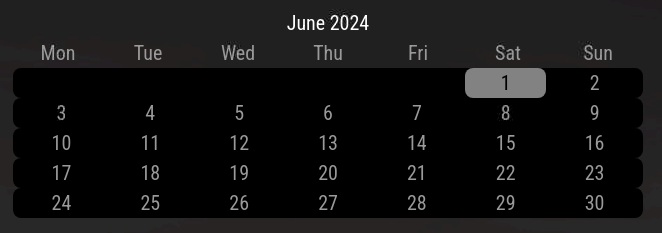
Did I oversee something ?
Thanks -
@p1lspeda full transparency,… isn’t the background black?
what are you expecting?
-
@sdetweil I’m assuming he wants to show a background image behind it.
I have error(s) in my CSS.
The settings don’t work. I think I reverted a bit too far on my end.
@p1lspeda - Give me 24-48 hours, I’ll fix this up by Sunday night, Los Angeles time. Expect an update, of which, will include removal of the
.MMM-Multimonth .currenttag in custom.css - it won’t be needed. -
@BKeyport remember to use the developers window
-
@sdetweil It’s easy fixes. I just reverted to a point where I had the proto-settings but not the actual use of them. 🤪🤪🤪
-
@p1lspeda I have it fixed. Remove the old from custom.css and replace it with the following and then set whichever backgrounds you’d like as before. (
rgba(255, 255, 255, 0);)Thanks for catching.
.MMM-Multimonth .settings {
  --background-dimmed: var(--color-background);
  --background-weekday: var(--color-background);
  --background-weekend: cornflowerblue;
  --background-current: Yellow;
  --background-header: Green;
  --background-weekno: grey;
  --background-dow: var(--color-background);
  --background-week: var(--color-background);
  --color-weekday: var(--color-text);
  --color-weekend: var(--color-background);
  --color-current: var(--color-background);
  --color-dimmed: var(--color-text-dimmed);
  --color-header: var(--color-text-bright);
  --color-weekno: var(--color-text-bright);
  --color-day: var(--color-text);
  --color-dow: var(--color-text);
  --color-event: Red;
  --back-rounding: 8px;
  --alignment: center;
  --fontsize: var(--font-size-xsmall);
}
the custom “.current” part is also not needed.
-
@BKeyport
Thanks!
Either I am doing something wrong (and cannot see it) or there is still an issue with getting the module fully transparent.
After the update and my custom.css this is what it looks like:
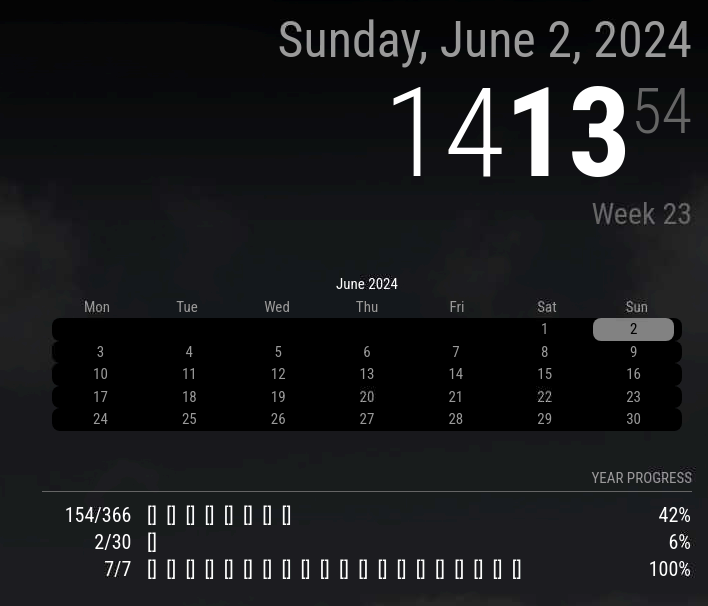
custom.css:/* MMM-Multimonth */ .MMM-Multimonth .settings { /* --background-color: transparent; */ --background-dimmed: rgba(255,255,255,0); /* var(--color-background); /* For dimmed (previous/next month in current grid), use the global background color */ --background-weekday: rgba(255,255,255,0); /*var(--color-background); /* For normal days, use global background */ --background-weekend: rgba(255,255,255,0); /*var(--color-background); /* For the days defined as your weekend, change the background to cornflowerblue */ --background-current: Grey; /* for the current day, change the background to yellow */ --background-header: rgba(255,255,255,0); /*var(--color-background); /* for the month and year line, use green background */ --background-weekno: Grey; /* for the week number, use a grey background */ --background-dow: rgba(255,255,255,0); /* var(--color-background); /* For the days of the week, use global background */ --color-weekday: var(--color-text); /* For normal days, use global normal text */ --color-weekend: var(--color-background); /* For the days defined as your weekend, change the text to the background color */ --color-current: var(--color-background); /* for the current day, change the text to the background color */ --color-dimmed: var(--color-text-dimmed); /* For dimmed (previous/next month in current grid), use the global dimmed text color */ --color-header: var(--color-text-bright); /* for the header lines, use the global bright text color */ --color-weekno: var(--color-text-bright); /* for the week numbers, use the global bright text color */ --color-dow: var(--color-text); /* for the days of the week header, use the global text color */ --color-event: Red; /* For events, the color of the underline */ --back-rounding: 8px; /* Set the radius of the background rounded edges. See documentation for border-radius elsewhere */ --alignment: center; /* Adjust the text alignment */ }as you can see (my background is not black, it’s grey-ish atm).
Thanks for all your help -
You’re missing one or two variables. I redid them. add
--background-week: rgba(255, 255, 255, 0);and it’ll snap into shape, assuming you’ve pulled the latest off github.
Double check your list against my new one. Make sure all of them are there.
-
@BKeyport
You sir, are great.
Thank you for being so patient. -
I am upgrading the module. Uploading a new release as soon as I’m done posting this.
This change is breaking old CSS.
Re-read the README.md before upgrading.
Updating from prior to 08 Jun 2024:
CSS is changed - please check all customizations. Old Elements, values, etc. have been deleted.The following CSS code is all you need in custom.css if all you’re changing is the colors and/or background edge rounding:
(Key changes here: “current” has been changed to “today”, “background-week, color-week have been removed as redundant”)
Most of the changes are to implement feature changes.
Thanks for the support folks.
-
Hallo guys,
nice Module, but I have one Question. Why there is no Space between the months? thanks al lot!
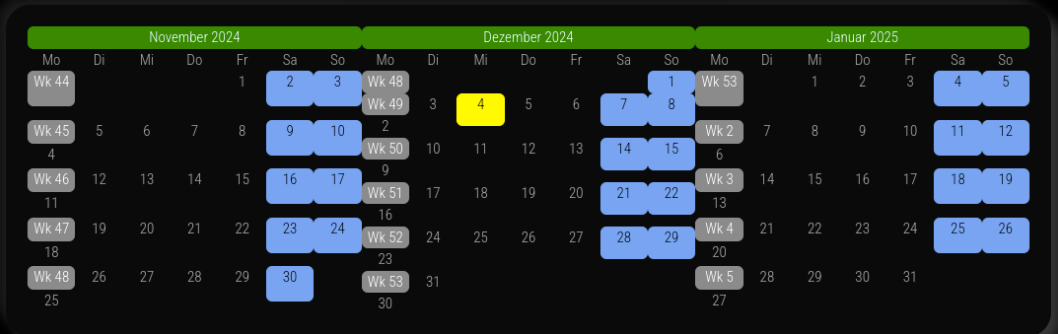
-
@Niggich The default CSS keeps it tight - because that’s how I like it.
However, it’s easy to change.
in your
magicmirror/cssdirectory, there should be a file namedcustom.css- in that file, paste the following, and modify it to suit./* Month Padding */ .MMM-Multimonth .month { padding: 0px; }Cheers.
-
@BKeyport Thanks a lot. It’s working…
-
Effective 8/14/2025 - @dathbe has been provided contributor role in my active modules. I’m not ready to turn them over full time, however, I am glad that someone is willing to work with them. I no longer use the modules myself and I’m welcoming a fresh view on the topic, and hopefully the project will continue in a more effective way, including clean up and improvement of my pre-amateur code.
Thanks for the support over my time handling this code - and if I do decide to pick it back up, I know that it is in good hands.
– Brendan


Hello! It looks like you're interested in this conversation, but you don't have an account yet.
Getting fed up of having to scroll through the same posts each visit? When you register for an account, you'll always come back to exactly where you were before, and choose to be notified of new replies (either via email, or push notification). You'll also be able to save bookmarks and upvote posts to show your appreciation to other community members.
With your input, this post could be even better 💗
Register Login