MagicMirror Forum
    • Recent
    • Tags
    • Unsolved
    • Solved
    • MagicMirror² Repository
    • Documentation
    • 3rd-Party-Modules
    • Donate
    • Discord
    • Register
    • Login
    A New Chapter for MagicMirror: The Community Takes the Lead
    Read the statement by Michael Teeuw here.

    MMM-Admin-Interface

    Scheduled Pinned Locked Moved System
    29 Posts 12 Posters 33.3k Views 11 Watching
    Loading More Posts
    • Oldest to Newest
    • Newest to Oldest
    • Most Votes
    Reply
    • Reply as topic
    Log in to reply
    This topic has been deleted. Only users with topic management privileges can see it.
    • W Offline
      wrumble
      last edited by

      Hi, after i install and run i get a blank white screen, if i install it and run on my macbook i get the following:

      Error: Cannot find module ‘body-parser’
      at Module._resolveFilename (module.js:455:15)
      at Function.Module._resolveFilename (/Users/wayne.rumble/Desktop/MagicMirror/node_modules/electron-prebuilt/dist/Electron.app/Contents/Resources/electron.asar/common/reset-search-paths.js:35:12)
      at Function.Module._load (module.js:403:25)
      at Module.require (module.js:483:17)
      at require (internal/module.js:20:19)
      at Object. (/Users/wayne.rumble/Desktop/MagicMirror/modules/MMM-Admin-Interface/node_helper.js:5:20)
      at Module._compile (module.js:556:32)
      at Object.Module._extensions…js (module.js:565:10)
      at Module.load (module.js:473:32)
      at tryModuleLoad (module.js:432:12)
      Whoops! There was an uncaught exception…
      { Error: Cannot find module ‘body-parser’
      at Module._resolveFilename (module.js:455:15)
      at Function.Module._resolveFilename (/Users/wayne.rumble/Desktop/MagicMirror/node_modules/electron-prebuilt/dist/Electron.app/Contents/Resources/electron.asar/common/reset-search-paths.js:35:12)
      at Function.Module._load (module.js:403:25)
      at Module.require (module.js:483:17)
      at require (internal/module.js:20:19)
      at Object. (/Users/wayne.rumble/Desktop/MagicMirror/modules/MMM-Admin-Interface/node_helper.js:5:20)
      at Module._compile (module.js:556:32)
      at Object.Module._extensions…js (module.js:565:10)
      at Module.load (module.js:473:32)
      at tryModuleLoad (module.js:432:12) code: ‘MODULE_NOT_FOUND’ }
      MagicMirror will not quit, but it might be a good idea to check why this happened. Maybe no internet connection?
      If you think this really is an issue, please open an issue on GitHub: https://github.com/MichMich/MagicMirror/issues
      Launching application.

      Running on an RPI 3 model B, when i comment out:
      ,
      {
      module: “MMM-Admin-Interface”,
      }

      from my config it works fine. Am i missing something?

      lolobyteL 1 Reply Last reply Reply Quote 0
      • lolobyteL Offline
        lolobyte @wrumble
        last edited by

        @wrumble

        Hi, same problem like on my system.

        log in with ssh to yur raspberry pi.

        cd ~/MagicMirror/

        npm install body-parser

        If you have an grunt error, then just install

        npm install grunt@(your version) --save-dev

        in my case it was ~0.4.0
        npm install grunt@~0.4.0 --save-dev

        make a

        sudo reboot

        after that and see if your MacicMirror works again without un commented

        { “module”: “MMM-Admin-Interface” },

        Be aware!

        the developer made a little mistake. He wrote…

        Usage

        Go to :8181/MMM-Admin-Interface/
        Edit away!

        You must use the port 8080

        Go to :8080/MMM-Admin-Interface/

        I 1 Reply Last reply Reply Quote 0
        • I Offline
          ItayXD
          last edited by ItayXD

          it seems body-parser is not installed.
          Do you have node_modules dir inside MagicMirror/modules/MMM-Admin-Interface/?
          Do you have body-parser dir inside MagicMirror/modules/MMM-Admin-Interface/node_modules/?
          -----------EDIT-----------
          please run cd ~/Desktop/MagicMirror/modules/MMM-Admin-Interface && git pull && npm install --only=production

          1 Reply Last reply Reply Quote 0
          • I Offline
            ItayXD @lolobyte
            last edited by

            @lolobyte Thanks for your note on the port I’ll fix it.
            Do you have any idea why body-parser isn’t installed automatically? I thought it should be…

            lolobyteL 1 Reply Last reply Reply Quote 0
            • lolobyteL Offline
              lolobyte @ItayXD
              last edited by

              @ItayXD

              No, sorry.
              I’m only a small and unknown user.

              1 Reply Last reply Reply Quote 0
              • I Offline
                ItayXD
                last edited by ItayXD

                Hi sorry I forgot to add install dependencies part to the readme.
                @wrumble please run cd ~/Desktop/MagicMirror/modules/MMM-Admin-Interface && git pull && npm install --only=production
                It should work

                lolobyteL 1 Reply Last reply Reply Quote 0
                • lolobyteL Offline
                  lolobyte @ItayXD
                  last edited by lolobyte

                  @ItayXD

                  i do that step, but it doesn’t work.

                  i mean the npm install in the Admin folder.

                  Only after i install the missing files manually.

                  1 Reply Last reply Reply Quote 0
                  • I Offline
                    ItayXD
                    last edited by

                    @lolobyte it seems my package.json is invalid will fix that

                    1 Reply Last reply Reply Quote 0
                    • I Offline
                      ItayXD
                      last edited by

                      Fixed, please try running git pull && npm install --only=production in the module directory

                      S 1 Reply Last reply Reply Quote 0
                      • S Offline
                        shashank @ItayXD
                        last edited by

                        @ItayXD Hi, I installed the module works great, can you help me in creating module to hide and unhide each module on a touch screen.

                        brobergB 1 Reply Last reply Reply Quote 0
                        • brobergB Offline
                          broberg Project Sponsor @shashank
                          last edited by

                          @shashank there is one already, mmm-navbar

                          S 1 Reply Last reply Reply Quote 0
                          • I Offline
                            ItayXD
                            last edited by

                            @shashank thank you. there is a great module called MMM-Remote-Control that does just that. I believe there is a module request forum, if you have any other requests

                            1 Reply Last reply Reply Quote 0
                            • W Offline
                              wrumble
                              last edited by

                              @ItayXD thanks for your help! I have the mirror running now but when i try to access the interface i get Cannot GET /MMM-Admin-Interface/ when i go to http://192.168.0.13:8080/MMM-Admin-Interface/ i have MMM-Remote-Control and when i access http://192.168.0.13:8080/remote.html it woks fine, any ideas why its not working? i dont get any errors in terminal

                              1 Reply Last reply Reply Quote 0
                              • I Offline
                                ItayXD
                                last edited by ItayXD

                                @wrumble
                                can you post your config.js? you can send a link to pastebin. can you also run git status in the module directory and post the output?
                                it might also be useful if you post the output in the terminal when you start the MM (npm start).

                                1 Reply Last reply Reply Quote 0
                                • W Offline
                                  wrumble
                                  last edited by

                                  im an idiot, it was still commented out in the config.js thanks for your help, it works great!

                                  1 Reply Last reply Reply Quote 0
                                  • S Offline
                                    shashank @broberg
                                    last edited by

                                    @broberg Thanks for suggesting the Nav bar, i installed the module working great

                                    1 Reply Last reply Reply Quote 0
                                    • lolobyteL Offline
                                      lolobyte
                                      last edited by

                                      Hello, i made the MM2 update and now i can’t access the admin

                                      ipWhitelist: ["127.0.0.1", "::ffff:127.0.0.1", "::1"],
                                      

                                      I can’t insert my ip from my laptop.
                                      I want to access MagicMirror from laptop with Admin-Interface, but it’s not possible now with this update.

                                      Where i have to insert my ip address in the white-list?
                                      How to insert a range?

                                      1 Reply Last reply Reply Quote 0
                                      • I Offline
                                        ItayXD
                                        last edited by

                                        Hi try putting your laptop’s up it the whitelist, it should probably by 192.168.X.X

                                        1 Reply Last reply Reply Quote 0
                                        • mochmanM Offline
                                          mochman Module Developer
                                          last edited by

                                          You might also have to add "::ffff:192.168.X.Y" as well. You could also just add "192.168.X.1/24 , ::ffff:192.168.X.1/24" to whitelist all of the IPs in your network (assuming you are using 192.168.X.1-254).

                                          1 Reply Last reply Reply Quote 0
                                          • R Offline
                                            rubenlaureys
                                            last edited by

                                            Hi,

                                            I love your module!
                                            I use it to modify my MagicMirror.

                                            But, is there a way to choose a module from a list, instead of entering the name myself?
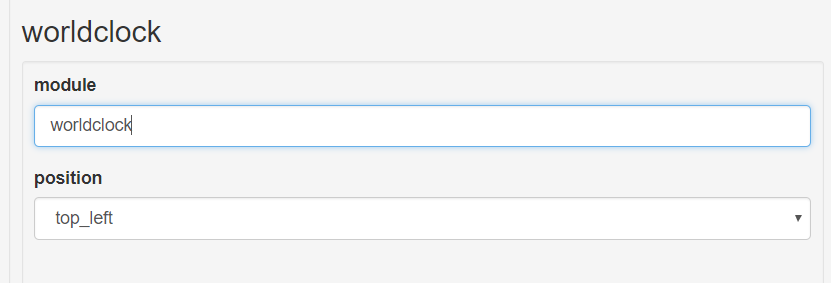
                                            0_1511893804705_MMM.PNG

                                            I want a dropdown list, just like the list of positions.

                                            Is this possible?

                                            Thank you.

                                            Have a great day,
                                            Ruben

                                            I 1 Reply Last reply Reply Quote 0

                                            Hello! It looks like you're interested in this conversation, but you don't have an account yet.

                                            Getting fed up of having to scroll through the same posts each visit? When you register for an account, you'll always come back to exactly where you were before, and choose to be notified of new replies (either via email, or push notification). You'll also be able to save bookmarks and upvote posts to show your appreciation to other community members.

                                            With your input, this post could be even better 💗

                                            Register Login

                                            • 1
                                            • 2
                                            • 3 / 2
                                            • First post
                                              Last post
                                            Enjoying MagicMirror? Please consider a donation!
                                            MagicMirror created by Michael Teeuw.
                                            Forum managed by Sam, technical setup by Karsten.
                                            This forum is using NodeBB as its core | Contributors
                                            Contact | Privacy Policy