MagicMirror Forum
    • Recent
    • Tags
    • Unsolved
    • Solved
    • MagicMirror² Repository
    • Documentation
    • 3rd-Party-Modules
    • Donate
    • Discord
    • Register
    • Login
    A New Chapter for MagicMirror: The Community Takes the Lead
    Read the statement by Michael Teeuw here.

    MM-Remote Android App

    Scheduled Pinned Locked Moved Utilities
    21 Posts 7 Posters 12.7k Views 10 Watching
    Loading More Posts
    • Oldest to Newest
    • Newest to Oldest
    • Most Votes
    Reply
    • Reply as topic
    Log in to reply
    This topic has been deleted. Only users with topic management privileges can see it.
    • K Offline
      Klettner
      last edited by

      Hello everyone,

      I have created an android app to remote controle MagicMirrors.
      With the app you can:

      • reboot/shutdown your mirror
      • toggle the monitor on/off
      • change the brightness
      • change the pages of the MMM-Pages module
      • play, pause and skip the displayed image of MMM-Background-Slideshow
      • send alerts to the mirror
      • you can also add custom commands

      As this is the first app I have created I would like to get some feedback.
      If you have trouble to set up the app let me know. If you discover bugs or have feature requests, please write an issue on github.

      You can find the latest release and a detaild describtion of the MM-Remote app in my github repository.

      Cr4z33C J 2 Replies Last reply Reply Quote 0
      • Cr4z33C Offline
        Cr4z33 @Klettner
        last edited by

        @Klettner said in MM-Remote Android App:

        • toggle the monitor on/off

        Did you add CEC compatibility with TVs too? :)

        If yes I am gonna give it a try.

        1 Reply Last reply Reply Quote 0
        • K Offline
          Klettner
          last edited by

          To be honest, I don’t know what CEC is, but I can explain you how turning the monitor on/off is implemented and how you can test if it will work for you.
          If you press a button to send a command to the mirror, the app sends a REST requests to MMM-Remote-Controle, which handles the execution.

          I looked up for you how they have implemented tuning the monitor on/off there.
          To turn the monitor off they use the shell command:

          tvservice -o
          

          To turn on the monitor they use:

          tvservice --preferred && sudo chvt 6 && sudo chvt 7
          

          You can test these commands in the terminal of your Raspberry pi. If it works there, this should work with the app as well.
          It is also possible to overwrite these shell commands with you own ones, if you are interested in this, have a look at the custom commands section in the MMM-Remote-Control github repository

          Cr4z33C 1 Reply Last reply Reply Quote 0
          • thgmirrorT Offline
            thgmirror
            last edited by thgmirror

            Hi @Klettner,
            I like your App very much!

            It also runs if I enter the hostname instead of the IP-address. This helps me a lot because I don’t use a static IP.

            Btw. I took the first apk in the list and it works on my Huawei P8Lite (Android 6.0.1).

            Thank you for the App

            Thomas

            K 1 Reply Last reply Reply Quote 0
            • Cr4z33C Offline
              Cr4z33 @Klettner
              last edited by

              @Klettner I asked because I’ve got a TV and those commands do not apply to turn on and off the screen. 😉

              Can you please add also support to package cec-utils (https://packages.debian.org/buster/cec-utils)?

              K 1 Reply Last reply Reply Quote 0
              • K Offline
                Klettner @thgmirror
                last edited by

                @thgmirror thanks for your feedback, I’am pleased to hear that :slightly_smiling_face:

                S 1 Reply Last reply Reply Quote 0
                • S Do not disturb
                  sdetweil @Klettner
                  last edited by

                  @Klettner you should make the command strings options so people don’t have to edit your code.
                  set the default as it is now.

                  my tvs don’t turn off , so I have hide/show for all modules

                  Sam

                  How to add modules

                  learning how to use browser developers window for css changes

                  S 1 Reply Last reply Reply Quote 0
                  • K Offline
                    Klettner @Cr4z33
                    last edited by

                    @Cr4z33 I think I found a solution that might work for your.

                    1. download the cec-utils package to your raspberry pi (you have probably already done that).
                      For Ubuntu or Debian use:
                    sudo apt install cec-utils
                    
                    1. scan for available devices to get the device number/address of your TV
                    echo 'scan' | cec-client -s -d 1
                    
                    1. Now you should be able to power on the TV via the Raspi command terminal (replace Device# with the number or address form step 2):
                    echo 'on Device#' | cec-client -s -d 1
                    

                    and off

                    echo 'standby Device#' | cec-client -s -d 1
                    
                    1. If these commands work, overwrite the commands of MMM-Remote-Control.
                      To do this, open you config.js file and add the customCommand section to the module MMM-Remote-Contorl:

                      f13dbf2b-052f-4ba2-9e63-967a3a7a8796-grafik.png

                    I’m wasn’t able to test the commands as my pi is currently not connected to a CEC-device. Let me know if this works for you.

                    Cr4z33C 1 Reply Last reply Reply Quote 0
                    • S Do not disturb
                      sdetweil @sdetweil
                      last edited by

                      @Klettner never mind, you are using remotecontrol on the pi side…

                      Sam

                      How to add modules

                      learning how to use browser developers window for css changes

                      K 1 Reply Last reply Reply Quote 0
                      • Cr4z33C Offline
                        Cr4z33 @Klettner
                        last edited by

                        @Klettner oh it’s easy then to fix it. :)

                        Thanks for the solution.

                        1 Reply Last reply Reply Quote 0
                        • K Offline
                          Klettner @sdetweil
                          last edited by

                          @sdetweil yes exactly, all the default commands can be changed in the config.js file. Therefore you need to edit the customCommands section of MMM-Remote-Control. So if your TV does not turn off with the default command and you know one that works for you, you can change it there.

                          1 Reply Last reply Reply Quote 0
                          • K Offline
                            Klettner
                            last edited by

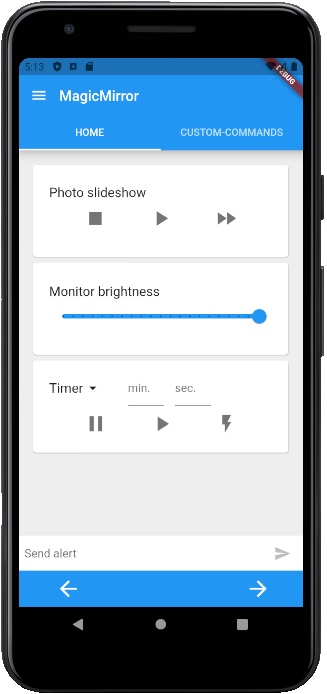
                            New version of the MM-Remote android app is now available (v1.0.3).

                            New functionalities:

                            • Start/Stop/Pause a timer on the mirror
                            • Start /Stop/Pause a stop-watch on the mirror
                            • Hide and reorder the default commands of the Home-tab
                            • Simplified set-up of the app

                            currentDeviceHomeTab.png

                            1 Reply Last reply Reply Quote 0
                            • ? Offline
                              A Former User
                              last edited by

                              • My alpha user: Yeah good, i can control my MM with my phone !

                              • My developer user : Yes… But well done… Main code of remote control have open the port mirror to everyone ! without user and pass… so every one can see your mirror !
                                99% of user don’t change port (lazy to read ReadMe) so th default port is 8080 ! yeah

                              • My security point of view…: try to recode MMM-Remote-control with more security…

                              Sorry, it’s not for blame for program, but it’s the reality ;)

                              S 1 Reply Last reply Reply Quote 0
                              • S Do not disturb
                                sdetweil @Guest
                                last edited by

                                @Bugsounet well you would have to be on their network, so not likely exposure for most users

                                Sam

                                How to add modules

                                learning how to use browser developers window for css changes

                                1 Reply Last reply Reply Quote 0
                                • ? Offline
                                  A Former User
                                  last edited by

                                  @sdetweil said in MM-Remote Android App:

                                  well you would have to be on their network, so not likely exposure for most users

                                  sam, look any firewall scan by external source hacking … 80 8080 25 etc…

                                  S 1 Reply Last reply Reply Quote 0
                                  • S Do not disturb
                                    sdetweil @Guest
                                    last edited by

                                    @Bugsounet yeh, most routers come with all ports closed. all mine in the last 10 years.

                                    I only open ports when I need to

                                    Sam

                                    How to add modules

                                    learning how to use browser developers window for css changes

                                    1 Reply Last reply Reply Quote 0
                                    • ? Offline
                                      A Former User
                                      last edited by

                                      I agree sam but you know most user (like me) … MM listen 8080 on internet expose …
                                      if ip found … it’s the open for Remote control :)
                                      browser command or androidapp -> no user /pass required

                                      what 's why i warn :)

                                      1 Reply Last reply Reply Quote 0
                                      • V Offline
                                        videogame95
                                        last edited by

                                        I have not setup your app yet , every time I add the remote file to my config in stop what am I doing wrong

                                        {
                                        module: ‘MMM-Remote-Control’
                                        // uncomment the following line to show the URL of the remote control on the mirror
                                        // , position: ‘bottom_left’
                                        // you can hide this module afterwards from the remote control itself
                                        config: {
                                        customCommand: {}, // Optional, See “Using Custom Commands” below
                                        customMenu: “custom_menu.json”, // Optional, See “Custom Menu Items” below
                                        showModuleApiMenu: true, // Optional, Enable the Module Controls menu
                                        apiKey: “”, // Optional, See API/README.md for details
                                        }
                                        },

                                        I set this up on my old mirror and it worked please change the code so it will work.
                                        or am I just pasting it in wrong?

                                        S K 2 Replies Last reply Reply Quote 0
                                        • S Do not disturb
                                          sdetweil @videogame95
                                          last edited by sdetweil

                                          @videogame95 said in MM-Remote Android App:

                                          module: ‘MMM-Remote-Control’
                                          // uncomment the following line to show the URL of the remote control on the mirror
                                          // , position: ‘bottom_left’
                                          // you can hide this module afterwards from the remote control itself
                                          config: {

                                          rules…

                                          the thing to the left of : does NOT need to be quoted

                                          if the next line starts with a word (config, foo, address), then THIS line needs a trailing , at the end ( comments // on a line mean the , has to be IN FRONT of the //

                                          the thing AFTER the : if a number or true, does NOT need to be quoted
                                          otherwise if it is a word, or contains letters, it MUST be quoted ‘fred’, ‘0912drb’ single or double doesn’t matter as long as they are the same

                                          so, given that, you should be able to fix this module definition…

                                          Sam

                                          How to add modules

                                          learning how to use browser developers window for css changes

                                          1 Reply Last reply Reply Quote 0
                                          • K Offline
                                            Klettner @videogame95
                                            last edited by

                                            @videogame95 in addition to the explanations of @sdetweil you can also start your MagicMirror in the console to get hints at problems in your config.js.

                                            First to go to the MagicMirror folder type cd ~/MagicMirror in your terminal.
                                            Then npm start to start the mirror.

                                            Now you should see some log messages in the terminal. If there is an error in your config.js there should also be an error message in between the logs. This message will tell you, around which line in the config.js the error occurs.
                                            Something like:

                                            WARNING! Could not validate config file. Starting with default configuration. Please correct syntax errors at or above this line: /home/pi/MagicMirror/config/config.js:361
                                            

                                            In the config you posted, you are missing for example a , after ‘MMM-Remote-Control’

                                            1 Reply Last reply Reply Quote 0

                                            Hello! It looks like you're interested in this conversation, but you don't have an account yet.

                                            Getting fed up of having to scroll through the same posts each visit? When you register for an account, you'll always come back to exactly where you were before, and choose to be notified of new replies (either via email, or push notification). You'll also be able to save bookmarks and upvote posts to show your appreciation to other community members.

                                            With your input, this post could be even better 💗

                                            Register Login

                                            • 1
                                            • 2
                                            • 1 / 2
                                            • First post
                                              Last post
                                            Enjoying MagicMirror? Please consider a donation!
                                            MagicMirror created by Michael Teeuw.
                                            Forum managed by Sam, technical setup by Karsten.
                                            This forum is using NodeBB as its core | Contributors
                                            Contact | Privacy Policy