Read the statement by Michael Teeuw here.
Add fade to transparent background on module.
-
I followed this thread to add transparent backgrounds to my custom.css
Is it possible to set a fade to the background similar to how the default calendar and weather have a fade?
Thanks.
.module.calendar { background-colour:rgba(0,0,0,0.1); border-radius:10px; padding:4px; } -
Take a look at https://www.w3schools.com/css/css3_gradients.asp - you might be able to get something working through that… RGBA values seem to work there.
The text gradients they do is different. :)
-
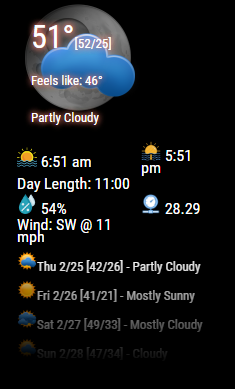
@jamaces easy peasy…here’s an example:
.MMM-YahooWeather .fade {
  	-webkit-mask-image: linear-gradient(to bottom, black 10%, transparent 100%);
    mask-image: linear-gradient(to bottom, black 10%, transparent 100%);
   height:  120px;
  }
The magic is in the fade… gives you this effect: [see bottom of 4 days forecast]
-
@cowboysdude said in Add fade to transparent background on module.:
easy peasy…here’s an example:
Easy for a genius like you. :thumbsup:
-
@mykle1 … when you pray to the CSS gods, you’re praying to @cowboysdude 🤣🤣🤣
The “E” in “Javascript” stands for “Easy”
-
@bkeyport said in Add fade to transparent background on module.:
@mykle1 … when you pray to the CSS gods, you’re praying to @cowboysdude 🤣🤣🤣
Welllllllllllllllllllllllll CSS and I have a complicated relationship LOL
-
@bkeyport said in Add fade to transparent background on module.:
when you pray to the CSS gods, you’re praying to @cowboysdude
Oh hell no! :-)
-
@bkeyport Thank you! I realized after I made the post it is called gradient.
For future knowledge
change background-color to background-image and add linear-gradient with another RGBA value.
Thank you for your help.
Is there a way to have CSS go gradient to the left and to the right?
I have the news module at the bottom and I really just want it to be dark in the centre where the headlines are.
I have tried to right and to left, I have tried radial and nothing seems to work.



Hello! It looks like you're interested in this conversation, but you don't have an account yet.
Getting fed up of having to scroll through the same posts each visit? When you register for an account, you'll always come back to exactly where you were before, and choose to be notified of new replies (either via email, or push notification). You'll also be able to save bookmarks and upvote posts to show your appreciation to other community members.
With your input, this post could be even better 💗
Register Login