Read the statement by Michael Teeuw here.
MMM-OpenWeatherForecast - Replacement for MMM-DarkSkyForecast
-
Ever since Apple bought Dark Sky and announced that that would stop allowing free access to their API (Thanks Apple!), I’ve been meaning to write a replacement for MMM-DarkSky Forecast.
Well I finally got off my lazy ass and wrote it. Link to code here:
https://github.com/jclarke0000/MMM-OpenWeatherForecast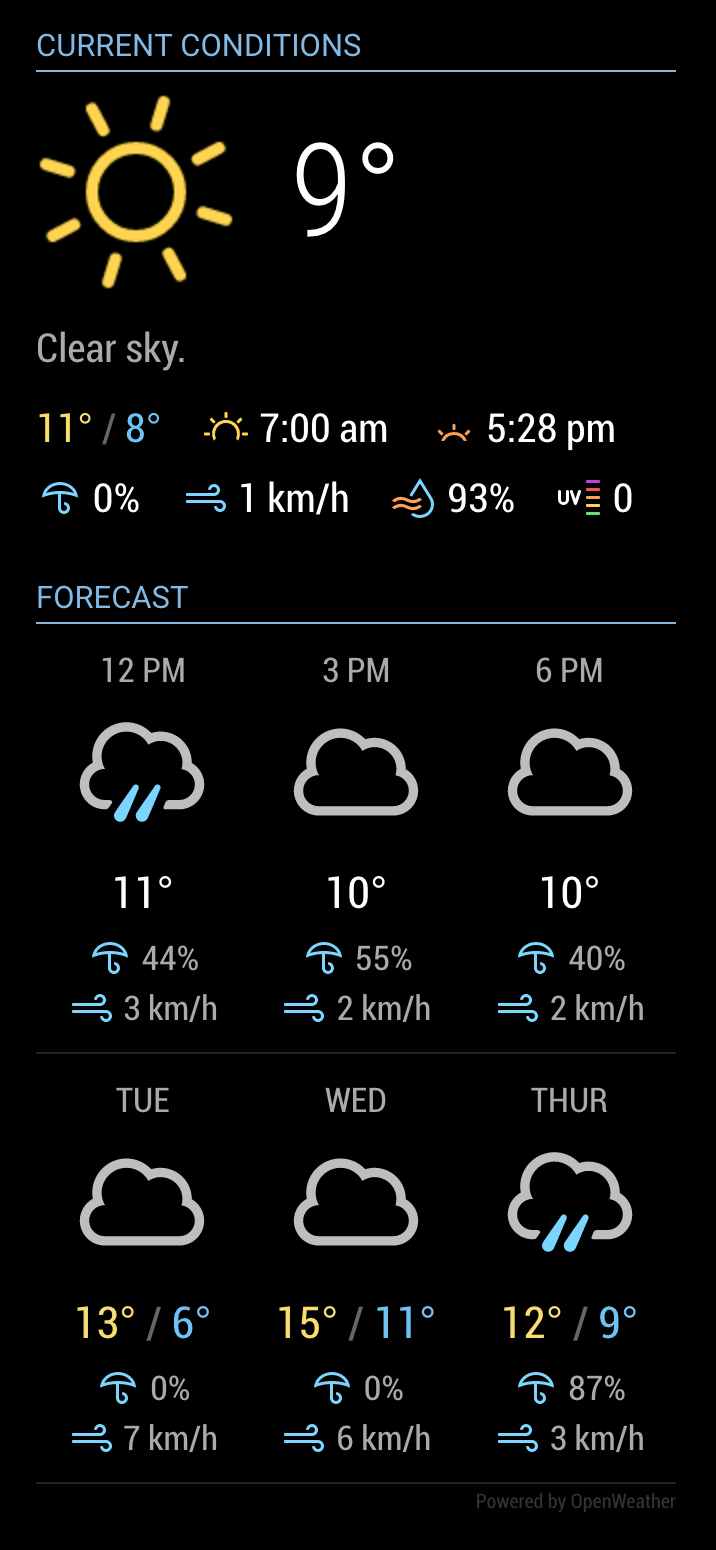
If you’re already using MMM-DarkSkyForecast, this will look familiar to you. In fact I based MMM-OpenWeatherForecast on MMM-DarkSkyForecast’s code.
But! Many improvements have been included. With this rewrite I have made it possible to display every bit of weather data provided in OpenWeather’s One Call API. Be sure to fully read the
README.mdfile to see how you can configure this module exactly to your liking.Installation:
-
Navigate into your MagicMirror
modulesfolder and execute
git clone https://github.com/jclarke0000/MMM-OpenWeatherForecast.git. -
Enter the new
MMM-OpenWeatherForecastdirectory and executenpm install.
NOTE
If you’re using a pre-release version, doinggit pullwon’t be enough to install the latest code. I replaced the deprecatedrequestlibrary withaxios. So make sure you runnpm installto get the latest dependencies. Optionally you may runnpm pruneto remove installation forrequest.Configuration:
At a minimum you need to supply the following required configuration parameters:
apikeylatitudelongitude
apikeyneeds to be specified as a String, whilelatitudeandlongitudecan be specified as either a String or a Number. Both work fine.e.g.,
  {
    module: "MMM-OpenWeatherForecast",
    position: "top_right",
    header: "Forecast",
    config: {
      apikey: "a1b2c3d4e5f6g7h8j9k0", //only string here
      latitude: 51.490230,            //number works here
      longitude: "-0.258810"          //so does a string
    }
  },
You need to create a free account with OpenWeather in order to get an API key:
https://home.openweathermap.org/users/sign_up.Free tier is fine – this module will not make anywhere near 60 calls per minute / 1,000,000 requests per month.
Find out your latitude and longitude here:
https://www.latlong.net/.Refer to the
READMEfor all of the other configuration options.NOTE
This module uses the Nunjucks templating system and therefore requires MagicMirror version 2.2.0 or later. -
-
I am trying to adjust the hours under the hourly forecast to reflect a different time zone. I was reviewing the code and I see UTC references. How can I adjust this to CST?
-
@jenga Maybe you are having the same issue I am with incorrect current/hourly time & temperature conversion?
-
@j-e-f-f That looks REALLY tasty! Thank you for the great work!
-
@j-e-f-f Am I missing a way to turn off current weather alerts? Once a weather alert like high wind or snow it drops my tables down and throws other modules off.
-
@j-e-f-f As always, great work. 😉
-
As of Saturday, May 1, 2021, the free Yahoo Weather API will be retired.
So as more time goes by the free weather api’s are dropping like flies…
-
Thanks For this great job! 👍
-
@cowboysdude it would be nice if someone with knowledge could have a look at the API of www.yr.no
The forecast is very good and they are providing free world wide data.
-
@j-e-f-f Thanks for sharing.
Does it work on Pi Zero? In my case it doesn’t load. I just see FORCAST and then “Loading…” forever :astonished_face:
Using defaults, no changes made. -
@jenga said in MMM-OpenWeatherForecast - Replacement for MMM-DarkSkyForecast:
I am trying to adjust the hours under the hourly forecast to reflect a different time zone. I was reviewing the code and I see UTC references. How can I adjust this to CST?
The API returns UTC time for everything as well as a timezone offset for the long/lat you provide. The module translates UTC into local time using these two bits of information. Say you’re living in London, but you configure this module with Long/Lat for New York, then the time you’ll see is local to New York. I can’t request a different timezone in the API.UPDATE
So quick to jump to conclusions am I… this was a bug in my code. OpenWeather documentation says the hourly time forecasts are provided in UTC, and elsewhere in the API response a timezone offset is provided. I took this to mean that in order to see local time for the forecast I needed to add the offset to the hourly time. As it turns out this is not the case. OpenWeather does not explicitly say this anywhere in the docs that I could find, but the JSON response is already translated to whatever local timezone the request was made from. So if I live in London and I make a request for weather in Chicago I’ll see the hourly forecasts in local London time, not in local Chicago time.
I’ve changed the code so that I no longer add the offset to hourly forecast times. Do a
git pullin the MMM-OpenWeatherForecast directory, then restart MM. Should be fixed up. -
@swvalenti said in MMM-OpenWeatherForecast - Replacement for MMM-DarkSkyForecast:
@j-e-f-f Am I missing a way to turn off current weather alerts? Once a weather alert like high wind or snow it drops my tables down and throws other modules off.
If you set
summary: falsethis will stop weather alerts from displaying. The OpenWeather API doesn’t return a detailed summary (usually just a single word like “Cloudy.” ) so I didn’t think it was necessary to split these two out into separate configs.If you wanted to keep the summary, but not show weather alerts, you can set
summary: truein your config and then prevent display of alerts in your custom CSS as follows:.MMM-OpenWeatherForecast .weather-alert { display: none; } -
@ebolisa said in MMM-OpenWeatherForecast - Replacement for MMM-DarkSkyForecast:
@j-e-f-f Thanks for sharing.
Does it work on Pi Zero? In my case it doesn’t load. I just see FORCAST and then “Loading…” forever :astonished_face:
Using defaults, no changes made.I haven’t tested this on a pi zero (I don’t have one to test on). Do you see any errors either in
pm2 logs mmor in Electron if you run Magic Mirror withnpm start dev?Also, just double-checking: did you remember to run
npm installin the MMM-OpenWeatherForecast` directory to ensure all of the dependencies were installed? Forgetting to do this would be another reason you might see it stuck on “Loading…” -
@majorc said in MMM-OpenWeatherForecast - Replacement for MMM-DarkSkyForecast:
@cowboysdude it would be nice if someone with knowledge could have a look at the API of www.yr.no
The forecast is very good and they are providing free world wide data.
This looks promising, and seemingly doesn’t require an API key. I’ll keep an eye on this as a replacement candidate in case OpenWeather follows Dark Sky’s lead.
-
Howdy!
I installed this beautiful module to my magic mirror2. i run my mm in docker container and I´m at version 2.14. When I take a view at the official site it seems the latest version with 2.14 is confirmed.
I think you know what comes next: I have installed the module properly and adjusted the configuration. However, only the word “forecast” is displayed. Now I have seen in the notes that I should be at least on version 2.2 with the magic mirror. I am slightly confused because 2.14 is the latest version?
When I do a git pull it says that the latest version is already installed.
Do I have a thinking error in my approach?
Would be happy to hear something about this :-)kind regards,
Nubi
-
@j-e-f-f It works on P0. My bad, had an extra space in the api key. Thank you.
-
@anubis273 This module works on 2.14 – tested that specifically myself. MagicMirror’s version numbering can get a bit confusing… 2.14 is MUCH newer than 2.2. Versioning goes 2.2, 2.3, … 2.9, 2.10, 2.11, etc.
Double check your config settings. Maybe try with just the minimal config required for MMM-OpenWeatherForecast –
apikey,latitude, andlongitude– and see if the module works with just those. Also make sure you’ve runnpm installin the MMM-OpenWeatherForecast directory.If the module runs with just the above, then start adding your additional configuration options one at a time to see which one caused it to fail. Let me know and we can take it from there.
-
@j-e-f-f
Hey j-e-f-f,
thanks for clearing up my confusion about MagicMirror versions ;-) And thanks also for the quick feedback!
So, I double checked the configuration and it doesn’t seem to have any syntax errors:
 {
        module: "MMM-OpenWeatherForecast",
        position: "top_right",
        header: "Forecast",
            config: {
            apikey: "myAPIKey",                                                                                            //only string here
            latitude: 50.748780,                                                                                           //number works here
            longitude: 7.137300                                                                                            //so does a string
                        }
  },
I tried the minimal configuration as you suggested, unfortunately without success. I also checked the Api Key of OpenWeatherMap, this is also correct. The module also seems to work. The problem is that it just doesn’t load any weather data and I don’t understand why.
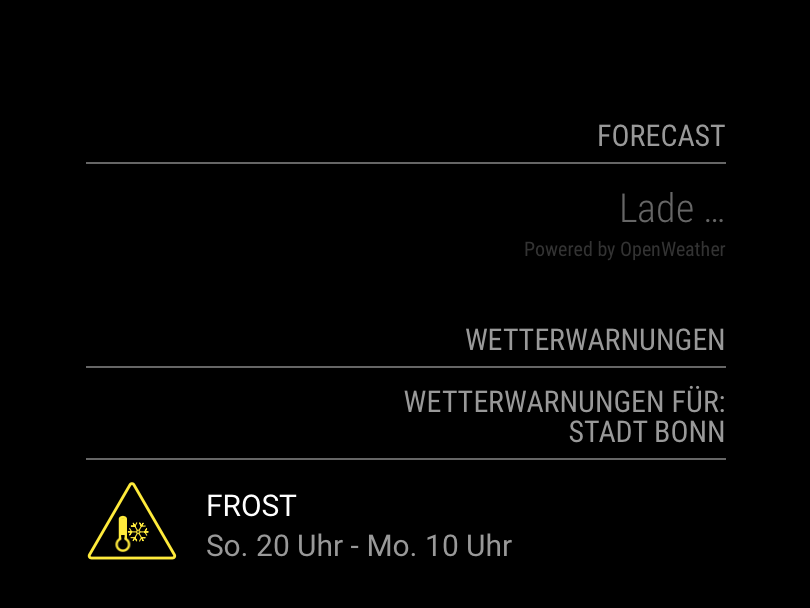
If I find a solution to this, I will of course get back to you.
Many greetings,
Nubi
-
@anubis273 I just tried the default config with your long/lat settings and the module worked for me. So let’s try digging a little more. Are you seeing any errors in the logs? There are a bunch of places to look:
If you are running MagicMirror using PM2, run
pm2 restart mm && pm2 logs mm. Look for any output prefixed with[MMM-OpenWeatherForecast]. If you are instead running MagicMirror from the command line, any errors will be in the in the console, prefixed like above.Also need to check to see if Electron is throwing any errors. start MagicMirror in dev mode
npm start dev. Any Electron errors will show in the browser console, usually in red.Also, since the basic config isn’t working for you, but is for me, can you double check that your API Key is correct?
- Jeff
-
@j-e-f-f
Hey j-e-f-f,thanks for your quick reply. I will investigate every single point you wrote. Give me a little time for that, I will get back to you as soon as possible.
Regards from Germany,
Nubi





Hello! It looks like you're interested in this conversation, but you don't have an account yet.
Getting fed up of having to scroll through the same posts each visit? When you register for an account, you'll always come back to exactly where you were before, and choose to be notified of new replies (either via email, or push notification). You'll also be able to save bookmarks and upvote posts to show your appreciation to other community members.
With your input, this post could be even better 💗
Register Login