Read the statement by Michael Teeuw here.
MMM-NINA
-
@mz-ber I just installed the module. It shows
No warningsfor me. Also if I use your config. -
@strawberry-3-141 I found the error w/ @Jalibu together.
The repo I have cloned from
git clone https://github.com/jalibu/MMM-NINA.gitcreated a folder with lower case letters (MMM-Nina). I renamed the folder to upper case (MMM-NINA). Now it works :-)
-
Hi Leute,
ich habe eben ein neues Update veröffentlicht. Damit können nun auch mehrere Städte/Gemeinden gleichzeitig abgerufen werden.
Da ich das Modul im Header/Top Bereich verwende, habe ich zusätzlich noch ein weiteres Theme erstellt.Viel Spaß beim Ausprobieren. Freue mich über Feedback.
-
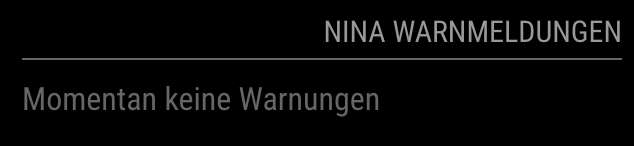
Gibt es eine Möglichkeit, wie ich den Hinweis “Momentan keine Warnungen” rechtsbündig bekomme? Ich habe das Module auf der rechten Seite meinen MM und der Hinweis steht jetzt viel zu weit in der Mitte.
Genau so wie in diesem Bild:
-
@majorc Versuch’s mal mit diesem Eintrag in der custom.css:
.MMM-NINA .nina-wrapper .nina-alert.severity-Fine{ text-align: right; } -
.MMM-NINA .nina-wrapper .nina-alert.severity-Fine{
text-align: right;
}leider verändert sich da nichts
-
@majorc zieh mal bitte die aller neuste Version (1.3.1). Das Alignment sollte jetzt automatisch funktionieren und besser sein.
-
@jalibu so richtig leider nicht.
Ich habe das Update gezogen, aber sobald ein anderes Module vor MMM-NINA angezeigt wird, springt NINA etwas nach link.Also NINA alleine in top_right funktioniert. NINA zusammen mit z.B. MMM-OpenmapWeather in top_right funktioniert nicht.
-
@majorc Habe ich schon mal gesagt, wie sehr ich CSS hasse? :face_with_symbols_on_mouth:
Probier nochmal -
@jalibu Ich glaube ich mache was nicht richtig. Das Update zieht er, aber der Text bleibt mittig/links. Vielleicht ist es auch eine andere App die dein CSS kaputt macht?
-
@majorc määähhhh…
Nee, ich hatte vergessen was zu commiten…
-
-
Wie bekomme ich denn den Titel mit angezeigt?
Trage ich in der config.jstitle: "NINA Warnungen",ein, wird es mir nicht angezeigt.
-
@sarcux
Mit der header property auf Modul Ebene{ module: "MMM-NINA", position: "top_bar", header: "Ich werde Jalibu etwas spenden", config: { ... } -
@jalibu Super funktioniert. Da kann man dann auch mal ein Bier springen lassen!
-
@majorc haha, danke.
Wurde eben schon eingelöst und war köstlich 👌 -
@jalibu {
 module: "MMM-NINA",

 position: "middle_center",

 config: {

     ags: ["05370016"],  // Liste der Gemeinden, die abgefragt werden sollen

     maxAgeInHours: 6,

     maxWidth: "200px",

     mergeAlerts: true,

     showIcon: true,

     showDate: true,

     showCity: true,

     showNoWarning: true,

     theme: "top", // Erlaubte Werte: top, side

     updateIntervalInSeconds: 120,


 }
},
funktioniert bei mir nicht …leider -
@locke35 “Funktioniert nicht” heißt was genau?
Ich kann btw. keine Gemeinde mit dem Schlüssel “05370016” finden -
Hi @jalibu,
Thank you for this very useful module!
I am using v1.3.0 and found that “Warnstufe: Hochwasserinformation” (normally yellow in NINA App) will also be displayed in red, same as severe level “Gefahr”.
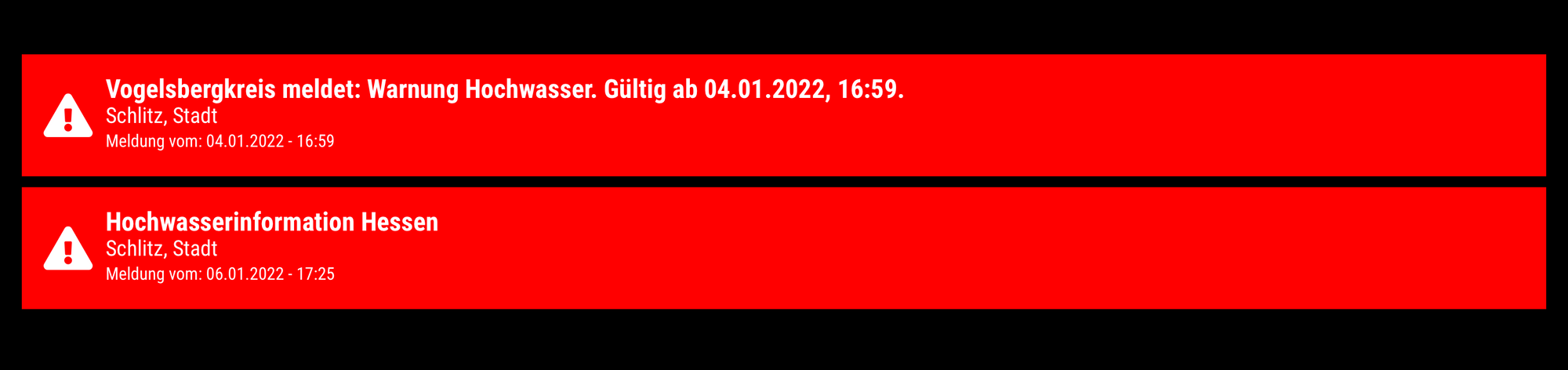
Not sure if this can be filtered differently, I tried to play around with the CSS file but had no luck.You may check this actually with referring to:
ags: “065350015015” with both active notifications- “Gefahr” (red)(Jan 4)
- “Hochwasserinformation” (yellow)
-
@bill22 ich gucks mir bei Gelegenheit mal an. Die Hochwasserinformation ist momentan auch in RLP und BW sichtbar und nervt mich ein bisschen :-)




Hello! It looks like you're interested in this conversation, but you don't have an account yet.
Getting fed up of having to scroll through the same posts each visit? When you register for an account, you'll always come back to exactly where you were before, and choose to be notified of new replies (either via email, or push notification). You'll also be able to save bookmarks and upvote posts to show your appreciation to other community members.
With your input, this post could be even better 💗
Register Login