Read the statement by Michael Teeuw here.
MMM-Nest
-
https://github.com/mochman/MMM-Nest
I just took a wack at making a Nest Module. It works, but it’s a pain to set up.
Nest has you walk through a bunch of hoops to get an account so you can get a token for your nest. I made a simple script that walks you through it in the root folder. The Module is very basic right now. It just displays your current temp, requested temp, and humidity.
I am using the REST format to get all the data. If someone knows how to use firebase, please contribute. -
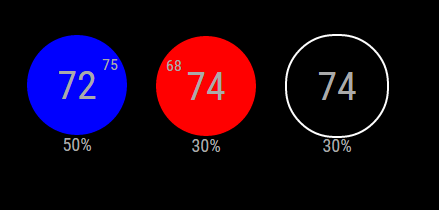
Here is the current display for the module.
The first show that the current temp is 75 and the system is cooling to 72. The second shows it’s 68 and heating to 74. The last is just that it’s 74 with the HVAC off. The humidity is displayed at the bottom.
-
After spending 15 minutes trying to figure exactly what Nest wanted from me during product creation, I got the module installed and it works great.
-
@willharwell Glad to hear it!
-
I’ve updated the module for all of those that use multi-thermostat setups. You now have the option to select the thermostat you want to see in “nest mode”, or you’re able to see all of your thermostats in a “grid mode”.


[card:mochman/MMM-Nest]
-
Hi I was wondering if some one can give me a hand with this Module.
So i am trying to set this up and have a dum question. How do you “Run getToken.sh”How would i put that in to the terminal?
I Know i would direct it to the MMM-Nest folder and then from there would i put “npm start getToken.sh”
-
On the terminal type
bash getToken.sh -
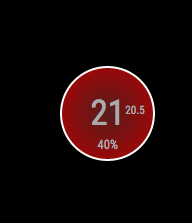
changed the CSS
for who want
.heating { width: 130px; height: 130px; background: red; background: radial-gradient(#571d1d, #b30000); -moz-border-radius: 50px; -webkit-border-radius: 50px; border-radius: 70px; line-height: 130px; font-size: 50px; text-align: center; position: relative; border: 4px solid #FFF; } .cooling { width: 130px; height: 130px; background: blue; background: radial-gradient(#0a237a, #436cc0); -moz-border-radius: 50px; -webkit-border-radius: 50px; border-radius: 70px; line-height: 130px; font-size: 50px; text-align: center; position: relative; border: 4px solid #FFF; } .heatingHC { width: 130px; height: 130px; background: red; background: radial-gradient(#571d1d, #b30000); -moz-border-radius: 50px; -webkit-border-radius: 50px; border-radius: 70px; line-height: 130px; font-size: 40px; text-align: center; position: relative; border: 4px solid #FFF; } .coolingHC { width: 130px; height: 130px; background: blue; background: radial-gradient(#0a237a, #436cc0); -moz-border-radius: 50px; -webkit-border-radius: 50px; border-radius: 70px; line-height: 130px; font-size: 40px; text-align: center; position: relative; border: 4px solid #FFF; } .off { width: 130px; height: 130px; border: 4px solid white; background: black; -moz-border-radius: 50px; -webkit-border-radius: 50px; border-radius: 70px; line-height: 130px; font-size: 50px; text-align: center; position: relative; } .heatingText { font-size:medium; position: absolute; top: -5px; right: 40px; width: 0; } .coolingText { font-size:medium; position: absolute; top: -5px; right: 40px; width: 0; } .humidityText { position:absolute; font-size:large; top: 35%; width: 100%; } .nameText { font-size:medium; text-align:center; width:33%; } .center { text-align:center; } .heatingCell { background:red; background:linear-gradient(to right, #990000 , red, #990000); } .coolingCell { background-color:blue; background:linear-gradient(to right, #000099 , blue, #000099); } .fanIcon { height:15px; width:15px; position:absolute; top: 72%; right: 42%; } -
@tidus5 Thanks! I’m terrible at CSS, I just keep changing numbers until it looks right to me.
-
I am looking forward when Nest sells officially in germany.
Whats about the cameras? Also Nest outdoor camera supported?
-
@fox I don’t have a camera so I’m not too sure how to program for it. The API does allow you to get data from the camera as well as take snapshots. The API also gives you the video URL which I imagine you can use to get video on the mirror.
-
I just installed this and everything worked as described. I have two thermostats, is there a way to increase the font size of the “list” view (it looks like the css only applies to the thermostat graphic view?). Thanks
-
@Mitch1138 You may be able to change the
.centerpart of the css to change the font size. I’m not to sure though, I don’t know much about CSS. Sorry. -
Thanks for the suggestion. I couldn’t get this to work and couldn’t find the css setting that changes the font size, it looks like most of the settings are for the thermostat graphic, not the list.
-
You might have to add some custom css to MagicMirror itself to get this to work the way you want it to. I’m not entirely sure how to do that, but I bet there are a bunch of posts in this forum with the answer.
-
I know this is a dumb question but is the Pin you get when you run the getToken script the same as the token that you put into the config file? If not where do I get a token from? I seem to only have a pin, a product id and a product secret…
When I added in the Pin to the token field and run mm… I get a Loading… where the module should be…
-
@mochman Many thanks. For now, changing the table font size in Nest.js seems to work (table.classList.add(“xsmall”, “table”); to table.classList.add(“small”, “table”);). I will keep looking at how to get this into custom.css.
-
@Mitch1138 did you try
.MMM-Nest table.xsmall.table { font-size: 20px; line-height: 25px; }? -
@strawberry-3.141 said in MMM-Nest:
.MMM-Nest table.xsmall.table { font-size: 20px; line-height: 25px; }
I am impressed. This worked perfectly. By adding it to the custom.css I can change size and spacing by changing the px sizes. Many thanks.
-
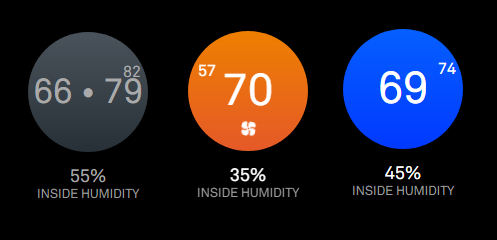
I updated the css using edits from @j-e-f-f. The nest display looks closer to what the actual nest thermostat looks like.


Hello! It looks like you're interested in this conversation, but you don't have an account yet.
Getting fed up of having to scroll through the same posts each visit? When you register for an account, you'll always come back to exactly where you were before, and choose to be notified of new replies (either via email, or push notification). You'll also be able to save bookmarks and upvote posts to show your appreciation to other community members.
With your input, this post could be even better 💗
Register Login