Read the statement by Michael Teeuw here.
MMM-FHEM no Fhem statusdisplay
-
hi folks,
I’ve tried to install and activate the MMM-FHEM module but with not to much success. There was actually no problem neither with the installation nor the configuration but I can’t get it running. It doesn’t matter if I use Http or Https, I tried also differed Devices and Readings but no luck. This is my config and maybe someone can point me out something wrong or give me any idea in debugging this.{ module: 'MMM-FHEM', position: 'bottom_bar', config: { host: '192.168.0.50', port: '8083', https: 'true', devices: [ { deviceName: 'Lichtfenster', deviceReadings: [ { name: 'state', suffix: 'test1' }, ], }, ], }, },any help will be appreciated. Thx in advance… Woody
-
Hello, you have deactivate The Passwort in fhem?!
-
@Woody I don’t have experience with this specific module, but I can tell you the way you defined the boolean https was always true.
In Javascript a string is always true no matter what the content is
"hello" -> true, "true" -> true, "false" -> true.If you remove the quotes and try again
https: false, then you will really use http instead of https. -
Thanks Folks,
it seem I was completely stumped. Sometimes I overlook the simplest things.
The password was the problem but, at least I think this is not a good solution to access Fhem without authorization. Anyway, problem solved - thanks a lot.Rgs. Woody
-
@Woody said in MMM-FHEM no Fhem statusdisplay:
Thanks Folks,
it seem I was completely stumped. Sometimes I overlook the simplest things.
The password was the problem but, at least I think this is not a good solution to access Fhem without authorization. Anyway, problem solved - thanks a lot.Rgs. Woody
Hi Woody,
how can i deactivate the passwort? I think my problem is the same. -
in fhem you have to disable “basicAuth” in fhem.cfg like this…
#attr allowed_WEB basicAuth shjedIOhbn6BHFJjGH -
@Woody said in MMM-FHEM no Fhem statusdisplay:
attr allowed_WEB basicAuth shjedIOhbn6BHFJjGH
Hi Woody, thanky you for your answer. Can you explain it?
I have defined WEB and than ? Sorry i am very new in FHEM what means " shjedIOhbn6BHFJjGH"? -
@Woody
So i now there is this entrie in the config.cfg “define allowed_WEB allowed
#attr allowed_WEB basicAuth xxxxxxxxxxxxxxx
#attr allowed_WEB validFor WEB”and my config.js looks like this
{
    module: 'MMM-FHEM',
    position: 'top_right',
    config: {
      host: 'localhost',
      port: '8083',
      https: false,
	        devices: [
                  { deviceName: 'ESPEasy_ESP_Test_DHT',
                    deviceReadings: [
                                      { name: 'Temperatur', icon: 'wi wi-thermometer', suffix: '°' },
                                      { name: 'Humidity', icon: 'wi wi-humidity', suffix: '%' },
                                    ],
                  },
                  { deviceName: '',
                    deviceReadings: [
                                      { name: 'Temperatur', icon: 'wi wi-thermometer', suffix: '°' },
                                      { name: 'Humidity', icon: 'fa fa-battery-half', suffix: '' },
                                    ],
                  },
                ],
    },
  },
And this is in FHEM…
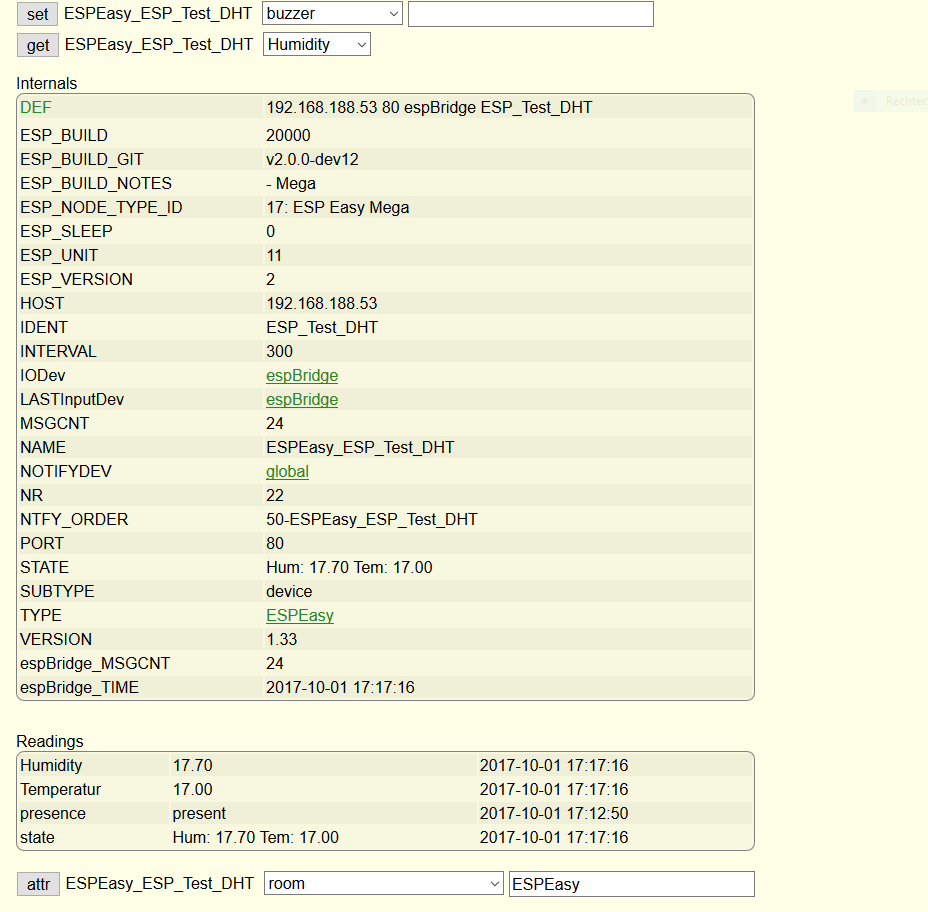
where is the mistake?
-
@dominic said in MMM-FHEM no Fhem statusdisplay:
shjedIOhbn6BHFJjGH is your base64 encoded string of user:password in your fhem.cfg.
In your forelast post it seems to be out commented with a # as i recommended in my last post. For me this means that you’ve no authentication in place and your original problem seems not to be an authorization issue. -
@Woody Thank you, yes i think my originlproblem is not the authorization.
Do you have any idea., what it could be ? -
Hello,
it seems to be a problem with fhem’s security mechanism “csrfToken”.
You can define a new Web in fhem with a different port and set this up as follws:
fhem.cfg:
define MagicM FHEMWEB 8086 global
attr MagicM allowfrom 192.168.1.14
attr MagicM csrfToken noneExplanation:
- This define’s a new listening port at your fhem server on port 8086
- The only allowed ip is 192.168.1.14 This is the ip of your MagicMirror Device. Choose your ip.
- Disable the use of csrfToken. https://fhem.de/commandref.html or https://wiki.fhem.de/wiki/CsrfToken-HowTo
After fhem restart your readings will be shown at your MagicMirror.
Hope it helps.
Greetz, Hotstepper.

Hello! It looks like you're interested in this conversation, but you don't have an account yet.
Getting fed up of having to scroll through the same posts each visit? When you register for an account, you'll always come back to exactly where you were before, and choose to be notified of new replies (either via email, or push notification). You'll also be able to save bookmarks and upvote posts to show your appreciation to other community members.
With your input, this post could be even better 💗
Register Login