MagicMirror Forum
    • Recent
    • Tags
    • Unsolved
    • Solved
    • MagicMirror² Repository
    • Documentation
    • 3rd-Party-Modules
    • Donate
    • Discord
    • Register
    • Login
    A New Chapter for MagicMirror: The Community Takes the Lead
    Read the statement by Michael Teeuw here.

    How HOT Does it Get?

    Scheduled Pinned Locked Moved General Discussion
    29 Posts 9 Posters 23.0k Views 8 Watching
    Loading More Posts
    • Oldest to Newest
    • Newest to Oldest
    • Most Votes
    Reply
    • Reply as topic
    Log in to reply
    This topic has been deleted. Only users with topic management privileges can see it.
    • P Offline
      planet4
      last edited by

      I did some tests and here is my results. However my PI is located on the other side of the wall and not in the frame.

      PI Without heatsink and with
      alt text

      With vent holes
      alt text

      Without holes

      alt text

      1 Reply Last reply Reply Quote 3
      • A Offline
        AAPS
        last edited by

        It seems like I should be completely fine, and nothing should melt or get messed up. Is this right?

        1 Reply Last reply Reply Quote 0
        • A Offline
          AAPS
          last edited by AAPS

          I just realized that I do have a heatsink, but it’s one for an old computer. Do they run mechanically or electronically? It might be just what I need. It won’t be ideal, but I can figure something out.

          1m21 1 Reply Last reply Reply Quote 0
          • 1m21 Offline
            1m2 @AAPS
            last edited by

            @AAPS
            Honestly I think this thing def. needs a fan even with a heatsink. It gets way too hot. I have not finished with OS set up and config quite yet though so it’s not my focus yet, case wise. I had to open the top part of the case even though it was well ventilated, I added a fan and sinse then it’s been running cool to the touch where that was not the case with an open case and heatsink. I will def. encorporate a fan once I get to that point in my build.

            Mykle1M 1 Reply Last reply Reply Quote 0
            • A Offline
              AAPS
              last edited by AAPS

              Thanks! That’s the kind of response I was waiting to hear.

              1 Reply Last reply Reply Quote 0
              • Mykle1M Offline
                Mykle1 Project Sponsor Module Developer @1m2
                last edited by

                @1m2 said in How HOT Does it Get?:

                I will def. encorporate a fan once I get to that point in my build.

                I was waiting to see what sort of response you would get about the fan. I’ve been wanting to add a fan although all searches say that the Pi can run without problems up to 80°C or more. That “seemed” hot to me. My Pi was running at 60°C, which is well under the maximum that I discovered. So, I took it upon myself to add a fan (I have spare parts lying around) and connected it to a 5V pin and a GRD pin on the GPIO header. I’ve been running the mirror all day without a hitch and my CPU temp is nearly 20°C cooler. Have a look.
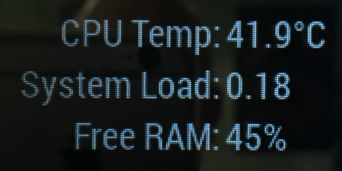
                0_1486693124992_temploadram3.png

                Create a working config
                How to add modules

                slametpsS 1 Reply Last reply Reply Quote 0
                • slametpsS Offline
                  slametps @Mykle1
                  last edited by

                  @Mykle1 my Pi CPU temp was at up to 73°C. I think the heat caused by monitor heat emission although there are some vent holes. When I turn off the monitor for a while, when I turn the monitor on, the CPU temp was at 61°C.
                  I think, it is a good idea add some fans to reduce the heat.

                  regards,

                  Slamet PS

                  1 Reply Last reply Reply Quote 0
                  • A Offline
                    AAPS
                    last edited by

                    @Mykle1 That’s great. My new problem now is figuring out how to make it wake up. How did you do it?

                    Mykle1M 1 Reply Last reply Reply Quote 0
                    • 1m21 Offline
                      1m2
                      last edited by

                      Not that anyone would need to see this but I thought I’d share just for reference ( it’s blowing air out ).
                      I just cut a hole and glued the four corners of the fan down ( can take it out any time I wish ).

                      1_1486697979646_IMG_20170209_203629.jpg 0_1486697979645_IMG_20170209_203647.jpg

                      A 1 Reply Last reply Reply Quote 0
                      • A Offline
                        AAPS @1m2
                        last edited by AAPS

                        @1m2 That’s really smart! What kind of case is that?

                        1 Reply Last reply Reply Quote 0
                        • Mykle1M Offline
                          Mykle1 Project Sponsor Module Developer @AAPS
                          last edited by

                          @AAPS said in How HOT Does it Get?:

                          That’s great. My new problem now is figuring out how to make it wake up. How did you do it?

                          It’s no good connecting a mouse and/or keyboard to the mirror to wake it up. It takes the “magic” away, you know?

                          I had this problem as well. I decided to disable the screensaver. IMHO this is easiest done by installing xscreensaver (you don’t have to do any coding). Once installed, you go to the desktop of your GUI on the Pi, click on the raspberry icon, upper left, select preferences, select screensaver and disable the screensaver. Its one of the button choices. Now you can use the MMM-Remote-Control module to turn your monitor on and off, modules on and off, etc. It’s fabulous. Works from any computer on the same network and even works from your cell phone.

                          You can thank me later. ;-)

                          Create a working config
                          How to add modules

                          1 Reply Last reply Reply Quote 1
                          • A Offline
                            AAPS
                            last edited by

                            I’ll thank you right now, and the remote control thing is pretty much what I have been doing, but I want motion detection because the ip adress of my pi changes constantly, so I run the risk of turning my display off and not knowing the site I need to go on to turn it back on. Either way I am about to buy a pir sensor for five bucks and play with it, so whatever I manage to do will have to work for me. ☺

                            Mykle1M 1 Reply Last reply Reply Quote 0
                            • Mykle1M Offline
                              Mykle1 Project Sponsor Module Developer @AAPS
                              last edited by

                              @AAPS

                              My ip address changes too but I can find it easily by signing in to my router. You can set a static ip address for your Pi. I tried but got frustrated and gave it up. I’ll try again when my patience isn’t so low.

                              I’ve also been toying with the idea of a PIR sensor or webcam but I’m still just trying to perfect my setup before diving into that. Good luck in your venture. I wish I could have been more help

                              Create a working config
                              How to add modules

                              O 1 Reply Last reply Reply Quote 0
                              • A Offline
                                AAPS
                                last edited by

                                You just telling me this is helpful. I could maybe set a static IP address if I suddenly start feeling less lazy. :thinking:

                                Mykle1M 1 Reply Last reply Reply Quote 0
                                • O Offline
                                  ottobot @AAPS
                                  last edited by

                                  @AAPS just checked my pi zero after running for a few days straight. 51.4c that’s with no fan, no heatsink, and the frame around the mirror covering it.

                                  1 Reply Last reply Reply Quote 0
                                  • O Offline
                                    ottobot @Mykle1
                                    last edited by

                                    @Mykle1 Fing is a great app to find your pi on your network as well. They make it for android and ios.

                                    1 Reply Last reply Reply Quote 0
                                    • Mykle1M Offline
                                      Mykle1 Project Sponsor Module Developer @AAPS
                                      last edited by

                                      @AAPS said in How HOT Does it Get?:

                                      You just telling me this is helpful. I could maybe set a static IP address if I suddenly start feeling less lazy. :thinking:

                                      I did some poking around and discovered an easier way to set a static IP for the Pi, although it’s not permanent. I have FIOS, and within the router interface you can set a “static lease” for any of the devices on your network. Easy as Pi. Took less than a minute

                                      Create a working config
                                      How to add modules

                                      A 2 Replies Last reply Reply Quote 0
                                      • Hein-JanH Offline
                                        Hein-Jan
                                        last edited by

                                        Mine was running at aprox 70°C. My mirror is vertically orientated. The Pi is in a casing but al the sides of the casing have been removed. I have fitted the CPU and the memory with heatsinks.
                                        The Pi was mounted near the top of my mirror (I could slide it under the piece of board that is being used to mount the mirror on the wall.) My mirror case does have some ventilation holes at the top, but no fan.
                                        Being slightly worried about the 70°C (I expect it to go up to 80°C in summer) I decided to change the postion of the Pi in my mirror from the top of the frame to the bottom, so it was no longer in the monitors pre-heated air.
                                        At the bottom of the case my Pi is now running at aprox 55°C. A drop of 15°C by simply relocating within the mirror frame.

                                        I’ll take that over running a fan for my mirror.

                                        1 Reply Last reply Reply Quote 1
                                        • A Offline
                                          AAPS @Mykle1
                                          last edited by

                                          @Mykle1 Can you just do that on the router’s webpage?

                                          Mykle1M 1 Reply Last reply Reply Quote 0
                                          • Mykle1M Offline
                                            Mykle1 Project Sponsor Module Developer @AAPS
                                            last edited by

                                            @AAPS said in How HOT Does it Get?:

                                            Can you just do that on the router’s webpage?

                                            You sure can. Here, I’ll save you some searching around:

                                            Sign in to Verizon router. Click Advanced tab (almost top right). Click yes to proceed. Click IP Address Distribution bottom right. Click Connection List almost in the middle. On the left, find the device that you want to assign a static lease IP address to. On the right, in the Action column, click the Edit icon. Tick the Static Lease Type box. Click Apply. That is now a static IP address. GO back one page and look in the Lease Type column. It will show you the Static designation.

                                            Peace

                                            Create a working config
                                            How to add modules

                                            1 Reply Last reply Reply Quote 0

                                            Hello! It looks like you're interested in this conversation, but you don't have an account yet.

                                            Getting fed up of having to scroll through the same posts each visit? When you register for an account, you'll always come back to exactly where you were before, and choose to be notified of new replies (either via email, or push notification). You'll also be able to save bookmarks and upvote posts to show your appreciation to other community members.

                                            With your input, this post could be even better 💗

                                            Register Login

                                            • 1
                                            • 2
                                            • 2 / 2
                                            • First post
                                              Last post
                                            Enjoying MagicMirror? Please consider a donation!
                                            MagicMirror created by Michael Teeuw.
                                            Forum managed by Sam, technical setup by Karsten.
                                            This forum is using NodeBB as its core | Contributors
                                            Contact | Privacy Policy