Read the statement by Michael Teeuw here.
-
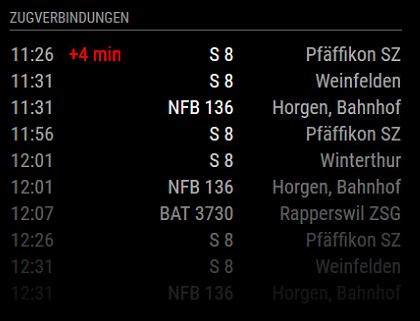
I’ve created a new module called SwissTransport Module which shows next trains departing on your favourit station.
It’s based on modified basic moduls from magic mirror and an opensource API.on git you’ll find it here:
[card:Bangee44/MMM-swisstransport]How can I add many diffrent departingstation? Any suggestions?
-
-
For troubleshooting or HOWTO questions, please post in the Troubleshooting thread:
https://forum.magicmirror.builders/topic/212/mmm-swisstransport/1 -
@Bangee is the first version of this module still around?
I prefer the old versions style as it looks ‘cleaner’…If this version doesn’t exist anymore, is it a load of stuff I would have to change to create that look in the new version? :D
-
@flooo, you can look at the repository’s commit history (https://github.com/Bangee44/MMM-swisstransport/commits/master), and then checkout a specific revision by using the SHA1:
git checkout <sha1>Note that you may need to use the full sha1 value, not the truncated one.For example, the last commit on May 3rd is
146a6ce. If you click on that, it expands that commit and you can see the full sha1 value as146a6cec2aaa5007255cb157ed415ba180639354in the upper right. So your checkout command then becomes:git checkout 146a6cec2aaa5007255cb157ed415ba180639354This is of course done from INSIDE the module’s folder!
-
Oh, I just noticed that his post where he said he change it was also done on May 3rd … so perhaps that original version no longer exists, which sort of defeats the purpose of using git …
-
I think you would like to use this one.
https://github.com/Bangee44/MMM-swisstransport -
cool, thanks a lot
-
Great module. Already added it to my mirror. Is there any chance I could filter the list and display only trains? If I put in my Station (Wädenswil) I get lots of busses and also boats.
-
@kwyjibo089, yes it’s possible:
change the line function getParams() like this:
	/* getParams()
	 * Generates an url with api parameters based on the config.
	 *
	 * return String - URL params.
	 */
	getParams: function() {
		var params = "?";
                params += "id=" + this.config.id;
		params += "&limit=" + this.config.maximumEntries;
                params += "&transportations[]=ec_ic&transportations[]=s_sn_r&transportations[]=ir&transportations[]=re_d&transportations[]=ice_tgv_rj";

		return params;
},
The line
params += "&transportations[]=ec_ic&transportations[]=s_sn_r...";is new an should allow you to filter the transportation object.Here are all option:
transportations
Transportation means; one or more ofice_tgv_rj, ec_ic, ir, re_d, ship, s_sn_r, bus, cableway, arz_ext, tramway_underground
example:
&transportations[]=ec_ic&transportations[]=busSource: http://transport.opendata.ch/docs.html#section
It’s not testet yet, but I think it should work for you.
Have fun,
Gruss aus Oberrieden :-)
-
nice, works like a charm! thanks a lot!
-
I’ve made an update. Now it works with a node_helper.js so you will have less problems with CORS errors.
Have fun
-
Hi @Bangee
Now it stays with connection and shows nothing else. I tried a clean install of the module but it did’t work anymore. -
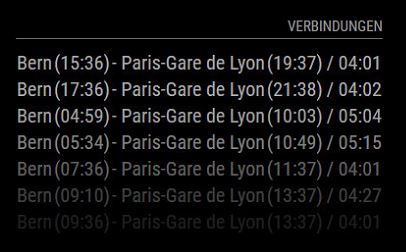
Has the station ID based data source been dropped by search.ch? Connections are not so convenient as station departure times. I have a bus stop nearby and want do display all departures, one particular connection is not informative enough.
-
Departure times have not been dropped by Search.ch. I had the same Issue as BenGig and then just reverted to the old version, which is still working.
-
@vanhoekd said in MMM-SwissTransport:
just reverted to the old version, which is still working.
how do you do that?
-
Use
git checkout sha1to check out a particular commit.
where sha1 is the number of the commit on this site: Git repo

Hello! It looks like you're interested in this conversation, but you don't have an account yet.
Getting fed up of having to scroll through the same posts each visit? When you register for an account, you'll always come back to exactly where you were before, and choose to be notified of new replies (either via email, or push notification). You'll also be able to save bookmarks and upvote posts to show your appreciation to other community members.
With your input, this post could be even better 💗
Register Login