Read the statement by Michael Teeuw here.
Replacing snow flakes with hearts in the MMM-SNOW module
-
I am just starting with my magic mirror, and have no programming experience, that I plan to give to my wife for valentines day. I have all of the standard modules working along with a few of the 3rd party modules (e-mail, remote control) working thanks to the awesome troubleshooting on this forum. I really like the idea of the snowflakes for the winter season and was wondering how one would go about switching to it displaying little hearts:). Any suggestions would be great!
-
@tamug1 Here you go. It’s running a little sluggish on my RasPi 2 and I don’t have RasPi 3 hooked up. Please let me know how well it performs on your system.
[card:morozgrafix/MMM-Valentine]
Thanks.
-
@tamug1 that’s a fun idea. I think it would be easy to modify this module https://github.com/MichMich/MMM-Snow to do hearts. If I have time later tonight I will try to do it.
-
Something like this:

-
@cowboysdude Yes exactly. Almost done with MMM-Valentine :heart:
-
How is it his? There are 15 different Valentines themed icons and most of the code is shamelessly borrowed from MMM-Snow by @MichMich
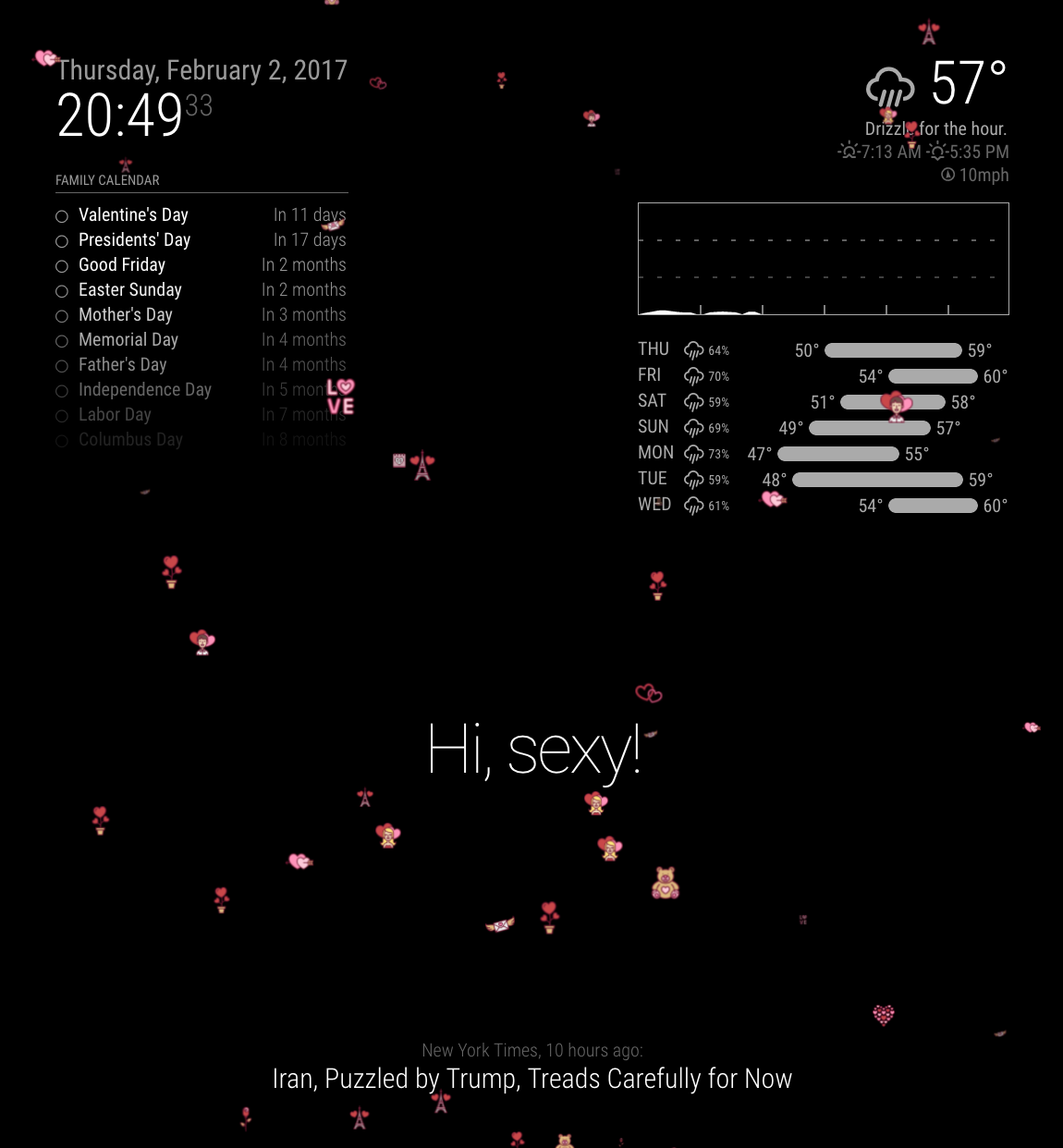
Going to get some dinner and push it up to GitHub
-
@tamug1 Here you go. It’s running a little sluggish on my RasPi 2 and I don’t have RasPi 3 hooked up. Please let me know how well it performs on your system.
[card:morozgrafix/MMM-Valentine]
Thanks.
-
It is running a bit sluggish on my Pi3 as well. But I love it anyway!
Briljant.
-
Can it be combined with MMM-Scheduler to only (and automatically) show up on the 14th of Feb?
-
@Hein-Jan not a bad idea. I can probably just hardcore that in and have a config setting that can enable it to only show on Feb 14th. One possible drawback of that is that module is still going to be loaded in memory other 364 days of the year.
-
Wow that looks awesome. Thanks for taking time to put this together😎
-
Fantastic! Nice work :) so i got an idea for march 17 … yeah ST. PATRICS DAY! :beer: falling clover, beer and goblins :D
http://www.flaticon.com/search?word=saint patrick&order_by=1&color=2 -
@Hein-Jan reducing
valenitnesCountmay help with “sluggishness”. -
@schlachtkreuzer6 Feel free to fork my repo. It’s pretty easy to modify it to display other images. I resized my images to 50x50px because they were fairly hi res after downloading them from flaticon site.
-
@morozgrafix I´ll try it :) but I´m not a coder^^ thanks for that advice
-
@schlachtkreuzer6 Neither am I and I did in about 30 seconds… LOL You can do it!
-
Yeah I did it :P
[card:schlachtkreuzer6/MMM-Saint-Patrick] -
@schlachtkreuzer6 nice job. I told you it wasn’t that hard. :clap: :thumbsup:
-
Yep, alreay did that.
This is my config included is the scheduling part.
{
                        module: 'MMM-Valentine',
                        position: 'fullscreen_above',
                        classes: 'scheduler',
                        config: {
                                // display the module only on the 14th of february
                                module_schedule: {from: '0 7 14 02 *', to: '30 23 14 02 *' },
                                valentinesCount: 25,
                                valentinesSize: 2.00,
                        }
                },
I have been struggling with the 2 asterixes behind the “minutes and hours” values but before the “day of the week” value. Cron revealed that they probably are “Day of the month” and “month of the year”.
I am a Noob, and all of the scheduling examples had wildcards there. I feel fairly confident this is going to work. -
@Hein-Jan I’m not very familiar with MMM-ModuleScheduler but I have some experience with cron jobs
It typically goes like this
[minute] [hour] [day of the month] [month] [day of the week]in your
module_schedule: {from: '0 7 14 02 *', to: '30 23 14 02 *' }I would replace month number from02to2(allowed values for that field are 1 through 12). So it would read likemodule_schedule: {from: '0 7 14 2 *', to: '30 23 14 2 *' }Your from value would translate to something like
at 07:00am on 14th day of the month in February (it can be any day of the week)in human languageand your to value would read as
at 11:30pm (or 23:30) on 14th day of the month in February (it can be any day of the week).Hope this helps.
-
@morozgrafix So cool!


Hello! It looks like you're interested in this conversation, but you don't have an account yet.
Getting fed up of having to scroll through the same posts each visit? When you register for an account, you'll always come back to exactly where you were before, and choose to be notified of new replies (either via email, or push notification). You'll also be able to save bookmarks and upvote posts to show your appreciation to other community members.
With your input, this post could be even better 💗
Register Login