Read the statement by Michael Teeuw here.
MMM-homeassistant-sensors no icons after MM upgrade to 2.19.0
-
Hi everyone,
our MM was running like a charm with 2.18.0 and MMM-homeassistant-sensors from @snille showing our family members and fuel prices with the icons configured in Home Assistant.
After the upgrade to 2.19.0 (and some manual tweaks with other modules) everything is up and running again, but the same elements provided by ha as before do not show up any icons (in fromt of the entries!). At the moment it looks like this:
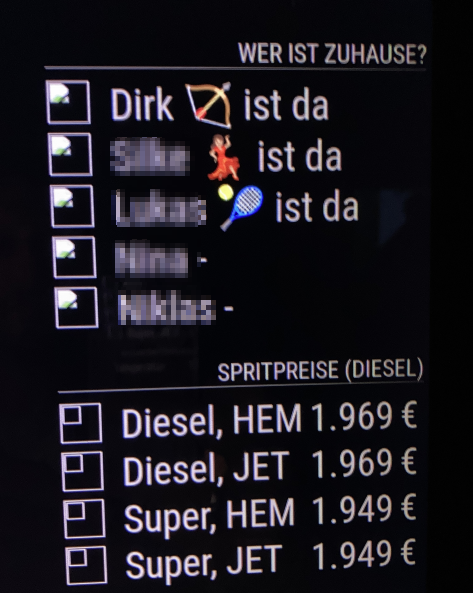
Normally there should be pictures from our family members and logos from the fuel stations and all comes from ha.Is there a way to fix this?
What more infos do you need to find what’s going wrong here?Any help welcome.
Regards -
Ok, I can reproduce this correction too! :-)
After changing address: “0.0.0.0” to the real ip address: “192.168.x.y” and removing every additional config from this thread ALL images are back again!Thank you all for this simple but effictive solution!
-
@wmx said in MMM-homeassistant-sensors no icons after MM upgrade to 2.19.0:
What more infos do you need to find what’s going wrong here?
may a cors problem, are there any errors in the console?
I assume you are running this on a pi, can you test if this works in a browser
http://<ip-address-of-the-pi>:8080? -
@karsten13 on a desktop??
-
@wmx Hi, this has to do with “cors”, it’s not allowed anymore to load the pictures the way I do it, I have to rewrite stuff to fix it, I just don’t have the time… I’m currently loading the pictures form “internet” using a URL instead… It works, but not as nice as geting them from HA…
Like this:
values: [
	{
		sensor: "person.jane_doe",
		name: "Jane are %v%",
		displayvalue: false,
		icons: [{
			"default": "https://www.snille.net/img/magicmirror/users/jane.png"
		}]
	],
},
If you cant find it, make it and share it
MMM-homeassistant-sensors,MMM-Modulebar,MMM-Profilepicture,MMM-Videoplayer,MMM-TautulliLatest -
can you test
"default": location.protocol + "//" + location.host + "/cors?url=" + old_ha_url?Since v2.19.0 there is a cors proxy inside mm which is used in the weather module and can be used by every other module.
-
@karsten13 Oh! I did not know that… I’m guessing this has to be done in the actual module somewhere? I have to see if I can figure it out. :)
If you cant find it, make it and share it
MMM-homeassistant-sensors,MMM-Modulebar,MMM-Profilepicture,MMM-Videoplayer,MMM-TautulliLatest -
S sdetweil referenced this topic on
-
-
@karsten13 Hm… Not sure if that works, the “picture” is different depending om what the “sensor” is sending, so it’s not possible to set the “url=http://your_not_working_url” to something static… I’ll have to read up on it… :) Thank you!
-
@Snille you should be able to see the CORS error in the dev window.
however the url gets built now for the image, should be able to change it
-
@karsten13 , @Snille
Sorry for the delay, but hanks for your feedback.Yes, I’m running MM on a raspi 3.
One more point I figured out:
The display connected to the raspi an showing THE mm on the wall has these problems with missing images.
If I connect with a browser from my desltop to the mm URL the images are visible.I’ll try to test your given notes this weekend and return the results back here.
-
@Snille said in MMM-homeassistant-sensors no icons after MM upgrade to 2.19.0:
  icons: [{
  	"default": "https://www.snille.net/img/magicmirror/users/jane.png"
  }]
(think in the example there is one closing bracket missing “]”)
Had the time right now to test this one issue. I insertet the URL to the image from ha :-) (which is a static one here)
http://<my-ha-url>:8123/local/images/hem.pngbut after restart of MM the problem still exists.
-
should be
icons: [{ "default": "http://localhost:8080/cors?url=http://<my-ha-url>:8123/local/images/hem.png" }] -
@karsten13
Ok, tried this new config, but it does not change anything. :-( -
I tried this(in the brackets)
default": "http://mm_url:8080/cors?url=http://ha_url:8123/media/borrmi.png but this doesn’t work. :-(
can i also use a local path on my mm instead? (e.g. ‘~/MagicMirror/pictures/person.png’)
-
@borrmi said in MMM-homeassistant-sensors no icons after MM upgrade to 2.19.0:
http://ha_url:8123/media/borrmi.png
does that work from a browser or curl on the system running MagicMirror?
curl -sL http://ha_url:8123/media/borrmi.png >borrmi.png -
@sdetweil said in MMM-homeassistant-sensors no icons after MM upgrade to 2.19.0:
curl -sL http://ha_url:8123/media/borrmi.png >borrmi.png
no “404: Not Found”
-
@borrmi u replaced ha_url with the right value, correct?
-
@sdetweil yes. My ha is under 192.168.2.100 and reachable via Browser(8123) and also in ssh
-
@borrmi ok, I just copy/pasted your url…
if it says 404, then thats the wrong URL to get the image
http://192.168.2.100:8123/is right… its the rest that is not
-
@sdetweil
i checked the ha path via ssh
the pictures are in /media.
should i put them in another directory (e.g. /home/borrmi/pictures)


Hello! It looks like you're interested in this conversation, but you don't have an account yet.
Getting fed up of having to scroll through the same posts each visit? When you register for an account, you'll always come back to exactly where you were before, and choose to be notified of new replies (either via email, or push notification). You'll also be able to save bookmarks and upvote posts to show your appreciation to other community members.
With your input, this post could be even better 💗
Register Login