MagicMirror Forum
    • Recent
    • Tags
    • Unsolved
    • Solved
    • MagicMirror² Repository
    • Documentation
    • 3rd-Party-Modules
    • Donate
    • Discord
    • Register
    • Login
    A New Chapter for MagicMirror: The Community Takes the Lead
    Read the statement by Michael Teeuw here.

    MMM-homeassistant-sensors no icons after MM upgrade to 2.19.0

    Scheduled Pinned Locked Moved Solved Troubleshooting
    38 Posts 5 Posters 15.6k Views 4 Watching
    Loading More Posts
    • Oldest to Newest
    • Newest to Oldest
    • Most Votes
    Reply
    • Reply as topic
    Log in to reply
    This topic has been deleted. Only users with topic management privileges can see it.
    • W Offline
      wmx
      last edited by wmx

      @Snille said in MMM-homeassistant-sensors no icons after MM upgrade to 2.19.0:

        icons: [{
        	"default": "https://www.snille.net/img/magicmirror/users/jane.png"
        }]
      

      (think in the example there is one closing bracket missing “]”)

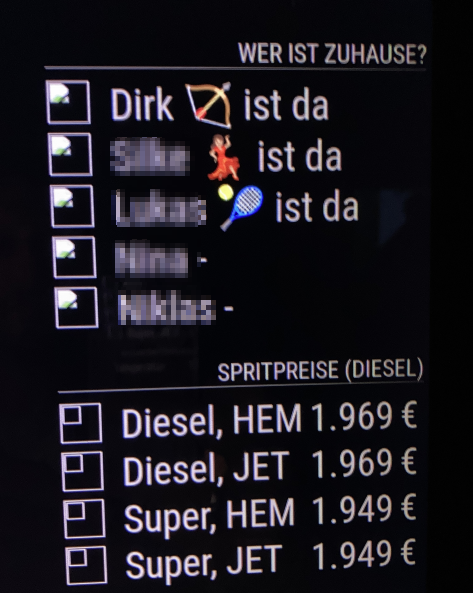
      Had the time right now to test this one issue. I insertet the URL to the image from ha :-) (which is a static one here)

      http://<my-ha-url>:8123/local/images/hem.png
      

      but after restart of MM the problem still exists.

      karsten13K 1 Reply Last reply Reply Quote 0
      • karsten13K Offline
        karsten13 @wmx
        last edited by

        @wmx

        should be

        icons: [{
          "default": "http://localhost:8080/cors?url=http://<my-ha-url>:8123/local/images/hem.png"
        }]
        
        1 Reply Last reply Reply Quote 1
        • W Offline
          wmx
          last edited by

          @karsten13
          Ok, tried this new config, but it does not change anything. :-(

          1 Reply Last reply Reply Quote 0
          • B Offline
            borrmi @Snille
            last edited by borrmi

            @karsten13

            I tried this(in the brackets)

            default": "http://mm_url:8080/cors?url=http://ha_url:8123/media/borrmi.png but this doesn’t work. :-(

            can i also use a local path on my mm instead? (e.g. ‘~/MagicMirror/pictures/person.png’)

            S 1 Reply Last reply Reply Quote 0
            • S Offline
              sdetweil @borrmi
              last edited by

              @borrmi said in MMM-homeassistant-sensors no icons after MM upgrade to 2.19.0:

              http://ha_url:8123/media/borrmi.png

              does that work from a browser or curl on the system running MagicMirror?

              curl -sL http://ha_url:8123/media/borrmi.png >borrmi.png
              

              Sam

              How to add modules

              learning how to use browser developers window for css changes

              B 1 Reply Last reply Reply Quote 0
              • B Offline
                borrmi @sdetweil
                last edited by

                @sdetweil said in MMM-homeassistant-sensors no icons after MM upgrade to 2.19.0:

                curl -sL http://ha_url:8123/media/borrmi.png >borrmi.png

                no “404: Not Found”

                S 1 Reply Last reply Reply Quote 0
                • S Offline
                  sdetweil @borrmi
                  last edited by

                  @borrmi u replaced ha_url with the right value, correct?

                  Sam

                  How to add modules

                  learning how to use browser developers window for css changes

                  B 1 Reply Last reply Reply Quote 0
                  • B Offline
                    borrmi @sdetweil
                    last edited by

                    @sdetweil yes. My ha is under 192.168.2.100 and reachable via Browser(8123) and also in ssh

                    S 1 Reply Last reply Reply Quote 0
                    • S Offline
                      sdetweil @borrmi
                      last edited by

                      @borrmi ok, I just copy/pasted your url…

                      if it says 404, then thats the wrong URL to get the image

                      http://192.168.2.100:8123/ 
                      

                      is right… its the rest that is not

                      Sam

                      How to add modules

                      learning how to use browser developers window for css changes

                      B 1 Reply Last reply Reply Quote 0
                      • B Offline
                        borrmi @sdetweil
                        last edited by

                        @sdetweil
                        i checked the ha path via ssh
                        the pictures are in /media.
                        should i put them in another directory (e.g. /home/borrmi/pictures)

                        S 1 Reply Last reply Reply Quote 0
                        • S Offline
                          sdetweil @borrmi
                          last edited by

                          @borrmi i have no idea where ha server makes them available to outside the ha machine consumers…

                          what did u have before this latest MM update?

                          Sam

                          How to add modules

                          learning how to use browser developers window for css changes

                          1 Reply Last reply Reply Quote 0
                          • B Offline
                            borrmi
                            last edited by sdetweil

                            nothing, it is a new installation. first time with a running ha instance in the house

                            funfact:

                            in a browser on my pc i can see the pictures with only

                            {
                                                        sensor: "person.borrmi",
                                                        name: "Borrmi ist %v%",
                                                        displayvalue: false,
                                                        replace: [{
                                                                        "home": "zu Hause",
                                                                        "not_home": "nicht zu Hause",
                                                                }
                                                        ]
                                                },
                            
                            1 Reply Last reply Reply Quote 0
                            • S Offline
                              sdetweil
                              last edited by

                              @borrmi ok never ha for me

                              that is the image definitions, what to use for what…

                              but not the image itself, which is what mm needs

                              I don’t know if u request it by name (sensor) or filename (person.borrmi)

                              Sam

                              How to add modules

                              learning how to use browser developers window for css changes

                              B SnilleS 2 Replies Last reply Reply Quote 0
                              • B Offline
                                borrmi @sdetweil
                                last edited by

                                @sdetweil person.borrmi ist a sensor

                                1 Reply Last reply Reply Quote 0
                                • SnilleS Offline
                                  Snille Module Developer @sdetweil
                                  last edited by

                                  @sdetweil This is what you get back (as a picture) from HA when adding a person as a sensor looks like this:

                                  https://your.haipaddress.here:443/api/image/serve/d5b50f6cf5e15d2e1d3f5457293458f6/512x512
                                  

                                  So, before “cors” I just did:

                                  <img src="https://your.haipaddress.here:443/api/image/serve/d5b50f6cf5e15d2e1d3f5457293458f6/512x512" class="ha-img">
                                  

                                  And it worked (still does in a browser), but not on the mirror.

                                  The whole “person”-object looks like this:

                                  {
                                      "entity_id": "person.firstname_lastname",
                                      "state": "at Some Place",
                                      "attributes": {
                                          "editable": false,
                                          "id": "9cd6gj3a4eb8ds4d0bfd2b0e1e57804ea",
                                          "latitude": 16.1241928,
                                          "longitude": 82.9718906,
                                          "gps_accuracy": 18,
                                          "source": "device_tracker.google_maps_105082325327346729172",
                                          "user_id": "402df0jd89b84230bf8fe3g7ff653048",
                                          "entity_picture": "/api/image/serve/a2dc96037s5b9dg86s4cc6336b62d742/512x512",
                                          "friendly_name": "FirstName LastName"
                                      },
                                      "last_changed": "2022-04-11T18:17:53.738567+00:00",
                                      "last_updated": "2022-04-11T19:53:55.043510+00:00",
                                      "context": {
                                          "id": "2489fb6bas56fgdds142155e5668093a28",
                                          "parent_id": null,
                                          "user_id": null
                                      }
                                  }
                                  

                                  Don’t know if this helps… :)

                                  If you cant find it, make it and share it!
                                  Modules: MMM-homeassistant-sensors, MMM-Modulebar, MMM-Profilepicture, MMM-Videoplayer

                                  S 1 Reply Last reply Reply Quote 0
                                  • S Offline
                                    sdetweil @Snille
                                    last edited by

                                    @Snille said in MMM-homeassistant-sensors no icons after MM upgrade to 2.19.0:

                                    “entity_picture”: “/api/image/serve/a2dc96037s5b9dg86s4cc6336b62d742/512x512”

                                    right, there is the url to use

                                    Sam

                                    How to add modules

                                    learning how to use browser developers window for css changes

                                    SnilleS 1 Reply Last reply Reply Quote 0
                                    • SnilleS Offline
                                      Snille Module Developer @sdetweil
                                      last edited by

                                      @sdetweil Correct, and in a normal browser it works. And for me, the “person.sensor” works too (now?)…

                                      Anyway, here you have the “Map-extract” from HA, also using my module for showing the picture of the vacuum-map… In the browser it works, on the Mirror it does not… :)

                                      Browser:
                                      7b611947-8372-41db-8c97-2bb910460c2a-image.png

                                      Mirror:
                                      8065e500-7d12-4899-8b3e-b95d327e6e97-image.png

                                      Here is “part” of the extract object (including the picture):

                                      ...
                                              ],
                                                  "model": "roborock.vacuum.s5",
                                                  "used_api": "xiaomi",
                                                  "entity_picture": "/api/camera_proxy/camera.xiaomi_cloud_map_extractor?token=1e870c95e944a30b0731ae4b3a3bc8dsf65231b6ba03fd91d8s96af38d05c6ce",
                                                  "friendly_name": "Xiaomi Cloud Map Extractor",
                                                  "supported_features": 1
                                              },
                                      ...
                                      

                                      For some reson the Browser works… Confused yet? :)

                                      If you cant find it, make it and share it!
                                      Modules: MMM-homeassistant-sensors, MMM-Modulebar, MMM-Profilepicture, MMM-Videoplayer

                                      S 1 Reply Last reply Reply Quote 0
                                      • W Offline
                                        wmx
                                        last edited by

                                        @sdetweil, @Snille
                                        same here.
                                        The urls to the icons work in browser sessions showing MM, but do not work local in raspi with MM.

                                        I tested access from raspi console with

                                        curl -sL http://<ma-ha-url>:8123/local/images/person.jpg >person.jpg 
                                        

                                        and this works too.

                                        I also have the same problem, the local MM is not able to access a remote_compliments.conf file via URL in the local module\defaults\compliments folder, but I can access it from a browser. Seems to be the same problem!?

                                        1 Reply Last reply Reply Quote 0
                                        • S Offline
                                          sdetweil @Snille
                                          last edited by

                                          @Snille what is the view of the console in the MM dev window? should be an access error

                                          Sam

                                          How to add modules

                                          learning how to use browser developers window for css changes

                                          SnilleS 1 Reply Last reply Reply Quote 0
                                          • SnilleS Offline
                                            Snille Module Developer @sdetweil
                                            last edited by

                                            @sdetweil Correct, it’s the cors error:
                                            c994e8de-8164-4307-b93e-ec340e8a13e7-image.png

                                            If you cant find it, make it and share it!
                                            Modules: MMM-homeassistant-sensors, MMM-Modulebar, MMM-Profilepicture, MMM-Videoplayer

                                            karsten13K 1 Reply Last reply Reply Quote 0

                                            Hello! It looks like you're interested in this conversation, but you don't have an account yet.

                                            Getting fed up of having to scroll through the same posts each visit? When you register for an account, you'll always come back to exactly where you were before, and choose to be notified of new replies (either via email, or push notification). You'll also be able to save bookmarks and upvote posts to show your appreciation to other community members.

                                            With your input, this post could be even better 💗

                                            Register Login

                                            • 1
                                            • 2
                                            • 1 / 2
                                            • First post
                                              Last post
                                            Enjoying MagicMirror? Please consider a donation!
                                            MagicMirror created by Michael Teeuw.
                                            Forum managed by Sam, technical setup by Karsten.
                                            This forum is using NodeBB as its core | Contributors
                                            Contact | Privacy Policy