Read the statement by Michael Teeuw here.
MMM-CalendarExt3
-
Hi
I would like to know how to make the calendar smaller. As you can see in the picture, my tv is in portrait, and the calendar takes up a lot of space. Where and what changes in custom css could I make to make it smaller and more rectangular? Thank you.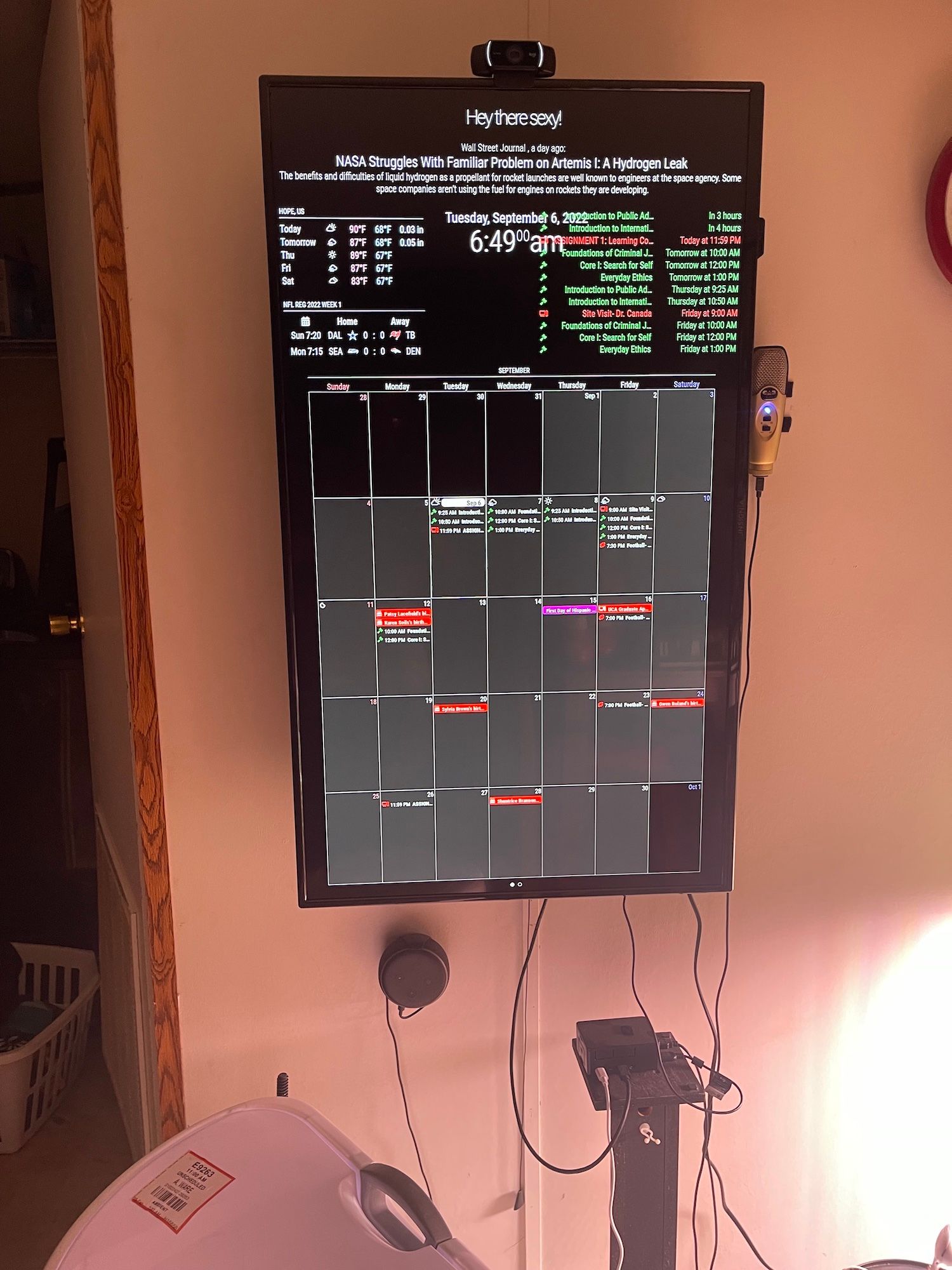
-
@techlady
Adjust ‘maxEventLines’ and ‘eventHeight’. The heighr of day cell would be calculated by maxEventLines x eventHeight. -
Hi Guys,
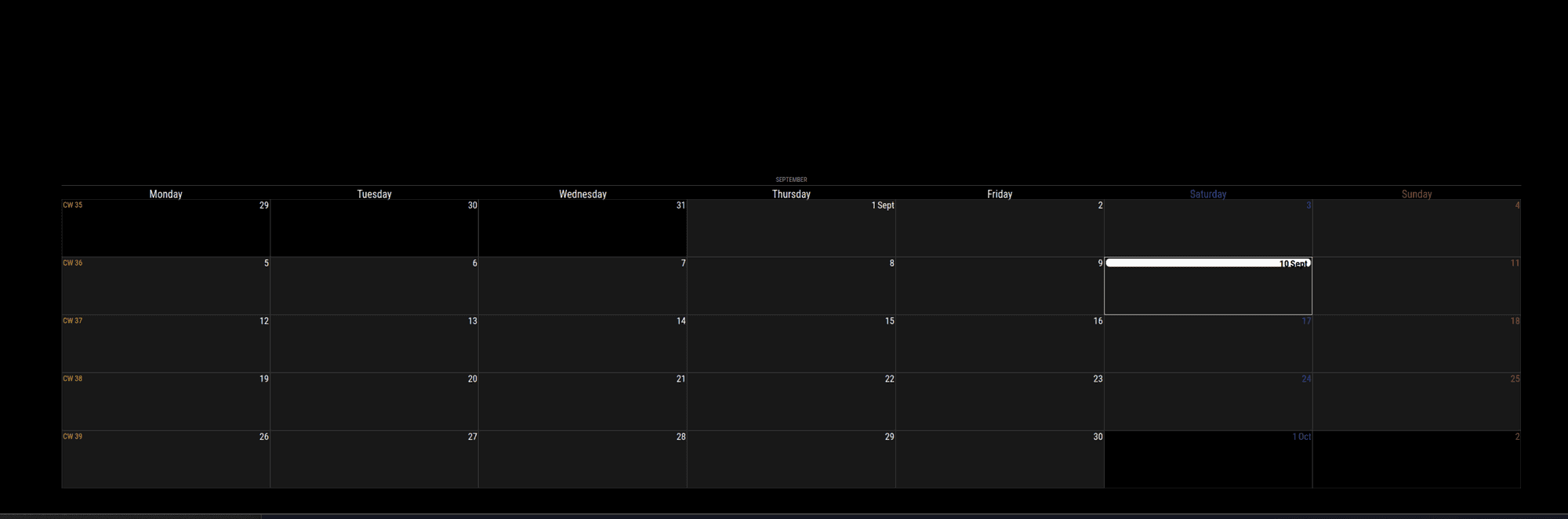
Just installed a brand new MM instance and downloaded the latest MMM-CalendarExt3 but for some reason i get no entries from my google calendars…
I get entries if i setup MMM-CalendarExt2 or the default calendar but not on MMM-CalendarExt3…
Here is my Config
{
  module: "MMM-CalendarExt3",
  position: "bottom_center",
  config: {
    mode: "month",
    instanceId: "basicCalendar",
    locale: 'en-UK',
	fontSize: '25px',
	refreshInterval: 10000,
    maxEventLines: 5,
    firstDayOfWeek: 1,
    calendarSet: ["KD", "Tini"],
		}
	},
	{
  module: "calendar",
  config: {
    broadcastPastEvents: true,
    calendars: [
	{
			name: "KD",
			className: "KD",
			url: "https://calendar.google.com/calendar/ical/basic.ics",
			color: "green"
		},
		{
			name: "Tini",
			className: "tini",
			url: "https://calendar.google.com/calendar/ical/basic.ics",
			color: "pink"
		},
	]
	}
      },
-
@KD if you use the calendar url in a browser, it should download a file, just text. you an edit that to see if there are events
-
@sdetweil Hi there - i can download the file by putting the URL in the browser and open it in Outlook and see the events…
Also, I use both URL’s in another 2 magic mirrors I have in the house… I’m confident it’s not the URL’s
-
@KD ok, this looks like the bug I introduced in 2.20. fixed in 2.21, October 1
broadcastPastEvents loads up the past events then the new, and the bug cuts off after the 1st maximumEntries
so u have to increase maximum entries
-
@sdetweil Thanks Sam - do you mean “maxEventLines”?
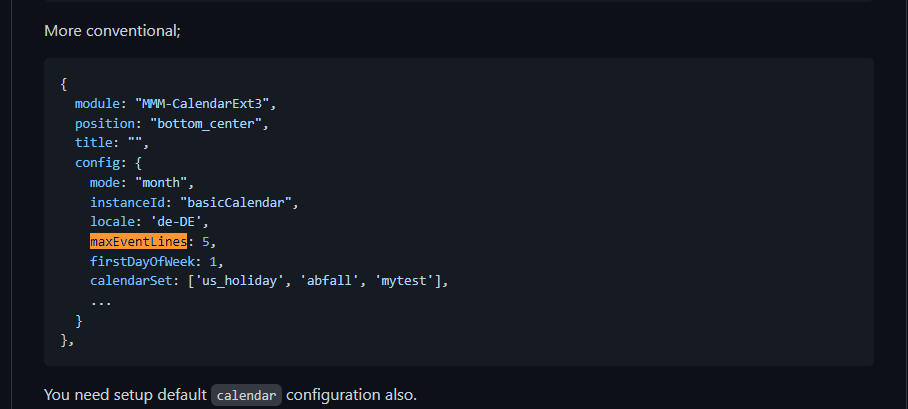
If yes I have set them up to 10 now and still nothing
module: "MMM-CalendarExt3", position: "bottom_center", config: { mode: "month", instanceId: "basicCalendar", locale: 'en-UK', fontSize: '25px', refreshInterval: 10000, maxEventLines: 10, firstDayOfWeek: 1, calendarSet: ["KD", "Tini"], } }, -
@KD no in the base calendar module. default
maximumEntries defaults to 10,
that is where you have broadcastPastEvents:true -
@sdetweil Thank you Sam, i tried that and still nothing…
Here is my config now:
{ module: "MMM-CalendarExt3", position: "bottom_center", config: { mode: "month", instanceId: "basicCalendar", locale: 'en-UK', fontSize: '25px', refreshInterval: 10000, maxEventLines: 10, firstDayOfWeek: 1, calendarSet: ["KD", "Tini"], } }, { module: "calendar", config: { broadcastPastEvents: true, maximumEntries: 100, calendars: [ { name: "KD", className: "KD", url: "https://calendar.google.com/calendar/ical/basic.ics", color: "green" }, { name: "Tini", className: "tini", url: "https://calendar.google.com/calendar/ical/basic.ics", color: "pink" }, ] } }, -
@KD for the short term add
position: “top_left”,
to the calendar module location
let’s make sure it is working
-
@sdetweil Thanks Sam - I now get Loading… than “error in the calendar module check log for more details” and finally no upcoming events… not sure how I have broken it as it was working yesterday… i also tried to replace the default calendar with
git checkout modules/default/calendar/calendar.jsAs per one of your other posts in the forum but got "updated 0 (zero) paths from the index…
-
@KD u have to be I the MagicMirror folder for the git checkout to work
you should not have changed that file anyhow
all config is done thru config.js
can u show the output where u start mm?
either npm start
or if you use pm2, thenpm2 logs --lines=50
calendarext3, gets it’s info from the default calendar. so if it has problems, then u get nothing
-
@sdetweil here is an output from “npm start”
kd@raspberrypi:~/MagicMirror $ npm start > magicmirror@2.20.0 start > DISPLAY="${DISPLAY:=:0}" ./node_modules/.bin/electron js/electron.js [11.09.2022 14:00.12.728] [LOG] Starting MagicMirror: v2.20.0 [11.09.2022 14:00.12.736] [LOG] Loading config ... [11.09.2022 14:00.12.743] [LOG] Loading module helpers ... [11.09.2022 14:00.12.745] [LOG] No helper found for module: clock. [11.09.2022 14:00.12.747] [LOG] No helper found for module: MMM-CalendarExt3. [11.09.2022 14:00.13.011] [LOG] Initializing new module helper ... [11.09.2022 14:00.13.012] [LOG] Module helper loaded: calendar [11.09.2022 14:00.13.013] [LOG] No helper found for module: weather. [11.09.2022 14:00.13.554] [LOG] Initializing new module helper ... [11.09.2022 14:00.13.556] [LOG] Module helper loaded: MMM-BackgroundSlideshow [11.09.2022 14:00.13.558] [LOG] All module helpers loaded. [11.09.2022 14:00.13.725] [LOG] Starting server on port 8080 ... [11.09.2022 14:00.13.745] [LOG] Server started ... [11.09.2022 14:00.13.747] [LOG] Connecting socket for: calendar [11.09.2022 14:00.13.748] [LOG] Starting node helper for: calendar [11.09.2022 14:00.13.749] [LOG] Connecting socket for: MMM-BackgroundSlideshow [11.09.2022 14:00.13.750] [LOG] Sockets connected & modules started ... [11.09.2022 14:00.14.038] [ERROR] Whoops! There was an uncaught exception... [11.09.2022 14:00.14.046] [ERROR] Error: listen EADDRINUSE: address already in use 127.0.0.1:8080 at Server.setupListenHandle [as _listen2] (node:net:1372:16) at listenInCluster (node:net:1420:12) at GetAddrInfoReqWrap.doListen [as callback] (node:net:1559:7) at GetAddrInfoReqWrap.onlookup [as oncomplete] (node:dns:73:8) { code: 'EADDRINUSE', errno: -98, syscall: 'listen', address: '127.0.0.1', port: 8080 } [11.09.2022 14:00.14.048] [ERROR] MagicMirror² will not quit, but it might be a good idea to check why this happened. Maybe no internet connection? [11.09.2022 14:00.14.052] [ERROR] If you think this really is an issue, please open an issue on GitHub: https://github.com/MichMich/MagicMirror/issues [11.09.2022 14:00.14.099] [LOG] Launching application. MESA-LOADER: failed to retrieve device information MESA-LOADER: failed to retrieve device information MESA-LOADER: failed to retrieve device information MESA-LOADER: failed to open kms_swrast: /usr/lib/dri/kms_swrast_dri.so: cannot open shared object file: Permission denied (search paths /usr/lib/arm-linux-gnueabihf/dri:\$${ORIGIN}/dri:/usr/lib/dri) failed to load driver: kms_swrast MESA-LOADER: failed to open swrast: /usr/lib/dri/swrast_dri.so: cannot open shared object file: Permission denied (search paths /usr/lib/arm-linux-gnueabihf/dri:\$${ORIGIN}/dri:/usr/lib/dri) failed to load swrast driver [11.09.2022 14:00.17.129] [LOG] Shutting down server... [11.09.2022 14:00.17.136] [LOG] Stopping module helper: calendar [11.09.2022 14:00.17.137] [LOG] Stopping module helper: MMM-BackgroundSlideshow kd@raspberrypi:~/MagicMirror $ -
@KD yep, two copies running
pm2 stop all
then u can do npm start -
@sdetweil Apologies yes i had a PM2 job in the background…
Here is the fresh output:
kd@raspberrypi:~/MagicMirror $ npm start > magicmirror@2.20.0 start > DISPLAY="${DISPLAY:=:0}" ./node_modules/.bin/electron js/electron.js [11.09.2022 14:07.14.079] [LOG] Starting MagicMirror: v2.20.0 [11.09.2022 14:07.14.088] [LOG] Loading config ... [11.09.2022 14:07.14.094] [LOG] Loading module helpers ... [11.09.2022 14:07.14.097] [LOG] No helper found for module: clock. [11.09.2022 14:07.14.099] [LOG] No helper found for module: MMM-CalendarExt3. [11.09.2022 14:07.14.368] [LOG] Initializing new module helper ... [11.09.2022 14:07.14.370] [LOG] Module helper loaded: calendar [11.09.2022 14:07.14.371] [LOG] No helper found for module: weather. [11.09.2022 14:07.14.976] [LOG] Initializing new module helper ... [11.09.2022 14:07.14.978] [LOG] Module helper loaded: MMM-BackgroundSlideshow [11.09.2022 14:07.14.979] [LOG] All module helpers loaded. [11.09.2022 14:07.15.149] [LOG] Starting server on port 8080 ... [11.09.2022 14:07.15.168] [LOG] Server started ... [11.09.2022 14:07.15.170] [LOG] Connecting socket for: calendar [11.09.2022 14:07.15.172] [LOG] Starting node helper for: calendar [11.09.2022 14:07.15.173] [LOG] Connecting socket for: MMM-BackgroundSlideshow [11.09.2022 14:07.15.174] [LOG] Sockets connected & modules started ... [11.09.2022 14:07.15.516] [LOG] Launching application. MESA-LOADER: failed to retrieve device information MESA-LOADER: failed to retrieve device information MESA-LOADER: failed to retrieve device information MESA-LOADER: failed to open kms_swrast: /usr/lib/dri/kms_swrast_dri.so: cannot open shared object file: Permission denied (search paths /usr/lib/arm-linux-gnueabihf/dri:\$${ORIGIN}/dri:/usr/lib/dri) failed to load driver: kms_swrast MESA-LOADER: failed to open swrast: /usr/lib/dri/swrast_dri.so: cannot open shared object file: Permission denied (search paths /usr/lib/arm-linux-gnueabihf/dri:\$${ORIGIN}/dri:/usr/lib/dri) failed to load swrast driver [11.09.2022 14:07.19.711] [LOG] Create new calendarfetcher for url: https://calendar.google.com/calendar/ - Interval: 300000 [11.09.2022 14:07.19.985] [INFO] BACKGROUNDSLIDESHOW: Reading directory "modules/MMM-BackgroundSlideshow/exampleImages/" for images. [11.09.2022 14:07.20.006] [INFO] BACKGROUNDSLIDESHOW: 171 files found [11.09.2022 14:07.20.057] [INFO] BACKGROUNDSLIDESHOW_NEXT_IMAGE [11.09.2022 14:07.20.058] [INFO] BACKGROUNDSLIDESHOW: reading path "modules/MMM-BackgroundSlideshow/exampleImages//DSC_0038.JPG" [11.09.2022 14:07.20.493] [INFO] Calendar-Fetcher: Broadcasting 0 events. [11.09.2022 14:07.29.492] [LOG] Shutting down server... [11.09.2022 14:07.29.493] [LOG] Stopping module helper: calendar [11.09.2022 14:07.29.494] [LOG] Stopping module helper: MMM-BackgroundSlideshow kd@raspberrypi:~/MagicMirror $ -
@KD said in MMM-CalendarExt3:
Calendar-Fetcher: Broadcasting 0 events.
so, the calendar module didnt find any events…
if you download the ICS file and look inside,
see the BEGIN VCALENDARBEGIN VEVENT
…
.
.
END VEVENTEND VCALENDAR
we can turn on debug to get more detail
change the config.js
logLevel: ["INFO", "LOG", "WARN", "ERROR"],to
logLevel: ["INFO", "LOG", "WARN", "ERROR","DEBUG"],then start mm with
npm start >somefile.txt
wait til the cal message comes up
then
ctrl-c (in the terminal window where u did npm start, or ctrl-q (if u didn’t start with pm2, as pm2’s JOB is to keep MM running, so it will restart it after it shuts down unexpectedly -
@sdetweil Added “Debug” to the config, and ran the npm start with the log file and waited for the calendar to say it was not able to find events - here is the output of the somefile.txt :
> magicmirror@2.20.0 start
> DISPLAY="${DISPLAY:=:0}" ./node_modules/.bin/electron js/electron.js

[11.09.2022 14:20.39.366] [LOG]   Starting MagicMirror: v2.20.0
[11.09.2022 14:20.39.373] [LOG]   Loading config ...
[11.09.2022 14:20.39.380] [LOG]   Loading module helpers ...
[11.09.2022 14:20.39.383] [LOG]   No helper found for module: clock.
[11.09.2022 14:20.39.384] [LOG]   No helper found for module: MMM-CalendarExt3.
[11.09.2022 14:20.39.628] [LOG]   Initializing new module helper ...
[11.09.2022 14:20.39.629] [LOG]   Module helper loaded: calendar
[11.09.2022 14:20.39.631] [LOG]   No helper found for module: weather.
[11.09.2022 14:20.40.066] [LOG]   Initializing new module helper ...
[11.09.2022 14:20.40.081] [LOG]   Module helper loaded: MMM-BackgroundSlideshow
[11.09.2022 14:20.40.082] [LOG]   All module helpers loaded.
[11.09.2022 14:20.40.206] [LOG]   Starting server on port 8080 ...
[11.09.2022 14:20.40.224] [LOG]   Server started ...
[11.09.2022 14:20.40.226] [LOG]   Connecting socket for: calendar
[11.09.2022 14:20.40.228] [LOG]   Starting node helper for: calendar
[11.09.2022 14:20.40.229] [LOG]   Connecting socket for: MMM-BackgroundSlideshow
[11.09.2022 14:20.40.230] [LOG]   Sockets connected & modules started ...
[11.09.2022 14:20.40.667] [LOG]   Launching application.
[11.09.2022 14:20.44.986] [LOG]   Create new calendarfetcher for url: https://calendar.google.com/calendar/embed?src=konstantin.denishev%40gmail.com&ctz=Europe%2FLondon - Interval: 300000
[11.09.2022 14:20.45.260] [INFO]  BACKGROUNDSLIDESHOW: Reading directory "modules/MMM-BackgroundSlideshow/exampleImages/" for images.
[11.09.2022 14:20.45.273] [INFO]  BACKGROUNDSLIDESHOW: 171 files found
[11.09.2022 14:20.45.315] [INFO]  BACKGROUNDSLIDESHOW_NEXT_IMAGE
[11.09.2022 14:20.45.317] [INFO]  BACKGROUNDSLIDESHOW: reading path "modules/MMM-BackgroundSlideshow/exampleImages//20161126_135734.jpg"
[11.09.2022 14:20.46.043] [DEBUG] parsed data={"value":"void 0}})},f=function(){var g={};return g.v=g.next=g.head=g},h=0;return c});var ea=function(a,b){a instanceof String&&(a+=);var c=0,d=!1,e={next:function(){if(!d&&c<a.length){var f=c++;return{value:b(f,a[f]),done:!1}}d=!0;return{done:!0,value:void 0}}};e[Symbol.iterator]=function(){return e};return e};p(Array.prototype.entries,function(a){return a?a:function(){return ea(this,function(b,c){return[b,c]})}});p(Array.prototype.keys,function(a){return a?a:function(){return ea(this,function(b){return b})}});","spdx-license-identifier":[" Apache-2.0"," Apache-2.0"],"e":")};M.prototype.get=function(a,b){for(var c=a+=,d=(this.g.cookie||).split(;),e=0,f;e<d.length;e++){f=H(d[e]);if(0==f.lastIndexOf(c,0))return f.slice(c.length);if(f==a)return}return b};M.prototype.o=function(){for(var a=(this.g.cookie||).split(;),b=[],c=[],d,e,f=0;f<a.length;f++)e=H(a[f]),d=e.indexOf(=),-1==d?(b.push(),c.push(e)):(b.push(e.substring(0,d)),c.push(e.substring(d+1)));return c};var Pa=new M;var Qa=function(){this.H=this.H;this.g=this.g};Qa.prototype.H=!1;Qa.prototype.G=function(){if(this.g)for(;this.g.length;)this.g.shift()()};var N=function(a,b){this.type=a;this.g=this.target=b;this.defaultPrevented=!1};N.prototype.h=function(){this.defaultPrevented=!0};var Ra=function(){if(!t.addEventListener||!Object.defineProperty)return!1;var a=!1,b=Object.defineProperty({},passive,{get:function(){a=!0}});try{t.addEventListener(test,function(){},b),t.removeEventListener(test,function(){},b)}catch(c){}return a}();var Sa=function(a){Sa[ ](a);return a};Sa[ ]=function(){};var Ua=function(a){var b=Ta;return Object.prototype.hasOwnProperty.call(b,9)?b[9]:b[9]=a(9)};var Va=K(Opera),Wa=K(Trident)||K(MSIE),Xa=K(Edge),Ya=K(Gecko)&&!(-1!=J().toLowerCase().indexOf(webkit)&&!K(Edge))&&!(K(Trident)||K(MSIE))&&!K(Edge),Za=-1!=J().toLowerCase().indexOf(webkit)&&!K(Edge),$a;","a":"{var ab=,bb=function(){var a=J();if(Ya)return/rv:([^\\);]+)(\\)|;)/.exec(a);if(Xa)return/Edge\\/([\\d\\.]+)/.exec(a);if(Wa)return/\\b(?:MSIE|rv)[: ]([^\\);]+)(\\)|;)/.exec(a);if(Za)return/WebKit\\/(\\S+)/.exec(a);if(Va)return/(?:Version)[ \\/]?(\\S+)/.exec(a)}();bb&&(ab=bb?bb[1]:);if(Wa){var cb,db=t.document;cb=db?db.documentMode:void 0;if(null!=cb&&cb>parseFloat(ab)){$a=String(cb);break a}}$a=ab}","array":"e:null)),e=type_error:SafeUrl;else{b:if(na){try{e=new URL(d)}catch(k){e=https:;break b}e=e.protocol}else c:{e=document.createElement(a);try{e.href=d}catch(k){e=void 0;break c}e=e.protocol;e=:===e||===e?https::e}javascript:===e?(oa(d),e=void 0):e=d}void 0!==e&&(b.href=e)}})};var Q=Object.create(null);function R(a,b){Q[a]||(Q[a]=b)};var S=function(){w.apply(this,arguments)};u(S,w);S.prototype.h=function(){var a=this.g.querySelector(#playCaptchaButton),b=this.g.querySelector(#captchaAudio),c=this.g.querySelector(input[name=ca]);a&&b&&c&&a.addEventListener(click,function(d){d.preventDefault();b.readyState===HTMLMediaElement.HAVE_NOTHING?b.load():b.paused&&b.play();c.value=;c.focus()})};var T=function(){w.apply(this,arguments)};u(T,w);T.prototype.h=function(){var a=this.g;void 0!==a.dataset.hasDomainSuffix&&(sa(a),ta(a))};var ta=function(a){a.addEventListener(keyup,function(){sa(a)})},sa=function(a){0<a.getElementsByTagName(INPUT.toString()).item(0).value.indexOf(@)?a.dataset.hasAtSign=:delete a.dataset.hasAtSign};var U=function(){w.apply(this,arguments)};u(U,w);U.prototype.h=function(){var a=this.g;void 0!==a.dataset.hasDomainSuffix&&(ua(a),va(a))};var va=function(a){a.addEventListener(keyup,function(){ua(a)})},ua=function(a){0<a.getElementsByTagName(INPUT.toString()).item(0).value.indexOf(@)?a.dataset.hasAtSign=:delete a.dataset.hasAtSign};R(CaptchaInput,S);R(Card,A);R(EmailInput,T);R(Footer,P);R(IdentifierInput,U);var wa=[],V,W=[].slice.call(document.querySelectorAll([data-auto-init])),xa=undefined!=typeof Symbol&&Symbol.iterator&&W[Symbol.iterator],X;xa?X=xa.call(W):X={next:h(W)};V=X;for(var Y=V.next();!Y.done;Y=V.next()){var Z=Y.value,ya=Z.getAttribute(data-auto-init);if(!ya)throw Error(auto-init attribute requires a value.);var za=new Q[ya](Z);wa.push(za);Z.removeAttribute(data-auto-init)};}).call(this);"}
[11.09.2022 14:20.46.045] [DEBUG] There are 5 calendar entries.
[11.09.2022 14:20.46.048] [DEBUG] Processing entry...
[11.09.2022 14:20.46.053] [DEBUG] Processing entry...
[11.09.2022 14:20.46.055] [DEBUG] Processing entry...
[11.09.2022 14:20.46.057] [DEBUG] Processing entry...
[11.09.2022 14:20.46.058] [DEBUG] Processing entry...
[11.09.2022 14:20.46.061] [INFO]  Calendar-Fetcher: Broadcasting 0 events.
This is the output from the terminal @almightyyoshi
kd@raspberrypi:~/MagicMirror $ npm start >somefile.txt
MESA-LOADER: failed to retrieve device information
MESA-LOADER: failed to retrieve device information
MESA-LOADER: failed to retrieve device information
MESA-LOADER: failed to open kms_swrast: /usr/lib/dri/kms_swrast_dri.so: cannot open shared object file: Permission denied (search paths /usr/lib/arm-linux-gnueabihf/dri:\$${ORIGIN}/dri:/usr/lib/dri)
failed to load driver: kms_swrast
MESA-LOADER: failed to open swrast: /usr/lib/dri/swrast_dri.so: cannot open shared object file: Permission denied (search paths /usr/lib/arm-linux-gnueabihf/dri:\$${ORIGIN}/dri:/usr/lib/dri)
failed to load swrast driver
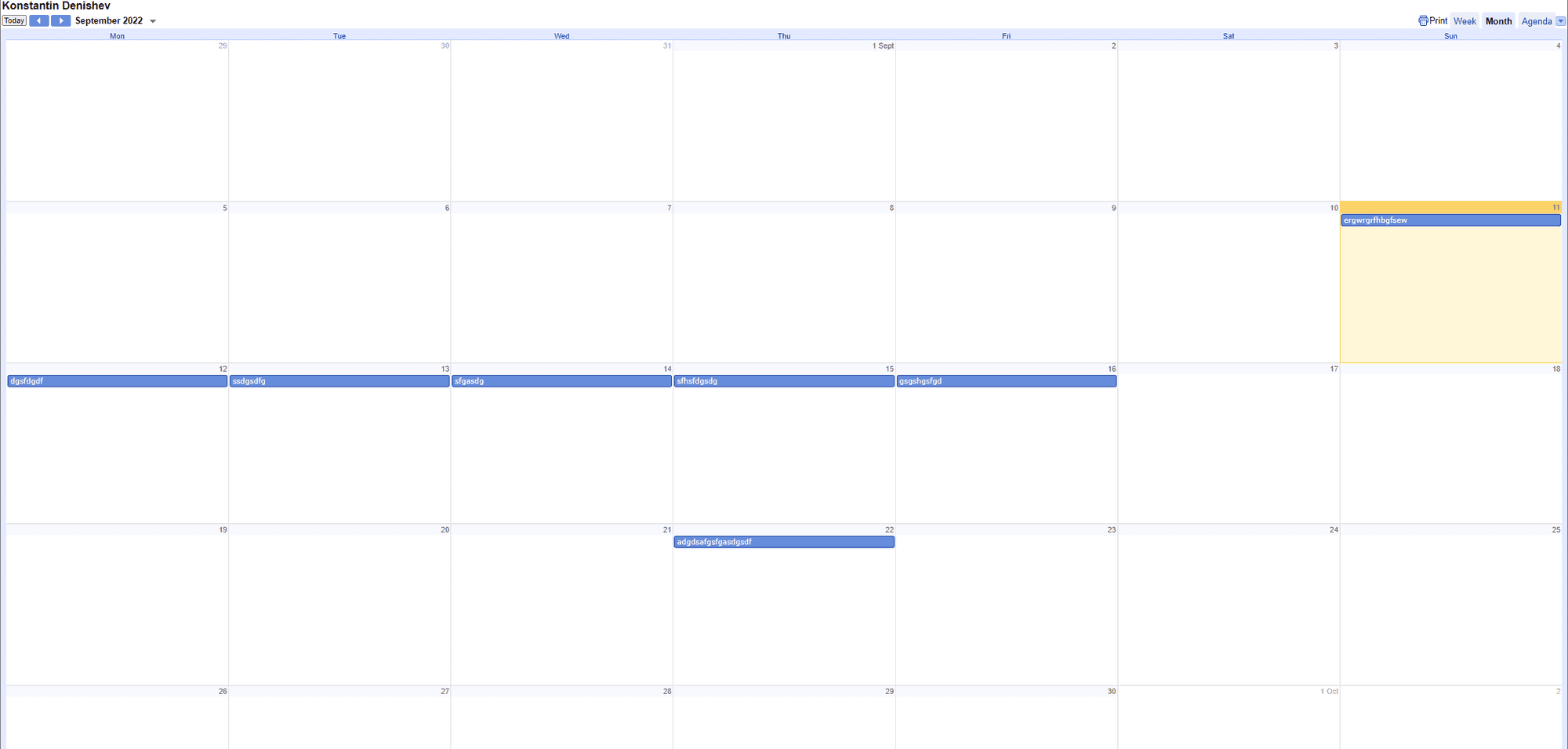
There is definitely events in the calendar…
-
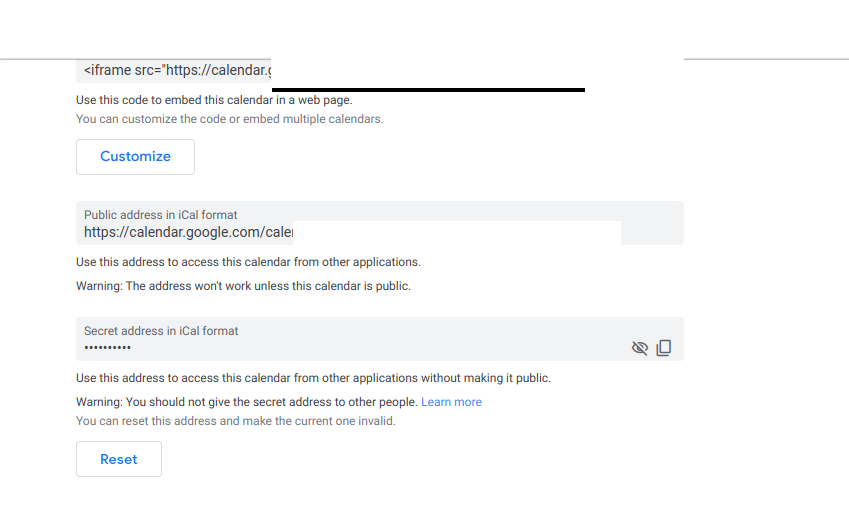
@KD wrong link… u used the embed link (make the full calendar SHOW in the client,…)
we want the ICal link
-
@sdetweil Huge apologies Sam! just noticed I had the wrong link in my clipboard when i copy and pasted it!:man_facepalming:
Thank you so much for your help with this and apologies to have wasted your time with such trivial mistake…
-
@KD np… dang computers do what we tell them, exactly…
u will want to remove the “DEBUG”
as it generates a lot of content
Hello! It looks like you're interested in this conversation, but you don't have an account yet.
Getting fed up of having to scroll through the same posts each visit? When you register for an account, you'll always come back to exactly where you were before, and choose to be notified of new replies (either via email, or push notification). You'll also be able to save bookmarks and upvote posts to show your appreciation to other community members.
With your input, this post could be even better 💗
Register Login