Read the statement by Michael Teeuw here.
MMM-CalendarExt3
-
@whimsicality
Hmmm. Works for me.
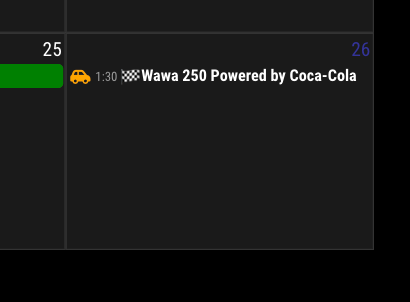
Maybe your
ev.startDatewould not be a valid format. (Are you using default calendar module? Or others? - like MMM-GoogleCalendar or something)
You can check with this code.eventTransformer: (ev) => { if (!ev.isFullday) { console.log("Check", ev.title, ev.startDate) let t = new Date(ev.startDate) let time = (t.getMinutes() == 0) ? String(t.getHours()) : String(t.getHours() + ":" + t.getMinutes()) ev.title = `<span class="myTime">${time}</span> ${ev.title}` } return ev }It will show additional info in your dev-console.

-
Hello Good Sirs,
I have been banging my head against the wall for 2 days on this and cannot get my calendar to show up with any of the dates. I went back and read a few days back and saw the basic set up you did for fun holidays and tried to replicate it with the same code but I get the same results.
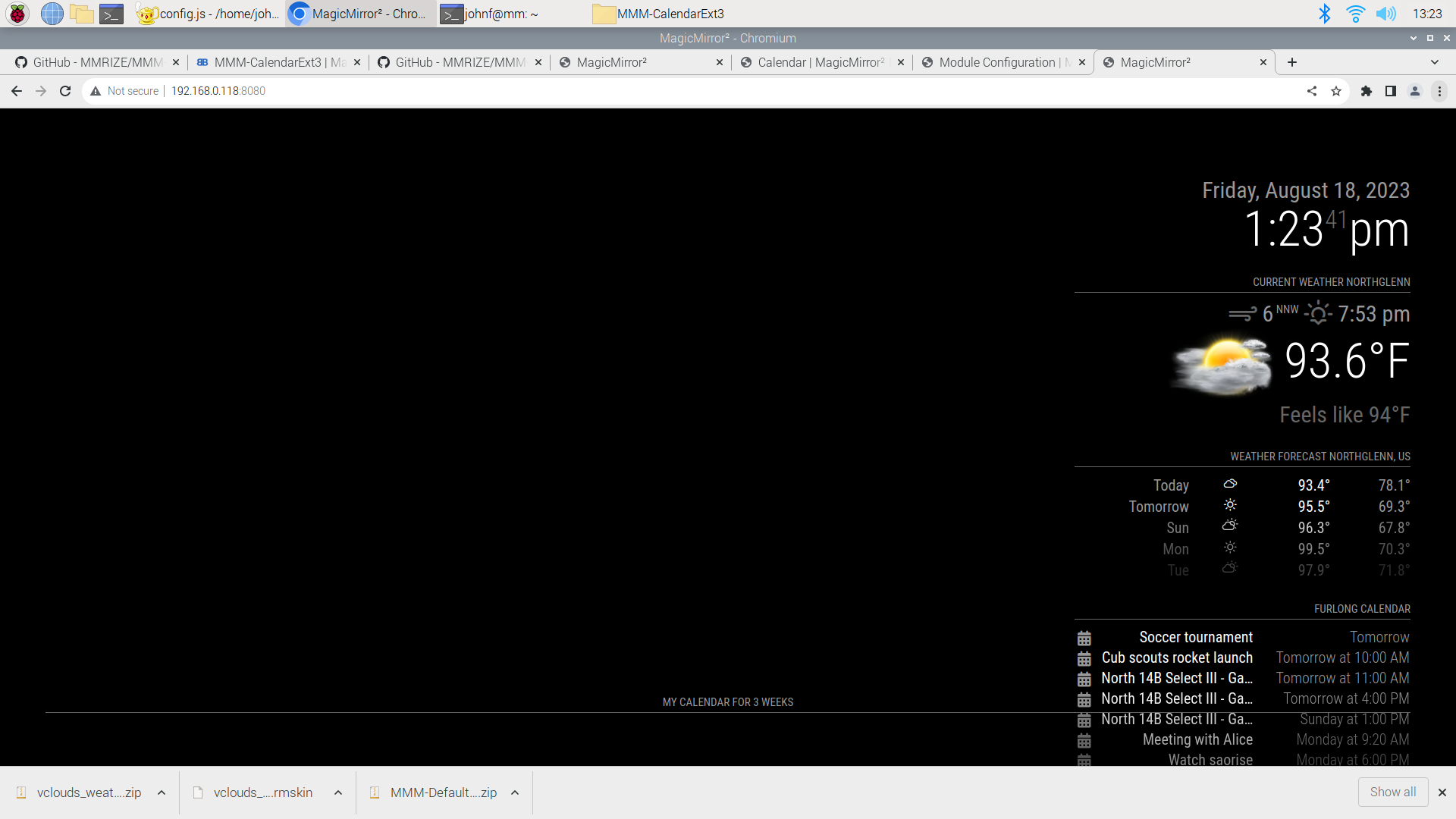
I can see my default running on the right side like it is supposed to. But the C3 loads on the bottom but doesn’t give any cells. (see screenshot) Just the header. I deleted the Module and reinstalled same thing. So I am assuming it is something to do with my config.
Any help is appreciated.
{ disabled:false, module: "calendar", header: "Furlong Calendar", position: "top_right", config: { broadcastPastEvents: true, // <= IMPORTANT to see past events maximumNumberOfDays: 45, calendars: [ { fetchInterval: 7 * 24 * 60 * 60 * 1000, symbol: "calendar-check", name: 'us_holiday', url: "webcal://www.calendarlabs.com/ical-calendar/ics/76/US_Holidays.ics", color: "rgb(235,20,16)", // <= RECOMMENDED to assign color }, { name: "Furlong Family", url: "webcal://p132-caldav.icloud.com/published/2/MTYxOTc4Nzc3MTYxOTc4N0UtCeAoDU9jR_G3F17Eh3VRz9FwPUKI9GaiJPDRlUx9w0xueLmCtnzAAks9h8v7F0TiHM6R7cKBwKH_2PXqGZ0", //color: "rgb(235,20,16)" }, { name: "Soccer", url: "https://api.playmetrics.com/calendar/304/team/111688-1156AA5E.ics", // color: "rgb(235,20,16)" }, ] } }, { module: "MMM-CalendarExt3", position: "bottom_bar", header: "My Calendar for 3 weeks", config: { mode: 'week', } }, -
@furry131 quick test… use the calendar url from the commandline
change webcal to https in the url
curl -sL the_url >somefile.icssee if it downloads the file… that is effectively all we do… download the file(it is text) and then process it…
i bet there is an error reported in the place u start MM (npm start)
-
OK I changed the webcal to https and ran the script on my terminal. Nothing happens. I ran this"
curl -sL https:://www.calendarlabs.com/ical-calendar/ics/76/US_Holidays.ics
"
When I run npm start, I can see some errors, but it looks like some calendar events are broadcasting.
Ready to go! Please point your browser to: http://0.0.0.0:8080 Starting chromium browser now, have patience, it takes a minute [18.08.2023 13:56.23.685] [ERROR] ERROR! Could not validate main module js file. [18.08.2023 13:56.23.688] [ERROR] ReferenceError: HTMLElement is not defined at Object.<anonymous> (/home/johnf/MagicMirror/modules/MMM-CalendarExt3/MMM-CalendarExt3.js:1:26) at Module._compile (node:internal/modules/cjs/loader:1101:14) at Object.Module._extensions..js (node:internal/modules/cjs/loader:1153:10) at Module.load (node:internal/modules/cjs/loader:981:32) at Function.Module._load (node:internal/modules/cjs/loader:822:12) at Module.require (node:internal/modules/cjs/loader:1005:19) at require (node:internal/modules/cjs/helpers:102:18) at Class.loadModuleDefaultConfig (/home/johnf/MagicMirror/modules/MMM-Remote-Control/node_helper.js:313:30) at /home/johnf/MagicMirror/modules/MMM-Remote-Control/node_helper.js:267:26 at FSReqCallback.oncomplete (node:fs:199:5) [18.08.2023 13:56.24.068] [ERROR] ERROR! Could not find main module js file for calendars [18.08.2023 13:56.27.820] [LOG] Create new calendarfetcher for url: https://www.calendarlabs.com/ical-calendar/ics/76/US_Holidays.ics - Interval: 3600000 [18.08.2023 13:56.27.871] [LOG] Create new calendarfetcher for url: https://p132-caldav.icloud.com/published/2/MTYxOTc4Nzc3MTYxOTc4N0UtCeAoDU9jR_G3F17Eh3VRz9FwPUKI9GaiJPDRlUx9w0xueLmCtnzAAks9h8v7F0TiHM6R7cKBwKH_2PXqGZ0 - Interval: 3600000 [18.08.2023 13:56.27.876] [LOG] Create new calendarfetcher for url: https://api.playmetrics.com/calendar/304/team/111688-1156AA5E.ics - Interval: 3600000 [18.08.2023 13:56.27.939] [INFO] Checking git for module: MMM-OpenmapWeather [18.08.2023 13:56.27.992] [INFO] Checking git for module: MMM-CalendarExt3 [18.08.2023 13:56.28.009] [INFO] Checking git for module: MMM-Remote-Control [18.08.2023 13:56.28.043] [INFO] Checking git for module: MagicMirror [18.08.2023 13:56.28.237] [INFO] Calendar-Fetcher: Broadcasting 2 events. [18.08.2023 13:56.28.426] [INFO] Calendar-Fetcher: Broadcasting 31 events. [18.08.2023 13:56.32.357] [ERROR] Moment Timezone has no data for GMT-0400. See http://momentjs.com/timezone/docs/#/data-loading/. [18.08.2023 13:56.32.358] [ERROR] Moment Timezone has no data for GMT-0400. See http://momentjs.com/timezone/docs/#/data-loading/. [18.08.2023 13:56.32.358] [ERROR] Moment Timezone has no data for GMT-0400. See http://momentjs.com/timezone/docs/#/data-loading/. [18.08.2023 13:56.32.414] [INFO] Calendar-Fetcher: Broadcasting 65 events. -
@furry131 remove the double :: from the url, only one
https://
-
Ok that fat finger was part of the download issue!!!
I do see it downloading.
here is the first date output
BEGIN:VCALENDAR VERSION:2.0 PRODID:-//Calendar Labs//Calendar 1.0//EN CALSCALE:GREGORIAN METHOD:PUBLISH X-WR-CALNAME:US Holidays X-WR-TIMEZONE:Etc/GMT BEGIN:VEVENT SUMMARY:New Year's Day DTSTART;VALUE=DATE:20230101 DTEND;VALUE=DATE:20230101 LOCATION:United States DESCRIPTION:Visit https://calendarlabs.com/holidays/us/new-years-day.php to know more about New Year's Day. \n\n Like us on Facebook: http://fb.com/calendarlabs to get updates UID:6496c24c7c2eb1687601740@calendarlabs.com DTSTAMP:20230624T101540Z STATUS:CONFIRMED TRANSP:TRANSPARENT SEQUENCE:0 END:VEVENT BEGIN:VEVENT SUMMARY:New Year's Day Holiday DTSTART;VALUE=DATE:20230102 DTEND;VALUE=DATE:20230102 LOCATION:United States DESCRIPTION:Visit https://calendarlabs.com/holidays/us/new-years-day.php to know more about New Year's Day Holiday. \n\n Like us on Facebook: http://fb.com/calendarlabs to get updates UID:6496c24c7c3541687601740@calendarlabs.com DTSTAMP:20230624T101540Z STATUS:CONFIRMED TRANSP:TRANSPARENT SEQUENCE:0 END:VEVENT -
@furry131 yeh, no holiday calendar event in the next 10 days, so … nothing of course…
try the other calendar urls
-
soccer is showing up fine. I see old plus some coming up. The last 3 events are for tomorrow and Sunday.
I will post results from my family calendar in another post not to mix up the data.
johnf@mm:~/MagicMirror/config $ curl -sL https://api.playmetrics.com/calendar/304/team/111688-1156AA5E.ics BEGIN:VCALENDAR CALSCAL:GREGORIAN METHOD:PUBLISH PRODID:-//Playmetrics//EN VERSION:2.0 X-PUBLISHED-TTL:PT1H X-WR-CALDESC:Calendar for the North 14B Select III soccer team X-WR-CALNAME:North 14B Select III X-WR-RELCALID:Team_111688_0@production BEGIN:VEVENT DESCRIPTION:For the first 5-10 minutes with Athletes and Parents. Then a little time just with parents. DTEND:20230727T003000Z DTSTAMP:20230816T212112Z DTSTART:20230727T000000Z LAST-MODIFIED:20230726T152913Z LOCATION:https://us04web.zoom.us/j/78643862130?pwd=a5pgPguIdPvNsxTbU5LfLH allqMLca.1 SEQUENCE:1690385353 STATUS:CONFIRMED SUMMARY:North 14B Select III - Coach Nando Rapids Kick-Off UID:GenericCalendarEvent_535357 URL:https://playmetrics.com END:VEVENT BEGIN:VEVENT DESCRIPTION:Westfield Village Park #4 East 7v7 North Half #4 East 7v7 Nor th Half DTEND:20230808T020000Z DTSTAMP:20230816T212112Z DTSTART:20230808T003000Z LAST-MODIFIED:20230731T171050Z LOCATION:11550 Wolff St\, Westminster\, CO 80031\, USA SEQUENCE:1690823450 STATUS:CONFIRMED SUMMARY:North 14B Select III - Practice UID:Practice_2422486 URL:https://playmetrics.com END:VEVENT BEGIN:VEVENT DESCRIPTION:Westfield Village Park #4 East 7v7 North Half #4 East 7v7 Nor th Half DTEND:20230810T003000Z DTSTAMP:20230816T212112Z DTSTART:20230809T230000Z LAST-MODIFIED:20230809T151631Z LOCATION:11550 Wolff St\, Westminster\, CO 80031\, USA SEQUENCE:1691594191 STATUS:CONFIRMED SUMMARY:North 14B Select III - Practice UID:Practice_2422611 URL:https://playmetrics.com END:VEVENT BEGIN:VEVENT DESCRIPTION:Westfield Village Park #4 East 7v7 South Half #4 East 7v7 Sou th Half DTEND:20230811T003000Z DTSTAMP:20230816T212112Z DTSTART:20230810T230000Z LAST-MODIFIED:20230809T151738Z LOCATION:11550 Wolff St\, Westminster\, CO 80031\, USA SEQUENCE:1691594258 STATUS:CONFIRMED SUMMARY:North 14B Select III - Practice UID:Practice_2422701 URL:https://playmetrics.com END:VEVENT BEGIN:VEVENT DESCRIPTION:FC 14B Select I @ North 14B Select III\nArrive by 3:29 PM\nGa tes North Soccer Complex 11 A DTEND:20230812T225000Z DTSTAMP:20230816T212112Z DTSTART:20230812T220000Z LAST-MODIFIED:00010101T000000Z LOCATION:6743 S Chambers Way\, Aurora\, CO 80015\, USA SEQUENCE:0 STATUS:CONFIRMED SUMMARY:North 14B Select III - Game UID:Game_873812 URL:https://playmetrics.com END:VEVENT BEGIN:VEVENT DESCRIPTION:North 14B Select III @ CR 14B Select 4\nArrive by 5:29 PM\nGa tes North Soccer Complex 11 A DTEND:20230813T005000Z DTSTAMP:20230816T212112Z DTSTART:20230813T000000Z LAST-MODIFIED:00010101T000000Z LOCATION:6743 S Chambers Way\, Aurora\, CO 80015\, USA SEQUENCE:0 STATUS:CONFIRMED SUMMARY:North 14B Select III - Game UID:Game_873811 URL:https://playmetrics.com END:VEVENT BEGIN:VEVENT DESCRIPTION:Westfield Village Park #4 East 7v7 North Half #4 East 7v7 Nor th Half DTEND:20230815T020000Z DTSTAMP:20230816T212112Z DTSTART:20230815T003000Z LAST-MODIFIED:20230809T151829Z LOCATION:11550 Wolff St\, Westminster\, CO 80031\, USA SEQUENCE:1691594309 STATUS:CONFIRMED SUMMARY:North 14B Select III - Practice UID:Practice_2422487 URL:https://playmetrics.com END:VEVENT BEGIN:VEVENT DESCRIPTION:Westfield Village Park #4 East 7v7 North Half #4 East 7v7 Nor th Half DTEND:20230817T003000Z DTSTAMP:20230816T212112Z DTSTART:20230816T230000Z LAST-MODIFIED:20230815T154145Z LOCATION:11550 Wolff St\, Westminster\, CO 80031\, USA SEQUENCE:1692114105 STATUS:CONFIRMED SUMMARY:North 14B Select III - Practice UID:Practice_2422612 URL:https://playmetrics.com END:VEVENT BEGIN:VEVENT DESCRIPTION:Westfield Village Park #4 East 7v7 South Half #4 East 7v7 Sou th Half DTEND:20230818T003000Z DTSTAMP:20230816T212112Z DTSTART:20230817T230000Z LAST-MODIFIED:20230814T160030Z LOCATION:11550 Wolff St\, Westminster\, CO 80031\, USA SEQUENCE:1692028830 STATUS:CONFIRMED SUMMARY:North 14B Select III - Practice UID:Practice_2422702 URL:https://playmetrics.com END:VEVENT BEGIN:VEVENT DESCRIPTION:North 14B Select III @ Colorado Rapids Youth Soccer Club CR 1 4B Select III (Rapids Classic Game #1)\nArrive by 10:30 AM\nUniform: Whi te Jersey with Black Shorts\nGates North Soccer Complex 9 B DTEND:20230819T190000Z DTSTAMP:20230816T212112Z DTSTART:20230819T170000Z LAST-MODIFIED:00010101T000000Z LOCATION:6743 S Chambers Way\, Aurora\, CO 80015\, USA SEQUENCE:0 STATUS:CONFIRMED SUMMARY:North 14B Select III - Game UID:Game_871031 URL:https://playmetrics.com END:VEVENT BEGIN:VEVENT DESCRIPTION:Colorado Rapids Youth Soccer Club Central 14B Select III @ No rth 14B Select III (Rapids Classic Game #2)\nArrive by 3:30 PM\nUniform: Maroon Jersey with Black Shorts\nGates North Soccer Complex 13B DTEND:20230820T000000Z DTSTAMP:20230816T212112Z DTSTART:20230819T220000Z LAST-MODIFIED:00010101T000000Z LOCATION:6743 S Chambers Way\, Aurora\, CO 80015\, USA SEQUENCE:0 STATUS:CONFIRMED SUMMARY:North 14B Select III - Game UID:Game_871034 URL:https://playmetrics.com END:VEVENT BEGIN:VEVENT DESCRIPTION:Colorado Rapids Youth Soccer Club South 14B Select V @ North 14B Select III (Rapids Classic Game #3)\nArrive by 12:30 PM\nUniform: Ma roon Jersey with Black Shorts\nGates North Soccer Complex 13B DTEND:20230820T210000Z DTSTAMP:20230816T212112Z DTSTART:20230820T190000Z LAST-MODIFIED:00010101T000000Z LOCATION:6743 S Chambers Way\, Aurora\, CO 80015\, USA SEQUENCE:0 STATUS:CONFIRMED SUMMARY:North 14B Select III - Game UID:Game_871041 URL:https://playmetrics.com END:VEVENT -
OK here is the ios calendar.
I see lots of old stuff on there. but I for certain see something starting on 9/3 and 9/8. So I assume it is pulling the correct calendar down
###the following is from the beginning of the logs### BEGIN:VCALENDAR VERSION:2.0 X-WR-CALNAME:Family X-APPLE-CALENDAR-COLOR:#ffcc00 ####below here is from further down the log showing an upcoming event BEGIN:VEVENT CREATED:20230816T132451Z DTEND;TZID=America/Denver:20230903T140000 DTSTAMP:20230816T132451Z DTSTART;TZID=America/Denver:20230903T100000 LAST-MODIFIED:20230816T132451Z LOCATION:Walmart Supercenter\n200 W 136th Ave\, Westminster\, CO 80234\, United States SEQUENCE:0 SUMMARY:Scouts popcorn UID:4B479445-47F6-4EE4-B4E4-2E45BE45949E URL;VALUE=URI: X-APPLE-STRUCTURED-LOCATION;VALUE=URI;X-ADDRESS="200 W 136th Ave, Westmin ster, CO 80234, United States";X-APPLE-MAPKIT-HANDLE=CAES7QIIrk0Qm/XnhY +ewPzYARoSCS9szVZe+ENAEZzB3y9mP1rAIqEBCg1Vbml0ZWQgU3RhdGVzEgJVUxoIQ29sb3 JhZG8iAkNPKgxBZGFtcyBDb3VudHkyC1dlc3RtaW5zdGVyOgU4MDIzNEIbSW50ZXJjaGFuZ2 UgQnVzaW5lc3MgQ2VudGVyUgtXIDEzNnRoIEF2ZVoDMjAwYg8yMDAgVyAxMzZ0aCBBdmWKAR tJbnRlcmNoYW5nZSBCdXNpbmVzcyBDZW50ZXIqE1dhbG1hcnQgU3VwZXJjZW50ZXIyDzIwMC BXIDEzNnRoIEF2ZTIWV2VzdG1pbnN0ZXIsIENPICA4MDIzNDINVW5pdGVkIFN0YXRlczgvUA FaVAolCJv154WPnsD82AESEgkvbM1WXvhDQBGcwd8vZj9awBiuTZADAaIfKgib9eeFj57A/N gBGh0KE1dhbG1hcnQgU3VwZXJjZW50ZXIQACoCZW5AAA==;X-APPLE-RADIUS=298.659415 5911811;X-TITLE=Walmart Supercenter:geo:39.940379,-104.990612 END:VEVENT BEGIN:VEVENT CREATED:20230816T131714Z DESCRIPTION:Oakhurst Park\n9255 Ammons St.\nWestminster\, CO 80021 DTEND;TZID=America/Denver:20230908T184500 DTSTAMP:20230816T131929Z DTSTART;TZID=America/Denver:20230908T171500 LAST-MODIFIED:20230816T131928Z LOCATION:9255 Ammons Cir\nWestminster\, CO\, United States RELATED-TO;RELTYPE=X-CALENDARSERVER-RECURRENCE-SET:9C8B1CA1-25F8-4DFC-AE4 2-ACCA1C4C81FF RRULE:FREQ=WEEKLY;UNTIL=20230929T231500Z SEQUENCE:0 SUMMARY:Corvers footwork camp UID:FA306006-B4CD-4781-8228-BD46FDE21ACE URL;VALUE=URI: X-APPLE-STRUCTURED-LOCATION;VALUE=URI;X-ADDRESS="Westminster, CO, United States";X-APPLE-MAPKIT-HANDLE=CAESywEaEgn40spzM/BDQBFxPtBlxUVawCJqCg1Vbm l0ZWQgU3RhdGVzEgJVUxoIQ29sb3JhZG8iAkNPKhBKZWZmZXJzb24gQ291bnR5MgtXZXN0bW luc3RlcjoFODAwMjFSCkFtbW9ucyBDaXJaBDkyNTViDzkyNTUgQW1tb25zIENpcioPOTI1NS BBbW1vbnMgQ2lyMg85MjU1IEFtbW9ucyBDaXIyFldlc3RtaW5zdGVyLCBDTyAgODAwMjEyDV VuaXRlZCBTdGF0ZXNQAQ==;X-APPLE-RADIUS=0;X-APPLE-REFERENCEFRAME=0;X-TITLE =9255 Ammons Cir:geo:39.876570,-105.090173 END:VEVENT BEGIN:VEVENT -
@furry131 9/8 is along way away… maybe ext3 in month view can show that…
default stops at 10 days I think. . actually 10 entries
maximumEntries: 10, -
i found something in my IOS for tomorrow. so I would think it is pulling down ok.
either way, the soccer one is pulling down current stuff this week.
BEGIN:VEVENT CREATED:20230719T035111Z DTEND;VALUE=DATE:20230821 DTSTAMP:20230810T232604Z DTSTART;VALUE=DATE:20230819 LAST-MODIFIED:20230810T232604Z SEQUENCE:1 SUMMARY:Soccer tournament UID:FB687F6C-CA14-4F4D-8AAD-FBB2D21688B2 URL;VALUE=URI: END:VEVENT -
@furry131 ok, one does it show on default cal? does default have position set?
does it show in ext3? -
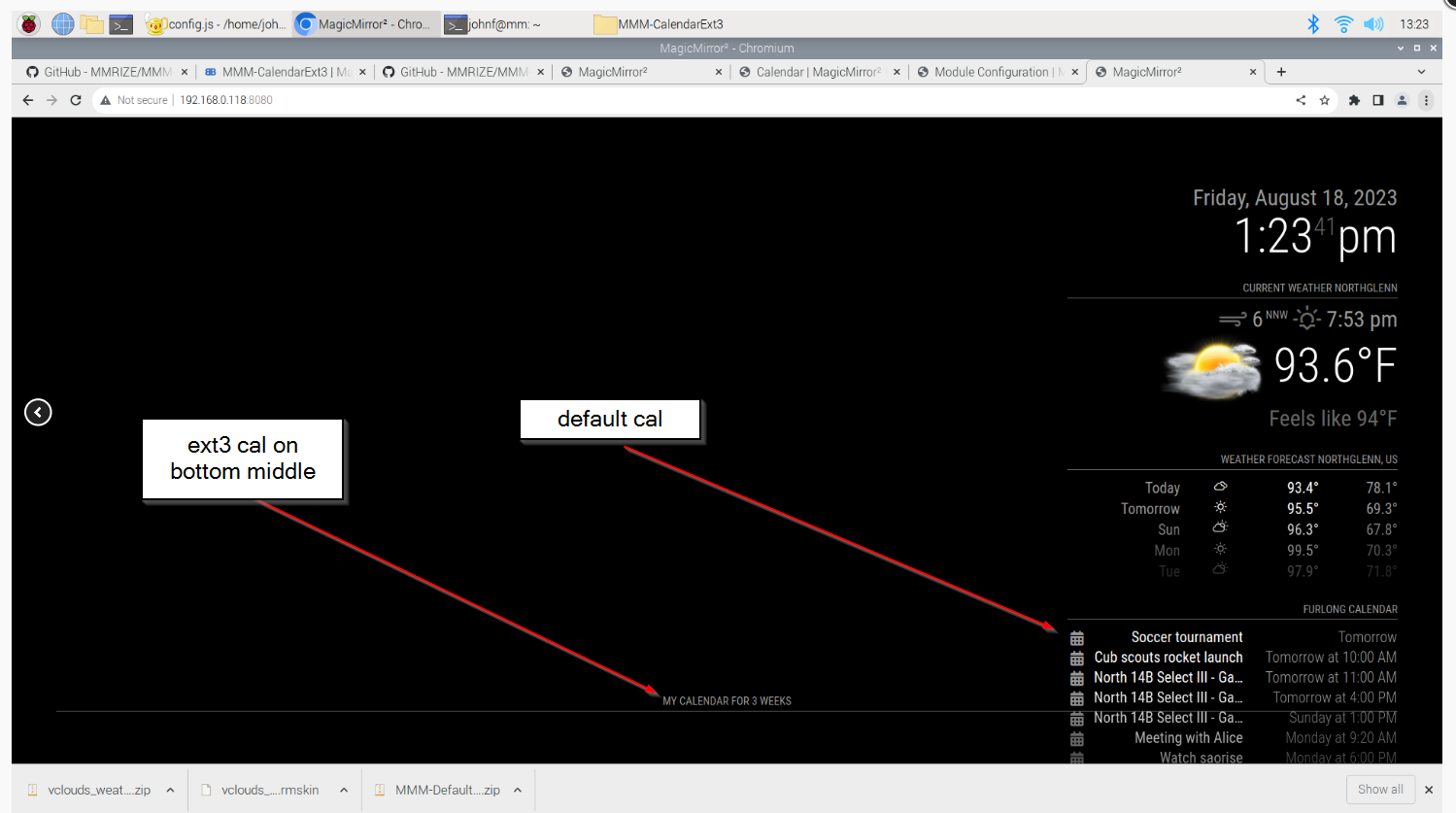
default calendar shows on the top right. It shows entries from my IOS calendar and my soccer calendar( IOS is “meeting with alice” Soccer is “north 14 B select III”) as positioned on the config.js, (see screen shot below)
it does not show on ext3. All I get is the header.
-
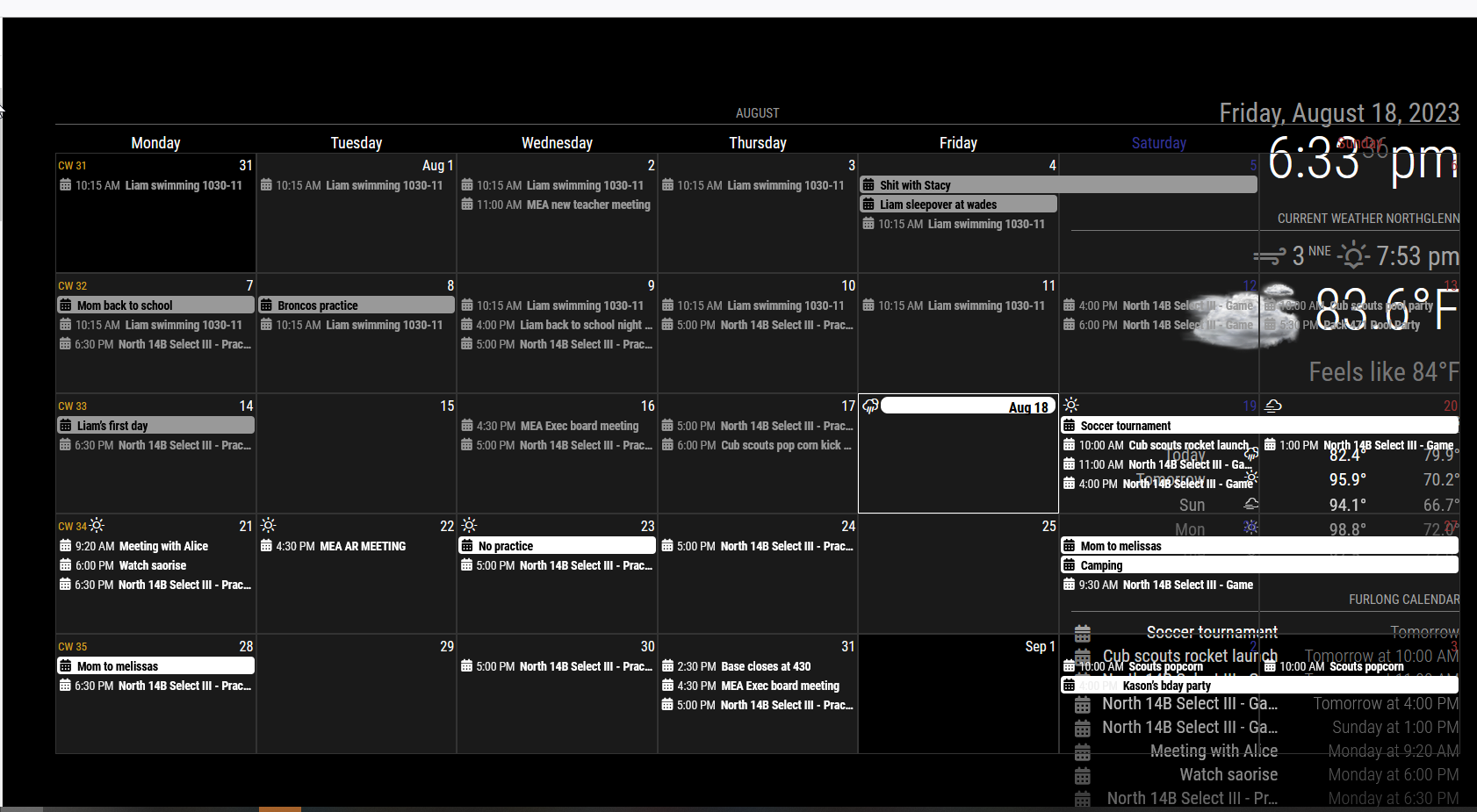
OK well this is fun. I was reading again and saw in the instructions about moving back to 1.2.6. SOOOOOO… I decided to give it a hoot. Well, now the calendar is showing up for me.
Not sure what this means.
just thought I would share.
Just need to fix the formatting now.
johnf@mm:~/MagicMirror/modules/MMM-CalendarExt3 $ git checkout snap-1.2.6 Branch 'snap-1.2.6' set up to track remote branch 'snap-1.2.6' from 'origin'. Switched to a new branch 'snap-1.2.6' -
@furry131
It might mean;- Your module was not properly installed. I think this would be the solution in your case generally.
cd ~/MagicMirror/modules/MMM-CalendarExt3 git checkout main git pull npm install git submodule update --init --recursive- Or your MM (Or Chromium/Browser what you are using) is somewhat old, update it.
-
OK thanks. I just ran your suggestions and restarted MM. It is running.
I just installed MM last week and I used sdetweil’s install script. Also just ran the the update script he has. seems to only needing to update Node.js from v16.13.0 to v16.13.1.
Must have been something odd with the install of the module then.
Appreciate everyone’s help.
-
UPDATE 1.5.0

Now, the module has a new mode,day; it could show a relatively week-like view. You can adjust the beginning of the seven-day cells from today (or relatively bydayIndex). -
@MMRIZE Thank you! That’s just what I wanted!
-
@MMRIZE
Is there a way to change the height of a calendar so it’s either nothing, or very thin?Using the “manipulateDateCell” I get the desired effect of having an icon in the cell header, however I’d like to not have a “blank” entry in the day view (see picture)
-
@bicolorbore586
What is that ‘blank’? I cannot guess what it is pointing. Could you show me a bigger picture? and to reproduce your case, send or show me the config and css with real ical urls. (eouia0819@gmail.com)
Hello! It looks like you're interested in this conversation, but you don't have an account yet.
Getting fed up of having to scroll through the same posts each visit? When you register for an account, you'll always come back to exactly where you were before, and choose to be notified of new replies (either via email, or push notification). You'll also be able to save bookmarks and upvote posts to show your appreciation to other community members.
With your input, this post could be even better 💗
Register Login