MagicMirror Forum
    • Recent
    • Tags
    • Unsolved
    • Solved
    • MagicMirror² Repository
    • Documentation
    • 3rd-Party-Modules
    • Donate
    • Discord
    • Register
    • Login
    A New Chapter for MagicMirror: The Community Takes the Lead
    Read the statement by Michael Teeuw here.

    MMM-CalendarExt3

    Scheduled Pinned Locked Moved Utilities
    689 Posts 82 Posters 2.8m Views 86 Watching
    Loading More Posts
    • Oldest to Newest
    • Newest to Oldest
    • Most Votes
    Reply
    • Reply as topic
    Log in to reply
    This topic has been deleted. Only users with topic management privileges can see it.
    • M Offline
      MMRIZE
      last edited by MMRIZE

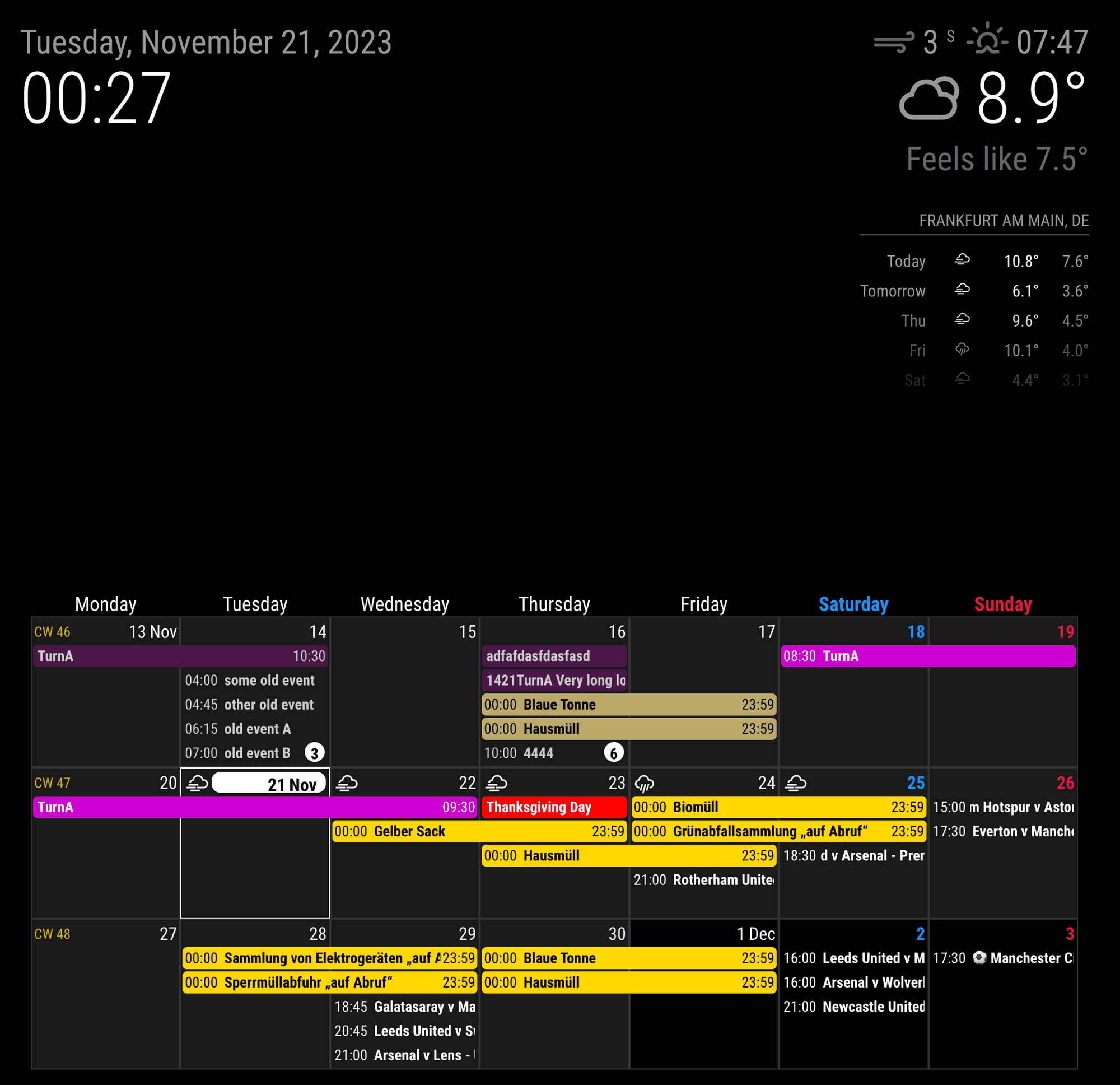
      [UPDATE] 1.7.1

      • ADDED useMarquee config
      • ADDED noMarquee event Object attribute
        From now, too long title will be rolling as marquee or ticker style.
        marquee
      1 Reply Last reply Reply Quote 1
      • N Offline
        nobbie35 @MMRIZE
        last edited by

        @MMRIZE big fan of Ext3 module… I was curious if there is any way to have the calendar setting to be the next 4 weeks? That is a valuable view for me that I currently use on MMM-MyCalendar as it seems to be one of the only calendar’s that supports that.

        N M 2 Replies Last reply Reply Quote 0
        • N Offline
          nobbie35 @nobbie35
          last edited by

          Disregard… I managed to make this work by using week view with week index and week view.

          1 Reply Last reply Reply Quote 0
          • M Offline
            MMRIZE @nobbie35
            last edited by MMRIZE

            @nobbie35
            You can use ‘mode:“week”’ and ‘weeksInView:4’(and ‘weekIndex:0’)

            1 Reply Last reply Reply Quote 0
            • B Offline
              bobbylx
              last edited by

              I’ve got this calendar set up almost perfect for my family. Just a couple minor things I would like to modify but am having no luck so far. Wondering if any of you can help. I’m sure I’m missing something easy here, but I would like to remove the little circle icon to the left of the calendar entry. I changed useSymbol to false but it still shows.

              Second, how the heck do you get the weather forecast/temp icons up next to the date? I chose useweather-true, displayweathertemp - true, I’ve tried a few of the other weather related fields but no luck. Any help with these would be appreciated.

              Also, I’ve tried a couple times now on this post and another, and cannot upload a pic no matter how small. Also wouldn’t accept my Imgur link. Not sure what I’ve done wrong there but I’ll post a pic when I can.

               {
                                      module: "MMM-CalendarExt3",
                                      position: "bottom_bar",
                                      title: "",
                                      config: {
                                        mode: "",
                                        weekIndex: 0,
                                        weeksInView: 4,
                                        instanceId: "basicCalendar",
                                        locale: 'en-EN',
                                        maxEventLines: 5,
                                        firstDayOfWeek: 0,
                                        refreshInterval: 120000,
                                        animationSpeed: 0,
                                        useSymbol: false,
                                        useWeather: true,
                                        displayWeatherTemp: true,
                                        calendarSet: ['us_holiday','family'],
                              }
                              },
                              {
                                      module: "calendar",
                                      position: "",
                                      config: {
                                        broadcastPastEvents: true,
                                        calendars: [
                                              {
                                                url: "webcal://www.calendarlabs.com/ical-calendar/ics/76/US_Holidays.ics",
                                                name: "us_holiday",
                                                color: "#6699ff"
                                              }
                                                      ]
                                              }
                              },
                              {
                                      module: "calendar",
                                      position: "",
                                      maximumNumberOfDays: 60,
                                      config: {
                                        animationSpeed: 0,
                                        fetchInterval: 100000,
                                        broadcastPastEvents: true,
                                        useSymbol: false,
                                        calendars: [
                                              {
                                                url: "https://calendar.google.com/calendar/ical/*****,                                 
              				  name: "family",
                                                color: "yellow",
                                                      user: '***@gmail.com',
                                                      pass: '***',
                                                      method: 'basic'
                                              }
                                                      ]
                                              }
                              },
              
              .MMM-CalendarExt3 {
                      margin-bottom: 0px;
                      width: 100%;
                      height: 575px;
                      font-size: 16px;
              }
              .CX3 .cw {
                      display:none
              }
              
              .CX3 .event.singleday {
                border-left:4px solid var(--calendarColor);
              }
              
              .CX3 .event.singleday:not(.useSymbol)::before {
                content: '';
              }
              ![screenshot.jpg](error) 
              
              M 1 Reply Last reply Reply Quote 0
              • M Offline
                MMRIZE @bobbylx
                last edited by MMRIZE

                @bobbylx

                1. to remove even dot mark on useSymbol: false; append this into your css/custom.css
                /* css/custom.css */
                .CX3 .event.singleday .headline:not(.useSymbol)::before {
                  display: none;
                }
                
                1. To use forecasted weather, you should activate the weather module in forecast mode.

                7d0512ef-000d-4345-b082-38021ea2511c-image.png

                1. To attach image; you image should be smaller than 2MB. That’s all.
                  To link external image; use this syntax.
                  ![caption](url)
                B 1 Reply Last reply Reply Quote 0
                • B Offline
                  bobbylx @MMRIZE
                  last edited by

                  @MMRIZE Awesome! Thank you for that. Works just like you said. I did have to put the Weather forecast module below the MMM-Calendarext3 module or else the calendar would not load. Might be something obvious to some but I’m teaching myself as I go.

                  1 Reply Last reply Reply Quote 0
                  • 1 Offline
                    1a2a3a
                    last edited by

                    Hi, couple of questions-

                    1. how do I get the soccer team news fixture into the calendar?

                    2. is is possible to not marquee the long text wording but “wrap” inside the cell?

                    M 1 Reply Last reply Reply Quote 0
                    • M Offline
                      MMRIZE @1a2a3a
                      last edited by

                      @1a2a3a

                      1. Google with some keywords, for example “epl fixtures ical” or “Arsenal schedule ics”… It will suggest some sites. Then you can get the ical(.ics) URL from those sites or can download it. I usually use footballwebages.co.uk for EPL. But for other sports, google it. :)
                        https://www.footballwebpages.co.uk/tottenham-hotspur/calendar

                      2. no you can’t.
                        https://github.com/MMRIZE/MMM-CalendarExt3/wiki/Multiliner-title-wrapping

                      1 1 Reply Last reply Reply Quote 0
                      • 1 Offline
                        1a2a3a @MMRIZE
                        last edited by

                        @MMRIZE got the ical through official manu website :)

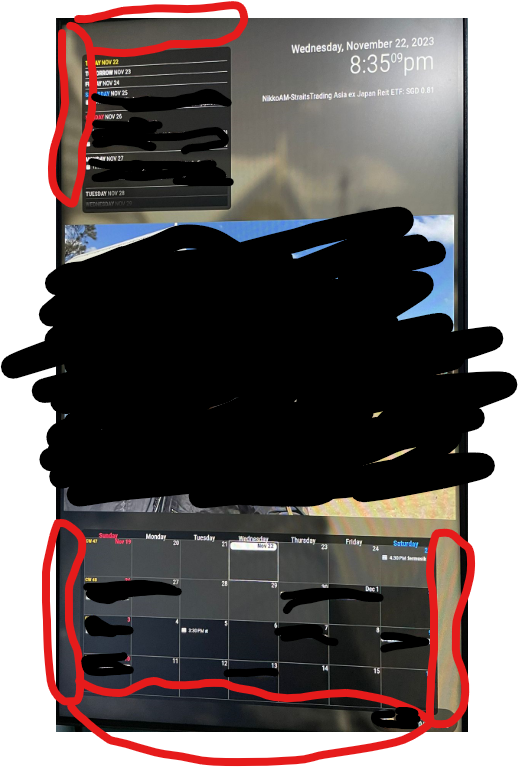
                        the ext3 is on my bottom bar. how do i flush them against the screen? no matter what setting i do, theres like a bezel portion gap between the screen and the calendar border.

                        same goes for extagenda3. i position it on top left but its not flush against the corner.

                        M 1 Reply Last reply Reply Quote 0
                        • M Offline
                          MMRIZE @1a2a3a
                          last edited by

                          @1a2a3a
                          Can you show me your screen taken? I cannot guess.

                          1 1 Reply Last reply Reply Quote 0
                          • 1 Offline
                            1a2a3a @MMRIZE
                            last edited by

                            @MMRIZE Screenshot 2023-11-22 203559.png

                            here you go. red marking

                            M 1 Reply Last reply Reply Quote 0
                            • M Offline
                              MMRIZE @1a2a3a
                              last edited by MMRIZE

                              @1a2a3a
                              Modules do not rule that area. It is the default padding of MM for the frame construction.

                              Open your css/custom.css then you can see this section.

                              :root {
                                --color-text: #999;
                                --color-text-dimmed: #666;
                                --color-text-bright: #fff;
                                --color-background: black;
                              
                                --font-primary: "Roboto Condensed";
                                --font-secondary: "Roboto";
                                
                                --font-size: 20px;
                                --font-size-small: 0.75rem;
                              
                                --gap-body-top: 60px;
                                --gap-body-right: 60px;
                                --gap-body-bottom: 60px;
                                --gap-body-left: 60px;
                                
                                --gap-modules: 30px;
                              }
                              

                              Adjust them for your purpose, especially --gap-body-XXX

                              1 1 Reply Last reply Reply Quote 0
                              • 1 Offline
                                1a2a3a @MMRIZE
                                last edited by

                                @MMRIZE thanks for that. It’s such a pain trying to figure out the css on the pi.

                                I’m currently in the midst of installing mm on my windows pc. And I will scp to copy all the modules and css to pc, then open dev and edit the css accordingly before using the pi and scp copy back the css file.

                                Is this the fastest and easiest way to go about doing this? If there’s a better route, do let me know.

                                S 1 Reply Last reply Reply Quote 0
                                • S Offline
                                  sdetweil @1a2a3a
                                  last edited by sdetweil

                                  @1a2a3a install the (free) bitvise or winscp clients on windows, enable ssh on pi
                                  and then you can edit on windows with double click on the file interface window they provide . bitvise also has a drag/drop window to copy files in either direction…

                                  on windows I use Notepad++ or Visual Studio Code as the editor…

                                  I NEVER edit ON the pi… EVER… I use ssh or one of the graphical tools…

                                  on Linux I use the Caja file manager as it can link to ‘servers’ (ssh systems) and provide the same file manager interface

                                  Sam

                                  How to add modules

                                  learning how to use browser developers window for css changes

                                  1 1 Reply Last reply Reply Quote 0
                                  • 1 Offline
                                    1a2a3a
                                    last edited by

                                    THANK YOU both! the gap body code is exactly what i needed and bitvise helps a plenty!

                                    Sam, do you mean i copy the code over from pi to pc > then simulate pc to run the mirror in dev mode and edit the css on the pc > then copy the css code from pc back to pi?

                                    S 1 Reply Last reply Reply Quote 0
                                    • S Offline
                                      sdetweil @1a2a3a
                                      last edited by sdetweil

                                      @1a2a3a no ,
                                      open any browser connected to mm, in developer mode, (so chrome on your PC viewing mm page, and editor on PC editing custom.css via bitvise directly)

                                      and you can set styles on any element to see it’s effect

                                      then can add those to custom.css and refresh

                                      see
                                      https://forum.magicmirror.builders/topic/14862/help-with-a-couple-css-issues?_=1700742616489

                                      Sam

                                      How to add modules

                                      learning how to use browser developers window for css changes

                                      1 1 Reply Last reply Reply Quote 0
                                      • 1 Offline
                                        1a2a3a @sdetweil
                                        last edited by

                                        @sdetweil hmmm, i have been editing in the module css instead of the custom css. any undesirable consequences? also, whats the button to press for refresh? i keep doing ctrl c and npm start for refresh.

                                        M S 2 Replies Last reply Reply Quote 0
                                        • M Offline
                                          MMRIZE @1a2a3a
                                          last edited by

                                          @1a2a3a
                                          Don’t do edit module’s CSS ever at all. It will be problem on module update.
                                          Instead, override them in your css/custom.css

                                          1 Reply Last reply Reply Quote 0
                                          • S Offline
                                            sdetweil @1a2a3a
                                            last edited by

                                            @1a2a3a refresh

                                            if the cursor is over the mm part of the page, ctrl-r
                                            if the cursor is over the developers window part, f5

                                            never edit any module provided file, or any mm provided file

                                            custom.css is designed to enable override of any css.
                                            Sam

                                            How to add modules

                                            learning how to use browser developers window for css changes

                                            1 1 Reply Last reply Reply Quote 0

                                            Hello! It looks like you're interested in this conversation, but you don't have an account yet.

                                            Getting fed up of having to scroll through the same posts each visit? When you register for an account, you'll always come back to exactly where you were before, and choose to be notified of new replies (either via email, or push notification). You'll also be able to save bookmarks and upvote posts to show your appreciation to other community members.

                                            With your input, this post could be even better 💗

                                            Register Login

                                            • 1
                                            • 2
                                            • 15
                                            • 16
                                            • 17
                                            • 18
                                            • 19
                                            • 34
                                            • 35
                                            • 17 / 35
                                            • First post
                                              Last post
                                            Enjoying MagicMirror? Please consider a donation!
                                            MagicMirror created by Michael Teeuw.
                                            Forum managed by Sam, technical setup by Karsten.
                                            This forum is using NodeBB as its core | Contributors
                                            Contact | Privacy Policy