MagicMirror Forum
    • Recent
    • Tags
    • Unsolved
    • Solved
    • MagicMirror² Repository
    • Documentation
    • 3rd-Party-Modules
    • Donate
    • Discord
    • Register
    • Login
    A New Chapter for MagicMirror: The Community Takes the Lead
    Read the statement by Michael Teeuw here.

    MMM-CalendarExt3

    Scheduled Pinned Locked Moved Utilities
    689 Posts 82 Posters 2.8m Views 86 Watching
    Loading More Posts
    • Oldest to Newest
    • Newest to Oldest
    • Most Votes
    Reply
    • Reply as topic
    Log in to reply
    This topic has been deleted. Only users with topic management privileges can see it.
    • S Offline
      sdetweil @1a2a3a
      last edited by sdetweil

      @1a2a3a he has a part called a submodule, that needs npm install to connect it

      so you didn’t need to clone again, just run npm install

      Sam

      How to add modules

      learning how to use browser developers window for css changes

      1 Reply Last reply Reply Quote 0
      • C Offline
        crisvdn
        last edited by

        Hi there,

        Installed your module which is really nice.
        I have one question though.
        At start up, it fetches all calendar’s I am using. However, it rendered and showed the calendars on the mirror before fetching. So its missing.

        Obviously you can fix that by having a faster fetchInterval. But I feel that is kind of unnecessary, since you dont make changes in your agenda by the minute.

        Is there a way to Fetch, and only populate the calendar on the mirror after all fetching is done?

        Regards, Cris

        M 1 Reply Last reply Reply Quote 0
        • M Offline
          MMRIZE @crisvdn
          last edited by

          @crisvdn
          There is ‘waifFetch’ config value to wait enough time.

          S C 2 Replies Last reply Reply Quote 0
          • S Offline
            Splashed @MMRIZE
            last edited by

            @MMRIZE

            I am having some issues where events show up in my Calendar Module, but don’t always show up in my CalendarExt3 module. For instance, I currently have 5 working calendars displaying the upcoming events via the calendar module. All five calendars are displaying their information.

            Currently though, only three of those calendars are showing in my monthly view of CalendarExt3. Sometimes, if I remove one or two of the calendars that do display, then I can get the ones that didnt work to show up on CalendarExt3. Currently however, I have removed all but two calendars, and still only one of them is displaying.

            Overall, I have about 8 calendars Id like to link, and Ive never gotten more than about 4-5 to work at once, despite the fact that I can get them all to show in the Calendar module at the same time.

            Any suggestions? I can post more details if desired.

            S M 2 Replies Last reply Reply Quote 0
            • S Offline
              sdetweil @Splashed
              last edited by sdetweil

              @Splashed the default calendar clips off the broadcast events using the

              maximumEntries
              

              property. the doc says the max is 100, but that is never checked

              it can be set above the calendars list
              and this value is used for the TOTAL number of events sent
              the code

              return events.slice(0, this.config.maximumEntries);
              

              or can also be set in a particular calendar

              note that this size INCLUDES the PAST events if broadcastPastEvents:true
              is set

              Sam

              How to add modules

              learning how to use browser developers window for css changes

              1 Reply Last reply Reply Quote 0
              • M Offline
                MMRIZE @Splashed
                last edited by

                @Splashed
                Maybe one of reason was mentioned by @sdetweil,
                The other reason might be fetching finish synchronization issue. When you operate many calendars to fetch, some calendars might not end fetching before drawing CX3 due to hw performance, internet speed, server’s issue, etc.
                There would be 2 general solution.

                • wait for next refreshing cycle. The fetching of calendars may be completed until then.
                • Or you can use ‘waitFetch’ config value to delay the rendering view.
                S 1 Reply Last reply Reply Quote 0
                • C Offline
                  crisvdn @MMRIZE
                  last edited by

                  @MMRIZE Thanks for your response. That actually did this.

                  The config name is a bit confusing though. It implies waiting to fetch the calendars?
                  Anyways, thank you for this awesome module :D

                  1 Reply Last reply Reply Quote 0
                  • G Offline
                    gonzonia
                    last edited by

                    I’ve been using MMM-CalendarExt3 for a while now and all is good. Suddenly I’ve got a single event that’s an hour off. The events for the rest of the day are fine, and the time is correct on all other methods (Google Calendar, BusyCal, iOS Calendar).

                    M 1 Reply Last reply Reply Quote 0
                    • M Offline
                      MMRIZE @gonzonia
                      last edited by

                      @gonzonia Could you send me the ice file(or downloadable url) and your config? (eouia0819@gmail.com)

                      1 Reply Last reply Reply Quote 0
                      • S Offline
                        Splashed @MMRIZE
                        last edited by

                        @MMRIZE Seems like you are correct with the refreshing interval. If I simply exercise patience and give it 5-10 minutes then all of my calendars do load.

                        1 Reply Last reply Reply Quote 0
                        • W Offline
                          wperry530
                          last edited by sdetweil

                          Hello all!

                          New to building out my magic mirror, and I’m running into a problem. If I understand correctly, this module would allow me to click an event from my google calendar and see the details. When I run the module, I am not getting that feature.

                          Is it something I’m doing wrong or am I misunderstanding something? Below is my config, and I have installed the lastest version of Electron.

                          {
                            module: "calendar",
                            header: "My Calendar",
                            config: {
                              calendars: [
                                {
                                  symbol: "calendar",
                                  url: "**super secret**", // Replace with your actual Google Calendar ICS link
                          		name:"wes",
                          		color:"red"
                                }
                              ],
                              maximumEntries: 10, // Number of events shown
                              maximumNumberOfDays: 365, // Show events up to a year in advance
                              displaySymbol: true, // Display the calendar symbol
                              defaultSymbol: "calendar", // Default symbol if none specified for calendar
                              // Other configuration options can be added here based on your preference
                            }
                          },
                          {
                            module: "MMM-CalendarExt3",
                            position: "middle center",
                            title: "",
                            config: {
                              mode: "week",
                              instanceId: "basicCalendar",
                              maxEventLines: 5,
                              firstDayOfWeek: 0,
                              calendarSet: ['wes']
                            }
                          
                          M 1 Reply Last reply Reply Quote 0
                          • M Offline
                            MMRIZE @wperry530
                            last edited by

                            @wperry530
                            Not only popover feature is not abled? Or some other symptom you have?
                            If only popover doesn’t work, What browser and version do you use? (Electron or Chromium version I need)

                            W 1 Reply Last reply Reply Quote 0
                            • W Offline
                              wperry530 @MMRIZE
                              last edited by

                              @MMRIZE

                              I tried a fourth uninstall / reinstall along with rebooting and it started to work. Thank you for the quick response!

                              1 Reply Last reply Reply Quote 0
                              • 1 Offline
                                1lolo94
                                last edited by

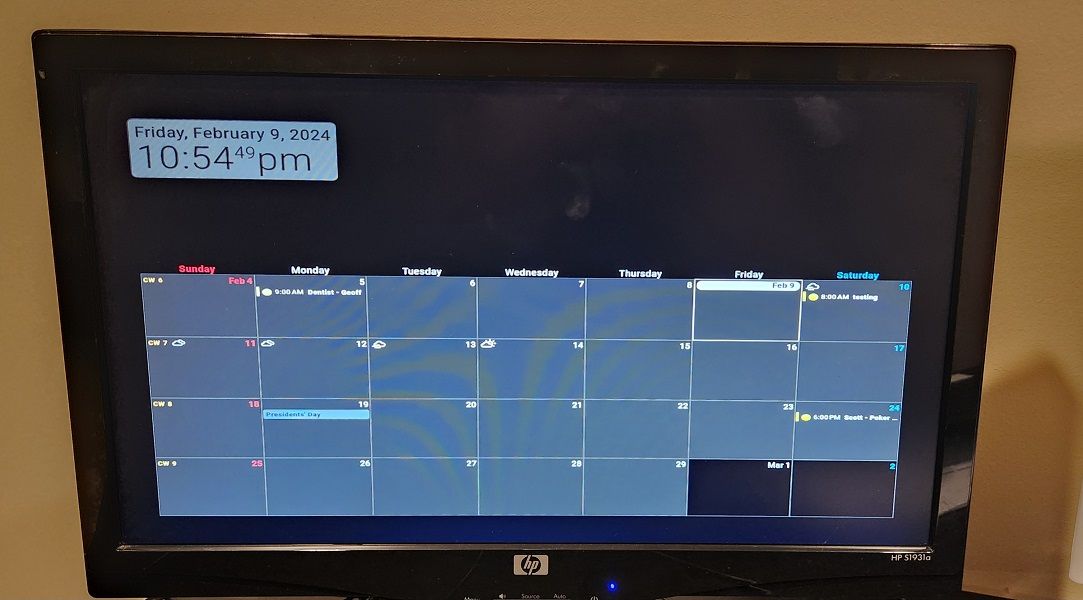
                                @MMRIZE - New to MagicMirror and need some help please! I finally got my calendar and google calendar sync’d… but now I lost my weather on the top right of the screen and for some reason the weather is showing for the next 5 days on the calendar - are these related?
                                Sorry my picture would not upload for some reason :(

                                	language: "en",
                                	locale: "en-US",
                                	logLevel: ["INFO", "LOG", "WARN", "ERROR"], // Add "DEBUG" for even more logging
                                	timeFormat: 12,
                                	units: "imperial",
                                
                                	modules: [
                                		{
                                			module: "alert",
                                		},
                                		{
                                			module: "updatenotification",
                                			position: "top_bar"
                                		},
                                		{
                                			module: "clock",
                                			position: "top_left"
                                		},
                                 {
                                                        module: "MMM-CalendarExt3",
                                                        position: "bottom_bar",
                                                        title: "",
                                                        config: {
                                                          mode: "",
                                                          weekIndex: 0,
                                                          weeksInView: 4,
                                                          instanceId: "basicCalendar",
                                                          locale: 'en-EN',
                                                          maxEventLines: 5,
                                                          firstDayOfWeek: 0,
                                                          refreshInterval: 120000,
                                                          animationSpeed: 0,
                                                          useSymbol: false,
                                                          calendarSet: ['us_holiday','family'],
                                                }
                                                },
                                                {
                                                        module: "calendar",
                                                        position: "",
                                                        config: {
                                                          broadcastPastEvents: true,
                                                          calendars: [
                                                                {
                                                                  url: "webcal://www.calendarlabs.com/ical-calendar/ics/76/US_Holidays.ics",
                                                                  name: "us_holiday",
                                                                  color: "#6699ff"
                                                                }
                                                                        ]
                                                                }
                                                },
                                                {
                                                        module: "calendar",
                                                        position: "",
                                                        maximumNumberOfDays: 60,
                                                        config: {
                                                          animationSpeed: 0,
                                                          fetchInterval: 100000,
                                                          broadcastPastEvents: true,
                                                          useSymbol: false,
                                                          calendars: [
                                                                {
                                                                  url: "PRIVATE STUFF",                                 
                                				  name: "family",
                                                                  color: "yellow",
                                                                        user: 'xxxxxxxxxxx@gmail.com',
                                                                        pass: 'x',
                                                                        method: 'basic'
                                                                }
                                                                        ]
                                                                }
                                                },
                                
                                		{
                                			module: "weather",
                                			position: "top_center",
                                			config: {
                                				weatherProvider: "openweathermap",
                                				type: "current",
                                				location: "xxxxx",
                                				locationID: "5x1x7xxx2xx078", //ID from http://bulk.openweathermap.org/sample/city.list.json.gz; unzip the gz file and find your city
                                				apiKey: "xxxxxxx",
                                				roundTemp: true,
                                			}
                                		},
                                		{
                                			module: "weather",
                                			position: "top_center",
                                			//header: "Weather Forecast",
                                			config: {
                                				weatherProvider: "openweathermap",
                                				type: "forecast",
                                				location: "xxxx",
                                				locationID: "51x72x0x78", //ID from http://bulk.openweathermap.org/sample/city.list.json.gz; unzip the gz file and find your city
                                				apiKey: "xxxxxx",
                                				fade: false,
                                				colored: "true",
                                				roundTemp: true,
                                			}
                                		},
                                	]
                                };
                                
                                /*************** DO NOT EDIT THE LINE BELOW ***************/
                                if (type of module !== "undefined") { module.exports = config; }
                                

                                CSS FILE (weather was working before adding calendar)

                                
                                 body { 
                                 color: #000;
                                 }
                                 
                                 .dimmed {
                                  color: #000;
                                  }
                                
                                .normal {
                                  color: #000;
                                }
                                
                                .bright {
                                  color: #000;
                                }
                                .module.clock {
                                  background-color:rgba(255,255,255,0.5);
                                  border-radius:8px;
                                  padding:8px;
                                }
                                .module.weather {
                                  background-color:rgba(255,255,255,0.5);
                                  border-radius:8px;
                                  padding:8px;
                                }
                                .module.weather {
                                  background-color:rgba(255,255,255,0.5);
                                  border-radius:8px;
                                  padding:8px;
                                  color: #000;
                                }
                                .dimmed {
                                /*  color: #666; */
                                    color: #000;
                                }
                                .normal {
                                /*  color: #999;*/
                                    color: #000;
                                }
                                .bright {
                                  color: #000;
                                }
                                .header {
                                  color: #000;
                                }
                                .MMM-CalendarExt3 {
                                        margin-bottom: -5px;
                                        width: 100%;
                                        height: 575px;
                                        font-size: 20px;
                                }
                                .CX3 .cw {
                                        display:none
                                }
                                
                                .CX3 .event.singleday {
                                  border-left:4px solid var(--calendarColor);
                                }
                                
                                .CX3 .event.singleday:not(.useSymbol)::before {
                                  content: '';
                                }
                                
                                S M 2 Replies Last reply Reply Quote 0
                                • S Offline
                                  sdetweil @1lolo94
                                  last edited by

                                  @1lolo94 said in MMM-CalendarExt3:

                                  Sorry my picture would not upload for some reason

                                  pic upload is the third icon from the right above the post editor

                                  Sam

                                  How to add modules

                                  learning how to use browser developers window for css changes

                                  1 Reply Last reply Reply Quote 0
                                  • M Offline
                                    MMRIZE @1lolo94
                                    last edited by

                                    @1lolo94
                                    top_right? You positioned weather module top_center… I need pictures what you mean.

                                    1 1 Reply Last reply Reply Quote 0
                                    • 1 Offline
                                      1lolo94
                                      last edited by

                                      I had to resize - sorry

                                      20240209_225448.jpg

                                      1 Reply Last reply Reply Quote 0
                                      • 1 Offline
                                        1lolo94 @MMRIZE
                                        last edited by

                                        @MMRIZE - correct, sorry - I was testing it out both ways and was about 6 hours straight trying to get everything setup.

                                        I would like it how it was in the top right. I removed all the calendar coding and the weather shows up correctly.

                                        modules: [
                                           	{
                                           		module: "alert",
                                           	},
                                           	{
                                           		module: "updatenotification",
                                           		position: "top_bar"
                                           	},
                                           	{
                                           		module: "clock",
                                           		position: "top_left"
                                           	},
                                           	{
                                           		module: "weather",
                                           		position: "top_right",
                                           		config: {
                                           			weatherProvider: "openweathermap",
                                           			type: "current",
                                           			location: "xx",
                                           			locationID: "517xx2078", //ID from http://bulk.openweathermap.org/sample/city.list.json.gz; unzip the gz file and find your city
                                           			apiKey: "1325b9a82957229ac168e428011778d8",
                                           			roundTemp: true,
                                           		}
                                           	},
                                           	{
                                           		module: "weather",
                                           		position: "top_right",
                                           		//header: "Weather Forecast",
                                           		config: {
                                           			weatherProvider: "openweathermap",
                                           			type: "forecast",
                                           			location: "xx",
                                           			locationID: "xxx", //ID from http://bulk.openweathermap.org/sample/city.list.json.gz; unzip the gz file and find your city
                                           			apiKey: "1325b9a82957229ac168e428011778d8",
                                           			fade: false,
                                           			colored: "true",
                                           			roundTemp: true,
                                           		}
                                           	},
                                           ]
                                        };
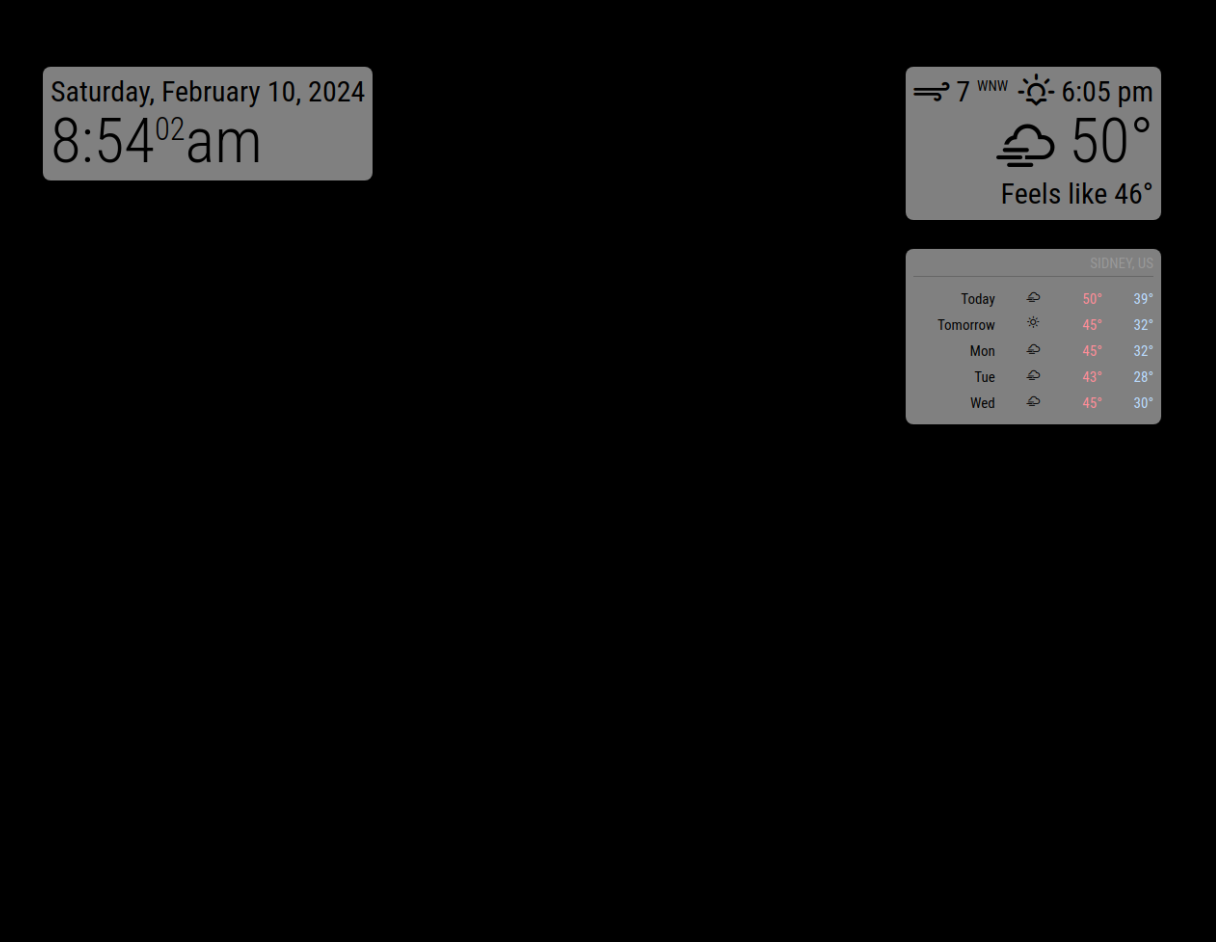
                                        

                                        dd686ea4-2afb-4995-bc26-34a61e033ab9-image.png

                                        S 2 Replies Last reply Reply Quote 0
                                        • S Offline
                                          sdetweil @1lolo94
                                          last edited by

                                          @1lolo94 just fyi. you can disable modules by adding a line for each

                                          disabled:true, 
                                          

                                          between the module: and config: lines
                                          note the trailing comma

                                          Sam

                                          How to add modules

                                          learning how to use browser developers window for css changes

                                          1 Reply Last reply Reply Quote 0
                                          • S Offline
                                            sdetweil @1lolo94
                                            last edited by

                                            @1lolo94 note that each section is a stack, 1st in config.js in that position goes first , next next, etc. if too much, it gets clipped off at the bottom of the screen.

                                            so if ext3 cal is first, others are below it.
                                            you could change css to prove it

                                            in custom.css

                                            body {
                                              overflow: default;
                                            }
                                            

                                            then try to scroll the page, up to see below the fold

                                            Sam

                                            How to add modules

                                            learning how to use browser developers window for css changes

                                            1 1 Reply Last reply Reply Quote 0

                                            Hello! It looks like you're interested in this conversation, but you don't have an account yet.

                                            Getting fed up of having to scroll through the same posts each visit? When you register for an account, you'll always come back to exactly where you were before, and choose to be notified of new replies (either via email, or push notification). You'll also be able to save bookmarks and upvote posts to show your appreciation to other community members.

                                            With your input, this post could be even better 💗

                                            Register Login

                                            • 1
                                            • 2
                                            • 31
                                            • 32
                                            • 33
                                            • 34
                                            • 35
                                            • 34 / 35
                                            • First post
                                              Last post
                                            Enjoying MagicMirror? Please consider a donation!
                                            MagicMirror created by Michael Teeuw.
                                            Forum managed by Sam, technical setup by Karsten.
                                            This forum is using NodeBB as its core | Contributors
                                            Contact | Privacy Policy