MagicMirror Forum
    • Recent
    • Tags
    • Unsolved
    • Solved
    • MagicMirror² Repository
    • Documentation
    • 3rd-Party-Modules
    • Donate
    • Discord
    • Register
    • Login
    A New Chapter for MagicMirror: The Community Takes the Lead
    Read the statement by Michael Teeuw here.

    MMM-CalendarExt3Agenda

    Scheduled Pinned Locked Moved Utilities
    224 Posts 30 Posters 362.3k Views 32 Watching
    Loading More Posts
    • Oldest to Newest
    • Newest to Oldest
    • Most Votes
    Reply
    • Reply as topic
    Log in to reply
    This topic has been deleted. Only users with topic management privileges can see it.
    • D Offline
      DDE12 @BKeyport
      last edited by

      @BKeyport
      I have been working on a new install of MM to clean everything up. I worked on CalExt3Ag today and I hope this helps you. Here is my entire custom Css. I am using Firefox in Windows 10.

      .CX3A_MAGIC {
        display:none;
      }
      
      .CX3A {
        font-size: 16px;
        min-width: 300px;
        max-width: 400px;
        text-align: left;
        color: lightgray;
        --saturdayColor : white;
        --sundayColor: white;
        --todayColor: gold;
      }
      
      /* +++  Colored symbol before event +++ */
      .CX3A .event .headline .symbol {
        color: var(--calendarColor);
        font-size: 75%;
        vertical-align: text-bottom;
      }
      .CX3A .event .headline .symbol.noSymbol::after {
        /*content: '⬤';/**/
        content: '|';
        font-family: Impact;
        font-weight: bold;
        /*display: inline-block;
        /*padding-right: 2px;/**/
      } 
       /**/
       
      /*  ++++ Divider Lines +++ */
      .CX3A .agenda .cell {
        padding-top: 2px;
        border-top: 1px solid gray;
        margin-top: 2px;
      }
      
      .CX3A .cellHeaderMain {
        display: flex;
        gap: 3px;
        text-transform: capitalize;
      }
      
      /* +++ Show/Hide event description or location +++ */
      .CX3A .agenda .event .description, 
      .CX3A .agenda .event .location {
        display: none;
      }
      
      /*  +++  Change order of info displayed  +++  */
      
      /* to test text-wrapping */
      /*.CX3A {
        width: 300px; 
      }/**/
      *.CX3A .cellBody .fullday .event {
        width: 100%;
      }/**/
      
      /* +++  Event title +++ */ 
      .CX3A .event .title {
        color: var(--calendarColor);
        order: 1;
        width: 135px; /* Adjust for your region width. Here I am using fixed value to make things simple */
        text-overflow: ellipsis;
        overflow: hidden;
        white-space: nowrap;/**/
        padding-left: 2px;
        flex-grow: 1;
      }
      
      .CX3A .event .time.startTime {
        order: 2;
        width: 79px;  
        text-align: right;
      }/**/
      
      .CX3A .event .startTime::after {
        content: ' -';
      }/**/
      
      .CX3A .event .time.endTime {
        order: 3;
        width: 45px;  
        text-align: left;
      }/**/
      
      .CX3A .event .symbol {
        order: 4;
      }/**/
      
      .CX3A .event .headline {
        justify-content: space-between;
      }
      
      .CX3A .event .description {
        overflow: hidden;
        white-space: nowrap;
        text-overflow: ellipsis;
        max-width: 100%;
        font-size: 90%;
        color: orange;
        padding-left: 20px;
      

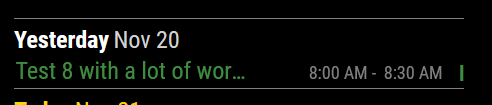
      Looks like:
      ellipsis.PNG

      Changing only .CX3A .event .title.

      /* +++  Event title +++ */ 
      .CX3A .event .title {
        color: var(--calendarColor);
        order: 1;
        width: 135px; /* Adjust for your region width. Here I am using fixed value to make things simple */
        /*text-overflow: ellipsis;
        overflow: hidden;
        white-space: nowrap;/**/
        padding-left: 1px;
        flex-grow: 1;
      }
      

      Gives:
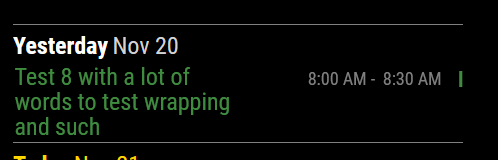
      wrapped.PNG

      I think you are wanting the wrapping and I do not LOL.

      1 Reply Last reply Reply Quote 0
      • S Offline
        shizzlesticks
        last edited by

        I’m confused how to implement the eventFilter. In the documentation it’s listed in the config properties but references a section that is with the CSS and DOM model. Should I just include it in my config.js?

        Here’s what I’m trying and it’s not removing the events like I want:

        {
        	module: "MMM-CalendarExt3Agenda",
        	position: "top_right",
        	config: {
        		instanceId: "familyCalendar",
        		calendarSet: ['Cal1', 'Cal2', 'Cal3', 'Cal4'],
        		useWeather: false,
        		showMiniMonthCalendar: false,
        		useSymbol: true,
        		waitFetch: 20000,
        		eventFilter: {
        			eventFilter: (ev) => {
        				if (ev.title.search('Your statement is ready') > -1) return false
        				return true
        			}
        		}
        	}
        },
        
        M 1 Reply Last reply Reply Quote 0
        • M Offline
          MMRIZE @shizzlesticks
          last edited by MMRIZE

          @shizzlesticks

          ...
          waitFetch: 20000,
          eventFilter: (ev) => {
          	if (ev.title.search('Your statement is ready') > -1) return false
          	return true
          },
          ...
          
          S 1 Reply Last reply Reply Quote 0
          • S Offline
            shizzlesticks @MMRIZE
            last edited by

            @MMRIZE That worked. Thanks for the help and finding my stupid mistake.

            You’ve made a nice module here. Enjoy a few coffees on me, thanks.

            1 Reply Last reply Reply Quote 1
            • luisestradaL Offline
              luisestrada
              last edited by

              Hello,

              I noticed when I select envcanada as my forecast provider I just get today’s value, not for the rest of the week. The issue happens in both, MMM-CalendarExt3 & MMM-CalendarExt3Agenda. :crying_face:

              {
              			module: "weather",
              			position: "top_right",
              			header: "Forecast",
              			config: {
              				weatherProvider: "envcanada",
              				type: "forecast",
              				maxNumberOfDays: "7",
              				location: "Montréal, QC",
              				siteCode: "s0000635",
              				provCode: "QC"
              			}
              		},
              
              M 2 Replies Last reply Reply Quote 0
              • M Offline
                MMRIZE @luisestrada
                last edited by

                @luisestrada
                Maybe its forecasted data format is different from the default OpenWeatherMap service.
                I’ll check envcanada service.

                1 Reply Last reply Reply Quote 0
                • M Offline
                  MMRIZE @luisestrada
                  last edited by MMRIZE

                  @luisestrada
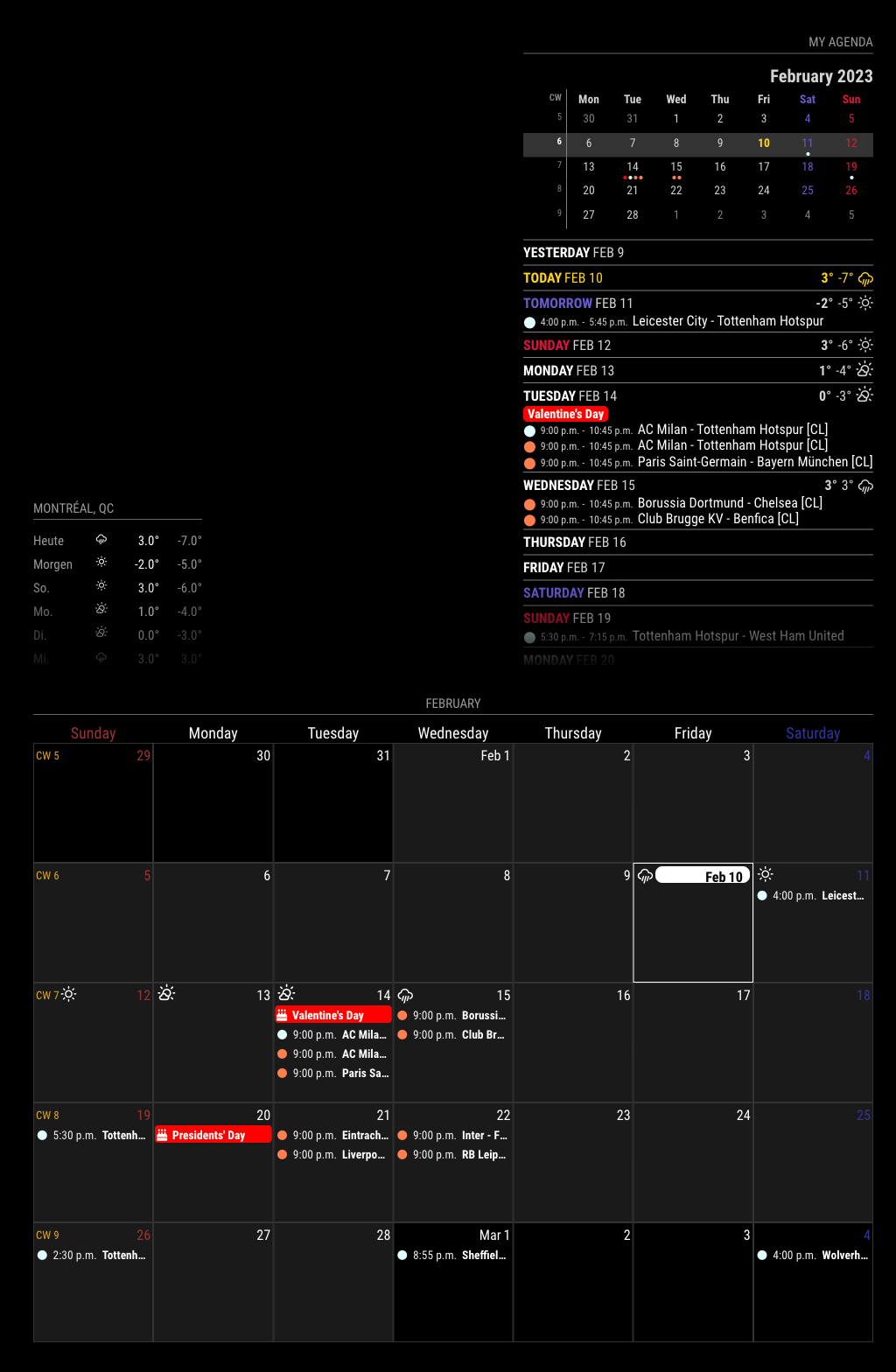
                  Hmmm… With my test, it works as expected.

                  bee15571-7c5d-4607-a0bb-7c7d4fd14daa-image.png

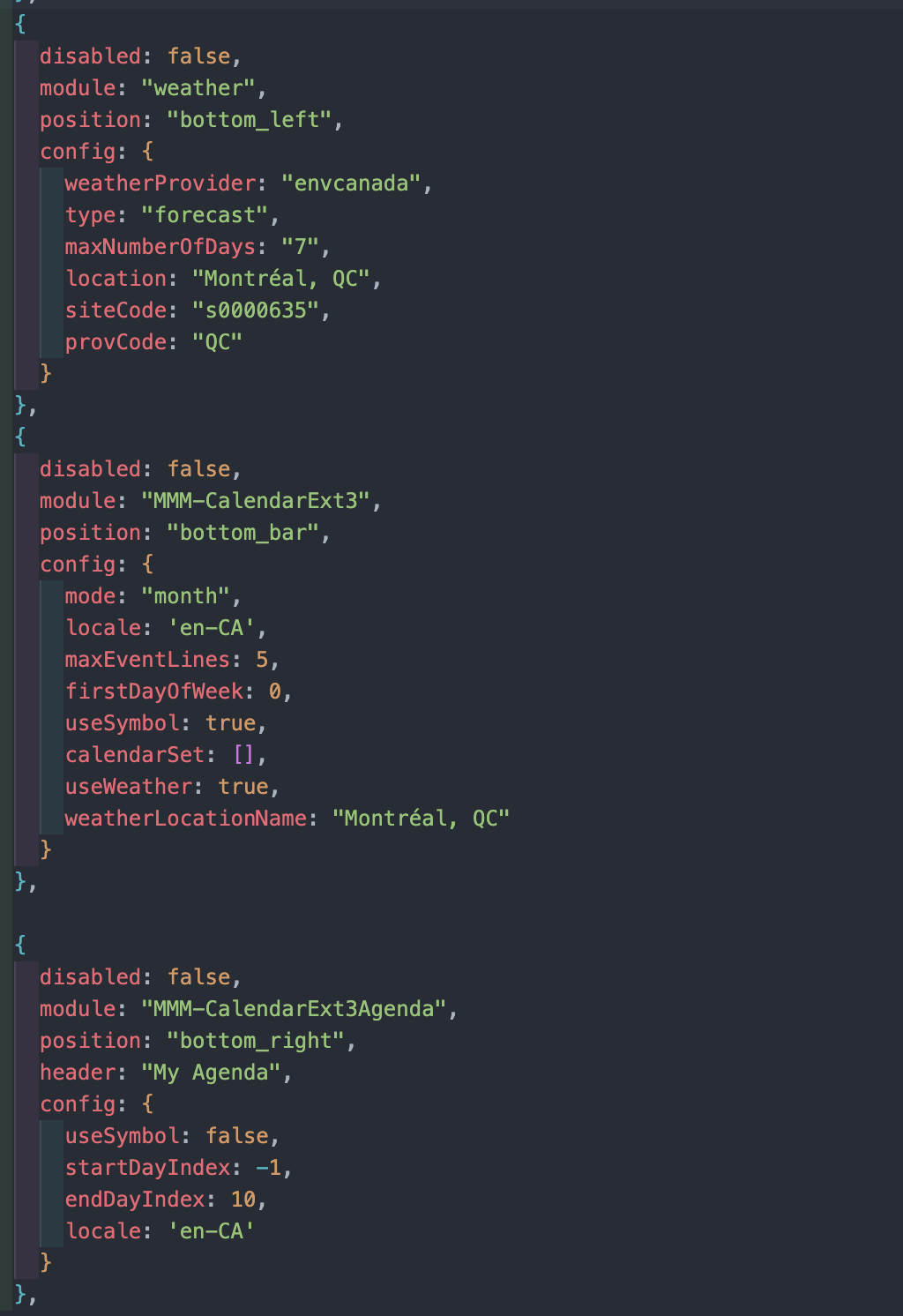
                  This is what I used for config;
                  1568d1cf-c634-4ee5-b816-70838fa71b90-image.png

                  luisestradaL 2 Replies Last reply Reply Quote 0
                  • luisestradaL Offline
                    luisestrada @MMRIZE
                    last edited by

                    @MMRIZE said in MMM-CalendarExt3Agenda:

                    @luisestrada
                    Hmmm… With my test, it works as expected.

                    …

                    This is what I used for config;
                    …

                    Thanks, I made the changes you did and it did not work, I hope it’s not because I updated Electron to the most recent version :downcast_face_with_sweat:

                    1 Reply Last reply Reply Quote 0
                    • BKeyportB Offline
                      BKeyport Module Developer @MMRIZE
                      last edited by

                      @MMRIZE Question for ya - how do you hide empty days? I would love to do that.

                      thanks!

                      The "E" in "Javascript" stands for "Easy"

                      luisestradaL 1 Reply Last reply Reply Quote 0
                      • luisestradaL Offline
                        luisestrada @BKeyport
                        last edited by

                        @BKeyport

                        I think it’s this

                        Show the days only which has event on the day.
                        .CX3A .agenda .cell[data-events-counts="0"] {
                          display: none;
                        }
                        
                        BKeyportB 1 Reply Last reply Reply Quote 1
                        • luisestradaL Offline
                          luisestrada @MMRIZE
                          last edited by

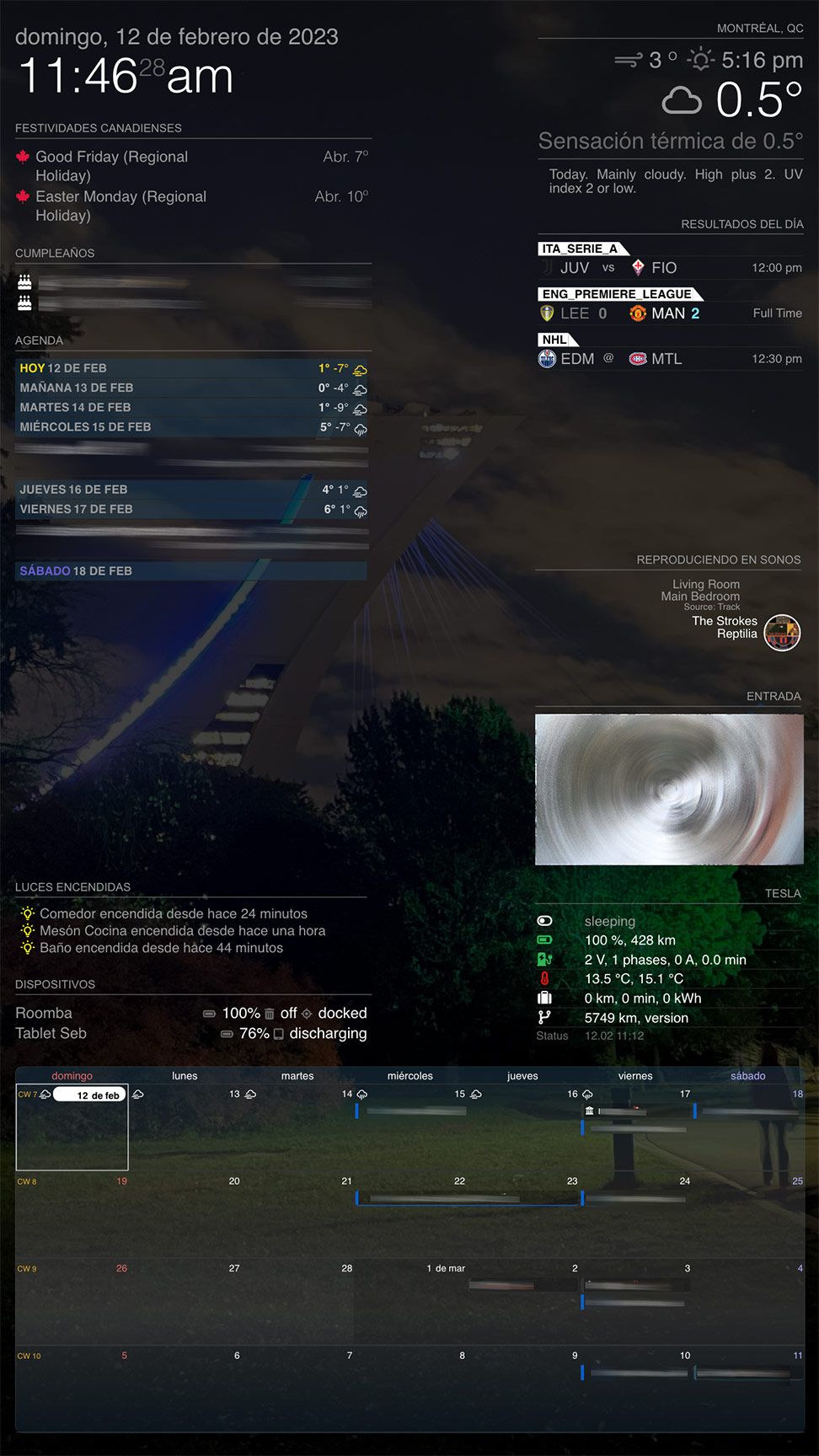
                          @MMRIZE I changed the module weatherProvider to “openweathermap”, for the type “forecast” and now it works.

                          I kept “envcanada” for the type “current”, though.
                          New Screen Shot 2023-02-12 at 11.46.24 AM.jpg

                          M 1 Reply Last reply Reply Quote 0
                          • BKeyportB Offline
                            BKeyport Module Developer @luisestrada
                            last edited by

                            @luisestrada said in MMM-CalendarExt3Agenda:

                            Show the days only which has event on the day.
                            .CX3A .agenda .cell[data-events-counts=“0”] {
                            display: none;
                            }

                            Perfect. Thank you.

                            The "E" in "Javascript" stands for "Easy"

                            1 Reply Last reply Reply Quote 1
                            • M Offline
                              MMRIZE @luisestrada
                              last edited by MMRIZE

                              @luisestrada
                              Hmmm. maybe the Locale issue. Could you send me your whole configuration(But to make things simple, drop out all other modules except MMM-CX3 and Weather(envCanada)) (eouia0819@gmail.com)

                              By the way, What’s the Tesla module?

                              BKeyportB luisestradaL 2 Replies Last reply Reply Quote 0
                              • BKeyportB Offline
                                BKeyport Module Developer @MMRIZE
                                last edited by

                                @MMRIZE I’m not quite sure how to do this -

                                I want to filter one calendar source only. This source is the schedule of an entire league, and I only want to include the “Seattle” Team. Can you help me with the filter code so I can do so?

                                Thanks!

                                The "E" in "Javascript" stands for "Easy"

                                M 1 Reply Last reply Reply Quote 0
                                • M Offline
                                  MMRIZE @BKeyport
                                  last edited by

                                  @BKeyport
                                  How can you distinguish? The target team name is included in the title of the event?

                                  BKeyportB 1 Reply Last reply Reply Quote 0
                                  • BKeyportB Offline
                                    BKeyport Module Developer @MMRIZE
                                    last edited by

                                    @MMRIZE 🏈 in the title for the one I want, and/or calendar name is “XFL”

                                    The "E" in "Javascript" stands for "Easy"

                                    S 2 Replies Last reply Reply Quote 0
                                    • S Offline
                                      sdetweil @BKeyport
                                      last edited by

                                      @BKeyport

                                      eventFilter: (ev) => {
                                      	if (ev.title.search('XFL') > -1) {Set color, whatever; }
                                      	return true
                                      },
                                      

                                      Sam

                                      How to add modules

                                      learning how to use browser developers window for css changes

                                      BKeyportB 1 Reply Last reply Reply Quote 0
                                      • BKeyportB Offline
                                        BKeyport Module Developer @sdetweil
                                        last edited by

                                        @sdetweil XFL isn’t in the title - just the calendar name.

                                        The "E" in "Javascript" stands for "Easy"

                                        1 Reply Last reply Reply Quote 0
                                        • S Offline
                                          sdetweil @BKeyport
                                          last edited by

                                          @BKeyport said in MMM-CalendarExt3Agenda:

                                          in the title for the one I want,

                                          XFL isn’t in the title

                                          ???
                                          which is it,?

                                          Sam

                                          How to add modules

                                          learning how to use browser developers window for css changes

                                          BKeyportB 1 Reply Last reply Reply Quote 0
                                          • BKeyportB Offline
                                            BKeyport Module Developer @sdetweil
                                            last edited by

                                            @sdetweil finish reading my statement. What’s unique abou that calendar is two things:

                                            1. In the title, the football emoji. (stripped by a transform)
                                            2. The calendar name is “XFL”

                                            The "E" in "Javascript" stands for "Easy"

                                            M 1 Reply Last reply Reply Quote 0

                                            Hello! It looks like you're interested in this conversation, but you don't have an account yet.

                                            Getting fed up of having to scroll through the same posts each visit? When you register for an account, you'll always come back to exactly where you were before, and choose to be notified of new replies (either via email, or push notification). You'll also be able to save bookmarks and upvote posts to show your appreciation to other community members.

                                            With your input, this post could be even better 💗

                                            Register Login

                                            • 1
                                            • 2
                                            • 3
                                            • 4
                                            • 5
                                            • 6
                                            • 7
                                            • 8
                                            • 11
                                            • 12
                                            • 6 / 12
                                            • First post
                                              Last post
                                            Enjoying MagicMirror? Please consider a donation!
                                            MagicMirror created by Michael Teeuw.
                                            Forum managed by Sam, technical setup by Karsten.
                                            This forum is using NodeBB as its core | Contributors
                                            Contact | Privacy Policy