Read the statement by Michael Teeuw here.
Upgrade errors?
-
@sdetweil – Apparently, script upgrade broke node on my system - can you help me figure how how to fix?
Thanks!
On run:
node: /lib/arm-linux-gnueabihf/libstdc++.so.6: version `GLIBCXX_3.4.26' not found (required by node)upgrade output:
doing test run = false update log will be in /home/bkey1970/MagicMirror/installers/upgrade.log Check current Node installation ... Node currently installed. Checking version number. Minimum Node version: v20.8.0 Installed Node version: v16.20.2 Node should be upgraded. Installing Node.js ... gpg: WARNING: unsafe ownership on homedir '/home/bkey1970/.gnupg' Reading package lists... Done Building dependency tree Reading state information... Done The following packages will be upgraded: nodejs 1 upgraded, 0 newly installed, 0 to remove and 0 not upgraded. Need to get 27.0 MB of archives. After this operation, 63.7 MB of additional disk space will be used. Get:1 https://deb.nodesource.com/node_20.x buster/main armhf nodejs armhf 20.5.1-deb-1nodesource1 [27.0 MB] Fetched 27.0 MB in 7s (4,153 kB/s) apt-listchanges: Reading changelogs... (Reading database ... 103684 files and directories currently installed.) Preparing to unpack .../nodejs_20.5.1-deb-1nodesource1_armhf.deb ... Unpacking nodejs (20.5.1-deb-1nodesource1) over (16.20.2-deb-1nodesource1) ... Setting up nodejs (20.5.1-deb-1nodesource1) ... Processing triggers for man-db (2.8.5-2) ... node version is node: /lib/arm-linux-gnueabihf/libstdc++.so.6: version `GLIBCXX_3.4.26' not found (required by node) node: /lib/arm-linux-gnueabihf/libstdc++.so.6: version `GLIBCXX_3.4.26' not found (required by node) Node.js installation Done! version= node: /lib/arm-linux-gnueabihf/libstdc++.so.6: version `GLIBCXX_3.4.26' not found (required by node) node: /lib/arm-linux-gnueabihf/libstdc++.so.6: version `GLIBCXX_3.4.26' not found (required by node) node: /lib/arm-linux-gnueabihf/libstdc++.so.6: version `GLIBCXX_3.4.26' not found (required by node) Check current NPM installation ... NPM currently installed. Checking version number. node: /lib/arm-linux-gnueabihf/libstdc++.so.6: version `GLIBCXX_3.4.26' not found (required by node) Minimum npm version: V10.1.0 Installed npm version: V npm should be upgraded. Installing npm ... E: Unable to correct problems, you have held broken packages. node: /lib/arm-linux-gnueabihf/libstdc++.so.6: version `GLIBCXX_3.4.26' not found (required by node) node: /lib/arm-linux-gnueabihf/libstdc++.so.6: version `GLIBCXX_3.4.26' not found (required by node) npm installation Done! version=V apply: line 318: [: -ge: unary operator expected saving custom.css upgrading from version 2.24.0 to 2.25.0 fetching latest revisions updating MagicMirror runtime, please wait apply: line 558: [: -ge: unary operator expected node: /lib/arm-linux-gnueabihf/libstdc++.so.6: version `GLIBCXX_3.4.26' not found (required by node) Checking for modules with removed libraries node: /lib/arm-linux-gnueabihf/libstdc++.so.6: version `GLIBCXX_3.4.26' not found (required by node) no modules found needing npm refresh restoring custom.css -
@BKeyport said in Upgrade errors?:
@sdetweil turns out there was an update to MMM-Wallpaper that missed due to all the bugs in upgrading. 😉
…just in case this might be interesting for anyone: I had the same problems on my Raspberry Pi 4 Model B (Rev 1.2) with buster (armv71).
- node 20 gave me the `GLIBCXX_3.4.26’ not found (required by node) error
- I had the “failed to load swrast driver”
I checked my modules, and the solution for my MM was (thanks to @sdetweil and @BKeyport here):
- installing node 18 (I did it manually like mentioned here)
- removing “DWD Warn Weather” (which caused the swrast error) from config.js
Now MagicMirror v2.25.0 is up and running! :beaming_face_with_smiling_eyes:
Thank you for all your effort and your tireless support!
May the code be with you.
-kai -
Nevermind. It appears required dependencies aren’t being updated to previous OSes. Time to switch away from Raspbian.
-
@BKeyport thanks, I’ll have to check this in the morning, and see how to do the c++ runtime upgrade too
-
@sdetweil It appears node and/or NPM is the problem - some of their newer dependencies aren’t compatible with older Raspbian installs, which will make it impossible for me to run what I want on the mirror.
Losing OMXPlayer murders my setup - so I’m working on something else.
-
@BKeyport yeh, looks like buster/legacy is too down level for node 20. let’s try 18
sudo npm  i n
sudo n i 18
node -v should show node 18
then
cd ~/MagicMirror
rm -rf node_modules
npm  run install-mm
please advise
-
@sdetweil said in Upgrade errors?:
cd ~/MagicMirror
rm -rf node_modules
npm run install-mmThe update seem to have crashed my Mirror, I applied these fixes but nothing will run here is my start up logs, what am I missing? Any help would be much appreciated! Thanks.
macserver@EDITHs-MacBook-Pro MagicMirror % npm run server > magicmirror@2.25.0 server > node ./serveronly [02.10.2023 07:51.49.432] [LOG] Starting MagicMirror: v2.25.0 [02.10.2023 07:51.49.436] [LOG] Loading config ... [02.10.2023 07:51.49.438] [DEBUG] config template file not exists, no envsubst [02.10.2023 07:51.49.442] [LOG] Loading module helpers ... [02.10.2023 07:51.49.443] [LOG] No helper found for module: alert. [02.10.2023 07:51.49.449] [LOG] Initializing new module helper ... [02.10.2023 07:51.49.450] [LOG] Module helper loaded: updatenotification [02.10.2023 07:51.49.451] [LOG] No helper found for module: clock. [02.10.2023 07:51.49.676] [LOG] Initializing new module helper ... [02.10.2023 07:51.49.676] [LOG] Module helper loaded: MMM-quote-of-the-day [02.10.2023 07:51.49.765] [ERROR] Whoops! There was an uncaught exception... [02.10.2023 07:51.49.770] [ERROR] Error: Cannot find module 'fetch' Require stack: - /Users/macserver/MagicMirror/modules/MMM-MyCalendar/calendarfetcher.js - /Users/macserver/MagicMirror/modules/MMM-MyCalendar/node_helper.js - /Users/macserver/MagicMirror/js/app.js - /Users/macserver/MagicMirror/serveronly/index.js at Module._resolveFilename (node:internal/modules/cjs/loader:1075:15) at Module._resolveFilename (/Users/macserver/MagicMirror/node_modules/module-alias/index.js:49:29) at Module._load (node:internal/modules/cjs/loader:920:27) at Module.require (node:internal/modules/cjs/loader:1141:19) at require (node:internal/modules/cjs/helpers:110:18) at Object.<anonymous> (/Users/macserver/MagicMirror/modules/MMM-MyCalendar/calendarfetcher.js:11:15) at Module._compile (node:internal/modules/cjs/loader:1254:14) at Module._extensions..js (node:internal/modules/cjs/loader:1308:10) at Module.load (node:internal/modules/cjs/loader:1117:32) at Module._load (node:internal/modules/cjs/loader:958:12) at Module.require (node:internal/modules/cjs/loader:1141:19) at require (node:internal/modules/cjs/helpers:110:18) at Object.<anonymous> (/Users/macserver/MagicMirror/modules/MMM-MyCalendar/node_helper.js:8:25) at Module._compile (node:internal/modules/cjs/loader:1254:14) at Module._extensions..js (node:internal/modules/cjs/loader:1308:10) at Module.load (node:internal/modules/cjs/loader:1117:32) { code: 'MODULE_NOT_FOUND', requireStack: [ '/Users/macserver/MagicMirror/modules/MMM-MyCalendar/calendarfetcher.js', '/Users/macserver/MagicMirror/modules/MMM-MyCalendar/node_helper.js', '/Users/macserver/MagicMirror/js/app.js', '/Users/macserver/MagicMirror/serveronly/index.js' ] } [02.10.2023 07:51.49.771] [ERROR] MagicMirror² will not quit, but it might be a good idea to check why this happened. Maybe no internet connection? [02.10.2023 07:51.49.771] [ERROR] If you think this really is an issue, please open an issue on GitHub: https://github.com/MichMich/MagicMirror/issues macserver@EDITHs-MacBook-Pro MagicMirror % -
@croc_dad72 said in Upgrade errors?:
Error: Cannot find module ‘fetch’
see https://forum.magicmirror.builders/topic/15778/fix-for-black-screen-in-2-16-and-later
-
@BKeyport also try the new temp node20 install script, listed at the top of my scripts page
-
looks like you are on deprecated node version, run
node -vwhich must be >=v18 -
@karsten13 Upgrade just broke my dev machine. :-) Guess I am not upgrading my mirror. Had to wipe my whole WSL Ubuntu install. Have to start from scratch with my dev machine. Not a great upgrade. My prod mirror is still a PI 3B running buster. :confounded_face:
-
-
@sdetweil Thanks Sam. I already broke my dev machine. How do I clean install 2.24.0?
-
@mumblebaj try the upgrade script again, with force instead of apply
it will remove and and add the right version the right way, including on buster
please advise your results…
-
for my buster install:
Ran “apply” re-run did bring back PM2 and other tools - No MagicMirror though. Says it’s running, but doesn’t appear.
Running “force” re-run same result.
0|MagicMirror | > magicmirror@2.25.0 start 0|MagicMirror | > DISPLAY="${DISPLAY:=:0}" ./node_modules/.bin/electron js/electron.js 0|MagicMirror | [02.10.2023 15:49.10.094] [LOG] Starting MagicMirror: v2.25.0 0|MagicMirror | [02.10.2023 15:49.10.101] [LOG] Loading config ... 0|MagicMirror | [02.10.2023 15:49.10.105] [DEBUG] config template file not exists, no envsubst 0|MagicMirror | [02.10.2023 15:49.10.112] [LOG] Loading module helpers ... 0|MagicMirror | [02.10.2023 15:49.10.114] [LOG] No helper found for module: MMM-MagicMover. 0|MagicMirror | [02.10.2023 15:49.10.116] [LOG] No helper found for module: alert. 0|MagicMirror | [02.10.2023 15:49.10.297] [LOG] Initializing new module helper ... 0|MagicMirror | [02.10.2023 15:49.10.298] [LOG] Module helper loaded: calendar 0|MagicMirror | [02.10.2023 15:49.10.319] [LOG] Initializing new module helper ... 0|MagicMirror | [02.10.2023 15:49.10.320] [LOG] Module helper loaded: MMM-CommandToNotification 0|MagicMirror | [02.10.2023 15:49.10.322] [LOG] No helper found for module: clock. 0|MagicMirror | [02.10.2023 15:49.10.323] [LOG] No helper found for module: MMM-Worldclock. 0|MagicMirror | [02.10.2023 15:49.10.326] [LOG] Initializing new module helper ... 0|MagicMirror | [02.10.2023 15:49.10.327] [LOG] Module helper loaded: MMM-ValuesByNotification 0|MagicMirror | [02.10.2023 15:49.10.328] [LOG] No helper found for module: MMM-Multimonth. 0|MagicMirror | [02.10.2023 15:49.10.331] [LOG] No helper found for module: MMM-CalendarExt3Agenda. 0|MagicMirror | [02.10.2023 15:49.10.332] [LOG] No helper found for module: MMM-CalendarExt3. 0|MagicMirror | [02.10.2023 15:49.10.463] [LOG] Initializing new module helper ... 0|MagicMirror | [02.10.2023 15:49.10.464] [LOG] Module helper loaded: newsfeed 0|MagicMirror | [02.10.2023 15:49.10.519] [LOG] Initializing new module helper ... 0|MagicMirror | [02.10.2023 15:49.10.519] [LOG] Module helper loaded: MMM-OpenWeatherForecast 0|MagicMirror | [02.10.2023 15:49.10.525] [LOG] Initializing new module helper ... 0|MagicMirror | [02.10.2023 15:49.10.525] [LOG] Module helper loaded: updatenotification 0|MagicMirror | [02.10.2023 15:49.10.856] [ERROR] (node:7847) UnhandledPromiseRejectionWarning: Error: Cannot find module 'fetch' 0|MagicMirror | Require stack: 0|MagicMirror | - /home/bkey1970/MagicMirror/modules/MMM-Wallpaper/node_helper.js 0|MagicMirror | - /home/bkey1970/MagicMirror/js/app.js 0|MagicMirror | - /home/bkey1970/MagicMirror/js/electron.js 0|MagicMirror | - /home/bkey1970/MagicMirror/node_modules/electron/dist/resources/default_app.asar/main.js 0|MagicMirror | - 0|MagicMirror | at node:internal/modules/cjs/loader:1084:15 0|MagicMirror | at Function.<anonymous> (node:electron/js2c/browser_init:2:117419) 0|MagicMirror | at Module._resolveFilename (/home/bkey1970/MagicMirror/node_modules/module-alias/index.js:49:29) 0|MagicMirror | at node:internal/modules/cjs/loader:929:27 0|MagicMirror | at Function._load (node:electron/js2c/asar_bundle:2:13327) 0|MagicMirror | at Module.require (node:internal/modules/cjs/loader:1150:19) 0|MagicMirror | at require (node:internal/modules/cjs/helpers:110:18) 0|MagicMirror | at Object.<anonymous> (/home/bkey1970/MagicMirror/modules/MMM-Wallpaper/node_helper.js:11:15) 0|MagicMirror | at Module._compile (node:internal/modules/cjs/loader:1271:14) 0|MagicMirror | at Object..js (node:internal/modules/cjs/loader:1326:10) 0|MagicMirror | at Module.load (node:internal/modules/cjs/loader:1126:32) 0|MagicMirror | at node:internal/modules/cjs/loader:967:12 0|MagicMirror | at Function._load (node:electron/js2c/asar_bundle:2:13327) 0|MagicMirror | at Module.require (node:internal/modules/cjs/loader:1150:19) 0|MagicMirror | at require (node:internal/modules/cjs/helpers:110:18) 0|MagicMirror | at loadModule (/home/bkey1970/MagicMirror/js/app.js:180:19) 0|MagicMirror | (Use `electron --trace-warnings ...` to show where the warning was created) 0|MagicMirror | [02.10.2023 15:49.10.857] [ERROR] (node:7847) UnhandledPromiseRejectionWarning: Unhandled promise rejection. This error originated either by throwing inside of an async function without a catch block, or by rejecting a promise which was not handled with .catch(). To terminate the node process on unhandled promise rejection, use the CLI flag `--unhandled-rejections=strict` (see https://nodejs.org/api/cli.html#cli_unhandled_rejections_mode). (rejection id: 1) 0|MagicMirror | [7847:1002/154911.190579:ERROR:object_proxy.cc(590)] Failed to call method: org.freedesktop.portal.Settings.Read: object_path= /org/freedesktop/portal/desktop: org.freedesktop.DBus.Error.ServiceUnknown: The name org.freedesktop.portal.Desktop was not provided by any .service files 0|MagicMirror | MESA-LOADER: failed to retrieve device information 0|MagicMirror | MESA-LOADER: failed to retrieve device information 0|MagicMirror | MESA-LOADER: failed to retrieve device information 0|MagicMirror | MESA-LOADER: failed to open kms_swrast (search paths /usr/lib/arm-linux-gnueabihf/dri:\$${ORIGIN}/dri:/usr/lib/dri) 0|MagicMirror | failed to load driver: kms_swrast 0|MagicMirror | MESA-LOADER: failed to open swrast (search paths /usr/lib/arm-linux-gnueabihf/dri:\$${ORIGIN}/dri:/usr/lib/dri) 0|MagicMirror | failed to load swrast driver -
@sdetweil now im getting this when I start it up? Any thoughts?
macserver@EDITHs-MacBook-Pro magicmirror % npm run server
evalmachine.<anonymous>:42
} = primordials;
    ^

ReferenceError: primordials is not defined
    at evalmachine.<anonymous>:42:5
    at Object.<anonymous> (/usr/local/lib/node_modules/npm/node_modules/graceful-fs/fs.js:11:8)
    at Module._compile (node:internal/modules/cjs/loader:1254:14)
    at Module._extensions..js (node:internal/modules/cjs/loader:1308:10)
    at Module.load (node:internal/modules/cjs/loader:1117:32)
    at Module._load (node:internal/modules/cjs/loader:958:12)
    at Module.require (node:internal/modules/cjs/loader:1141:19)
    at require (node:internal/modules/cjs/helpers:110:18)
    at Object.<anonymous> (/usr/local/lib/node_modules/npm/node_modules/graceful-fs/graceful-fs.js:3:27)
    at Module._compile (node:internal/modules/cjs/loader:1254:14)

Node.js v18.15.0
macserver@EDITHs-MacBook-Pro magicmirror %
Tried running the node upgrade but that seem to fail too?
-
@croc_dad72 did u run the node20_install.sh script? by itself?
I have to go test it again
-
@croc_dad72 @BKeyport and any others… I screwed up for the non-buster systems…
please try my scripts again… they should FIX the problems encountered…
I remove the current node and then install the correct… 18 for buster, 20 for bullseye
-
@sdetweil It does seem to work again on latest.
-
I also had this problem, using Buster on a Raspberry pi 3b.
It started with my npm being to old, unable to upgrade because my node was to old.
Installing the newest node gave me the `GLIBCXX_3.4.26’ not found (required by node) error.The solution for me was installing the LTS version of node using nvm.
nvm install 'lts/*' --reinstall-packages-from=current
nvm alias default 18
this uses node version 18.
after that I could upgrade npm
nvm install-latest-npmand with all this in place the upgrade of magic mirror worked.
Hope this helps
-
@sdetweil I tried to run the upgrade script on my RPI 4B running Bullseye and it hosed my MM. During the install, I see this:
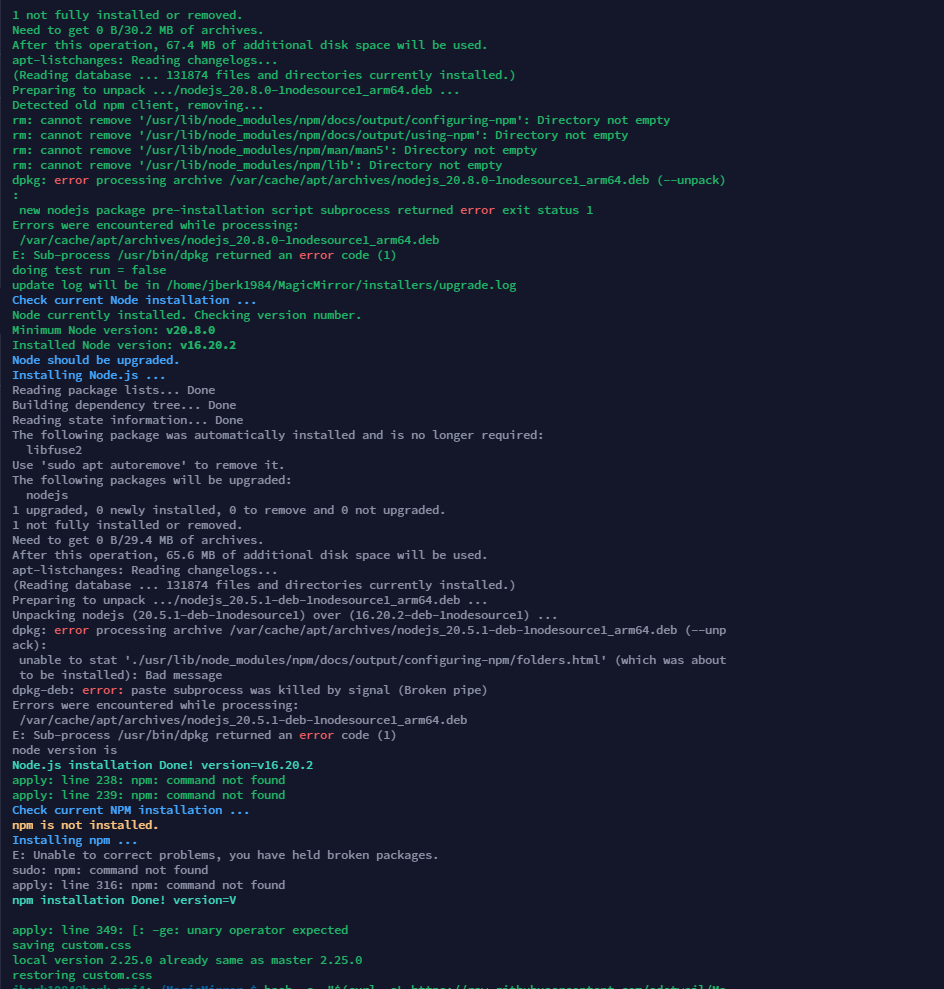
It appears to have removed/partially remove npm altogether:

Any thoughts?




Hello! It looks like you're interested in this conversation, but you don't have an account yet.
Getting fed up of having to scroll through the same posts each visit? When you register for an account, you'll always come back to exactly where you were before, and choose to be notified of new replies (either via email, or push notification). You'll also be able to save bookmarks and upvote posts to show your appreciation to other community members.
With your input, this post could be even better 💗
Register Login