MagicMirror Forum
    • Recent
    • Tags
    • Unsolved
    • Solved
    • MagicMirror² Repository
    • Documentation
    • 3rd-Party-Modules
    • Donate
    • Discord
    • Register
    • Login
    A New Chapter for MagicMirror: The Community Takes the Lead
    Read the statement by Michael Teeuw here.

    Default weather module stuck loading after latest MM update

    Scheduled Pinned Locked Moved Solved Troubleshooting
    35 Posts 8 Posters 11.4k Views 8 Watching
    Loading More Posts
    • Oldest to Newest
    • Newest to Oldest
    • Most Votes
    Reply
    • Reply as topic
    Log in to reply
    This topic has been deleted. Only users with topic management privileges can see it.
    • P Offline
      pritikin71 @sdetweil
      last edited by pritikin71

      @sdetweil Thanks, You solve a 2 weeks headache problem wit this line:

      weatherEndpoint: “/onecall”,

      1 Reply Last reply Reply Quote 1
      • J Offline
        JMac @sdetweil
        last edited by JMac

        @sdetweil so my config was identical to above, so I’ve added you new line “weatherEndpoint…”

        I’m using Putty to access the MM and used pm2 to stop the MM.
        which it did.
        However now, pm2 via Putty is no longer having any effect on the MM.
        MM isn’t launching.

        run pm2 logs mm and get a parsing error over adding the new line
        unexpected token weatherEndpoint your configuration file contains syntax errors.

        all I’ve added is weatherEndpoint: “/onecall”, to a final line under the apiKey line above.

        any thoughts?

        edit to add, pm2 status and logs show that pm2 exists still it’s just not launching. can pm2 be “updated” or should I follow the process for a first install?
        for completeness I don’t want it to launch MM on boot I just want to be able to start and stop the MM using pm2.

        S 1 Reply Last reply Reply Quote 0
        • S Do not disturb
          sdetweil @JMac
          last edited by

          @JMac did u have the trailing comma

          we added code to stop MagicMirror coming up with garbage profile on error

          Sam

          How to add modules

          learning how to use browser developers window for css changes

          J P 2 Replies Last reply Reply Quote 0
          • J Offline
            JMac @sdetweil
            last edited by

            @sdetweil I have it exactly as you have it above.

            can you share a config for this module as an example?
            I can’t even check if this is working with pm2 not launching the MM

            S 1 Reply Last reply Reply Quote 0
            • S Do not disturb
              sdetweil @JMac
              last edited by

              @JMac

              cd ~/MagicMirror
              npm start

              Sam

              How to add modules

              learning how to use browser developers window for css changes

              J 1 Reply Last reply Reply Quote 0
              • P Offline
                Peter @sdetweil
                last edited by Peter

                @sdetweil Adding ‘weatherEndpoint: “/onecall”,’’ gives some kind of weather, but for the wrong location I presume (26C but it is only 15C here).
                So, location ID does not work with API 3.0; it worked with 2.5.
                Somebody have the solution?
                Lat/ Lon?

                Peter

                M 1 Reply Last reply Reply Quote 0
                • J Offline
                  JMac @sdetweil
                  last edited by

                  @sdetweil

                  > magicmirror@2.29.0 start
                  > DISPLAY="${DISPLAY:=:0}" ./node_modules/.bin/electron js/electron.js
                  
                  [2024-10-08 19:41:58.640] [LOG]   Starting MagicMirror: v2.29.0
                  [2024-10-08 19:41:58.693] [LOG]   Loading config ...
                  [2024-10-08 19:41:58.698] [LOG]   config template file not exists, no envsubst
                  [2024-10-08 19:41:59.497] [INFO]  Checking config file /home/MagicMirror/MagicMirror/config/config.js ...
                  [2024-10-08 19:41:59.584] [ERROR] Your configuration file contains syntax errors :(
                  Line 94 column 5: Parsing error: Unexpected token weatherEndpoint
                  

                  That parsing error is for the new line added in for weatherEndpoint

                  S 1 Reply Last reply Reply Quote 0
                  • S Do not disturb
                    sdetweil @JMac
                    last edited by

                    @JMac yes, the line before needs a trailing comma

                    Sam

                    How to add modules

                    learning how to use browser developers window for css changes

                    1 Reply Last reply Reply Quote 1
                    • M Offline
                      MaXi-XCeL Project Sponsor @Peter
                      last edited by

                      @Peter Found it in the documentation!

                      Note: Latitude and longitude are REQUIRED if weatherEndpoint is set to ‘/onecall’. The locationID and location options are ignored when the OpenWeatherMap One Call API is used.

                      https://docs.magicmirror.builders/modules/weather.html#configuration-options

                      P P 2 Replies Last reply Reply Quote 1
                      • P Offline
                        Peter @MaXi-XCeL
                        last edited by

                        @MaXi-XCeL it works!
                        Thanks,
                        Peter

                        1 Reply Last reply Reply Quote 0
                        • S sdetweil has marked this topic as solved on
                        • P Offline
                          pritikin71 @MaXi-XCeL
                          last edited by

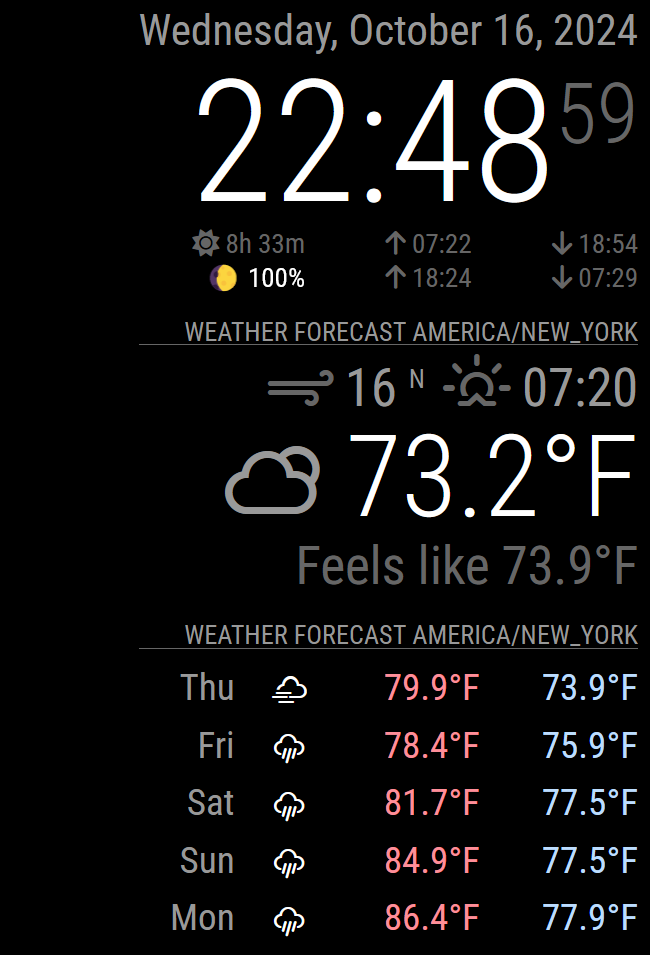
                          @MaXi-XCeL Screenshot 2024-10-16 224904.png

                          Hi I have a new problem now, using /onecall and the correct Lat /Long parameters shows my Time Zone Name omn top of Weather modules and a Crazy time… the Clock Module shows correct.

                          What else I need to modify to have Weather working again like before the doomed update? ( “Xx” for privacy)

                          	{
                          		module: "weather",
                          		CalendarClasses: "current",
                          		position: "top_right",
                          		header: "Weather Forecast",
                                  disabled: false,
                          		config: {
                          			weatherProvider: "openweathermap",
                          			weatherEndpoint: "/onecall",
                          			//updateInterval: "20",
                          			type: "current",
                          			tempUnits: "imperial",
                          			degreeLabel: "false",
                          			location: "XxXxX",
                          			locationID: "XXxXXX", //ID from http://bulk.openweathermap.org/sample/city.list.json.gz; unzip the gz file and find your city
                          			apiKey: "XxXXXXxxXXXXxXXxXXxX",
                                      showFeelsLike: "false",
                          			lat: "2XXXX350",
                                      lon: "-8X.3XXxX915"	
                          			
                          		}
                          
                          S S 2 Replies Last reply Reply Quote 0
                          • S Do not disturb
                            sdetweil @pritikin71
                            last edited by

                            @pritikin71

                            see
                            https://forum.magicmirror.builders/topic/19043/location-title-in-default-module-weather-openweather

                            Sam

                            How to add modules

                            learning how to use browser developers window for css changes

                            P 1 Reply Last reply Reply Quote 0
                            • P Offline
                              pritikin71 @sdetweil
                              last edited by

                              @sdetweil Thank you a lot.

                              I was able to fix the header problem but not the time problem. I looked to a lot of /js files looking for the TimeZone Parameter but I didnt get it.
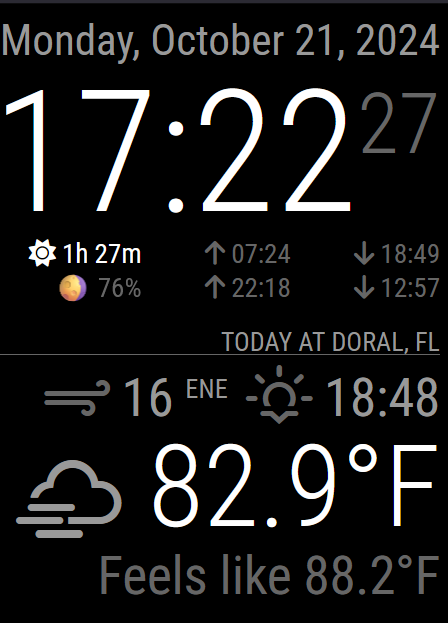
                              4f3c3b4a-a899-4a5c-9e43-9cdb9f97e7d5-image.png

                              Also is really weird the 18:48… the different minutes tells that maybe isn’t a timezone problem.

                              S karsten13K 2 Replies Last reply Reply Quote 0
                              • S Do not disturb
                                sdetweil @pritikin71
                                last edited by sdetweil

                                @pritikin71 weather with openweather 3 uses lat/lon for location
                                and time is local system time . make sure you have timezone set correctly

                                corrected below… sunrise/sunset time is shown (whichever is next)
                                not current wall clock time

                                Sam

                                How to add modules

                                learning how to use browser developers window for css changes

                                1 Reply Last reply Reply Quote 0
                                • karsten13K Offline
                                  karsten13 @pritikin71
                                  last edited by

                                  @pritikin71 said in Default weather module stuck loading after latest MM update:

                                  Also is really weird the 18:48

                                  this is not an actual time, but sunrise or sunset (depending on what comes next)

                                  S 1 Reply Last reply Reply Quote 0
                                  • S Do not disturb
                                    sdetweil @karsten13
                                    last edited by

                                    @karsten13 dang I get that wrong EVERY time!

                                    Sam

                                    How to add modules

                                    learning how to use browser developers window for css changes

                                    karsten13K 1 Reply Last reply Reply Quote 0
                                    • karsten13K Offline
                                      karsten13 @sdetweil
                                      last edited by

                                      @sdetweil said in Default weather module stuck loading after latest MM update:

                                      @karsten13 dang I get that wrong EVERY time!

                                      one of the reasons I wrote my own njk …
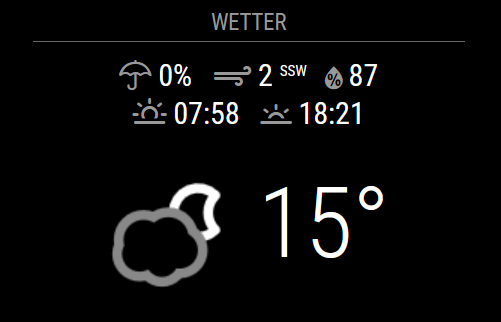
                                      83d6bdf4-2130-45d9-9c83-72f2894fec3d-grafik.png

                                      P 1 Reply Last reply Reply Quote 1
                                      • P Offline
                                        pritikin71 @karsten13
                                        last edited by

                                        @karsten13 Wow… you kill me… what a Shame jaja Sorry for the misunderstood and great idea your config/

                                        @sdetweil thanks too

                                        1 Reply Last reply Reply Quote 0
                                        • S Offline
                                          Sampleswow @pritikin71
                                          last edited by

                                          @pritikin71 said in [Default weather module stuck loading after latest MM

                                            {
                                            	module: "weather",
                                            	CalendarClasses: "current",
                                            	position: "top_right",
                                            	header: "Weather Forecast",
                                                  disabled: false,
                                            	config: {
                                            		weatherProvider: "openweathermap",
                                            		weatherEndpoint: "/onecall",
                                            		//updateInterval: "20",
                                            		type: "current",
                                            		tempUnits: "imperial",
                                            		degreeLabel: "false",
                                            		location: "XxXxX",
                                            		locationID: "XXxXXX", //ID from http://bulk.openweathermap.org/sample/city.list.json.gz; unzip the gz file and find your city
                                            		apiKey: "XxXXXXxxXXXXxXXxXXxX",
                                                      showFeelsLike: "false",
                                            		lat: "2XXXX350",
                                                      lon: "-8X.3XXxX915"	
                                            		
                                            	}
                                          

                                          My code looks exactly like this i even generated a new api key paid setup payment and i am still only getting loading on my npm start i have Zero Errors im so confused

                                          S 1 Reply Last reply Reply Quote 0
                                          • S Do not disturb
                                            sdetweil @Sampleswow
                                            last edited by

                                            @Sampleswow weather is done all in browser, so you have to open the browser developers window condole tab to see any errors

                                            ctrl-shift-i

                                            Sam

                                            How to add modules

                                            learning how to use browser developers window for css changes

                                            S 1 Reply Last reply Reply Quote 0

                                            Hello! It looks like you're interested in this conversation, but you don't have an account yet.

                                            Getting fed up of having to scroll through the same posts each visit? When you register for an account, you'll always come back to exactly where you were before, and choose to be notified of new replies (either via email, or push notification). You'll also be able to save bookmarks and upvote posts to show your appreciation to other community members.

                                            With your input, this post could be even better 💗

                                            Register Login

                                            • 1
                                            • 2
                                            • 2 / 2
                                            • First post
                                              Last post
                                            Enjoying MagicMirror? Please consider a donation!
                                            MagicMirror created by Michael Teeuw.
                                            Forum managed by Sam, technical setup by Karsten.
                                            This forum is using NodeBB as its core | Contributors
                                            Contact | Privacy Policy