Read the statement by Michael Teeuw here.
MMM-Neko — a classic animated cat for your mirror
-
Years ago, I had Neko running on my Macintosh SE. Now it lives on my MagicMirror.
Neko wanders around, pauses to scratch, and takes naps. It works without a mouse or touchscreen, but you can optionally have it walk toward a touch target.
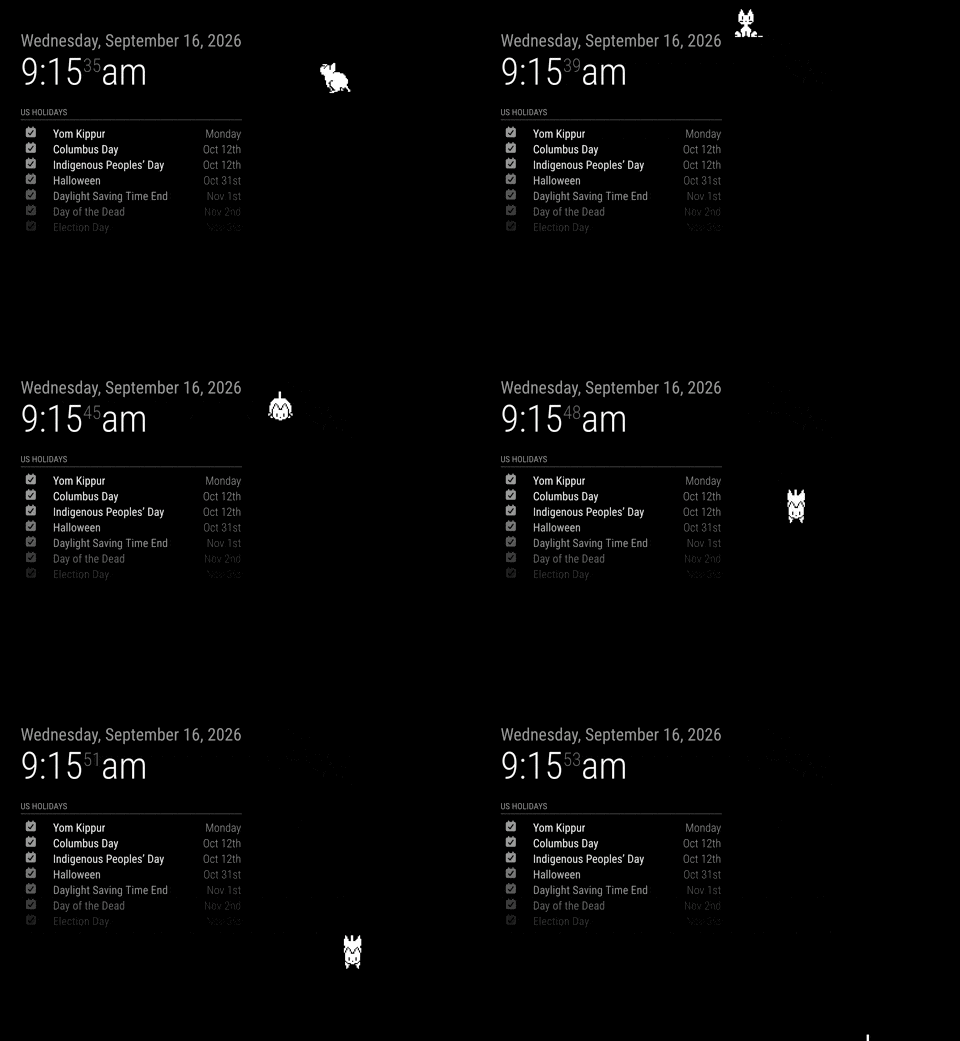
A few features:
- Transparent, click-through overlay—other modules remain usable.
- Four sprite sizes, from 32 × 32 to 128 × 128 pixels.
- Respects reduced-motion settings.
- Notifications to show, hide, pause, resume, change behavior, or send Neko to a named mirror region.
- Supports MagicMirror’s normal hide/show behavior, so other modules can hide it when needed.
Basic configuration:
{
  module: "MMM-Neko",
  position: "fullscreen_above",
  config: {
    mode: "wander",
    scale: 2
  }
}
Code, installation instructions, and configuration options:
https://github.com/bwente/MMM-Neko
Feedback and reports from other setups would be appreciated! -
@bwente Nice :D Don’t forget to add it to the module list: https://github.com/MagicMirrorOrg/MagicMirror/wiki/3rd-party-modules
-
@KristjanESPERANTO Only so many hours in the day. :)
-
@bwente
Can I run the Cat and Dog at the same time? -
@plainbroke Sure. Most modules can be run at the same time with different configs. I run the weather module with two configs at once.
Don’t expect them to chase each other. They will be independent. I would start them in to different locations, to help prevent them from overlapping.
{ module: "MMM-Neko", position: "fullscreen_above", config: { character: "cat", startPosition: { x: 0.3, y: 0.7 } } }, { module: "MMM-Neko", position: "fullscreen_above", config: { character: "dog", startPosition: { x: 0.7, y: 0.7 } } }, -
@bwente
Cool, Thanks so much. -
This is one cool module, thanks!
The cat goes under the calendar module and on top of others. Is there any option to keep it on top only? -
There isn’t a separate “always on top” option, but Neko should be configured with:
position: "fullscreen_above",If that’s already set, the calendar may have CSS that puts it above Neko. Which calendar module are you using, and do you have any custom CSS for it? That will help me suggest the right adjustment.
-
There isn’t a separate “always on top” option, but Neko should be configured with:
position: "fullscreen_above",If that’s already set, the calendar may have CSS that puts it above Neko. Which calendar module are you using, and do you have any custom CSS for it? That will help me suggest the right adjustment.
Yes, it looks like ccs config, I asked AI and it gave me this option and it works for me.
   /* Force MMM-Neko to always render on the absolute top layer */
   .MMM-Neko {
       z-index: 9999 !important;
       pointer-events: none; /* Ensures the cat doesn't block clicks/hover on modules underneath */
   }

   /* Ensure the actual cat image/sprite also inherits the top layer */
   .MMM-Neko img,
   .MMM-Neko svg {
       z-index: 9999 !important;
       pointer-events: auto; /* Re-enables touch/mouse interaction specifically for the cat if you use "touch" or "mouse" mode */
   }

Hello! It looks like you're interested in this conversation, but you don't have an account yet.
Getting fed up of having to scroll through the same posts each visit? When you register for an account, you'll always come back to exactly where you were before, and choose to be notified of new replies (either via email, or push notification). You'll also be able to save bookmarks and upvote posts to show your appreciation to other community members.
With your input, this post could be even better 💗
Register Login