Read the statement by Michael Teeuw here.
MMM-Swipe - Hand gestures
-
@Mitchfarino Looks almost all good. I’m not sure if you have your trigger pin hooked up to ground from this picture. The pins in the config are not the actual pin #'s of the header. It uses the GPIO#. I use this picture as a reference.

As an example you can see that pin 32 is called GPIO12. If you connected your Trig wire to that and your Echo wire to GPIO16 (physical pin 36). In the config.js you would use :
echoLeftPin: 12,
triggerLeftPin: 16,and then a similar setup for your other sensor.
If you are still having issues with the setup, please let me know.As a reference point, your red wire is connected to physical pin #2.
-
@mochman I have a problem when installing the modules. When I enter the module in the config. When I start the Magic Mirror I get the following error message and a white screen.
Loading config ... Loading module helpers ... No helper found for module: alert. WARNING! Could not load config file. Starting with default configuration. Error found: Error: Module version mismatch. Expected 49, got 48. Loading module helpers ... No helper found for module: alert. App threw an error during load Error: Module version mismatch. Expected 49, got 48. at Error (native) at process.module.(anonymous function) [as dlopen] (ELECTRON_ASAR.js:167:20) at Object.Module._extensions..node (module.js:568:18) at Object.module.(anonymous function) [as .node] (ELECTRON_ASAR.js:167:20) at Module.load (module.js:458:32) at tryModuleLoad (module.js:417:12) at Function.Module._load (module.js:409:3) at Module.require (module.js:468:17) at require (internal/module.js:20:19) at Object.<anonymous> (/home/pi/MagicMirror/node_modules/mmm-usonic/lib/usonic.js:5:14) Whoops! There was an uncaught exception... Error: Module version mismatch. Expected 49, got 48. at Error (native) at process.module.(anonymous function) [as dlopen] (ELECTRON_ASAR.js:167:20) at Object.Module._extensions..node (module.js:568:18) at Object.module.(anonymous function) [as .node] (ELECTRON_ASAR.js:167:20) at Module.load (module.js:458:32) at tryModuleLoad (module.js:417:12) at Function.Module._load (module.js:409:3) at Module.require (module.js:468:17) at require (internal/module.js:20:19) at Object.<anonymous> (/home/pi/MagicMirror/node_modules/mmm-usonic/lib/usonic.js:5:14) MagicMirror will not quit, but it might be a good idea to check why this happened. Maybe no internet connection? If you think this really is an issue, please open an issue on GitHub: https://github.com/MichMich/MagicMirror/issues Launching application. ´´´ -
@BeLuGe Have you run
npm installin theMMM-Swipefolder? Are you running the mirror withsudo? If so would you mind posting your config.js file. Thanks. -
@mochman Yes I have run
npm installin the MMM-Swipe folder. I running the mirror withoutsudo.
Error Message without sudo:Loading config ... Loading module helpers ... No helper found for module: alert. Initializing new module helper ... WARNING! Could not load config file. Starting with default configuration. Error found: Error: Module version mismatch. Expected 49, got 48. Loading module helpers ... No helper found for module: alert. Initializing new module helper ... App threw an error during load Error: Module version mismatch. Expected 49, got 48. at Error (native) at process.module.(anonymous function) [as dlopen] (ELECTRON_ASAR.js:167:20) at Object.Module._extensions..node (module.js:568:18) at Object.module.(anonymous function) [as .node] (ELECTRON_ASAR.js:167:20) at Module.load (module.js:458:32) at tryModuleLoad (module.js:417:12) at Function.Module._load (module.js:409:3) at Module.require (module.js:468:17) at require (internal/module.js:20:19) at Object.<anonymous> (/home/pi/MagicMirror/modules/MMM-Swipe/node_modules/mmm-usonic/lib/usonic.js:5:14) Whoops! There was an uncaught exception... Error: Module version mismatch. Expected 49, got 48. at Error (native) at process.module.(anonymous function) [as dlopen] (ELECTRON_ASAR.js:167:20) at Object.Module._extensions..node (module.js:568:18) at Object.module.(anonymous function) [as .node] (ELECTRON_ASAR.js:167:20) at Module.load (module.js:458:32) at tryModuleLoad (module.js:417:12) at Function.Module._load (module.js:409:3) at Module.require (module.js:468:17) at require (internal/module.js:20:19) at Object.<anonymous> (/home/pi/MagicMirror/modules/MMM-Swipe/node_modules/mmm-usonic/lib/usonic.js:5:14) MagicMirror will not quit, but it might be a good idea to check why this happened. Maybe no internet connection? If you think this really is an issue, please open an issue on GitHub: https://github.com/MichMich/MagicMirror/issues Launching application.Error Message with sudo:
No protocol specified npm ERR! Linux 4.4.19-v7+ npm ERR! argv "/usr/bin/nodejs" "/usr/bin/npm" "start" npm ERR! node v6.4.0 npm ERR! npm v3.10.3 npm ERR! code ELIFECYCLE npm ERR! magicmirror@2.0.0 start: `electron js/electron.js` npm ERR! Exit status 1 npm ERR! npm ERR! Failed at the magicmirror@2.0.0 start script 'electron js/electron.js'. npm ERR! Make sure you have the latest version of node.js and npm installed. npm ERR! If you do, this is most likely a problem with the magicmirror package, npm ERR! not with npm itself. npm ERR! Tell the author that this fails on your system: npm ERR! electron js/electron.js npm ERR! You can get information on how to open an issue for this project with: npm ERR! npm bugs magicmirror npm ERR! Or if that isn't available, you can get their info via: npm ERR! npm owner ls magicmirror npm ERR! There is likely additional logging output above. npm ERR! Please include the following file with any support request: npm ERR! /home/pi/MagicMirror/npm-debug.logconfig.js
/* Magic Mirror Config Sample * * By Michael Teeuw http://michaelteeuw.nl * MIT Licensed. */ var config = { port: 8080, language: 'de', timeFormat: 24, units: 'metric', modules: [ { module: 'alert', }, { module: 'motiondetector', config: { timeout: 600000 // time in milliseconds for to switch off the display after last movement is detected. } }, { module: 'MMM-Swipe', position: 'bottom_left', // Doesn't matter after it's setup. It should be blank. // Best results in one of the side regions like: bottom_left config: { // See 'Configuration options' for more information. echoLeftPin: 24, //Left Sensor's BCM Numbered Echo pin - REQUIRED triggerLeftPin: 23, //Left Sensor's BCM Numbered trigger pin - REQUIRED echoRightPin: 26, //Right Sensor's BCM Numbered Echo pin - REQUIRED triggerRightPin: 25, //Right Sensor's BCM Numbered trigger pin - REQUIRED useAsButton: false, //Enable a GPIO output when you "press". buttonPin: 8, verbose: true, calibrate: true } }, { module: 'clock', position: 'top_left' }, { module: 'calendar', header: 'Feiertage', position: 'top_left', config: { calendars: [ { symbol: 'calendar-check-o ', url: '' } ] } }, { module: 'MMM-FRITZ-Box-Callmonitor', position: 'top_right', // This can be any of the regions. Best results in left or right regions. header: "Letzte Anrufe", // This is optional config: { // See 'Configuration options' for more information. } }, { module: 'compliments', position: 'lower_third' }, { module: 'currentweather', position: 'top_right', config: { location: '', locationID: '', //ID from http://www.openweathermap.org appid: '' } }, { module: 'weatherforecast', position: 'top_right', header: 'Wettervorhersage', config: { location: '', locationID: '', //ID from http://www.openweathermap.org appid: '' } }, { module: 'newsfeed', position: 'bottom_bar', config: { feeds: [ { title: "N24 News", url: "http://feeds.n24.de/n24/homepage.xml" } ], showSourceTitle: true, showPublishDate: true } }, ] }; /*************** DO NOT EDIT THE LINE BELOW ***************/ if (typeof module !== 'undefined') {module.exports = config;} -
@mochman I’m only just back looking at this
Any tutorial I find online says I need a breadboard too - is that correct?
What pins should put these in? Or where can I find resource on how to do it?
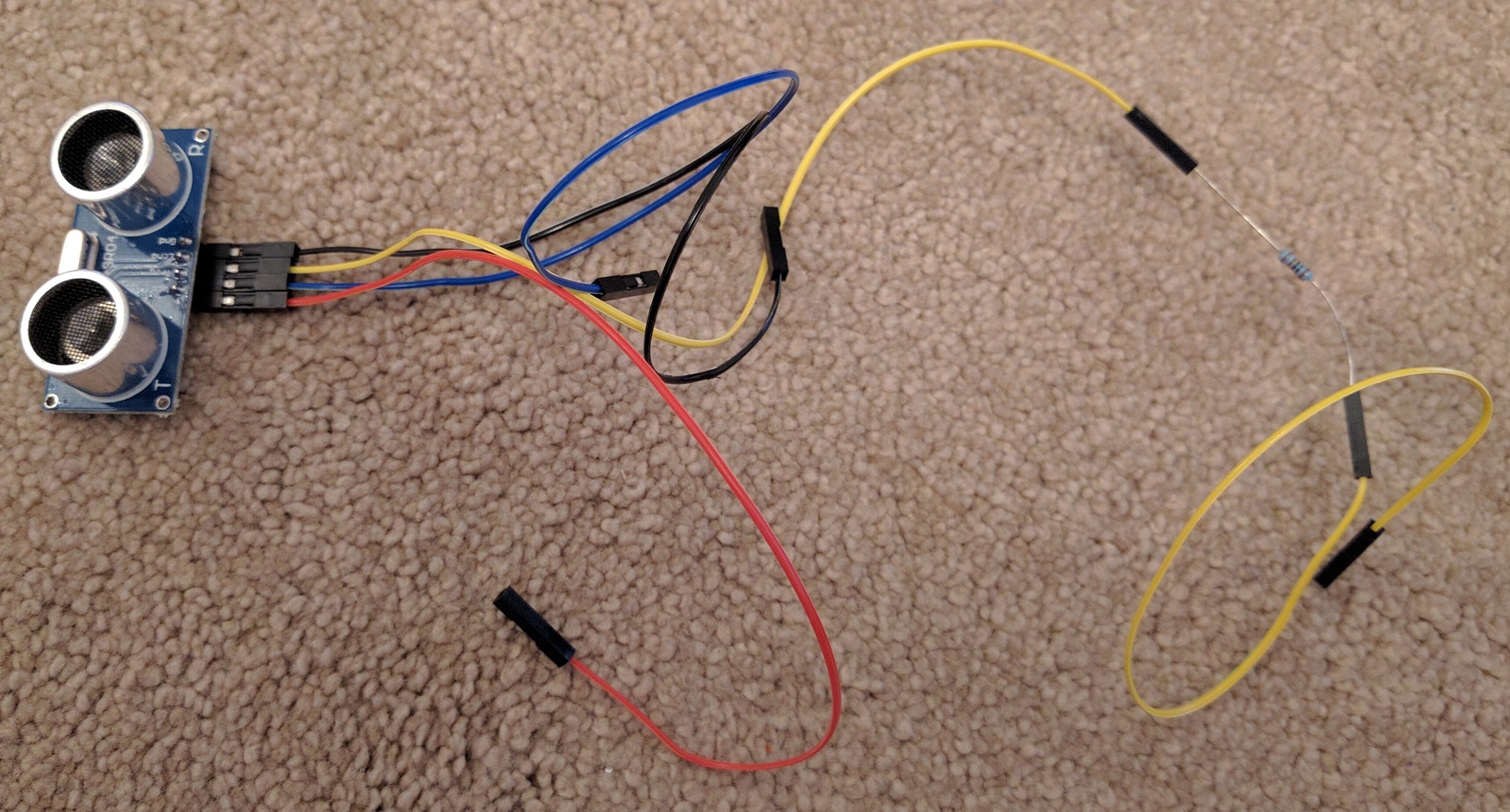
-
@BeLuGe So I just tried this myself. When I created the module, I was connected to the pi to test. I just tried using SSH to start the program and got the same error you’re getting. Looks like it’s a issue with running a sudo command over SSH, the workaround I found was to run
sudo cp ~/.Xauthority /root/then runDISPLAY=:0 sudo npm start. The problem with this is that everytime you restart your mirror you will need to run the copy command again.@Mitchfarino You don’t need a breadboard. I just used one to test out my configuration. You can hook it up directly to the pi using those wires you have already connected. When I tested out my setup, I used these pins.
echoLeftPin: 24, triggerLeftPin: 23, echoRightPin: 26, triggerRightPin: 25,Remember that those are the GPIO #'s and not the physical pin #.
-
@mochman I have vcc, trig, echo and gnd on my sensor - how do they map to the config you have posted?
-
Your left sensor
Vcc goes to pin #2
Gnd goes to pin #6
Trig goes to physical pin #26 (Which is labeled GPIO 23)
Echo goes to physical pin #18 (Which is labeled GPIO 24)Your right sensor
Vcc goes to pin #4
Gnd goes to pin #9
Trig goes to physical pin #22 (Which is labeled GPIO 25)
Echo goes to physical pin #37 (Which is labeled GPIO 26)You need both sensors if you want to detect movement.
-
@mochman OK, I’m an idiot!
I only have one sensor! Ha
Thanks very much for your help, I’m gonna get one ordered then get back on it.
Sorry for the daft questions
-
No worries. Yeah the sensor looks like it has 2 detectors on it. I’m pretty sure one is the speaker and the other is the microphone detector.
-
@mochman when I use your workaround i get the following errormessage and a whitescreen:
Loading config ... Loading module helpers ... No helper found for module: alert. Initializing new module helper ... WARNING! Could not load config file. Starting with default configuration. Error found: Error: Module version mismatch. Expected 49, got 48. Loading module helpers ... No helper found for module: alert. Initializing new module helper ... App threw an error during load Error: Module version mismatch. Expected 49, got 48. at Error (native) at process.module.(anonymous function) [as dlopen] (ELECTRON_ASAR.js:167:20) at Object.Module._extensions..node (module.js:568:18) at Object.module.(anonymous function) [as .node] (ELECTRON_ASAR.js:167:20) at Module.load (module.js:458:32) at tryModuleLoad (module.js:417:12) at Function.Module._load (module.js:409:3) at Module.require (module.js:468:17) at require (internal/module.js:20:19) at Object.<anonymous> (/home/pi/MagicMirror/modules/MMM-Swipe/node_modules/mmm-usonic/lib/usonic.js:5:14) Whoops! There was an uncaught exception... Error: Module version mismatch. Expected 49, got 48. at Error (native) at process.module.(anonymous function) [as dlopen] (ELECTRON_ASAR.js:167:20) at Object.Module._extensions..node (module.js:568:18) at Object.module.(anonymous function) [as .node] (ELECTRON_ASAR.js:167:20) at Module.load (module.js:458:32) at tryModuleLoad (module.js:417:12) at Function.Module._load (module.js:409:3) at Module.require (module.js:468:17) at require (internal/module.js:20:19) at Object.<anonymous> (/home/pi/MagicMirror/modules/MMM-Swipe/node_modules/mmm-usonic/lib/usonic.js:5:14) MagicMirror will not quit, but it might be a good idea to check why this happened. Maybe no internet connection? If you think this really is an issue, please open an issue on GitHub: https://github.com/MichMich/MagicMirror/issues Launching application. -
Can you make another config.js file with just the MMM-Swipe module in there? I don’t know what the:
WARNING! Could not load config file. Starting with default configuration. Error found: Error: Module version mismatch. Expected 49, got 48.means. -
@mochman I change the config file to default and add your Module. The same errormessage.
-
@BeLuGe Try running
rm -rf node_modules/inside the MMM-Swipe folder then runningnpm installagain. -
@mochman I have delete the directory and install the packages with
npm install
And I have reinstall the complete Raspberry and install only your module.
The error is still there -
I can’t help you then. That was my last option. I don’t receive that error nor do I know what that error means.
-
@mochman and @BeLuGe can you tell us what are the versions you are using :
Raspbian Jessie or Wheezy, which version of nodes, npm … ?
From where are you running npm start (local, ssh) using sudo or not ?
I have the same issue as @BeLuGe and I would like to debug/understand what’s is the problem.
I already red it could be a nodejs version issue (compiling vs running version)
So guys tell us what are your configurationHere is mine :
Rpi 3 updated firmware with rpi-update
Raspbian Jessie last version (apt-get update && upgrade && dist-upgrade)
Nodejs last version 6.5.0 ARM version (not sure if it’s 64 bit or 32 bit) from https://nodejs.org
Then install of MM and packages
MM is working fine until I add MMM-Swipe module configuration then got same error message about
Error: Module version mismatch. Expected 49, got 48.Hope we will find the solution …
-
@bob123bob I use Raspbian Jessie last version, Nodejs 6.5.0.
I have test it with Nodejs 5.11.1, the same issue.
I run MM without sudo. -
I’m running:
RasPi 3 with Jessie
NodeJs 6.7.0
Fully updated withsudo apt-get update sudo apt-get dist-upgrade sudo rpi-updateI just removed the entire MMM-Swipe Folder
cd ~/MagicMirror/modules/
git clone https://github.com/mochman/MMM-Swipe
cd MMM-Swipe/
npm install
cd ~/MagicMirror/
sudo npm start
I don’t get any of those errors. I don’t know what module version 49 is?
-
@mochman Similar issue here. They changed the package.json to fix it. Seems to be a problem with a new Electron version.
You would only get this error if you newly install Magic Mirror (
npm installin theMagicMirrorfolder gets the new package, if you want to reproduce it).
Hello! It looks like you're interested in this conversation, but you don't have an account yet.
Getting fed up of having to scroll through the same posts each visit? When you register for an account, you'll always come back to exactly where you were before, and choose to be notified of new replies (either via email, or push notification). You'll also be able to save bookmarks and upvote posts to show your appreciation to other community members.
With your input, this post could be even better 💗
Register Login