MagicMirror Forum
    • Recent
    • Tags
    • Unsolved
    • Solved
    • MagicMirror² Repository
    • Documentation
    • 3rd-Party-Modules
    • Donate
    • Discord
    • Register
    • Login
    A New Chapter for MagicMirror: The Community Takes the Lead
    Read the statement by Michael Teeuw here.

    Facial Recognition - customize your mirror for every user!

    Scheduled Pinned Locked Moved Troubleshooting
    215 Posts 55 Posters 520.2k Views 57 Watching
    Loading More Posts
    • Oldest to Newest
    • Newest to Oldest
    • Most Votes
    Reply
    • Reply as topic
    Log in to reply
    This topic has been deleted. Only users with topic management privileges can see it.
    • J Offline
      j.e.f.f Project Sponsor Module Developer @reaper81
      last edited by

      @reaper81 I think you also need to include the class default as the facial recognition app spends most of its time logged out.

      1 Reply Last reply Reply Quote 0
      • R Offline
        reaper81
        last edited by reaper81

        @j.e.f.f

        the default-class works fine but i whould like to show modules only if a person is in the room. thats why the class “everyone” exist. Do you use it? does it work?

        J 1 Reply Last reply Reply Quote 1
        • J Offline
          j.e.f.f Project Sponsor Module Developer @reaper81
          last edited by

          @reaper81 yeah in that case it should work for what you’re trying to do. If it isn’t then I don’t know why.

          You could also try using a motion sensor to turn the screen on and off. Essentially when someone walks up to the screen it shows modules, and after a specified time out of no motion sensed, if turns itself back off.

          1 Reply Last reply Reply Quote 1
          • R Offline
            reaper81
            last edited by

            So i repeat my question: does anybody use the “everyone”-class and it work?

            1 Reply Last reply Reply Quote 0
            • M Offline
              mc_landin
              last edited by

              I am struggling to get modules using a name class to work. Still waiting for an answer as well

              T 1 Reply Last reply Reply Quote 1
              • J Offline
                JavierTSalas
                last edited by

                Hey guys. I’m having difficulty using my webcam with the capture.py script. I’m able to use fswebcame and motion to capture video but I keep getting errors running the script. I’m using a the playstion eye as a webcam. Any ideas?

                1 Reply Last reply Reply Quote 0
                • S Offline
                  salamures
                  last edited by

                  Hi there, maybe someone is able to help me out.
                  I am trying to run capture.py but getting this Error

                  Traceback (most recent call last):
                     File "capture.py", line 18, in 
                        import lib.capture as capture
                     File "/home/pi/MagicMirror/modules/MMM-Facial-Recognition-Tools/lib/capture.py", line 21, in 
                       from . import config
                     File "/home/pi/MagicMirror/modules/MMM-Facial-Recognition-Tools/lib/config.py", line 15, in 
                       (CV_MAJOR_VER, CV_MINOR_VER, mv1, mv2) = cv2.__version__.split(".")
                  ValueError: not enough values to unpack (expected 4, got 3)
                  
                  A 1 Reply Last reply Reply Quote 0
                  • A Offline
                    avinash @salamures
                    last edited by

                    @salamures said in Facial Recognition - customize your mirror for every user!:

                    Hi there, maybe someone is able to help me out.
                    I am trying to run capture.py but getting this Error

                    Traceback (most recent call last):
                       File "capture.py", line 18, in 
                          import lib.capture as capture
                       File "/home/pi/MagicMirror/modules/MMM-Facial-Recognition-Tools/lib/capture.py", line 21, in 
                         from . import config
                       File "/home/pi/MagicMirror/modules/MMM-Facial-Recognition-Tools/lib/config.py", line 15, in 
                         (CV_MAJOR_VER, CV_MINOR_VER, mv1, mv2) = cv2.__version__.split(".")
                    ValueError: not enough values to unpack (expected 4, got 3)
                    

                    I am also facing the same issue. Any effort to resolve it will be appreciated.

                    S 1 Reply Last reply Reply Quote 0
                    • S Offline
                      salamures @avinash
                      last edited by salamures

                      Are you using OpenCV 3.3? Then i might can help you.

                      1 Reply Last reply Reply Quote 0
                      • S Offline
                        salamures
                        last edited by

                        Got another problem. My picam is not able to open. I am using opencv 3.3.

                        Remember to set the name list environment variable FACE_USERS
                        Using default FACE_ALGORITM: 1
                        Traceback (most recent call last):
                        File "facerecognition.py", line 30, in 
                        camera = config.get_camera(preview)
                        File "/home/pi/MagicMirror/modules/MMM-Facial-Recognition-Tools/lib/config.py", line 101, in get_camera
                        return webcam.OpenCVCapture(device_id=0)
                        File "/home/pi/MagicMirror/modules/MMM-Facial-Recognition-Tools/lib/webcam.py", line 29, in __init__
                        self._camera.open()
                        TypeError: Required argument 'device' (pos 1) not found
                        

                        any suggestions?

                        1 Reply Last reply Reply Quote 0
                        • P Offline
                          PrivatVoidMarmot
                          last edited by

                          Hello!

                          I have an problem wirth the Facial Regonition Module. I have tried it with the PiCam and an normal webcam. It worked not really good with die webcam and after i’ve tried it with die PiCam it doesn’t work any more. I’ve updatet the config.js.

                          This is the npm output:
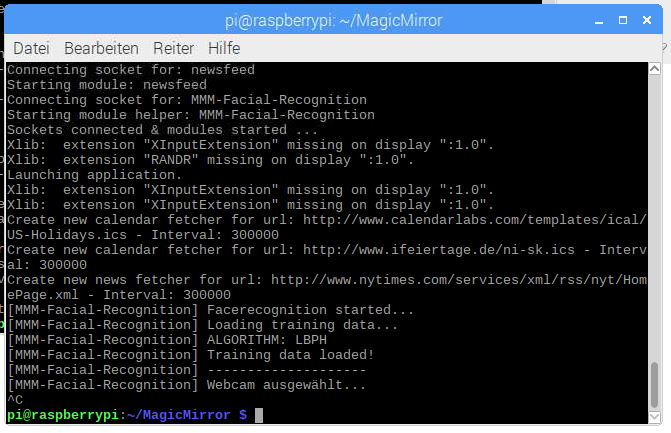
                          0_1510996315204_mmm.PNG

                          config.js:

                          On the mirror nothing is shown. {
                          			module: 'MMM-Facial-Recognition',
                          			config: {
                          				// 1=LBPH | 2=Fisher | 3=Eigen
                          				recognitionAlgorithm: 1,
                          				// Threshold for the confidence of a recognized face before it's considered a
                          				// positive match.  Confidence values below this threshold will be considered
                          				// a positive match because the lower the confidence value, or distance, the
                          				// more confident the algorithm is that the face was correctly detected.
                          				lbphThreshold: 50,
                          				fisherThreshold: 250,
                          				eigenThreshold: 3000,
                          				// force the use of a usb webcam on raspberry pi (on other platforms this is always true automatically)
                          				useUSBCam: true,
                          				// Path to your training xml
                          				trainingFile: 'modules/MMM-Facial-Recognition-Tools/training.xml',
                          				// recognition intervall in seconds (smaller number = faster but CPU intens!)
                          				interval: 1,
                          				// Logout delay after last recognition so that a user does not get instantly logged out if he turns away from the mirror for a few seconds
                          				logoutDelay: 15,
                          				// Array with usernames (copy and paste from training script)
                          				users: ['Jenny'],
                          				//Module set used for strangers and if no user is detected
                          				defaultClass: "default",
                          				//Set of modules which should be shown for every user
                          				everyoneClass: "everyone",
                          				// Boolean to toggle welcomeMessage
                          				welcomeMessage: true
                          			}
                          

                          Any suggestions?

                          1 Reply Last reply Reply Quote 0
                          • T Offline
                            thebeetleuk @mc_landin
                            last edited by

                            @mc_landin I’m at this stage as well! for some reason the classes dont change whats displayed when a new face is seen. So in this example the “default” is seen all the time and then when a generic face is seen then the “everyone” class isnt shown. Has anyone got this working?

                                        {
                                                module: "updatenotification",
                                                position: "top_bar",
                                                classes: 'default'
                                        },
                                        {
                                                module: "clock",
                                                position: "top_left",
                                                classes: 'everyone'
                                        },
                                        {
                                                module: 'MMM-Facial-Recognition',
                                                config: {
                                                        recognitionAlgorithm: 1, // 1=LBPH | 2=Fisher | 3=Eigen
                                                        // Threshold for the confidence of a recognized face before it's considered a
                                                        // positive match.  Confidence values below this threshold will be considered
                                                        // a positive match because the lower the confidence value, or distance, the
                                                        // more confident the algorithm is that the face was correctly detected.
                                                        lbphThreshold: 50,
                                                        fisherThreshold: 250,
                                                        eigenThreshold: 3000,
                                                        useUSBCam: true, // force the use of a usb webcam on raspberry pi (on other platforms this is always true automatically)
                                                        trainingFile: 'modules/MMM-Facial-Recognition-Tools/training.xml', // Path to your training xml
                                                        interval: 2, // recognition intervall in seconds (smaller number = faster but CPU intens!)
                                                        logoutDelay: 15, // Logout delay after last recognition so that a user does not get instantly logged out if he turns away from the mirror f$
                                                        users: [], // Array with usernames (copy and paste from training script)
                                                        defaultClass: "default", //Module set used for strangers and if no user is detected
                                                        everyoneClass: "everyone", //Set of modules which should be shown for every user
                                                        welcomeMessage: true // Boolean to toggle welcomeMessage
                                                }
                                        },
                            
                            T 1 Reply Last reply Reply Quote 0
                            • T Offline
                              thebeetleuk @thebeetleuk
                              last edited by

                              This post is deleted!
                              1 Reply Last reply Reply Quote 0
                              • T Offline
                                thebeetleuk
                                last edited by

                                Hi All, I have found out that if you want to use your USB webcam for training you can update the file https://github.com/paviro/MMM-Facial-Recognition-Tools/blob/master/lib/config.py in the appropriate directory with the following. for some reason it doesnt seem to want to fall over to the webcam so I just commented out the pi web cam and added the usb one.

                                def get_camera(preview=True):
                                    try:
                                #        from . import picam
                                #        capture = picam.OpenCVCapture(preview)
                                #        capture.start()
                                #        return capture
                                        from . import webcam
                                        return webcam.OpenCVCapture(device_id=0)
                                        capture.start()
                                        return capture
                                    except Exception:
                                        from . import webcam
                                        return webcam.OpenCVCapture(device_id=0)
                                
                                1 Reply Last reply Reply Quote 1
                                • T Offline
                                  thebeetleuk
                                  last edited by

                                  OK after lots and lots of trial and error I hope this helps people… these are the settings and results I had and as far as I can tell the everyone setting doesnt do what I would expect…

                                  I don’t hink you have a way of identifying a stranger and do something specific for them?

                                  defaultClass: "default", //Module set used for strangers and if no user is detected
                                  

                                  It looks like when everyone is specified on its own then the logic doesnt seem to work. See classes: “everyone” below…

                                                                  users: ['martin'], // Array with usernames (copy and paste from training script)
                                                                  defaultClass: "default", //Module set used for strangers and if no user is detected
                                                                  everyoneClass: "everyone", //Set of modules which should be shown for every user
                                                                  welcomeMessage: false // Boolean to toggle welcomeMessage
                                                          }
                                                  },
                                                  {
                                                          module: "clock",
                                                          position: "top_left",
                                                          classes: "default" // displays with no face detection (OK) - not displayed when martin detected (OK) - displayed with no specific user detected (OK?)
                                                  },
                                                  {
                                                          module: "clock",
                                                          position: "top_right",
                                                          classes: "default everyone" // displays with no face detection (OK) - displayed with no specific user and martin (OK)
                                                  },
                                                  {
                                                          module: "clock",
                                                          position: "bottom_right",
                                                          classes: "default martin" // displays with no face detection (OK) - displayed with no specific user and martin (OK)
                                                  },
                                                  {
                                                          module: "clock",
                                                          position: "bottom_left",
                                                          classes: "everyone" // never displays (??? I would expect this to display when Martin is detected - or any other user)
                                                  },
                                                  {
                                                          module: "compliments",
                                                          position: "lower_third",
                                                          classes: "martin" // only displayed when martin detected (OK)
                                                  },
                                  
                                  1 Reply Last reply Reply Quote 0
                                  • G Offline
                                    gismo2006
                                    last edited by

                                    Hi,

                                    I use your Facial Recognition modul. I have create some user and everything work fine.

                                    But now I install MMM-Motion-Detection modul. I works fine, too. But if I use this modul your modul didn´t work. When I cut off the MMM-Motion-Detection module from config.js and start again your modul will work fine again.

                                    Can someone help me?

                                    greets gismo

                                    1 Reply Last reply Reply Quote 0
                                    • P Offline
                                      PrivatVoidMarmot @paviro
                                      last edited by PrivatVoidMarmot

                                      @paviro I have the same problem like @shashank, but I don’t figure out any mistake… the trainingfile is in the right direction… It doesn’t work with PiCam and with an webcam neither…

                                      1 Reply Last reply Reply Quote 0
                                      • P Offline
                                        PrivatVoidMarmot
                                        last edited by PrivatVoidMarmot

                                        Sorry for spaming,

                                        but I tried to refresh everything. So I installed the Rasbian new, the Magic Mirror, the Facial Recognition and the Tools. It worked… ONCE. After rebooting the system I have the same error as bevor:

                                        It load training data and select the PiCam and then it doesn’t go on. No error-message.

                                        Any idea which component was active when I reinstalled everything and isn’t active after rebooting?
                                        The camera is enabled.

                                        1 Reply Last reply Reply Quote 0
                                        • J Offline
                                          jer78
                                          last edited by

                                          I have the same issue. Training went fine. I got everything working but then after a reboot it seems to load the module but then nothing. It doesn’t seem to want to do anything. No errors just no facial recognition.

                                          J 1 Reply Last reply Reply Quote 0
                                          • J Offline
                                            jer78 @jer78
                                            last edited by

                                            So I figured out my own problem. Seems like it doesn’t like it when I changed the language file. Restored the old one and everything works as it should. Also, I find raising the threshold to 250 for the LBPH Algorithm helps a lot to get more accurate results. The confidence seems to hover around 49-52 for me but I couldn’t get any results with 50, constantly thought I was “stranger”. Thanks for all the hard work on this module. It’s really fun to play with!

                                            1 Reply Last reply Reply Quote 1

                                            Hello! It looks like you're interested in this conversation, but you don't have an account yet.

                                            Getting fed up of having to scroll through the same posts each visit? When you register for an account, you'll always come back to exactly where you were before, and choose to be notified of new replies (either via email, or push notification). You'll also be able to save bookmarks and upvote posts to show your appreciation to other community members.

                                            With your input, this post could be even better 💗

                                            Register Login

                                            • 1
                                            • 2
                                            • 7
                                            • 8
                                            • 9
                                            • 10
                                            • 11
                                            • 10 / 11
                                            • First post
                                              Last post
                                            Enjoying MagicMirror? Please consider a donation!
                                            MagicMirror created by Michael Teeuw.
                                            Forum managed by Sam, technical setup by Karsten.
                                            This forum is using NodeBB as its core | Contributors
                                            Contact | Privacy Policy