Read the statement by Michael Teeuw here.
Wunderlist - your todos on the mirror
-
-
@jagerpower also toggle the array in the array until there is nothing else to toggle…
-
@paviro do i need to toggle these too?

-
@jagerpower sorry forgot about those… Will add a Screenshot to this post when I am home.
-
Sorry to start a new question thread but how do you determine the app url and auth callback url to get the token from Wunderlist? I know it must be very simple but I can’t seem to figure it out. Is the app url just http://localhost:8080?
-
@laknermi, you can start your own new topic with your question(s) posted. It’s preferred that way, so we keep the discussions on-topic for the original poster. And then someone more familiar with that module can reply to you.
-
@KirAsh4 Thanks!
-
@laknermi does not matter just leave it as it is when you create the app.
We’re all stories in the end. Just make it a good one, eh?
– The Doctor
-
Hey all of you! :slight_smile:
Please try again with the updated version from GitHub!
Thanks to @MichMich for now knowing how to better handle API requests in Node :D -
@paviro Hmmm… The developer portal at Wunderlist will not allow me to create a new app if I don’t provide an app URL and Auth callback URL.
-
@laknermi then set it to http://localhost I thought it was the default.
-
@paviro Okay. I’ll try creating a new token with app URL and callback URL set to http://localhost.
-
@laknermi "@paviro
Referencing my post for posterity
I got it to work! I created a new app in Wunderlist and set the App URL to “https://a.wunderlist.com/api/v1/lists” and Auth Callback URL to “http://localhost:8080” then applied the accessToken and clientID as @jagerpower did above. -
@laknermi the App url should not be necessary :) or can be set to anything, like the callback too.
-
@paviro In that case, your updated version works great! (Which by the way is incredibly cool!!! :dark_sunglasses: )
-
@laknermi glad you like it :slight_smile:
-
@paviro I reinstalled my MM and it works now. Thank you for this module
-
Looks like i’ve got same issue,
tried the Curl line you said before, that gives me the info tht is is all correct.
but nothing shows up.
-
Seems to work after a second npm install.
-
Hi, i’m having some problems with this too.
tokens and client ID are generated, and wanderlist appears on my mirror but non of this list content.
and when i run the curl command i get this.
{“error”:{“type”:“server_error”,“translation_key”:“api_error_unknown”,“message”:“An unknown server error occurred”,“authentication”:[“missing”]}}
i am a complete novice and just trying to follow instructions, but i’ve clearly messed up somewhere.
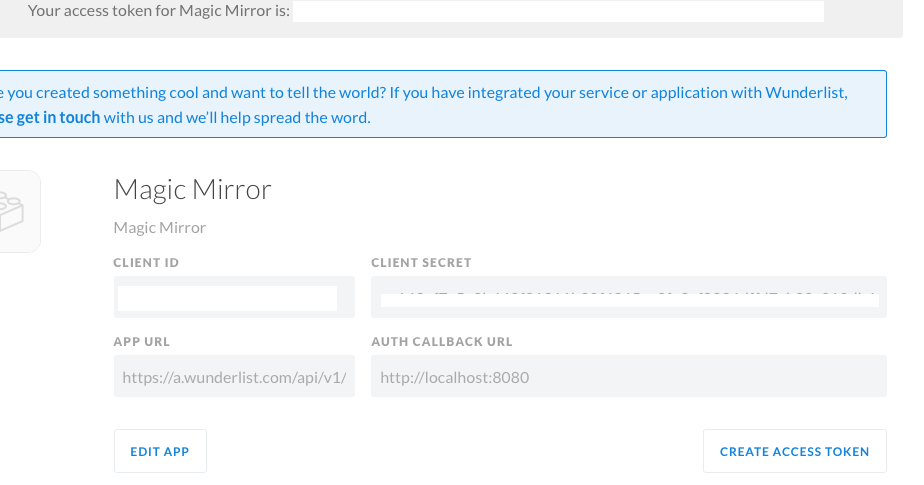
Access token and client id are taken as the values that are labelled just that.
heres what i have in my config.js ££££ have replaced numbers
{
                        module: 'MMM-Wunderlist',
                        position: 'left',  // This can be any of the regions. Best results in left or right regions.
                        header: 'To Do', // This is optional
                        config: {
                                accessToken:    '07ad3c20bb0500b£££££££££££££££££a759b6a7e07da2',
                                clientID:       'f1££££££££££££££££££1eb',
                                lists:          ["Inbox"],
                                maximumEntries: '60',
                                interval:       '1',
                                fade:           'true',
            // See 'Configuration options' for more information.
        }
    },
any help would be really appreciated.
Note from Moderator: Please use Markdown on code snippets for easier reading.





Hello! It looks like you're interested in this conversation, but you don't have an account yet.
Getting fed up of having to scroll through the same posts each visit? When you register for an account, you'll always come back to exactly where you were before, and choose to be notified of new replies (either via email, or push notification). You'll also be able to save bookmarks and upvote posts to show your appreciation to other community members.
With your input, this post could be even better 💗
Register Login