MagicMirror Forum
    • Recent
    • Tags
    • Unsolved
    • Solved
    • MagicMirror² Repository
    • Documentation
    • 3rd-Party-Modules
    • Donate
    • Discord
    • Register
    • Login
    A New Chapter for MagicMirror: The Community Takes the Lead
    Read the statement by Michael Teeuw here.

    MMM-UKNationalRail - Rail departure info for specific UK Railway stations

    Scheduled Pinned Locked Moved Transport
    uk railtransport
    33 Posts 15 Posters 22.2k Views 16 Watching
    Loading More Posts
    • Oldest to Newest
    • Newest to Oldest
    • Most Votes
    Reply
    • Reply as topic
    Log in to reply
    This topic has been deleted. Only users with topic management privileges can see it.
    • M Offline
      McSorley
      last edited by

      Those kind of reddit posts make me wish I took photos when I built mine. Looks great.

      1 Reply Last reply Reply Quote 0
      • N Offline
        noelandrews
        last edited by yawns

        Hi,
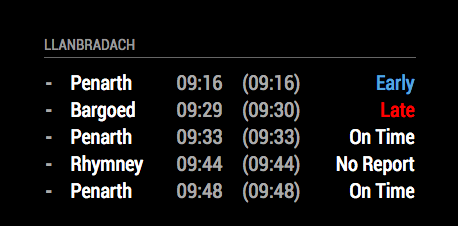
        apologies, sure i’m doing something obvious but my module isn’t showing up.

        I’ve done to install it, git clone… then cd to the folder and npm install

        then add to the config.js file (my addition below).

        I changed the ’ to " in case that was causing the issue. Still no joy, no errors on the screen it simply doesn’t show up.

        Any help would be massively appreciated.
        Thanks
        Noel

        {
                        module:                 "MMM-UKNationalRail",
                        position:               "bottom_left",
                        header:                 "Departures",           //Optional - delete this line to turn OFF the header completely
                        config: {
                                stationCode:            "LNB",          // CRS code for station
                                app_id:                         "49d8e014",             // TransportAPI App ID
                                app_key:                        "1a3d4XXXXXXXXXXXceac3d9f14be",             // TransportAPI App Key
                                maxResults:             5,              //Optional - Maximum results to display.
                                showOrigin:             false           //Optional - Show the origin of the train in the table
                        }
                },
        
        1 Reply Last reply Reply Quote 0
        • nwoottonN Offline
          nwootton Module Developer
          last edited by nwootton

          @noelandrews said in MMM-UKNationalRail - Rail departure info for specific UK Railway stations:

          I have to say - changing the " to ’ made it work for me.

              {
                  module: 'MMM-UKNationalRail',
                  position: 'bottom_left',
                  header: 'Departures', //Optional - delete this line to turn OFF the header completely
                  config: {
                      stationCode: 'LNB', // CRS code for station
                      app_id: '49XXX014', // TransportAPI App ID
                      app_key: '1a3d4XXXXXXXXXXXceac3d9f14be', // TransportAPI App Key
                      maxResults: 5, //Optional - Maximum results to display.
                      showOrigin: false //Optional - Show the origin of the train in the table
                  }
              },
          

          0_1511515250663_Screen Shot 2017-11-24 at 09.19.50.png

          Also using the API_ID, API_Key and Station code in the actual TransportAPI also worked. Could it be the rest of JSON config that has issues? Have you tried pasting the whole file into something like jsonlint.com to validate it’s right.

          I’d STRONGLY advise you remove your API keys from the JSON. Hate for other people to mis-use your account BTW

          yawnsY 1 Reply Last reply Reply Quote 0
          • yawnsY Offline
            yawns Moderator @nwootton
            last edited by

            @nwootton said in MMM-UKNationalRail - Rail departure info for specific UK Railway stations:

            I’d STRONGLY advise you remove your API keys from the JSON. Hate for other people to mis-use your account BTW

            Good advise. That’s why I edited his post and replaced several characters with X :)

            nwoottonN 1 Reply Last reply Reply Quote 0
            • N Offline
              noelandrews
              last edited by

              Thanks for the advice and the edits! Didn’t think about that :)

              1 Reply Last reply Reply Quote 0
              • nwoottonN Offline
                nwootton Module Developer @yawns
                last edited by

                @yawns Explains why my email had the key and the post was XXXXXX.

                Thought I was losing it!

                1 Reply Last reply Reply Quote 0
                • F Offline
                  funk0id
                  last edited by

                  Absolutely love this plugin, just wish it was still being improved :(

                  1 Reply Last reply Reply Quote 0
                  • D Offline
                    dawookie1979
                    last edited by

                    Hello, i have the module working, i just cant get it to display the title.

                    {
                    module: ‘MMM-UKNationalRail’,
                    position: ‘bottom_left’,
                    header: ‘Whittlesford Parkway’, //Optional - delete this line to turn OFF the header completely
                    config: {
                    stationCode: ‘WLF’, // CRS code for station
                    app_id: ‘xxxxxxxx’, // TransportAPI App ID
                    app_key: ‘xxxxxxxxxx’, // TransportAPI App Key
                    maxResults: 5, //Optional - Maximum results to display.
                    showOrigin: false //Optional - Show the origin of the train in the table
                    }

                    any ideas?

                    S 1 Reply Last reply Reply Quote 0
                    • S Offline
                      sdetweil @dawookie1979
                      last edited by

                      @dawookie1979 u mean the header?

                      Sam

                      How to add modules

                      learning how to use browser developers window for css changes

                      1 Reply Last reply Reply Quote 0
                      • D Offline
                        dawookie1979
                        last edited by

                        yes the header is not showing

                        1 Reply Last reply Reply Quote 0
                        • T Offline
                          tenpinmark
                          last edited by

                          Hello,

                          Does anyone have a multi-station configuration working? I also do not get any headers showing - anyone managed to solve that one?

                          Thanks in advance

                          1 Reply Last reply Reply Quote 0
                          • B Offline
                            Bob
                            last edited by

                            Headers have been broken for a while now. Happened after MM version update. Not sure if @nwootton is still working on this or not though.

                            Also not been able to get multi-station working. The fix I used was just to have 2 modules listed one after each other (ie, duplicate the code in the config file, including API etc). That seems to work fine.

                            1 Reply Last reply Reply Quote 0
                            • T Offline
                              tenpinmark
                              last edited by

                              Hi Bob,

                              Thanks for the information. I’ve been playing and have fixed up the header not being shown and in addition have added column headings such as "Platform, To, From, Planned, Actual and Status to the displayed table.

                              I have seen in the forums elsewhere you do have to have multiple modules in order to get multiple stations which I suppose is OK, but a bit awkward. I may have a look to see if this can be all rolled into one config section.

                              One other feature I would like to work on is this: My partner travels home eveyday and says what train she is on, but never knows what time it will arrive at our home station - I want to see if it is possible to have a a listing of the possible trains with the departue and arrival times. As I’m very new to all this, it’s going to hurt my head coding it I suspect.

                              G 1 Reply Last reply Reply Quote 0
                              • G Offline
                                Glass92 @tenpinmark
                                last edited by Glass92

                                @tenpinmark

                                Hi Tenpin,

                                Sounds like me and you want the same thing!
                                I’m currently having issues with my module updating after a refresh though, don’t know what is going on there! Essentially after I restart the Mirror, the module will work for a couple of hours, then when I get up the next day it will still be showing last nights times, almost like it’s frozen.
                                How did you get the Header sorted and column headings?

                                I am also using MMM-ModuleScheduler to display the specific Trains at different times.
                                I have three modules running see below, where my app id and app key I have replaced with xxx.
                                One for my partner, Monday to Friday from Home to Work in the morning. Stirling - Dundee (See Station Code is Stirling, calling_at: Dundee)
                                One for my partner, Monday to Friday from Work to Home in the evening. Dundee - Stirling (See Station Code is Stirling, called_at: Dundee)
                                One for me, Tuesday to Thursday from Home to Work in the morning. Stirling - Glasgow (See Station Code is Stirling, calling_at: Glasgow)

                                {
                                			module: 		'MMM-UKNationalRail',
                                			position: 		'bottom_left',
                                			header:			'Stirling - Glasgow',		//Optional - delete this line to turn OFF the header completely
                                			classes: 'scheduler',
                                			config: {
                                				module_schedule: {from: '0 7 * * 2-4', to: '0 9 * * 2-4' },
                                				stationCode: 		'STG', 		// CRS code for station
                                				calling_at: 		'GLQ',
                                				app_id: 			'xxx', 		// TransportAPI App ID
                                				app_key: 			'xxx', 		// TransportAPI App Key
                                				maxResults: 		3,  		//Optional - Maximum results to display.
                                				showOrigin: 		true   	//Optional - Show the origin of the train in the table
                                			}
                                		},
                                			{
                                			module: 		'MMM-UKNationalRail',
                                			position: 		'bottom_left',
                                			header:			'Stirling - Dundee',		//Optional - delete this line to turn OFF the header completely
                                			classes: 'scheduler',
                                			config: {
                                				module_schedule: {from: '0 7 * * 1-5', to: '0 9 * * 1-5' },
                                				stationCode: 		'STG', 		// CRS code for station
                                				calling_at: 		'DEE',
                                				app_id: 			'xxx', 		// TransportAPI App ID
                                				app_key: 			'xxx', 		// TransportAPI App Key
                                				maxResults: 		3,  		//Optional - Maximum results to display.
                                				showOrigin: 		true   	//Optional - Show the origin of the train in the table
                                			}
                                		},
                                			{
                                			module: 		'MMM-UKNationalRail',
                                			position: 		'bottom_left',
                                			header:			'Dundee to Stirling',		//Optional - delete this line to turn OFF the header completely
                                			classes: 'scheduler',
                                			config: {
                                				module_schedule: {from: '0 17 * * 1-5', to: '30 19 * * 1-5' },
                                				stationCode: 		'STG', 		// CRS code for station
                                				called_at: 			'DEE',
                                				app_id: 			'xxx', 		// TransportAPI App ID
                                				app_key: 			'xxx', 		// TransportAPI App Key
                                				maxResults: 		3,  		//Optional - Maximum results to display.
                                				showOrigin: 		true   	//Optional - Show the origin of the train in the table
                                			}
                                		},
                                

                                This is my partner’s trians for coming home
                                https://imgur.com/a/OGflgLi
                                See it doesn’t list Stirling. It lists end destination and origin station.

                                1 Reply Last reply Reply Quote 0
                                • B Offline
                                  Bob
                                  last edited by

                                  @tenpinmark Any chance you can post the code you used to fix it ? (or submit a fork to switch to instead)

                                  @Glass92 I had similar problems (and only with this module). My solution was to create a cron job to reboot the mirror after midnight, which restarted the code. It’s not ideal, and actually introduces other issues with the HDMI port (will sometimes fail to initialise the display). I’ve since removed the cron job, and now just manually reboot if needed (usually once every couple of days)

                                  1 Reply Last reply Reply Quote 0
                                  • A Offline
                                    alexbell62
                                    last edited by

                                    Is there a way to make it work?

                                    1 Reply Last reply Reply Quote 0
                                    • M Offline
                                      matt216
                                      last edited by

                                      Getting emails from transportapi.com saying I’m over my call limit. Anyone else?

                                      1 Reply Last reply Reply Quote 0
                                      • M Offline
                                        matt216
                                        last edited by

                                        Looks like transportAPI.com has changed their free tier to just 30 calls per day. This module (for me) seems to have used almost 300 per day previously.
                                        Also it doesn’t look like the module is maintained by the developer anymore.

                                        1 Reply Last reply Reply Quote -1
                                        • B Offline
                                          Bungle68
                                          last edited by

                                          Is anyone able to show how I can get arrivals as well as departures showing?
                                          I tried this, but it’s still only showing Departures.

                                          {
                                          	module: 	'MMM-UKNationalRail',
                                          	position: 	'bottom_left',
                                          	header:		'Departure',		//Optional - delete this line to turn OFF the header completely
                                          	config: {
                                          		stationCode: 		'CUF', 		// CRS code for station
                                          		app_id: 		'8e9c6489', 	// TransportAPI App ID
                                          		app_key: 		'd8*********************7c9c45550', 	// TransportAPI App Key
                                          		maxResults: 		5,  		//Optional - Maximum results to display.
                                          		showOrigin: 		false,   	//Optional - Show the origin of the train in the table
                                          		type: "arrival,departure"
                                          	}
                                          },
                                          
                                          S 1 Reply Last reply Reply Quote 0
                                          • S Offline
                                            sdetweil @Bungle68
                                            last edited by

                                            @Bungle68 it appears this module is no longer maintained, and most of the code is 6 years old.

                                            wko knows what has changed in that time

                                            Sam

                                            How to add modules

                                            learning how to use browser developers window for css changes

                                            B 1 Reply Last reply Reply Quote 0

                                            Hello! It looks like you're interested in this conversation, but you don't have an account yet.

                                            Getting fed up of having to scroll through the same posts each visit? When you register for an account, you'll always come back to exactly where you were before, and choose to be notified of new replies (either via email, or push notification). You'll also be able to save bookmarks and upvote posts to show your appreciation to other community members.

                                            With your input, this post could be even better 💗

                                            Register Login

                                            • 1
                                            • 2
                                            • 2 / 2
                                            • First post
                                              Last post
                                            Enjoying MagicMirror? Please consider a donation!
                                            MagicMirror created by Michael Teeuw.
                                            Forum managed by Sam, technical setup by Karsten.
                                            This forum is using NodeBB as its core | Contributors
                                            Contact | Privacy Policy