MagicMirror Forum
    • Recent
    • Tags
    • Unsolved
    • Solved
    • MagicMirror² Repository
    • Documentation
    • 3rd-Party-Modules
    • Donate
    • Discord
    • Register
    • Login
    A New Chapter for MagicMirror: The Community Takes the Lead
    Read the statement by Michael Teeuw here.

    MMM-Fortune

    Scheduled Pinned Locked Moved Fun & Games
    14 Posts 4 Posters 9.1k Views 4 Watching
    Loading More Posts
    • Oldest to Newest
    • Newest to Oldest
    • Most Votes
    Reply
    • Reply as topic
    Log in to reply
    This topic has been deleted. Only users with topic management privileges can see it.
    • cowboysdudeC Offline
      cowboysdude Module Developer
      last edited by

      Nice job!

      Mykle1M 1 Reply Last reply Reply Quote 1
      • Mykle1M Offline
        Mykle1 Project Sponsor Module Developer @cowboysdude
        last edited by

        @cowboysdude

        Thank you, sir.

        Create a working config
        How to add modules

        1 Reply Last reply Reply Quote 1
        • F Offline
          Fonfon
          last edited by

          Great job! is it possible to translate in a other language ?

          Mykle1M 1 Reply Last reply Reply Quote 0
          • cowboysdudeC Offline
            cowboysdude Module Developer
            last edited by

            I do not believe the api supports other languages.

            Mykle1M 1 Reply Last reply Reply Quote 0
            • Mykle1M Offline
              Mykle1 Project Sponsor Module Developer @cowboysdude
              last edited by

              @cowboysdude said in MMM-Fortune:

              I do not believe the api supports other languages.

              You are absolutely right. I checked the api and it is only in English.

              Create a working config
              How to add modules

              1 Reply Last reply Reply Quote 0
              • Mykle1M Offline
                Mykle1 Project Sponsor Module Developer @Fonfon
                last edited by

                @Fonfon said in MMM-Fortune:

                Great job! is it possible to translate in a other language ?

                Thanks. This API is only in English. However, if you can find one in your language I’ll be happy to give it a go.

                Create a working config
                How to add modules

                1 Reply Last reply Reply Quote 0
                • T Offline
                  TheKyleJohnson90
                  last edited by

                  I only see the square blocks where it is supposed to have the Chinese translation.

                  I used the Raspbian Jessie lite; Is there possibly a dependency that this needs that is not included?

                  Mykle1M 1 Reply Last reply Reply Quote 1
                  • Mykle1M Offline
                    Mykle1 Project Sponsor Module Developer @TheKyleJohnson90
                    last edited by Mykle1

                    @TheKyleJohnson90

                    First, thanks for trying out my module.

                    Second, thanks for pointing that out. I neglected to include npm install into the ~/MagicMirror/modules/MMM-Fortune in the installation instructions of the readme.

                    Other than that, the characters are part of the data itself, as you can see.

                    [{"fortune":{"message":"One false move may lose the game.","id":"8"},"lesson":{"english":"English-language books","chinese":"英文书","pronunciation":"Yīngwén shū","id":""},"lotto":{"id":"","numbers":[33,55,18,30,17,10]}}]
                    

                    Hopefully, the dependencies will fix your problem. If it is a problem with jesse lite then I really don’t know how to correct the issue.

                    Let me know how you make out.

                    Create a working config
                    How to add modules

                    T 1 Reply Last reply Reply Quote 0
                    • Mykle1M Offline
                      Mykle1 Project Sponsor Module Developer
                      last edited by

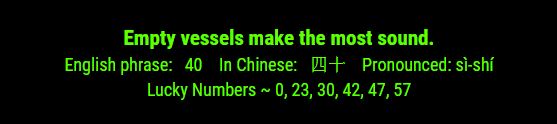
                      I just downloaded and re-installed MMM-Fortune just to see what would happen. Before I even installed the dependencies it worked fine, albeit, on my windows dev machine. Installed the dependencies and again, it worked fine. I hope Jessie Lite, or the version of Pi you are using, isn’t the reason for the characters not being displayed.

                      Screenshot from installation WITHOUT dependencies installed
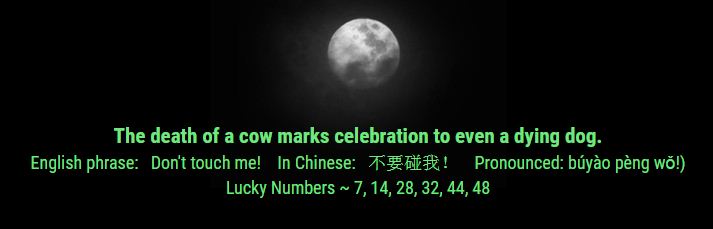
                      0_1501982875722_t2.JPG

                      Create a working config
                      How to add modules

                      1 Reply Last reply Reply Quote 0
                      • T Offline
                        TheKyleJohnson90 @Mykle1
                        last edited by

                        @Mykle1

                        Thanks for the response. I ended up having to install the following

                        sudo apt-get install fonts-font-awesome
                        

                        Then ran through the raspi-config again to set to None as default. Guess the Jessie Lite does not include the font your module needed.

                        Mykle1M 2 Replies Last reply Reply Quote 0
                        • cowboysdudeC Offline
                          cowboysdude Module Developer
                          last edited by

                          @TheKyleJohnson90 said in MMM-Fortune:

                          fonts-font-awesome

                          That’s interesting… I was also unable to reproduce the issue you had. There must be something different within Raspbian Jessie lite that does this… not really sure but it’s a good catch!!

                          Did you do this in the root "MagicMirror’ or in the MMM-Fortune directory?

                          1 Reply Last reply Reply Quote 0
                          • Mykle1M Offline
                            Mykle1 Project Sponsor Module Developer @TheKyleJohnson90
                            last edited by

                            @TheKyleJohnson90 said in MMM-Fortune:

                            I ended up having to install the following

                            So, it’s working now?

                            Create a working config
                            How to add modules

                            1 Reply Last reply Reply Quote 0
                            • Mykle1M Offline
                              Mykle1 Project Sponsor Module Developer @TheKyleJohnson90
                              last edited by

                              @TheKyleJohnson90 said in MMM-Fortune:

                              Guess the Jessie Lite does not include the font your module needed.

                              I used default fonts from MagicMirror. They should have been included in your MagicMirror installation. shrug


                              Create a working config
                              How to add modules

                              1 Reply Last reply Reply Quote 0

                              Hello! It looks like you're interested in this conversation, but you don't have an account yet.

                              Getting fed up of having to scroll through the same posts each visit? When you register for an account, you'll always come back to exactly where you were before, and choose to be notified of new replies (either via email, or push notification). You'll also be able to save bookmarks and upvote posts to show your appreciation to other community members.

                              With your input, this post could be even better 💗

                              Register Login

                              • 1 / 1
                              • First post
                                Last post
                              Enjoying MagicMirror? Please consider a donation!
                              MagicMirror created by Michael Teeuw.
                              Forum managed by Sam, technical setup by Karsten.
                              This forum is using NodeBB as its core | Contributors
                              Contact | Privacy Policy