MagicMirror Forum
    • Recent
    • Tags
    • Unsolved
    • Solved
    • MagicMirror² Repository
    • Documentation
    • 3rd-Party-Modules
    • Donate
    • Discord
    • Register
    • Login
    A New Chapter for MagicMirror: The Community Takes the Lead
    Read the statement by Michael Teeuw here.

    [MMM-RTSPStream] - Video Streaming from Live Feeds & Security Cameras

    Scheduled Pinned Locked Moved Utilities
    602 Posts 67 Posters 2.1m Views 68 Watching
    Loading More Posts
    • Oldest to Newest
    • Newest to Oldest
    • Most Votes
    Reply
    • Reply as topic
    Log in to reply
    This topic has been deleted. Only users with topic management privileges can see it.
    • N Offline
      Niggich @shbatm
      last edited by

      @shbatm Hello, I found the time to try this tweak but after I changed everything the Stream doesn’t start.

      1 Reply Last reply Reply Quote 0
      • S Offline
        shbatm Module Developer
        last edited by

        I have some things to try when I get back in town this week. Please make sure you have hideFfmpegOutput: false in your stream config section and post any errors. Were you able to get it back working after reverting the changes?

        N 1 Reply Last reply Reply Quote 0
        • N Offline
          Niggich @shbatm
          last edited by

          @shbatm I change back everything and its working again. I also changed my config file to the setting you said. It’s a bit better now. In the Log I doesn’t have any errors.

          1 Reply Last reply Reply Quote 0
          • S Offline
            shbatm Module Developer
            last edited by shbatm

            @Niggich Just letting you know that I’m testing an alternate method for displaying the video if you want to test it out. It uses omxplayer to overlay the video stream directly onto the display, which uses hardware acceleration. It only works on the local display and is still a work in progress, but there is minimum latency since it’s a direct stream.

            To use, make sure you have omxplayer installed and then switch to the development branch:

            cd ~/MagicMirror/modules/MMM-RTSPStream
            git checkout wip
            

            And update your module config to add: player: 'omx' (outside of the streamX configs).

            Future plans include:

            • Ability to play full screen
            • Show thumbnails on remote screen when playing locally with OMX
            • Show ffmpeg stream on remote screen when playing locally with OMX
            bheplerB 1 Reply Last reply Reply Quote 0
            • bheplerB Offline
              bhepler Module Developer @shbatm
              last edited by

              @shbatm Thanks for the different rendering process. It’s still very choppy for me, but it is noticeably better framerate.

              Both techniques are maxxing my RasPi’s processor at 100% and I’m getting temperature warnings. But I’m just at the beginning of the process. Let’s see if I can’t cut that down a bit.

              1 Reply Last reply Reply Quote 0
              • S Offline
                shbatm Module Developer
                last edited by shbatm

                @bhepler Have you tried the omxplayer method above? This should be using hardware acceleration–on my RPi3 this is using ~10% CPU.

                Note: I have updated the development branch to use omxplayer by default for the local screen. You do not need to change anything in your config, just switch to the branch using:

                cd ~/MagicMirror/modules/MMM-RTSPStream
                git checkout wip
                # Update node modules
                npm run-script update
                

                See the updated README here for more details – once tested I’ll update the main branch:
                https://github.com/shbatm/MMM-RTSPStream/tree/wip

                bheplerB 1 Reply Last reply Reply Quote 0
                • bheplerB Offline
                  bhepler Module Developer @shbatm
                  last edited by

                  @shbatm Whoops. That’s the mistake I made. I switched to the wip branch but didn’t put the omx flag in there.

                  I’ll try it out tonight. Thanks for the update!

                  1 Reply Last reply Reply Quote 0
                  • bheplerB Offline
                    bhepler Module Developer
                    last edited by

                    Success! I tried the omxplayer version of this module and it works like a charm. The video updates about half a second behind, but that’s well within acceptable limits. The RasPi also is running much cooler and isn’t giving me temperature warnings.

                    The only problem I have at this point is that the border around the module doesn’t line up with the video. And all things considered, not a big deal. Great work!
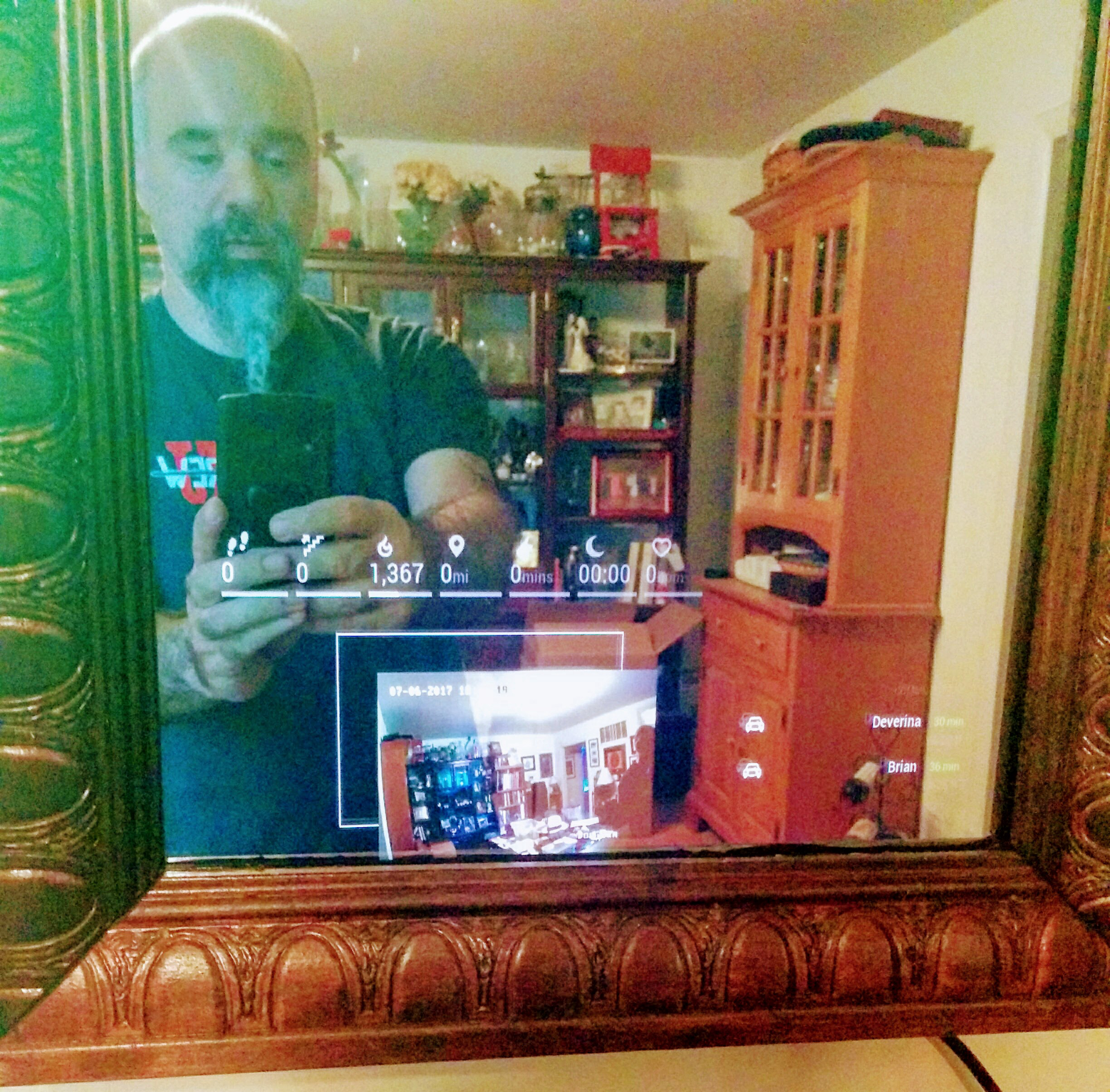
                    0_1499382491512_IMG_20170706_182518.jpg

                    1 Reply Last reply Reply Quote 0
                    • S Offline
                      shbatm Module Developer
                      last edited by shbatm

                      Great! I’m glad it’s working!

                      Still trying to find a more robust way for getting the right location for the overlay that doesn’t get messed up by margins and borders.

                      Starting on line 321 of MMM-RTSPStream.js try changing the +47 at the end of each line. I’d start with making them 0 and see if that helps:

                      box: {
                          top: rect.top + 47,       // Compensate for Margins 
                          right: rect.right + 47,   // Compensate for Margins
                          bottom: rect.bottom + 47, // Compensate for Margins
                          left: rect.left + 47      // Compensate for Margins
                      }
                      

                      ICYW: The 47 comes from a combo of the body margin, padding and borders on my setup.

                      bheplerB 1 Reply Last reply Reply Quote 0
                      • bheplerB Offline
                        bhepler Module Developer @shbatm
                        last edited by bhepler

                        @shbatm Again, thanks for all the hard work. Here are my findings (all taken from the development branch):

                        • The video was displaced from the border only on the PI, but not on Chrome nor Firefox whilst viewing the PI’s interface.
                        • Viewing the interface via Chrome or Firefox did show a video image, but it started up FFMPEG and started to heat the Pi up.
                        • Removing the 47 pixel offset made everything line up perfectly on the mirror itself.
                        • Removing the 47 pixel offset made no difference in border position when viewing the Magic Mirror interface via Chrome or Firefox. Everything lined up perfectly.
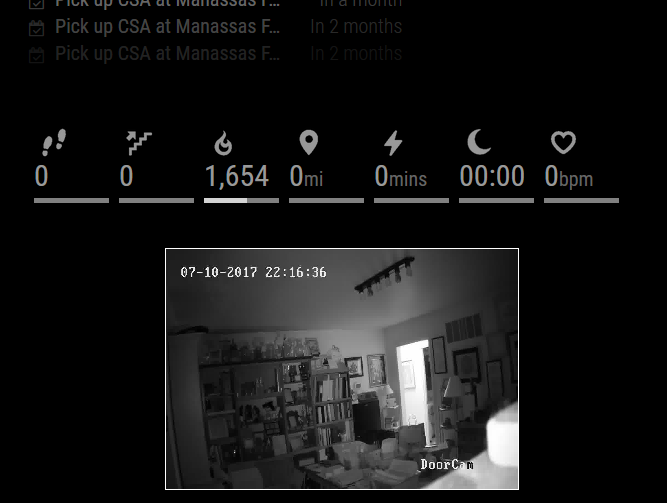
                          0_1499739728177_ipcam-test.png
                        bheplerB S 2 Replies Last reply Reply Quote 0
                        • bheplerB Offline
                          bhepler Module Developer @bhepler
                          last edited by

                          @bhepler Additionally, when I’m running this module, I cannot tell PM2 to restart the MM process. Any attempt to shut down the Magic Mirror and then start it again results in an error claiming that port 8080 is already in use. I have to reboot the Pi in order to get MM running again.
                          Error message:

                          Whoops! There was an uncaught exception...
                          0|mm       | { Error: listen EADDRINUSE 
                          :::
                          8080
                          0|mm       |     at Object.exports._errnoException (util.js:1022:11)
                          0|mm       |     at exports._exceptionWithHostPort (util.js:1045:20)
                          0|mm       |     at Server._listen2 (net.js:1262:14)
                          0|mm       |     at listen (net.js:1298:10)
                          0|mm       |     at Server.listen (net.js:1376:9)
                          0|mm       |     at new Server (/home/pi/MagicMirror/js/server.js:26:9)
                          0|mm       |     at /home/pi/MagicMirror/js/app.js:219:18
                          0|mm       |     at loadNextModule (/home/pi/MagicMirror/js/app.js:168:5)
                          0|mm       |     at /home/pi/MagicMirror/js/app.js:163:6
                          0|mm       |     at Class.loaded (/home/pi/MagicMirror/modules/node_modules/node_helper/index.js:19:3)
                          0|mm       |   code: 'EADDRINUSE',
                          0|mm       |   errno: 'EADDRINUSE',
                          0|mm       |   syscall: 'listen',
                          0|mm       |   address: '::',
                          0|mm       |   port: 8080 }
                          

                          Which is weird, because when I shut down MM, netstat -l doesn’t show anything listening on port 8080. A before-and-after shows the following two processes started (8027 is the port for my IP camera):

                          tcp        0      0 *:8027                  *:*                     LISTEN
                          tcp6       0      0 [::]:http-alt           [::]:*                  LISTEN
                          
                          1 Reply Last reply Reply Quote 0
                          • S Offline
                            shbatm Module Developer @bhepler
                            last edited by shbatm

                            @bhepler Thank you so much for the feedback and the testing.

                            The video was displaced from the border only on the PI, but not on Chrome nor Firefox whilst viewing the PI’s interface.
                            Viewing the interface via Chrome or Firefox did show a video image, but it started up FFMPEG and started to heat the Pi up.
                            Removing the 47 pixel offset made no difference in border position when viewing the Magic Mirror interface via Chrome or Firefox. Everything lined up perfectly.

                            – This is to be expected. OMXPlayer draws the video on top of the Pi’s screen (over the desktop & electron.js running the mirror). It can only do that on the Pi itself, so if you view it in another browser, the module defaults back to FFMPEG and software decoding.

                            Removing the 47 pixel offset made everything line up perfectly on the mirror itself.

                            Good – I will continue looking for a way to improve how the module “finds” the border box to give to OMX. For now this offset may just get moved into a config setting.

                            when I’m running this module, I cannot tell PM2 to restart the MM process. Any attempt to shut down the Magic Mirror and then start it again results in an error claiming that port 8080 is already in use. I have to reboot the Pi in order to get MM running again.

                            I noticed this on my system too, but didn’t associate it back to this module. Thanks for pointing it out. Something is not getting cleaned up properly. I am able to restart MM without restarting the whole Pi by killing the electron process manually (e.g. pkill electron or ps aux | grep electron and then kill {pid} on the process number that comes up. I will work on a fix for this in the next update.

                            Additional Development Notes:
                            • Still working on finding a better solution to using FFMPEG to decode and then re-transmit the stream. With Chrome/Firefox removing support for NPAPI plug-ins, it’s very restricting for RTSP. If anyone has any suggestions, I’m open to them.
                            1 Reply Last reply Reply Quote 0
                            • F Offline
                              Fonfon
                              last edited by Fonfon

                              Thanks !!! Works great with all my Dahua ip cam
                              but i don’t know why but i think when my motion sensor put in sleep my mirror my cam disconnect why ?

                              1 Reply Last reply Reply Quote 0
                              • I Offline
                                imdickie
                                last edited by

                                Great module. Allows my family to see the front door as they walk to answer it.

                                I am trying to use multiple streams so it shows the camera on my driveway and front door side by side. The layout is setup but, it duplicates the camera feed listed under stream1.

                                What is the reason why it is not seeing the second stream?

                                I’ve validated my RSP 3 can see both rtsp streams. In fact, if I swap the ip addresses my MM still shows just the first one listed.

                                Here is the code I am using.

                                {
                                module: 'MMM-RTSPStream',
                                position: 'bottom_center',
                                config: {
                                	autoStart: true,
                                        rotateStreams: false,
                                        rotateStreamTimeout: 10,
                                        showSnapWhenPaused: false,
                                        moduleWidth: 704,
                                        moduleHeight: 240,
                                	localPlayer: 'omxplayer',
                                        	stream1: {
                                                name: 'Front Door',
                                                url: 'rtsp://xxxxx:xxxxx@192.168.1.164:554/Streaming/Channels/102/',
                                                snapshotUrl: '',
                                                snapshotRefresh: 10, // Seconds
                                                frameRate: "30",
                                                port: 9999,
                                		width: "320",
                                		height: "240",
                                		},
                                                stream2: {
                                                name: 'Front Door',
                                                url: 'rtsp://xxxxx:xxxxx@192.168.1.163:554/Streaming/Channels/102/',
                                                snapshotUrl: '',
                                                snapshotRefresh: 10, // Seconds
                                                frameRate: "30",
                                                port: 9999,
                                		width: "320",
                                		height: "240",
                                                }
                                            }
                                        },
                                

                                Here is the result:
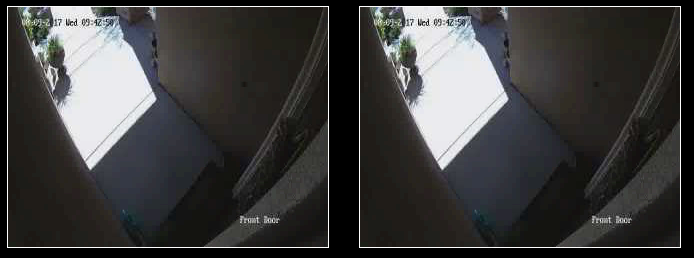
                                0_1502297117801_mmm-rstpstream.PNG

                                S 1 Reply Last reply Reply Quote 0
                                • S Offline
                                  shbatm Module Developer @imdickie
                                  last edited by

                                  @imdickie I’d be happy to take a look. First thing to try: change the name property of the second stream so it is different from the first one and see if that fixes it. In your config above, both are name: 'Front Door'

                                  1 Reply Last reply Reply Quote 0
                                  • I Offline
                                    imdickie
                                    last edited by

                                    @shbatm Thanks for the quick response. I changed them both to the correct names. Same result though, one stream in both windows.


                                    S 1 Reply Last reply Reply Quote 0
                                    • S Offline
                                      shbatm Module Developer @imdickie
                                      last edited by

                                      @imdickie OK, couple more things to try:

                                      • Make sure you are actually on the wip branch to use OMXPlayer:
                                        • Run cd ~/MagicMirror/modules/MMM-RTSPStream/ && git status and the first line should say: On branch wip. If it says On branch master then run git checkout wip to switch.
                                      • Change the port setting of stream2 to port: 10000 (or some other free port, different than stream1 – this shouldn’t matter when using omxplayer, but if it works it means there’s probably a bug I need to fix.
                                      • Can you please restart the MM2 script and post (or send in a chat) your Mirror’s server log–e.g. the output to the console/log file and not the DevTools/browser?
                                        • If you’re using pm2 to run the MM script, this would be in ~/.pm2/logs/ on a RPi or run pm2 restart mm && pm2 logs mm
                                        • I’m looking for any errors and the lines that start with “Starting WebSocket server on port…” and “Starting stream stream1 with args…”
                                      1 Reply Last reply Reply Quote 0
                                      • I Offline
                                        imdickie
                                        last edited by

                                        @shbatm Changing the ports did allow me to see separate streams.

                                        However, when I did the && git status command it did come up On Branch Master so I ran git checkout wip. When I kicked off the MM script after that change my screen just goes black. I went back to master with the different port numbers for now.

                                        I am not running pm2. I can rebuild from scratch and set it up though. This is all pretty new to me and I am learning as I go.

                                        Ctl+q doesn’t stop MM when in the black screen. I had to alt+tab to the console window and ctl+c to stop the script.

                                        Below is the console from when I ran the MM script and it went to a black screen. Hopefully that gives you some idea what is going on.

                                        Thanks again for the help.

                                        pi@raspberrypi:~/MagicMirror $ npm start
                                        
                                        > magicmirror@2.1.2 start /home/pi/MagicMirror
                                        > sh run-start.sh
                                        
                                        Starting MagicMirror: v2.1.2
                                        Loading config ...
                                        Loading module helpers ...
                                        No helper found for module: alert.
                                        Initializing new module helper ...
                                        Module helper loaded: updatenotification
                                        No helper found for module: clock.
                                        Initializing new module helper ...
                                        Module helper loaded: calendar
                                        No helper found for module: compliments.
                                        No helper found for module: currentweather.
                                        Initializing new module helper ...
                                        Module helper loaded: newsfeed
                                        Initializing new module helper ...
                                        Module helper loaded: MMM-WunderGround
                                        WARNING! Could not load config file. Starting with default configuration. Error found: Error: Cannot find module 'ps-tree'
                                        Loading module helpers ...
                                        No helper found for module: alert.
                                        Initializing new module helper ...
                                        Module helper loaded: updatenotification
                                        No helper found for module: clock.
                                        Initializing new module helper ...
                                        Module helper loaded: calendar
                                        No helper found for module: compliments.
                                        No helper found for module: currentweather.
                                        Initializing new module helper ...
                                        Module helper loaded: newsfeed
                                        Initializing new module helper ...
                                        Module helper loaded: MMM-WunderGround
                                        App threw an error during load
                                        Error: Cannot find module 'ps-tree'
                                            at Module._resolveFilename (module.js:470:15)
                                            at Function.Module._resolveFilename (/home/pi/MagicMirror/node_modules/electron/dist/resources/electron.asar/common/reset-search-paths.js:35:12)
                                            at Function.Module._load (module.js:418:25)
                                            at Module.require (module.js:498:17)
                                            at require (internal/module.js:20:19)
                                            at Object. (/home/pi/MagicMirror/modules/MMM-RTSPStream/node_helper.js:15:16)
                                            at Object. (/home/pi/MagicMirror/modules/MMM-RTSPStream/node_helper.js:188:3)
                                            at Module._compile (module.js:571:32)
                                            at Object.Module._extensions..js (module.js:580:10)
                                            at Module.load (module.js:488:32)
                                        Whoops! There was an uncaught exception...
                                        { Error: Cannot find module 'ps-tree'
                                            at Module._resolveFilename (module.js:470:15)
                                            at Function.Module._resolveFilename (/home/pi/MagicMirror/node_modules/electron/dist/resources/electron.asar/common/reset-search-paths.js:35:12)
                                            at Function.Module._load (module.js:418:25)
                                            at Module.require (module.js:498:17)
                                            at require (internal/module.js:20:19)
                                            at Object. (/home/pi/MagicMirror/modules/MMM-RTSPStream/node_helper.js:15:16)
                                            at Object. (/home/pi/MagicMirror/modules/MMM-RTSPStream/node_helper.js:188:3)
                                            at Module._compile (module.js:571:32)
                                            at Object.Module._extensions..js (module.js:580:10)
                                            at Module.load (module.js:488:32) code: 'MODULE_NOT_FOUND' }
                                        MagicMirror will not quit, but it might be a good idea to check why this happened. Maybe no internet connection?
                                        If you think this really is an issue, please open an issue on GitHub: https://github.com/MichMich/MagicMirror/issues
                                        Launching application.
                                        ^C
                                        pi@raspberrypi:~/MagicMirror $
                                        
                                        1 Reply Last reply Reply Quote 0
                                        • S Offline
                                          shbatm Module Developer
                                          last edited by

                                          @imdickie If you were on the Master branch it makes sense now why you were getting duplicate views, it was using ffmpeg and looking at only the first port for both cameras. The work-in-progress branch does not use websockets/ports for local playback since OMXPlayer just draws directly on top of the MM’s browser window.

                                          For the black screen: I forgot the wip branch has an additional node package required. This should take care of your problem:

                                          cd ~/MagicMirror/modules/MMM-RTSPStream
                                          git checkout wip
                                          git pull
                                          npm install
                                          

                                          You may or may not need to also add a moduleOffset config option: see the posts above for pictures, if the video doesn’t line up with the border, you can add moduleOffset: X to shift the video over (where X is a number of pixels).

                                          For more information about the wip branch, there is an updated README on the Github page: https://github.com/shbatm/MMM-RTSPStream/tree/wip

                                          For pm2: it’s definitely not a requirement, but I find it’s nice to have; I included in the note above just in case you were already using it. It will automatically run the MM script for you on startup. See this page if you want more information.

                                          To all using the module: Thanks for bearing with me, I haven’t had a lot of time this past month to finish out the hardware-accelerated version (wip/development branch) but I hope to get it done in the next month or so. I really do appreciate any feedback / issues you have to help me improve this module.

                                          I L 2 Replies Last reply Reply Quote 1
                                          • I Offline
                                            imdickie
                                            last edited by

                                            @shbatm said in [MMM-RTSPStream] - Video Streaming from Live Feeds & Security Cameras:

                                            …

                                            That did it. Thanks a ton.

                                            Not sure if it is omxplayer or not, but the stream seems to be much clearer. There is definitely less lag.

                                            Excellent work, thanks again.

                                            1 Reply Last reply Reply Quote 0

                                            Hello! It looks like you're interested in this conversation, but you don't have an account yet.

                                            Getting fed up of having to scroll through the same posts each visit? When you register for an account, you'll always come back to exactly where you were before, and choose to be notified of new replies (either via email, or push notification). You'll also be able to save bookmarks and upvote posts to show your appreciation to other community members.

                                            With your input, this post could be even better 💗

                                            Register Login

                                            • 1
                                            • 2
                                            • 3
                                            • 4
                                            • 5
                                            • 30
                                            • 31
                                            • 1 / 31
                                            • First post
                                              Last post
                                            Enjoying MagicMirror? Please consider a donation!
                                            MagicMirror created by Michael Teeuw.
                                            Forum managed by Sam, technical setup by Karsten.
                                            This forum is using NodeBB as its core | Contributors
                                            Contact | Privacy Policy