MagicMirror Forum
    • Recent
    • Tags
    • Unsolved
    • Solved
    • MagicMirror² Repository
    • Documentation
    • 3rd-Party-Modules
    • Donate
    • Discord
    • Register
    • Login
    A New Chapter for MagicMirror: The Community Takes the Lead
    Read the statement by Michael Teeuw here.

    [MMM-RTSPStream] - Video Streaming from Live Feeds & Security Cameras

    Scheduled Pinned Locked Moved Utilities
    602 Posts 67 Posters 2.1m Views 68 Watching
    Loading More Posts
    • Oldest to Newest
    • Newest to Oldest
    • Most Votes
    Reply
    • Reply as topic
    Log in to reply
    This topic has been deleted. Only users with topic management privileges can see it.
    • S Offline
      shbatm Module Developer @Niggich
      last edited by

      @Niggich said in [MMM-RTSPStream] - Video Streaming from Live Feeds & Security Cameras:

      The installation of the “Graceful Shutdown” fails.

      OK. It’s not required to get the streams to work, but is required to shutdown the streams if you exit/stop MM. This will be included automatically in the next MagicMirror release.

      If you’re comfortable making the changes manually, you can find them here f646360 – otherwise don’t worry about it for now, you’ll just have to stop the streams by hand if you exit MM (they will restart automatically if you restart MM).

      1 Reply Last reply Reply Quote 0
      • J Offline
        Johans @shbatm
        last edited by

        @shbatm for the moment i didn’t use any scheduler, carousel or profileswitcher.

        1 Reply Last reply Reply Quote 0
        • ? Offline
          A Former User
          last edited by

          Hi everyone, do you know how I would do this? I have a 8 channel Annke DVR analogue cameras not IP, I can view them via a web browser but a plugin is needed to be installed before I can view them.

          S 1 Reply Last reply Reply Quote 0
          • S Offline
            shbatm Module Developer @Guest
            last edited by

            @PCPAYN3 said in [MMM-RTSPStream] - Video Streaming from Live Feeds & Security Cameras:

            I have a 8 channel Annke DVR analogue cameras not IP

            You just need to find out if you can access an RTSP stream for the cameras through the DVR. Not sure which exact model you have but:

            First, check here: https://www.ispyconnect.com/man.aspx?n=Annke

            Second, I found this after a Quick google search:
            According to this thread here, you can access an RTSP stream for each of the cameras using the following:

            rtsp://[username]:[password]@[ip]:[port]/[codec]/[channel]/[subtype]/av_stream
            username such as admin
            password such as 12345
            ip: device IP, such as 192.0.0.64
            port: 554
            codec: h264, MPEG-4 or mpeg4
            channel: channel number, such as channel one is ch1
            subtype: type of steam. main stream is main and substeam is sub

            For example:
            main stream of channel 1
            rtsp://admin:12345@192.0.0.64:554/h264/ch1/main/av_stream

            substream of channel 1
            rtsp://admin:12345@192.0.0.64:554/h264/ch1/sub/av_stream

            1 Reply Last reply Reply Quote 0
            • B Offline
              barnosch
              last edited by

              Since i updated to the actual RTSPStream version i have a new issue.
              The whole mirror crashes for some reason (black screen) and only the stream is still showing.
              This is not on a regular basis, after some hours it happens.
              Rebooting and everything is fine again.

              I have not updated yet to the new MM version (because of all the issue threads in the forum)

              Any idea?

              S cowboysdudeC 2 Replies Last reply Reply Quote 0
              • S Offline
                shbatm Module Developer @barnosch
                last edited by

                @barnosch said in [MMM-RTSPStream] - Video Streaming from Live Feeds & Security Cameras:

                The whole mirror crashes for some reason (black screen) and only the stream is still showing.

                Is there anything that shows up in the server or console log? Can you run the mirror using npm start dev to monitor the electron console for logs and let me know what the error is?

                I had already upgraded my mirror to the new version, there may be a dependency or change that is effecting it that I missed.

                1 Reply Last reply Reply Quote 0
                • R Offline
                  richfreeman
                  last edited by richfreeman

                  Sorry to hijack this thread.
                  Are there any log’s created to investigate why a video feed will not display in the MM.
                  omxplayer will stream the feed fine from the command line, using
                  sudo omxplayer -o hdmi rtsp://0.0.0.0:554/onvif1

                  Any advice gratefully received…

                  Thanks.

                  1 Reply Last reply Reply Quote 0
                  • R Offline
                    richfreeman
                    last edited by

                    udp protocol needed for my doorbell rtsp feed!
                    Just needed to add the protocol: “udp”,
                    instead of typical tcp.
                    Feed appeared after a few seconds!
                    At last!

                    1 Reply Last reply Reply Quote 1
                    • V Offline
                      Vauxdvihl
                      last edited by Vauxdvihl

                      Hi,
                      thanks for this great module.
                      One question.
                      I am using a bird cam with another rpi
                      This “live stream” directly coming from the birds housing is available under the IP
                      “http://xxx.xxx.xxx.xxx”
                      Unfortunately i am was not able so far, to “show” this live stream on my magic mirror.
                      The link that i used in the config file for this module was:
                      “rstp://http://…”
                      “http://…”
                      “rstp://…”

                      The Bird Cam uses “RPI CAM Control V6.2.31”

                      Can anybody help?
                      Thanks a lot

                      S 1 Reply Last reply Reply Quote 0
                      • S Offline
                        shbatm Module Developer @Vauxdvihl
                        last edited by

                        @Vauxdvihl – when you open the stream in your browser, do you need any special plugins to view it?

                        Without digging too deep, it looks like this is a MJPEG stream, which can be viewed without any special software in the browser. For these kind of streams it’s easiest to just use the MMM-iframe module to show the stream.

                        If you don’t want to show the controls the page generates, you can find the link directly to the camera image by viewing the source of the camera stream page.

                        V 1 Reply Last reply Reply Quote 0
                        • V Offline
                          Vauxdvihl @shbatm
                          last edited by

                          @shbatm
                          THANKS A LOT
                          Thumbs up to you
                          It works

                          1 Reply Last reply Reply Quote 0
                          • N Offline
                            nagaculun
                            last edited by

                            @shbatm
                            It works. But I have issue with global zoom.

                            With the zoom value 1.5, the module size is enlarged by 1.5 while the actual video feed is not.

                            How do I fix this ?

                            Thanks

                            S 1 Reply Last reply Reply Quote 0
                            • S Offline
                              shbatm Module Developer @nagaculun
                              last edited by

                              @nagaculun You’ll have to set the width and height of the stream manually because and OMXPlayer should resize the video for you. It’s a bit trial and error, but you should be able to get it lined up very close.

                              Refer to the README and the moduleOffset module setting and width, height, and absPosition stream settings.

                              Let me know if you have issues getting it to work.

                              1 Reply Last reply Reply Quote 0
                              • G Offline
                                goprojojo
                                last edited by

                                I need some help with this module. I can see the RTSP stream without issues BUT when I use it with the MMM-Wallpaper then the stream doesn’t show. Any suggestions?

                                1 Reply Last reply Reply Quote 0
                                • evroomE Offline
                                  evroom
                                  last edited by

                                  Hello,

                                  I have been playing with MagicMirror for 2 weeks now and am slowly getting the hang of it.
                                  It was the MMM-RTSPStream that sparked it all and made me decide to dedicate a monitor for all the other nice modules.

                                  Now I have a question concerning MMM-RTSPStream.
                                  The streams are ordered from left to right and then from top to bottom, all depending on the size of the windows.
                                  I would like to have a bit more control, like with tables.
                                  My goal for now is to have a bigger window on the left and 2 little windows on the right.

                                  I have no idea how to place a picture, so I try to place a link to a picture.
                                  This shows the current implementation, with 2 streams.

                                  Current implementation - 2 streams

                                  Any idea where and how to achieve that (if possible at all) ??

                                  I guess the MMM-RTSPStream.css is a place to start, but for the moment I fail to understand it to be able to make the wanted changes.
                                  Due to a lack of knowledge of css, but I am willing to learn.

                                  Thanks in advance and best regards,

                                  Erik-Jan

                                  MagicMirror version: 2.33.0
                                  Raspberry Pi 4 Model B Rev 1.5 (8 GB RAM)
                                  Raspbian GNU/Linux 12 (bookworm)

                                  Test environment:
                                  MagicMirror version: v2.33.0
                                  Raspberry Pi 3 Model B Plus Rev 1.3 (1 GB RAM)
                                  Raspbian GNU/Linux 12 (bookworm)

                                  S 1 Reply Last reply Reply Quote 0
                                  • S Offline
                                    shbatm Module Developer @evroom
                                    last edited by

                                    @evroom said in [MMM-RTSPStream] - Video Streaming from Live Feeds & Security Cameras:

                                    I guess the MMM-RTSPStream.css is a place to start

                                    @evroom – First of all welcome to the community.

                                    You should be able to do what you’re asking by manipulating the CSS (or another way I’ll mention below).

                                    For CSS:

                                    First, you should put all customizations in the ~/MagicMirror/css/custom.css file so they don’t get overwritten by any module or MagicMirror updates.

                                    Try adding this to custom.css:

                                    .MMM-RTSPStream .innerWrapper {
                                        float: left;
                                    }
                                    

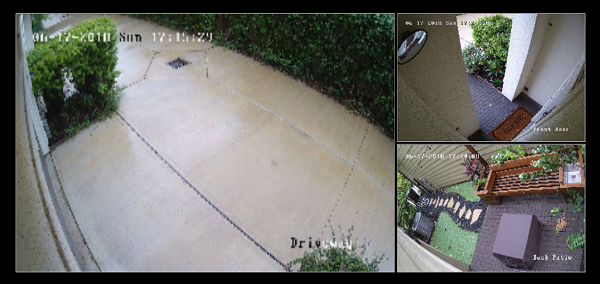
                                    Without float (original):
                                    0_1529274362847_Capture.PNG

                                    With float (and reducing the size of the other two streams by half and the moduleWidth settings in my config):
                                    0_1529274464031_Capture2.PNG

                                    Background if needed for further changes: the MMM-RSTPStream draws all of the streams inside of a single, outerdiv with the "MMM-RTSPStream wrapper" classes. Each stream consists of an "MMM-RTSPStream innerWrapper"-classed div block which contains all the controls, canvas, and screenshot for each stream. This is the tag you’ll need to manipulate to get it to do what you want. If you need to override one particular stream’s size/container, you can reference it in CSS by using it’s ID, which ends in the stream number. For example, something like this:

                                    #iw_stream1 {
                                        width: 123px;
                                    }
                                    

                                    Additional option If you’re using Raspberry Pi directly attached to the monitor and using OMXPlayer to play the streams, you can also turn off the borders and send exact sizes and locations for each stream on the monitor using the absPosition parameter. See the README on GitHub for more details. This will break any thumbnail or remote playback, though.

                                    1 Reply Last reply Reply Quote 0
                                    • evroomE Offline
                                      evroom
                                      last edited by

                                      @shbatm said in [MMM-RTSPStream] - Video Streaming from Live Feeds & Security Cameras:

                                      .MMM-RTSPStream .innerWrapper {
                                      float: left;
                                      }

                                      @shbatm
                                      Thanks a lot! Works just fine.
                                      A bit of calculating and adjusting the margin, and it does what I wanted.

                                      MagicMirror version: 2.33.0
                                      Raspberry Pi 4 Model B Rev 1.5 (8 GB RAM)
                                      Raspbian GNU/Linux 12 (bookworm)

                                      Test environment:
                                      MagicMirror version: v2.33.0
                                      Raspberry Pi 3 Model B Plus Rev 1.3 (1 GB RAM)
                                      Raspbian GNU/Linux 12 (bookworm)

                                      1 Reply Last reply Reply Quote 0
                                      • evroomE Offline
                                        evroom
                                        last edited by

                                        Hi,

                                        Quite happy with MMM-RTSPStream so far; thx to those that contributed to it.

                                        Next thing I am trying to use MMM-RTSPStream for, is streaming sat-tv from a Dreambox & VU+ receivers.
                                        I am able to stream a channel using:

                                        omxplayer --vol -3000 --win “0 0 480 320” --live http://192.168.178.28:8001/1:0:19:283D:3FB:1:C00000:0:0:0:

                                        It is not a rtsp stream, but it can use omxplayer for streaming.
                                        When I try to use MMM-iFrame, I can add the URL, but then it tries to open a program that can play mpg (and MagicMirror won’t start).
                                        When I use it to stream using my browser (on my PC), I have it open VLC player, but installing VLC on Raspberry (using HW acceleration) is quite an act, so I would prefer to use omxplayer.

                                        Could this be done ?

                                        I am not so familiar with JavaScript and CCS (yet), more a Perl guy, but am willing to assist and test-drive.

                                        MagicMirror version: 2.33.0
                                        Raspberry Pi 4 Model B Rev 1.5 (8 GB RAM)
                                        Raspbian GNU/Linux 12 (bookworm)

                                        Test environment:
                                        MagicMirror version: v2.33.0
                                        Raspberry Pi 3 Model B Plus Rev 1.3 (1 GB RAM)
                                        Raspbian GNU/Linux 12 (bookworm)

                                        A 1 Reply Last reply Reply Quote 1
                                        • evroomE Offline
                                          evroom
                                          last edited by evroom

                                          Hi,

                                          To come back to my own request.

                                          The line that works from the command line is:

                                          omxplayer --vol -3000 --win “0 0 480 320” --live http://192.168.178.28:8001/1:0:19:283D:3FB:1:C00000:0:0:0:

                                          When I look at the code
                                          https://github.com/shbatm/MMM-RTSPStream/blob/master/node_helper.js

                                          I notice following:

                                          –vol : not present, not really necessary, yet
                                          –win : present
                                          –live : present
                                          –avdict rtsp_transport:tcp : present, needed ?
                                          -–video_queue 4 : present, needed ?
                                          –fps 30 : present, needed ?

                                          When home I will try:

                                          $ omxplayer --avdict rtsp_transport:tcp --win “0 0 480 320” --live -–video_queue 4 --fps 30 http://192.168.178.28:8001/1:0:19:283D:3FB:1:C00000:0:0:0:

                                          And I will try:

                                          node_helper.js :

                                          if (this.config[s.name].protocol == “http”) {
                                          args.unshift(“–vol 3000”);
                                          }

                                          MagicMirror version: 2.33.0
                                          Raspberry Pi 4 Model B Rev 1.5 (8 GB RAM)
                                          Raspbian GNU/Linux 12 (bookworm)

                                          Test environment:
                                          MagicMirror version: v2.33.0
                                          Raspberry Pi 3 Model B Plus Rev 1.3 (1 GB RAM)
                                          Raspbian GNU/Linux 12 (bookworm)

                                          1 Reply Last reply Reply Quote 0
                                          • evroomE Offline
                                            evroom
                                            last edited by

                                            Okay, it is actually quite simple.
                                            It works without any modifications.

                                            stream1: {
                                            	url: 'http://192.168.178.28:8001/1:0:19:2B66:3F3:1:C00000:0:0:0:', // ZDF HD
                                            	//url: 'http://192.168.178.28:8001/1:0:19:283D:3FB:1:C00000:0:0:0:', // ARD HD
                                            	protocol: "tcp",
                                            	width: 590,
                                            	height: 332
                                            }
                                            
                                            
                                            2|mm       | Starting stream stream1 with args: [
                                            2|mm       |     "--avdict",
                                            2|mm       |     "rtsp_transport:tcp",
                                            2|mm       |     "--win",
                                            2|mm       |     "4, 608, 594, 940",
                                            2|mm       |     "--live",
                                            2|mm       |     "--video_queue",
                                            2|mm       |     "4",
                                            2|mm       |     "--fps",
                                            2|mm       |     "30",
                                            2|mm       |     "http://192.168.178.28:8001/1:0:19:2B66:3F3:1:C00000:0:0:0:"
                                            2|mm       | ]
                                            2|mm       | Starting PM2 for omx_stream1
                                            2|mm       | PM2 started for omx_stream1


                                            It is just that the Raspberry Pi 3 Model 3 and omxplayer only can handle 1 TS stream, as it appears to be the case.
                                            Simular like the max. 3 RTSP camera streams.

                                            So, if you do not use omxplayer for something else and you want to use MMM-RTSPStream for streaming just the one TS channel, it can be used.


                                            MagicMirror version: 2.33.0
                                            Raspberry Pi 4 Model B Rev 1.5 (8 GB RAM)
                                            Raspbian GNU/Linux 12 (bookworm)

                                            Test environment:
                                            MagicMirror version: v2.33.0
                                            Raspberry Pi 3 Model B Plus Rev 1.3 (1 GB RAM)
                                            Raspbian GNU/Linux 12 (bookworm)

                                            1 Reply Last reply Reply Quote 0

                                            Hello! It looks like you're interested in this conversation, but you don't have an account yet.

                                            Getting fed up of having to scroll through the same posts each visit? When you register for an account, you'll always come back to exactly where you were before, and choose to be notified of new replies (either via email, or push notification). You'll also be able to save bookmarks and upvote posts to show your appreciation to other community members.

                                            With your input, this post could be even better 💗

                                            Register Login

                                            • 1
                                            • 2
                                            • 3
                                            • 4
                                            • 5
                                            • 6
                                            • 7
                                            • 30
                                            • 31
                                            • 5 / 31
                                            • First post
                                              Last post
                                            Enjoying MagicMirror? Please consider a donation!
                                            MagicMirror created by Michael Teeuw.
                                            Forum managed by Sam, technical setup by Karsten.
                                            This forum is using NodeBB as its core | Contributors
                                            Contact | Privacy Policy