MagicMirror Forum
    • Recent
    • Tags
    • Unsolved
    • Solved
    • MagicMirror² Repository
    • Documentation
    • 3rd-Party-Modules
    • Donate
    • Discord
    • Register
    • Login
    A New Chapter for MagicMirror: The Community Takes the Lead
    Read the statement by Michael Teeuw here.

    [MMM-RTSPStream] - Video Streaming from Live Feeds & Security Cameras

    Scheduled Pinned Locked Moved Utilities
    602 Posts 67 Posters 2.1m Views 68 Watching
    Loading More Posts
    • Oldest to Newest
    • Newest to Oldest
    • Most Votes
    Reply
    • Reply as topic
    Log in to reply
    This topic has been deleted. Only users with topic management privileges can see it.
    • S Offline
      shbatm Module Developer
      last edited by shbatm

      @imdickie Great! I’m glad it’s working!

      WRT the offset – that part is definitely a work in progress and the moduleOffset setting is a stop-gap.

      For anyone who is proficient in JavaScript – I need a better way to get the position of the camera window’s canvas tag with respect to the corner of the screen and not the browser window. Currently I’m using canvas.getBoundingClientRect() which doesn’t account for all of the borders, margins, or paddings.

      1 Reply Last reply Reply Quote 0
      • B Offline
        barnosch
        last edited by

        Do i understand correctly?
        Local Player means that it only can playback a source, directly installed at the pi?
        No source from a wlan attached ip cam?

        Tried the wip branch for my IP cam, since the ffmeg player uses 100% and has 6 seconds delay in my case.
        With the omx player i do not get a picture anymore. (At least i do not have a complete black screen anymore ;) )

        S 1 Reply Last reply Reply Quote 0
        • S Offline
          shbatm Module Developer @barnosch
          last edited by shbatm

          @barnosch Here is a picture to explain:
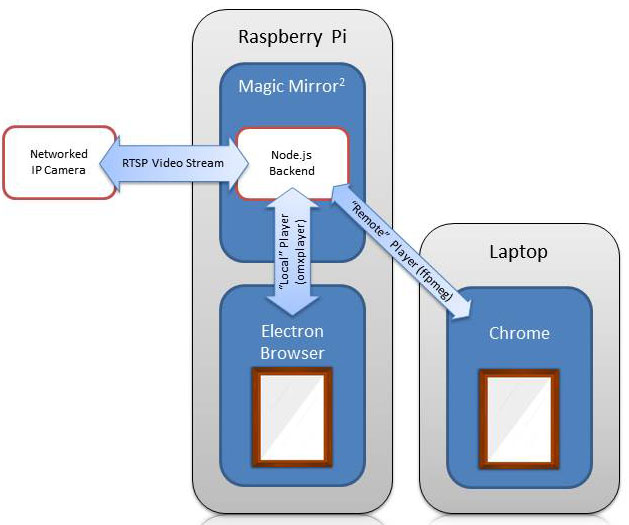
          0_1502450595358_RTSPStream.jpg

          • Please make sure you run the following after switching branches:
              cd ~/MagicMirror/modules/MMM-RTSPStream
              npm install
          
          • Do you have any errors in the console log?
          • Please check omxplayer is installed
              which omxplayer
              # Should show '/usr/bin/omxplayer'
          
          • Please check omxplayer is running when the video should be playing:
              pgrep omx
              # Should show a number (process ID)
          
          1 Reply Last reply Reply Quote 0
          • B Offline
            barnosch
            last edited by

            Thanks for the explanation.
            It was already working, but i could not see the stream remotely within a VNC session (the ffmpeg stream was visible).
            It works perfect now. No delay, and way sharper.
            But…
            If i restart the mirror because of changes in the config, i get a blank black screen.
            The omxplayer does not stop completely. One instance is still running and is not killable.

            Additionally it seems that something kills the DNS of the pi. (Could be something else, but i guess it starts by adding your module).
            Now the stupid thing. if i restart the service with “dhclient”, the name resolution works again, but i need to restart the mirror, that the scripts are loading.
            If i restart the mirror, dns is not working anymore. (etc/resolve.conf is correct)

            It would really helpful if the omxplayer would shutdown completely if i
            pm2 stop mirror.sh
            or
            pm2 restart mirror.sh
            to not get a blank screen.

            Above all this, i love the module and appreciate your work. Thanks a lot.
            WAF is really huge for this great addon ;)

            1 Reply Last reply Reply Quote 0
            • S Offline
              shbatm Module Developer
              last edited by

              @barnosch Great! I’m glad its working. You bring up an important point that I should emphasize:

              For anyone using the OMXPlayer Version: OMXPlayer outputs directly to the screen via the GPU. The video window will show up on top of anything else and will not appear in any remote desktop, VLC, or remote browser windows. This is by design. Think of it like picture-in-picture on your TV.

              About the OMXPlayer not exiting: this is a known issue and is the reason the wip branch hasn’t been made the master yet. I thought I had a fix for it, but it’s inconsistent.

              A temporary fix is to try adding the following BEFORE the npm start line in your mirror.sh script to make sure everything is dead before restarting:

              pkill omxplayer
              pkill electron
              
              B 1 Reply Last reply Reply Quote 0
              • L Offline
                LindaBrestine @shbatm
                last edited by

                @shbatm said in [MMM-RTSPStream] - Video Streaming from Live Feeds & Security Cameras:

                @imdickie If you were on the Master branch it makes sense now why you were getting duplicate views, it was using ffmpeg and looking at only the first port for both cameras. The work-in-progress branch does not use websockets/ports for local playback since OMXPlayer just draws directly on top of the MM’s browser window.

                For the black screen: I forgot the wip branch has an additional node package required. This should take care of your problem:

                cd ~/MagicMirror/modules/MMM-RTSPStream
                git checkout wip
                git pull
                npm install
                

                You may or may not need to also add a moduleOffset config option: see the posts above for pictures, if the video doesn’t line up with the border, you can add moduleOffset: X to shift the video over (where X is a number of pixels).

                For more information about the wip branch, there is an updated README on the Github page: https://github.com/shbatm/MMM-RTSPStream/tree/wip

                For pm2: it’s definitely not a requirement, but I find it’s nice to have; I included in the note above just in case you were already using it. It will automatically run the MM script for you on startup. See this page if you want more information.

                To all using the module: Thanks for bearing with me, I haven’t had a lot of time this past month to finish out the hardware-accelerated version (wip/development branch) but I hope to get it done in the next month or so. I really do appreciate any feedback / issues you have to help me improve this module.

                thanks for your support. It really helps

                1 Reply Last reply Reply Quote 0
                • B Offline
                  barnosch @shbatm
                  last edited by

                  added the pkill commands but it does not work. It does not kill the apps.

                  From time to time, the feed disappears. Have not yet found when and why.
                  Sometimes it runs 2 days without problems, the other day it only lasts for some hours.
                  Weird.

                  Only thing what helps is currently a reboot of the whole pi.

                  Since it was to complicated to log in on a device to give the reboot command, i set up a
                  Amazon Dash Button and placed it right next to the mirror.
                  So my wife can reboot the mirror with just a simple order- click. ;)

                  Hopefully the OMX version will become more stable sooner or later.

                  K S 2 Replies Last reply Reply Quote 0
                  • X Offline
                    xblackdemonx
                    last edited by xblackdemonx

                    I don’t understand, I downloaded the module, i’ve added this to my config.js file and I only see the square box where it’s supposed to show the feeed but it doesn’t show anything. The box is blank. If I put the same URL(rtsp://192.168.1.2:554/unicast/) in VLC on my magic mirror it works fine.
                    My MagicMirror is setup using Debian Jessie and I autostart MagicMirror via PM2. The camera I use is the XiaoMi XiaoFang Smart IP Security Home Camera running fang-hacks Please help.

                    {
                    module: ‘MMM-RTSPStream’,
                    position: ‘bottom_center’,
                    config: {
                    autoStart: true,
                    rotateStreams: false,
                    rotateStreamTimeout: 10,
                    showSnapWhenPaused: false,
                    moduleWidth: 704,
                    moduleHeight: 240,
                    stream1: {
                    name: ‘salon’,
                    url: ‘rtsp://192.168.1.2:554/unicast/’,
                    snapshotUrl: ‘’,
                    snapshotRefresh: 10, // Seconds
                    frameRate: “30”,
                    port: 9999,
                    width: “320”,
                    height: “240”,
                    },

                    1 Reply Last reply Reply Quote 0
                    • K Offline
                      kasperb @barnosch
                      last edited by

                      @barnosch Having the same issue; only a browser refresh or restart of the MM works. I started to question my camera and thought it was going offline, but looks like it’s related to the current WIP version. :-)

                      1 Reply Last reply Reply Quote 0
                      • N Offline
                        Niggich
                        last edited by

                        @shbatm I try everything to get stream working with omxplayer but I always get a black blank screen. I don’t know what can I try anymore. When I change it back to ffmpeg the stream is working…

                        X 1 Reply Last reply Reply Quote 0
                        • X Offline
                          xblackdemonx @Niggich
                          last edited by

                          @Niggich Then why do you insist on using omxplayer then?

                          N 1 Reply Last reply Reply Quote 0
                          • N Offline
                            Niggich @xblackdemonx
                            last edited by

                            @xblackdemonx The ffmpeg have a time difference from live to stream about 10 seconds.

                            X 1 Reply Last reply Reply Quote 0
                            • X Offline
                              xblackdemonx @Niggich
                              last edited by

                              @Niggich Not for me. I see maybe a 1/2 second delay only.

                              N 1 Reply Last reply Reply Quote 0
                              • N Offline
                                Niggich @xblackdemonx
                                last edited by

                                @xblackdemonx how you did this? I try everything… how is your config?

                                X 1 Reply Last reply Reply Quote 0
                                • X Offline
                                  xblackdemonx @Niggich
                                  last edited by

                                  @Niggich Nothing special. Maybe reboot your cameras?

                                          module: 'MMM-RTSPStream',
                                          position: 'bottom_bar',
                                          config: {
                                              autoStart: true,
                                              rotateStreams: false,
                                              rotateStreamTimeout: 10,
                                              showSnapWhenPaused: false,
                                              moduleWidth: 354,
                                              moduleHeight: 240,
                                              stream1: {
                                                  name: 'Salon',
                                                  url: 'rtsp://192.168.1.2:554/unicast',
                                                  snapshotUrl: '',
                                                  snapshotRefresh: 10, // Seconds
                                                  frameRate: "15",
                                                  port: 9999,
                                             			 }
                                        		  }
                                   		   },
                                  
                                  N 1 Reply Last reply Reply Quote 0
                                  • N Offline
                                    Niggich @xblackdemonx
                                    last edited by

                                    @xblackdemonx ok, almost the same like my config. Just the Framerate is different. I change it like it is in your config and will see.

                                    1 Reply Last reply Reply Quote 0
                                    • D Offline
                                      Drooneyef
                                      last edited by Drooneyef

                                      I noticed the following:
                                      When using omxplayer i also had a black screen instead of the camera image.
                                      I removed the sd card and inserted it in a different raspberry.
                                      Then everything was working fine.
                                      The only difference between those 2 is the monitor connected to it.
                                      It was working on a 7 inch monitor and on a 24 inch monitor it didn’t work.
                                      The problem was the resolution.
                                      Now the module is using stream2 and i changed in my Hikvision camera the resolution settings for stream2.
                                      Now my mirror is working fine.
                                      Maybe this is also a solution for you.

                                      1 Reply Last reply Reply Quote 0
                                      • bheplerB Offline
                                        bhepler Module Developer
                                        last edited by

                                        I hope my configuration will help give you guys another possibility. I locked down my camera a bit with a username & password. So my configuration looks as so:

                                        {
                                        module: "MMM-RTSPStream",
                                            position: "bottom_left",
                                            config: {
                                                  autostart: true,
                                                  rotateStreams: false,
                                                  showSnapWhenPaused: false,
                                                  moduleWidth: 354,
                                                  moduleHeight: 242,
                                                  stream1: {
                                                       name: 'Front Door',
                                                       url: 'rtsp://[username]:[password]@10.0.0.25/cam1/mpeg4',
                                                       port: 8027,
                                                       shutdownDelay: 0,
                                                       width: 352,
                                                       height: 240,
                                                       frameRate: "30"
                                                       }
                                                  }
                                        }
                                        
                                        1 Reply Last reply Reply Quote 0
                                        • N Offline
                                          Niggich
                                          last edited by

                                          The stream works fine with the omx… finally, after 4 weeks playing…

                                          Another question. Is any way to remove the little white Frame around video picture?

                                          D B 2 Replies Last reply Reply Quote 0
                                          • D Offline
                                            Drooneyef @Niggich
                                            last edited by

                                            @Niggich
                                            What was the trick that made it work finally?

                                            N 1 Reply Last reply Reply Quote 0

                                            Hello! It looks like you're interested in this conversation, but you don't have an account yet.

                                            Getting fed up of having to scroll through the same posts each visit? When you register for an account, you'll always come back to exactly where you were before, and choose to be notified of new replies (either via email, or push notification). You'll also be able to save bookmarks and upvote posts to show your appreciation to other community members.

                                            With your input, this post could be even better 💗

                                            Register Login

                                            • 1
                                            • 2
                                            • 3
                                            • 4
                                            • 5
                                            • 30
                                            • 31
                                            • 2 / 31
                                            • First post
                                              Last post
                                            Enjoying MagicMirror? Please consider a donation!
                                            MagicMirror created by Michael Teeuw.
                                            Forum managed by Sam, technical setup by Karsten.
                                            This forum is using NodeBB as its core | Contributors
                                            Contact | Privacy Policy