Read the statement by Michael Teeuw here.
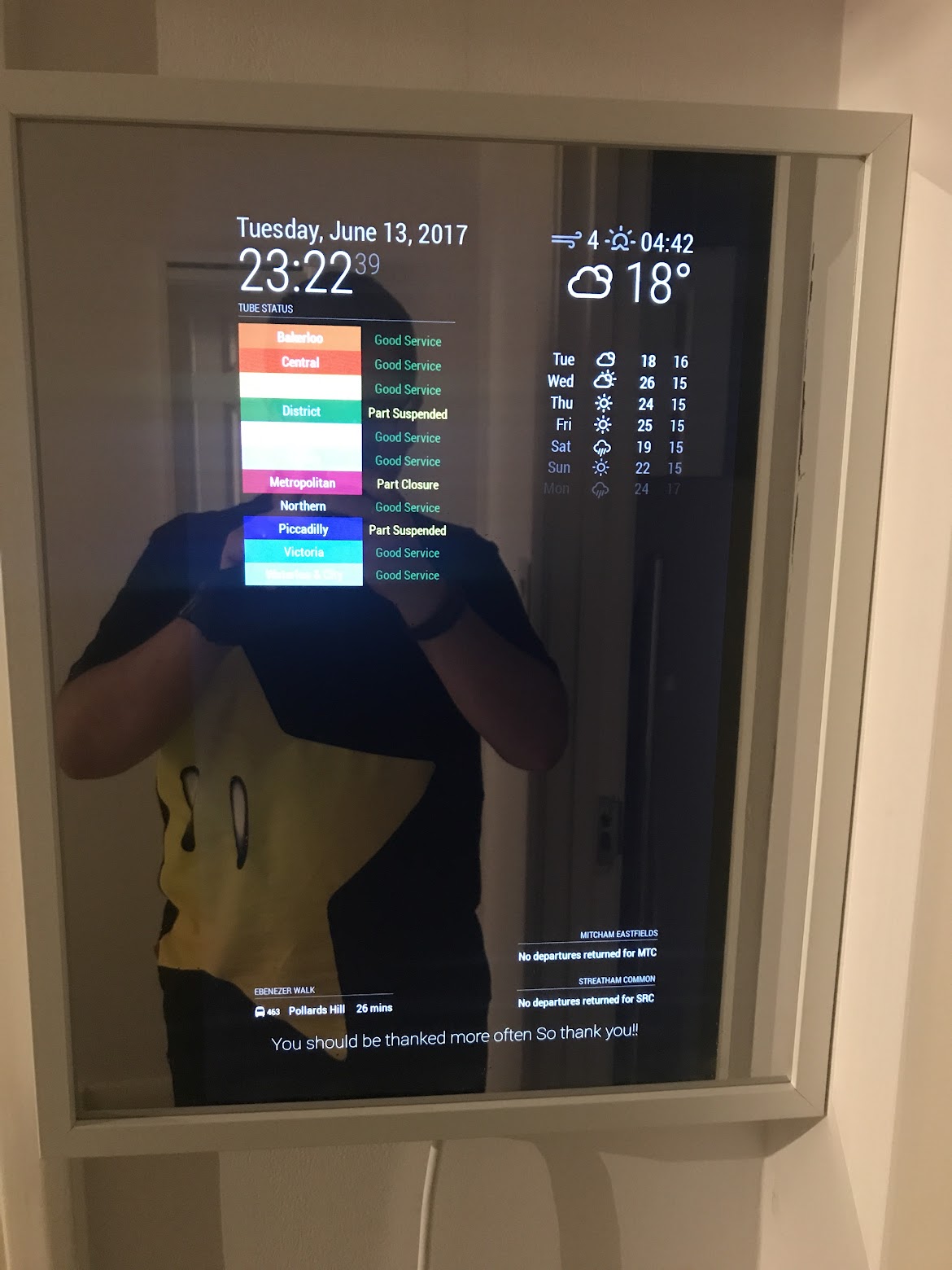
22'' Display + 40cmx50cm IKEA Frame + PIR Sensor
-
Frame
Just two IKEA RIBBA glued back to back. You can use the included glass to use some film on it and the back to “close” the back and hang the frame.
I tried to do my own frame, but I suck at that…Modules
- clock
- currentweather
- MMM-Tube-Status
- weatherforecast
- MMM-TFL-Arrivals
- MMM-UKNationalRail
- compliments (with a custom compliments.json file)
CSS
Just some custom CSS to make everything a little bigger and some transform: scale(1.5)
to make the clock & weather modules biggerPIR Sensor
The PIR sensor is “hidden” in the right bottom corner. Not the best place, but is so useful than I can really complain. When the screen turns on when you are near is when this MagicMirror feels like magic :)
I got this one and I am using MagicMirror-Display-Controller to control it. -
Looks really good. Thinking about using the same ikea frame.
Did you use some film on the glass or did you end up buying a one way mirror? -
I used a film and the glass included with the frame, as I didn’t want to go crazy for my first magic mirror, but as soon as I get another display ( a good one) I will order a proper two way mirror and make another one using the same frame (super easy to do and quite cheap)
-
You are the genius!! I considered IKEA RIBBA, but I gave up the idea because the depth was not enough. How can you find “Back-to-Back” solution! I should have read this article 1 weeks before.
-
@Sean Well, to be honest, my wife deserves all the credit: I was desperate after 2 weeks of trying to do my own frame, including butchering 3 RiBBAs (just to get the glass) and my wife just said: hey, you already have two unused frames, why you just don’t glue them back to back? MIND BLOWN
-
@ryck Would please you post a hardware list with prices? I like your setup and it looks like a simple cost effective design for my first project.
-
@AZ_Geek I can try :)
Required
- Old 22’’ display (£10)
- 2 x IKEA RIBBA 40x50
- One way reflective film
- Micro SDHC
- Raspberry Pi 3 B
- HDMI to VGA adaptor
Optional
You will also need some glue to join the two frames together, an extension lead to plugin everything inside the frame, a drill to hang the frame and make a hole for the extension lead cable… but hopefully you’ll have all this things already.
Good luck with your new MagicMirror!
-
Isn’t a 40/50 Ribba frame at Ikea…?!? Thinking of using this or two back to back. Also can you quote the one way reflective film you used as the link was just a link to Ebay.
-
Hey ryck,
is it possible to show us some pictures from the backside how do you placed the PIR ?
How do you fix the PIR and, if possible, the connection from the PIR to the raspi …
And what hight did your RIBBA have?Thanks!
-
@MyMirror Sure, I’ll try tonight, but I can already tell you:
- The PIR is attached to the bottom of the frame with some bluetack
- The PIR sensor is using this “module” so just follow the instruction (ie, here)
- My frame was 40x50, but you have more options, just choose the one that works better for you (and fits your screen, of course)
Good luck!
-
-
Hey ryck, thanks for the details.
Did your monitor shows information like “no HMDI found” or “lost signal” or anything like this, when the PIR turns off the screen?
If not … what have you done to suppress the text/infos?
Or is your monitor smart enough to do that for you?
Greets
MyMirror -
@MyMirror I don’t get any text on the display when it goes off, maybe the display is smart enough? Are you using the same software to turn it off?
-
Hi @ryck,
i think it is python …
I just get “Python 2 (IDLE)” on my menue.
I’ll try to force an update with
sudo apt-get update
sudo apt-get upgrade
sudo apt-get install --reinstall python3
but, after reboot, nothing happens. I’ve got just python2 on my menue.
…
(After searching in the main menue Editor …)
OK - found python3 but without IDLE) - but this should not be the problem, or?
But if it is “easy” to install the IDLE - can you give me a hint?I use pin 14 - as in the pir.py written - nothing happens … :-(
I think, it is the missing line 7 in the pir.py.
You wrote:
You have to change line 7 to the location of the pir.py file like this:
ExecStart=/usr/bin/python /path/to/your/pir.pyBut in my pir.py i didn’t find a line like this …
Can you help me?Thanks
MyMirror -
@MyMirror in the pir.py file you need to change only one thing, the GPIO data pin to which the PIR sensor is connected (you can double check yours here: https://pinout.xyz/). The line is this one: https://github.com/deg0nz/MagicMirror-Display-Controller/blob/master/pir.py#L8
That should be all.
The line 7 stuff is for the service (ie, run the script automatically every time the Pi reboots) and is in a different file: https://github.com/deg0nz/MagicMirror-Display-Controller/blob/master/pir_sensor.service#L7
-
Merry xmas :-),
thanks … your script works - my monitor not really :-(
If your script power off HDMI i’ll get a “HDMI”-Logo and “no Signal” … bad :-(
It seems that i have to buy a different screen.
Which one do you use? Is it available as 32’’ ?Greets
MyMirror -
You can see it here :-(
-
Nice mirror. Have you considered leading the cable to the right and down along the corner of the wall? Might look even cleaner. And if it’s a selfmade cable, I’d consider some white cable sleeving.
-
@ryck hello. Please, would you consider making a video on installing software steps for morons like me? I manage to install the module but after that I was lost completely. Following the github Magic Mirror pir control hdmi. If you would be kind enough to make that video please consider every step as I am a complete noob and a moron considering raspbian. I was lucky that there are a great number of videos on how to install Magic Mirror otherwise I would never been able to get it done. Thank you very much.
-
@cornusandu said in 22’’ Display + 40cmx50cm IKEA Frame + PIR Sensor:
@ryck hello. Please, would you consider making a video on installing software steps for morons like me? I manage to install the module but after that I was lost completely. Following the github Magic Mirror pir control hdmi. If you would be kind enough to make that video please consider every step as I am a complete noob and a moron considering raspbian. I was lucky that there are a great number of videos on how to install Magic Mirror otherwise I would never been able to get it done. Thank you very much.
PS. I do not understand how to install and get it working Magic Mirror Display Control for the PIR

Hello! It looks like you're interested in this conversation, but you don't have an account yet.
Getting fed up of having to scroll through the same posts each visit? When you register for an account, you'll always come back to exactly where you were before, and choose to be notified of new replies (either via email, or push notification). You'll also be able to save bookmarks and upvote posts to show your appreciation to other community members.
With your input, this post could be even better 💗
Register Login