MagicMirror Forum
    • Recent
    • Tags
    • Unsolved
    • Solved
    • MagicMirror² Repository
    • Documentation
    • 3rd-Party-Modules
    • Donate
    • Discord
    • Register
    • Login
    A New Chapter for MagicMirror: The Community Takes the Lead
    Read the statement by Michael Teeuw here.

    start on reboot

    Scheduled Pinned Locked Moved Troubleshooting
    14 Posts 6 Posters 9.5k Views 5 Watching
    Loading More Posts
    • Oldest to Newest
    • Newest to Oldest
    • Most Votes
    Reply
    • Reply as topic
    Log in to reply
    This topic has been deleted. Only users with topic management privileges can see it.
    • B Offline
      Bu52
      last edited by

      I would like to have npm start executed upon reboot. I’ve gone through every line of the install procedure (which is very good, BTW), but I have to manually open a terminal window from the gui and then cd HOME/MagicMirror and then npm start. This works fine. But how do I get it to do it automatically upon a reboot?

      1 Reply Last reply Reply Quote 0
      • KirAsh4K Offline
        KirAsh4 Moderator
        last edited by

        I didn’t get a chance to write that part yet, however it is (also) documented on the wiki:
        https://github.com/MichMich/MagicMirror/wiki/Auto-Starting-MagicMirror

        A Life? Cool! Where can I download one of those from?

        B 1 Reply Last reply Reply Quote 0
        • B Offline
          Bu52 @KirAsh4
          last edited by

          @KirAsh4 Thank-you for adding to my knowledge again!!

          1 Reply Last reply Reply Quote 0
          • KirAsh4K Offline
            KirAsh4 Moderator
            last edited by

            Part of the reason for the auto starting is that occasionally, npm will die, and having the auto restart will take care of that as well.

            A Life? Cool! Where can I download one of those from?

            B 1 Reply Last reply Reply Quote 0
            • B Offline
              Bu52 @KirAsh4
              last edited by

              @KirAsh4 Well, it must be working well because it has been 12 hours and it is still going strong. However, I don’t know how many times pm2 had to restart it. Either way, my perception is that it is working fine. Thanks again.

              1 Reply Last reply Reply Quote 0
              • KirAsh4K Offline
                KirAsh4 Moderator
                last edited by

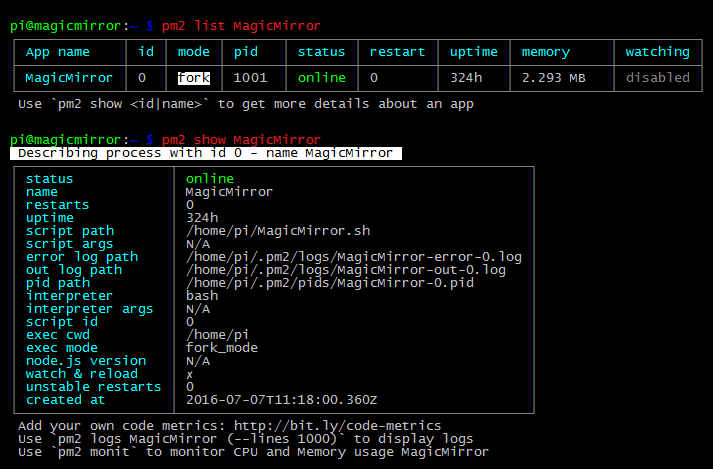
                Log into your rpi and execute 'pm2 list' to list all running pm2 tasks. If you have a bunch of them, then add the task name, like 'pm2 list <TASK NAME>'.

                If you want more info on a specific task, execute 'pm2 show <TASK NAME>'.

                You’ll get info screens like this:

                0_1469122651820_MM.png

                A Life? Cool! Where can I download one of those from?

                X 1 Reply Last reply Reply Quote 0
                • X Offline
                  xbmcnut @KirAsh4
                  last edited by

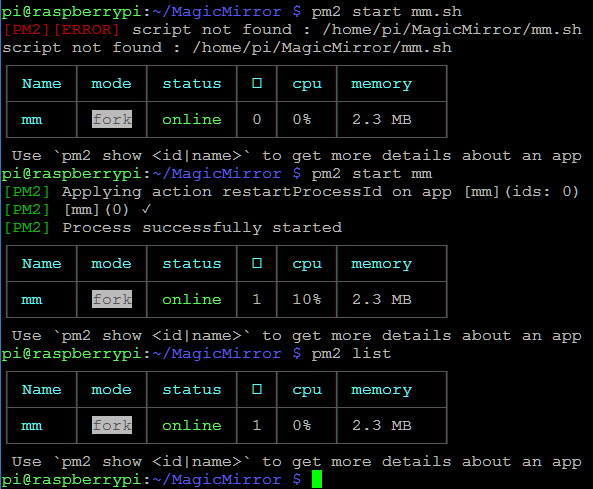
                  @KirAsh4 Thanks for the screenshots. I’m having trouble with mine starting after a reboot too and when I run pm2 list, it does not show a PID even though MM is working. Is that why it won’t start on reboot?
                  0_1489397924822_upload-5ea2ce1a-ac9b-46bf-b907-33133f2ff9ac

                  1 Reply Last reply Reply Quote 0
                  • X Offline
                    xbmcnut
                    last edited by

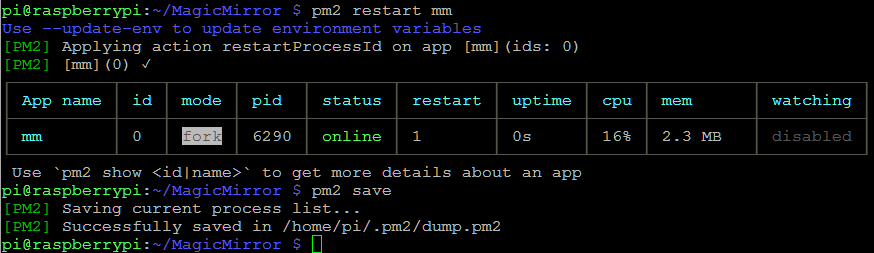
                    OK, did pm2 restart mm and now have a better result. Am I right to issue pm2 save after that?
                    0_1489398453521_upload-00e37575-c508-4665-b348-1be887be8cb0

                    1 Reply Last reply Reply Quote 0
                    • X Offline
                      xbmcnut
                      last edited by

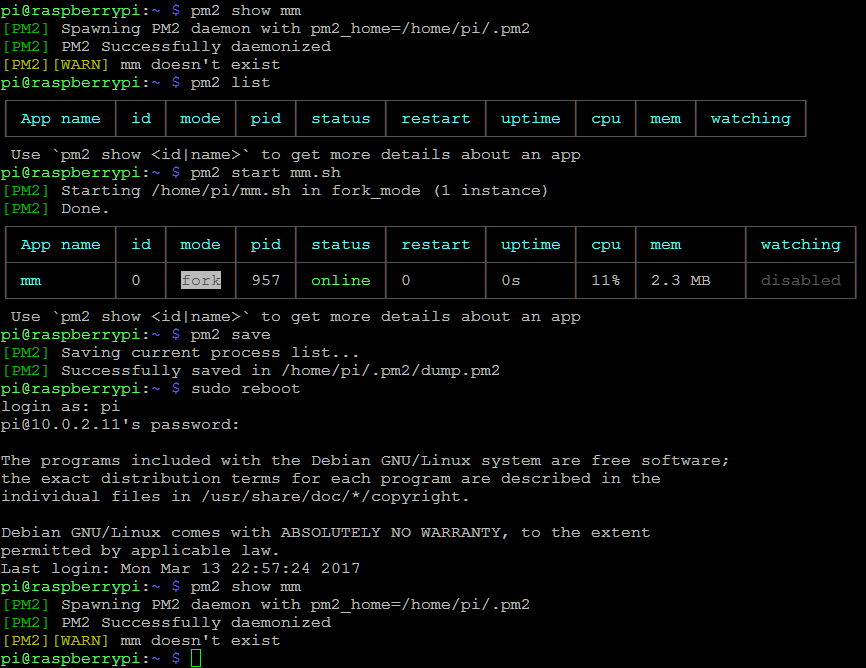
                      OK, here seems to be the problem after a reboot; MM doesn’t exist. Anyone help with that?
                      0_1489399154131_upload-11cdce11-27e8-4035-ace2-552205eb0546

                      1 Reply Last reply Reply Quote 0
                      • M Offline
                        mortenbirkelund
                        last edited by

                        I think the reason why you get the “MM doesnt exist” error is just because the script isnt running.

                        You are asking pm2 to show you status of a process that doesn’t exist. So this error is not the problem, but just a symptom of the fact that pm2 doesnt start mm.sh after reboot as it should. . Hope that makes sense.

                        From what i can see on your screenshots, you seems to be doing it correctly so i dont know why pm2 will not start mm.sh for you. Sorry

                        1 Reply Last reply Reply Quote 0
                        • R Offline
                          robiv8
                          last edited by

                          I have the same problem after a new Installation.
                          I do all how is documented in the Auto Starting MagicMirror GitHub Page

                          Any help will be nice :-)

                          1 Reply Last reply Reply Quote 0
                          • R Offline
                            robiv8
                            last edited by

                            OK for all newbies and dummies like me ;-)

                            The ‘pm2 startup’ on the beginning is very important !!

                            Thanks

                            1 Reply Last reply Reply Quote 0
                            • C Offline
                              Charley Module Developer
                              last edited by

                              With the pm2 startup you are not ready.

                              Read the output and copy and paste the command that is the most made mistake.

                              MMM-Bose-Soundtouch, MMM-Domoticz, MMM-crypto-portfolio, MMM-Fibaro, MMM-rain-forecast

                              R 1 Reply Last reply Reply Quote 0
                              • R Offline
                                robiv8 @Charley
                                last edited by

                                @charley
                                Maybe you are right!
                                But for me that was the reason wy it is not starting. I forgot this at first. ;-)
                                Of course you should do everything in order. Then it works.

                                1 Reply Last reply Reply Quote 0

                                Hello! It looks like you're interested in this conversation, but you don't have an account yet.

                                Getting fed up of having to scroll through the same posts each visit? When you register for an account, you'll always come back to exactly where you were before, and choose to be notified of new replies (either via email, or push notification). You'll also be able to save bookmarks and upvote posts to show your appreciation to other community members.

                                With your input, this post could be even better 💗

                                Register Login

                                • 1 / 1
                                • First post
                                  Last post
                                Enjoying MagicMirror? Please consider a donation!
                                MagicMirror created by Michael Teeuw.
                                Forum managed by Sam, technical setup by Karsten.
                                This forum is using NodeBB as its core | Contributors
                                Contact | Privacy Policy