MagicMirror Forum
    • Recent
    • Tags
    • Unsolved
    • Solved
    • MagicMirror² Repository
    • Documentation
    • 3rd-Party-Modules
    • Donate
    • Discord
    • Register
    • Login
    A New Chapter for MagicMirror: The Community Takes the Lead
    Read the statement by Michael Teeuw here.

    Module WunderGround problem

    Scheduled Pinned Locked Moved Troubleshooting
    9 Posts 4 Posters 5.3k Views 3 Watching
    Loading More Posts
    • Oldest to Newest
    • Newest to Oldest
    • Most Votes
    Reply
    • Reply as topic
    Log in to reply
    This topic has been deleted. Only users with topic management privileges can see it.
    • strawberry 3.141S Offline
      strawberry 3.141 Project Sponsor Module Developer
      last edited by

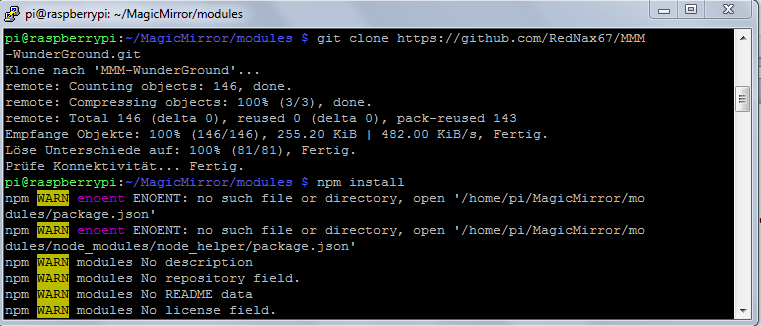
      you are in the wrong directory cd into it first then npm install

      Please create a github issue if you need help, so I can keep track

      1 Reply Last reply Reply Quote 0
      • S Offline
        shgmongohh
        last edited by

        But which is the right directory?

        1 Reply Last reply Reply Quote 0
        • strawberry 3.141S Offline
          strawberry 3.141 Project Sponsor Module Developer
          last edited by

          MMM-WunderGround

          Please create a github issue if you need help, so I can keep track

          1 Reply Last reply Reply Quote 0
          • S Offline
            shgmongohh
            last edited by

            No, that doesn´t work. I get the same message.
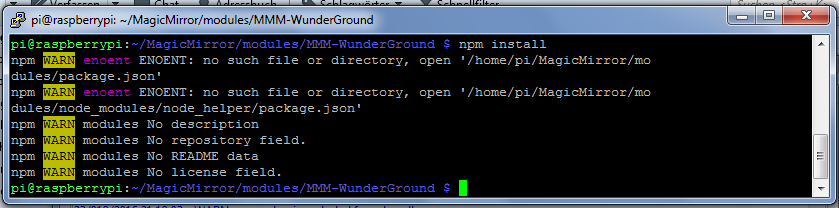
            0_1469301617847_WunderGround2.PNG

            1 Reply Last reply Reply Quote 0
            • strawberry 3.141S Offline
              strawberry 3.141 Project Sponsor Module Developer
              last edited by

              well i looked in the repository and the author doesn’t say that you have to run the command npm install, so i don’t know why you are trying this?!

              Please create a github issue if you need help, so I can keep track

              1 Reply Last reply Reply Quote 0
              • A Offline
                amanzimdwini @shgmongohh
                last edited by

                @shgmongohh
                It’s not obvious what to do - but you can look at the instructions for, say, MMM-Wunderlist:
                “Navigate into your MagicMirror’s modules folder and execute git clone https://github.com/paviro/MMM-Wunderlist.git. A new folder will appear navigate into it.”

                So you need to do the same for WUNDERGROUND (but use the correct git). In other words, execute
                sudo git clone https://github.com/RedNax67/MMM-WunderGround.git

                Viel Glueck

                1 Reply Last reply Reply Quote 0
                • KirAsh4K Offline
                  KirAsh4 Moderator
                  last edited by

                  I said it before, I will say it again:

                  Do not run 'npm install' unless you are specifically told to do so by the module’s README, or by the author (who should be putting it in the README anyway.)

                  A Life? Cool! Where can I download one of those from?

                  1 Reply Last reply Reply Quote 0
                  • S Offline
                    shgmongohh
                    last edited by

                    Hello guys,
                    thank you for your help. I thought I have always to run npm install.

                    Now I´m a little bit smarter. Only run npm install when the author it´s write.

                    Sebastian

                    1 Reply Last reply Reply Quote 0
                    • 1 / 1
                    • First post
                      Last post
                    Enjoying MagicMirror? Please consider a donation!
                    MagicMirror created by Michael Teeuw.
                    Forum managed by Sam, technical setup by Karsten.
                    This forum is using NodeBB as its core | Contributors
                    Contact | Privacy Policy