MagicMirror Forum
    • Recent
    • Tags
    • Unsolved
    • Solved
    • MagicMirror² Repository
    • Documentation
    • 3rd-Party-Modules
    • Donate
    • Discord
    • Register
    • Login
    A New Chapter for MagicMirror: The Community Takes the Lead
    Read the statement by Michael Teeuw here.

    Complete Walkthrough - Install MagicMirror on a PC - Windows 7/10

    Scheduled Pinned Locked Moved Troubleshooting
    324 Posts 55 Posters 783.2k Views 59 Watching
    Loading More Posts
    • Oldest to Newest
    • Newest to Oldest
    • Most Votes
    Reply
    • Reply as topic
    Log in to reply
    This topic has been deleted. Only users with topic management privileges can see it.
    • K Offline
      KillK
      last edited by

      Hi, newby here… I have reinstaled MM in my win 10 laptop… It was working well until the reinstallation…
      I am having an issue, i will try to translate it, cuz my cmd is in spanish…

      magicmirror@2.17.1 start
      node_modules/.bin/electron js/electron.js

      “node_modules” doesn’t recognize it as an internal or external command,
      program or file by executable lot.

      At the same time i have notice, that “.bin” folder doesn’t contain “electron js” folder inside…

      I have had to install manually npm for fonts ans vendor’s folders…

      Please, help me Obi Wan Kenobi…

      mumblebajM S 2 Replies Last reply Reply Quote 0
      • mumblebajM Offline
        mumblebaj Module Developer @KillK
        last edited by

        @killk You have asked the same question in different posts a few times. This can be seen as spamming,

        Check out my modules at: https://github.com/mumblebaj?tab=repositories
        Check my blog-post: https://mumblebaj.xyz/
        Check my MM Container: https://hub.docker.com/repository/docker/mumblebaj/magicmirror/general

        K 1 Reply Last reply Reply Quote 0
        • K Offline
          KillK @mumblebaj
          last edited by

          @mumblebaj oh sorry, i have to delete the other one… I didn’t know it.

          S 1 Reply Last reply Reply Quote 0
          • S Offline
            sdetweil @KillK
            last edited by

            @killk we are all volunteers here. more folks around in the evenings, weekends. but it’s all volunteer. no commitment to answer any question or solve any problem . asking in multiple places doesn’t get help any faster.

            Sam

            How to add modules

            learning how to use browser developers window for css changes

            1 Reply Last reply Reply Quote 0
            • S Offline
              sdetweil @KillK
              last edited by

              @killk I had no problem

              Win 10, under Vmware

              git clone

              npm install
              and in vendors and fonts
              edit the package.json
              copy the default config.js from the sample

              npm start
              Screenshot at 2021-10-05 17-35-46.png

              Sam

              How to add modules

              learning how to use browser developers window for css changes

              1 Reply Last reply Reply Quote 0
              • M Offline
                mounir @Mykle1
                last edited by

                @mykle1 how can i resolve this ?
                ‘DISPLAY’ is not recognized as an internal or external command,
                operable program or batch file.

                S 1 Reply Last reply Reply Quote 0
                • S Offline
                  sdetweil @mounir
                  last edited by

                  @mounir have to scan further back
                  see
                  https://forum.magicmirror.builders/topic/4089/complete-walkthrough-install-magicmirror-on-a-pc-windows-7-10/141?_=1638708846564

                  Sam

                  How to add modules

                  learning how to use browser developers window for css changes

                  1 Reply Last reply Reply Quote 0
                  • M Offline
                    mounir @sdetweil
                    last edited by

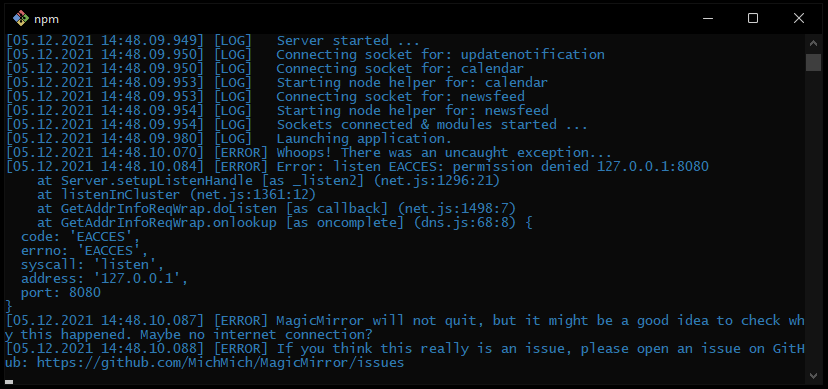
                    @sdetweil no i see this
                    listen EACCES: permission denied 127.0.0.1:8080
                    can you help me fix it

                    S M 2 Replies Last reply Reply Quote 0
                    • S Offline
                      sdetweil @mounir
                      last edited by sdetweil

                      @mounir where do u see that?

                      u are installing in cmd terminal window, right?
                      not PowerShell

                      Sam

                      How to add modules

                      learning how to use browser developers window for css changes

                      1 Reply Last reply Reply Quote 0
                      • M Offline
                        mounir @mounir
                        last edited by

                        @mounir yes in cmd Untitled22.png

                        S 1 Reply Last reply Reply Quote 0
                        • S Offline
                          sdetweil @mounir
                          last edited by sdetweil

                          @mounir is this windows 10, or 11?

                          never seen this. installed on windows 11 last week to test

                          are u running any other web server apps?

                          Sam

                          How to add modules

                          learning how to use browser developers window for css changes

                          M 1 Reply Last reply Reply Quote 0
                          • M Offline
                            mounir @sdetweil
                            last edited by

                            @sdetweil i’m in windows 11 but there is no webserver running

                            S 1 Reply Last reply Reply Quote 0
                            • S Offline
                              sdetweil @mounir
                              last edited by sdetweil

                              @mounir read this
                              https://superuser.com/questions/1437780/how-to-fix-listen-eacces-permission-denied-on-any-port/1568476

                              u can change the port in MagicMirror\config\config.js

                              Sam

                              How to add modules

                              learning how to use browser developers window for css changes

                              M 1 Reply Last reply Reply Quote 0
                              • M Offline
                                mounir @sdetweil
                                last edited by

                                @sdetweil thank you it works when i’m changing the port in the config.js

                                1 Reply Last reply Reply Quote 0
                                • S Offline
                                  sdetweil
                                  last edited by sdetweil

                                  Note for v ersion 2.18 a little twist
                                  do

                                   npm install --only=prod
                                  

                                  otherwise the developer dependencies will be installed too, and fail, causing electron not to be installed.

                                  then
                                  the additional steps are the same

                                  cd fonts
                                  npm install
                                  cd ..\vendor
                                  npm install
                                  cd ..
                                  

                                  and edit package.json to change the start line as shown in prior posts

                                  new info for change of start line in package.json, with node 16
                                  should be like this (earlier worked with node 14,)

                                  "start": "node_modules\\.bin\\electron js\\electron.js",
                                  

                                  Sam

                                  How to add modules

                                  learning how to use browser developers window for css changes

                                  1 Reply Last reply Reply Quote 0
                                  • P Offline
                                    Pearce
                                    last edited by

                                    I went through the installation guide and got this error:

                                    $ npm start

                                    magicmirror@2.18.0 start

                                    DISPLAY=“${DISPLAY:=:0}” ./node_modules/.bin/electron js/electron.js

                                    ‘DISPLAY’ is not recognized as an internal or external command,

                                    operable program or batch file.

                                    S 1 Reply Last reply Reply Quote 0
                                    • S Offline
                                      sdetweil @Pearce
                                      last edited by

                                      @pearce further up
                                      https://forum.magicmirror.builders/topic/4089/complete-walkthrough-install-magicmirror-on-a-pc-windows-7-10/141?_=1638708846564

                                      Sam

                                      How to add modules

                                      learning how to use browser developers window for css changes

                                      1 Reply Last reply Reply Quote 0
                                      • N6NGN Offline
                                        N6NG
                                        last edited by

                                        Hi all… Looks like a lot of people are trying this… I’m going for it myself but ran into this problem…
                                        When I try to do the
                                        git clone https://github.com/MichMich/MagicMirror.git

                                        I get the following error.

                                        N6NG@Main-Computer-in-Ham-Shack MINGW64 /
                                        $ git clone https://github.com/MichMich/MagicMirror.git
                                        fatal: could not create work tree dir ‘MagicMirror’: Permission denied
                                        Anyone figured out how to change permissions… sudo isn’t recognized yet.
                                        Dennis

                                        S 1 Reply Last reply Reply Quote 0
                                        • S Offline
                                          sdetweil @N6NG
                                          last edited by

                                          @n6ng no mingw,
                                          just normal windows prompt

                                          Sam

                                          How to add modules

                                          learning how to use browser developers window for css changes

                                          1 Reply Last reply Reply Quote 0
                                          • swvalentiS Offline
                                            swvalenti Project Sponsor
                                            last edited by

                                            @sdetweil I installed MagicMirror no issues on Windows 11 but get undefined on several modules. Here is npm start dev

                                            Refused to execute inline script because it violates the following Content Security Policy directive: "script-src 'self'". Either the 'unsafe-inline' keyword, a hash ('sha256-+VvWeRXLFRBjsYaMznmUQGiO1Vl3+a2jdYPOrV4EIp8='), or a nonce ('nonce-...') is required to enable inline execution.
                                            
                                            main.js:481 Initializing MagicMirror.
                                            translator.js:128 Loading core translation file: translations/en.json
                                            translator.js:146 Loading core translation fallback file: translations/en.json
                                            loader.js:184 Load script: modules/default/alert/alert.js
                                            module.js:509 Module registered: alert
                                            loader.js:155 Bootstrapping module: alert
                                            loader.js:184 Load script: modules/default/alert/notificationFx.js
                                            loader.js:160 Scripts loaded for: alert
                                            loader.js:203 Load stylesheet: vendor/css/font-awesome.css
                                            loader.js:203 Load stylesheet: modules/default/alert/./styles/notificationFx.css
                                            loader.js:203 Load stylesheet: modules/default/alert/./styles/center.css
                                            loader.js:162 Styles loaded for: alert
                                            translator.js:107 alert - Load translationfalse: translations/en.json
                                            translator.js:107 alert - Load translation fallback: translations/bg.json
                                            loader.js:164 Translations loaded for: alert
                                            loader.js:184 Load script: modules/default/updatenotification/updatenotification.js
                                            module.js:509 Module registered: updatenotification
                                            loader.js:155 Bootstrapping module: updatenotification
                                            loader.js:160 Scripts loaded for: updatenotification
                                            loader.js:203 Load stylesheet: modules/default/updatenotification/updatenotification.css
                                            loader.js:162 Styles loaded for: updatenotification
                                            loader.js:164 Translations loaded for: updatenotification
                                            loader.js:184 Load script: modules/default/clock/clock.js
                                            module.js:509 Module registered: clock
                                            loader.js:155 Bootstrapping module: clock
                                            loader.js:184 Load script: vendor/node_modules/moment/min/moment-with-locales.js
                                            loader.js:184 Load script: vendor/node_modules/moment-timezone/builds/moment-timezone-with-data.js
                                            loader.js:184 Load script: vendor/node_modules/suncalc/suncalc.js
                                            loader.js:160 Scripts loaded for: clock
                                            loader.js:203 Load stylesheet: modules/default/clock/clock_styles.css
                                            loader.js:162 Styles loaded for: clock
                                            loader.js:164 Translations loaded for: clock
                                            loader.js:184 Load script: modules/default/calendar/calendar.js
                                            module.js:501 Check MagicMirror version for module 'calendar' - Minimum version:  2.1.0 - Current version: undefined
                                            module.js:525 Uncaught TypeError: Cannot read properties of undefined (reading 'replace')
                                                at cmpVersions (module.js:525)
                                                at Function.Module.register (module.js:502)
                                                at calendar.js:9
                                            loader.js:184 Load script: modules/default/compliments/compliments.js
                                            module.js:509 Module registered: compliments
                                            loader.js:155 Bootstrapping module: compliments
                                            loader.js:244 File already loaded: moment.js
                                            loader.js:160 Scripts loaded for: compliments
                                            loader.js:162 Styles loaded for: compliments
                                            loader.js:164 Translations loaded for: compliments
                                            loader.js:184 Load script: modules/default/weather/weather.js
                                            module.js:509 Module registered: weather
                                            loader.js:155 Bootstrapping module: weather
                                            loader.js:244 File already loaded: moment.js
                                            loader.js:184 Load script: modules/default/weather/weatherprovider.js
                                            loader.js:184 Load script: modules/default/weather/weatherobject.js
                                            loader.js:244 File already loaded: suncalc.js
                                            loader.js:184 Load script: modules/default/weather/providers/openweathermap.js
                                            loader.js:160 Scripts loaded for: weather
                                            loader.js:244 File already loaded: font-awesome.css
                                            loader.js:203 Load stylesheet: vendor/node_modules/weathericons/css/weather-icons.css
                                            loader.js:203 Load stylesheet: modules/default/weather/weather.css
                                            loader.js:162 Styles loaded for: weather
                                            loader.js:164 Translations loaded for: weather
                                            loader.js:184 Load script: modules/MMM-News/MMM-News.js
                                            module.js:509 Module registered: MMM-News
                                            loader.js:155 Bootstrapping module: MMM-News
                                            loader.js:160 Scripts loaded for: MMM-News
                                            loader.js:203 Load stylesheet: modules/MMM-News/MMM-News.css
                                            loader.js:162 Styles loaded for: MMM-News
                                            loader.js:164 Translations loaded for: MMM-News
                                            loader.js:203 Load stylesheet: css/custom.css
                                            alert.js:47 Starting module: alert
                                            updatenotification.js:18 Starting module: updatenotification
                                            clock.js:48 Starting module: clock
                                            compliments.js:38 Starting module: compliments
                                            weatherprovider.js:35 Weather provider: OpenWeatherMap initialized.
                                            weatherprovider.js:46 Weather provider: OpenWeatherMap started.
                                            main.js:499 All modules started!
                                            module.js:94 Template render error: (updatenotification.njk)
                                              EvalError: Refused to evaluate a string as JavaScript because 'unsafe-eval' is not an allowed source of script in the following Content Security Policy directive: "script-src 'self'".
                                            
                                                at Object.n.t (http://localhost:8080/vendor/node_modules/nunjucks/browser/nunjucks.min.js:2:2630)
                                                at n.i.render (http://localhost:8080/vendor/node_modules/nunjucks/browser/nunjucks.min.js:2:37638)
                                                at http://localhost:8080/vendor/node_modules/nunjucks/browser/nunjucks.min.js:2:35783
                                                at http://localhost:8080/vendor/node_modules/nunjucks/browser/nunjucks.min.js:2:35581
                                                at o (http://localhost:8080/vendor/node_modules/nunjucks/browser/nunjucks.min.js:2:35306)
                                                at http://localhost:8080/vendor/node_modules/nunjucks/browser/nunjucks.min.js:2:64086
                                                at XMLHttpRequest.i.onreadystatechange (http://localhost:8080/vendor/node_modules/nunjucks/browser/nunjucks.min.js:2:64326)
                                            (anonymous) @ module.js:94
                                            module.js:94 Template render error: (current.njk)
                                              EvalError: Refused to evaluate a string as JavaScript because 'unsafe-eval' is not an allowed source of script in the following Content Security Policy directive: "script-src 'self'".
                                            
                                                at Object.n.t (http://localhost:8080/vendor/node_modules/nunjucks/browser/nunjucks.min.js:2:2630)
                                                at n.i.render (http://localhost:8080/vendor/node_modules/nunjucks/browser/nunjucks.min.js:2:37638)
                                                at http://localhost:8080/vendor/node_modules/nunjucks/browser/nunjucks.min.js:2:35783
                                                at http://localhost:8080/vendor/node_modules/nunjucks/browser/nunjucks.min.js:2:35581
                                                at o (http://localhost:8080/vendor/node_modules/nunjucks/browser/nunjucks.min.js:2:35306)
                                                at http://localhost:8080/vendor/node_modules/nunjucks/browser/nunjucks.min.js:2:64086
                                                at XMLHttpRequest.i.onreadystatechange (http://localhost:8080/vendor/node_modules/nunjucks/browser/nunjucks.min.js:2:64326)
                                            (anonymous) @ module.js:94
                                            weather.js:149 New weather information available.
                                            module.js:94 Template render error: (current.njk)
                                              EvalError: Refused to evaluate a string as JavaScript because 'unsafe-eval' is not an allowed source of script in the following Content Security Policy directive: "script-src 'self'".
                                            
                                                at Object.n.t (http://localhost:8080/vendor/node_modules/nunjucks/browser/nunjucks.min.js:2:2630)
                                                at n.i.render (http://localhost:8080/vendor/node_modules/nunjucks/browser/nunjucks.min.js:2:37638)
                                                at http://localhost:8080/vendor/node_modules/nunjucks/browser/nunjucks.min.js:2:35783
                                                at http://localhost:8080/vendor/node_modules/nunjucks/browser/nunjucks.min.js:2:35581
                                                at o (http://localhost:8080/vendor/node_modules/nunjucks/browser/nunjucks.min.js:2:35306)
                                                at http://localhost:8080/vendor/node_modules/nunjucks/browser/nunjucks.min.js:2:64086
                                                at XMLHttpRequest.i.onreadystatechange (http://localhost:8080/vendor/node_modules/nunjucks/browser/nunjucks.min.js:2:64326)
                                            (anonymous) @ module.js:94
                                            module.js:94 Template render error: (updatenotification.njk)
                                              EvalError: Refused to evaluate a string as JavaScript because 'unsafe-eval' is not an allowed source of script in the following Content Security Policy directive: "script-src 'self'".
                                            
                                                at Object.n.t (http://localhost:8080/vendor/node_modules/nunjucks/browser/nunjucks.min.js:2:2630)
                                                at n.i.render (http://localhost:8080/vendor/node_modules/nunjucks/browser/nunjucks.min.js:2:37638)
                                                at http://localhost:8080/vendor/node_modules/nunjucks/browser/nunjucks.min.js:2:35783
                                                at http://localhost:8080/vendor/node_modules/nunjucks/browser/nunjucks.min.js:2:35581
                                                at o (http://localhost:8080/vendor/node_modules/nunjucks/browser/nunjucks.min.js:2:35306)
                                                at http://localhost:8080/vendor/node_modules/nunjucks/browser/nunjucks.min.js:2:64086
                                                at XMLHttpRequest.i.onreadystatechange (http://localhost:8080/vendor/node_modules/nunjucks/browser/nunjucks.min.js:2:64326)
                                            
                                            swvalentiS S 2 Replies Last reply Reply Quote 0

                                            Hello! It looks like you're interested in this conversation, but you don't have an account yet.

                                            Getting fed up of having to scroll through the same posts each visit? When you register for an account, you'll always come back to exactly where you were before, and choose to be notified of new replies (either via email, or push notification). You'll also be able to save bookmarks and upvote posts to show your appreciation to other community members.

                                            With your input, this post could be even better 💗

                                            Register Login

                                            • 1
                                            • 2
                                            • 10
                                            • 11
                                            • 12
                                            • 13
                                            • 14
                                            • 15
                                            • 16
                                            • 17
                                            • 12 / 17
                                            • First post
                                              Last post
                                            Enjoying MagicMirror? Please consider a donation!
                                            MagicMirror created by Michael Teeuw.
                                            Forum managed by Sam, technical setup by Karsten.
                                            This forum is using NodeBB as its core | Contributors
                                            Contact | Privacy Policy