MagicMirror Forum
    • Recent
    • Tags
    • Unsolved
    • Solved
    • MagicMirror² Repository
    • Documentation
    • 3rd-Party-Modules
    • Donate
    • Discord
    • Register
    • Login
    A New Chapter for MagicMirror: The Community Takes the Lead
    Read the statement by Michael Teeuw here.

    VoiceControl module

    Scheduled Pinned Locked Moved Utilities
    79 Posts 27 Posters 114.3k Views 29 Watching
    Loading More Posts
    • Oldest to Newest
    • Newest to Oldest
    • Most Votes
    Reply
    • Reply as topic
    Log in to reply
    This topic has been deleted. Only users with topic management privileges can see it.
    • A Offline
      alexyak
      last edited by

      I’ve managed to create the VoiceControl module based on Snowboy Hotword detection: https://snowboy.kitt.ai/

      https://github.com/alexyak/voicecontrol

      T 1 Reply Last reply Reply Quote 4
      • T Offline
        tyho @alexyak
        last edited by

        @alexyak cool! How does it work?

        1 Reply Last reply Reply Quote -1
        • A Offline
          alexyak
          last edited by alexyak

          Pull it or clone from the github into your MM modules directory. Go to the https://snowboy.kitt.ai, login with any of your emails, create voice models as much as you need and copy the pmdl files into the root folder, modify the config.js as it described in the Readme.md.

          1 Reply Last reply Reply Quote 0
          • T Offline
            tyho
            last edited by

            where to place “notificationReceived: function” to get a text output on the mirror?

            A 1 Reply Last reply Reply Quote 0
            • A Offline
              alexyak @tyho
              last edited by

              @tyho said in VoiceControl module:

              notificationReceived

              You can put it in any other module that you would like to react on the voice command and then just call self.updateDom(self.config.animationSpeed);

              1 Reply Last reply Reply Quote 0
              • T Offline
                tyho
                last edited by

                Wow! @alexyak nice work. I got it running. and i am playing around with it.

                1 question:
                I want to display the commands i said for 3 seconds.

                If i say a command i can get the text with:
                this.config.text = “going to sleep…”;
                this.updateDom(this.config.animationSpeed);

                Is there a way to auto reset it to default/hide after a few seconds? (i am trying this for hours already ^^)

                A 1 Reply Last reply Reply Quote 0
                • A Offline
                  alexyak @tyho
                  last edited by

                  @tyho, you can use setTimeout function to wait a for few seconds and then reset the text value. Something like that:

                  var self = this;
                  setTimeout(function(){
                  self.config.text = “”;
                  self.updateDom …
                  }, 3000);

                  1 Reply Last reply Reply Quote 0
                  • T Offline
                    tyho
                    last edited by tyho

                    thanks again it’s working :)

                    i made a notification.js:

                    notificationReceived: function(notification, payload, sender) {
                    		var self = this;
                    				if (notification === "go_to_sleep"){
                                		this.config.text = "going to sleep...";
                    					this.updateDom(this.config.animationSpeed);
                    					setTimeout(function(){
                    						self.config.text = "";
                    						self.updateDom(self.config.animationSpeed);
                    					}, 3000);
                            		}
                    				if (notification === "wake_up"){
                                		this.config.text = "waking up...";
                    					this.updateDom(this.config.animationSpeed);
                    					setTimeout(function(){
                    						self.config.text = "";
                    						self.updateDom(self.config.animationSpeed);
                    					}, 3000);
                            		}
                        },


                    i have made a node_helper.js:

                    const NodeHelper = require('node_helper');
                    const exec = require('child_process').exec;
                    
                    module.exports = NodeHelper.create({
                      start: function () {
                    	      this.started = false
                      }, 
                     
                      socketNotificationReceived: function(notification, payload) {
                        if (notification === 'go_to_sleep' && this.started == false) {
                                exec("/opt/vc/bin/tvservice -o", null);
                    	}
                    	    if (notification === 'wake_up' && this.started == false) {
                                exec("/opt/vc/bin/tvservice -p", null);
                    	}
                      }
                    }); 
                    

                    It shows the command i speak for 3 seconds. But i can’t get the node helper working to actualy turn on and off my monitor. How can i bind this 2 modules? Or do i have to include it as a separate js file?

                    strawberry 3.141S 1 Reply Last reply Reply Quote 0
                    • strawberry 3.141S Offline
                      strawberry 3.141 Project Sponsor Module Developer @tyho
                      last edited by

                      @tyho try this.sendSocketNotification('go_to_sleep', {}); in notification.js otherwise the node_helper doesnt’t get any msg and will not perform any action

                      Please create a github issue if you need help, so I can keep track

                      1 Reply Last reply Reply Quote 0
                      • T Offline
                        tyho
                        last edited by

                        Great! it’s working! thanks!

                        1 Reply Last reply Reply Quote 0
                        • T Offline
                          tyho
                          last edited by

                          I still have a little problem. I want to register that if the monitor is on or off. It’s working very well except on the autosleep function that is loaded in the node_helper.

                          My notification.js

                          var awake = 1;
                          Module.register("notification",{
                          
                          	// Default module config.
                          	defaults: {
                          		text: "",
                          		animationSpeed: 500,
                          	},
                          	notificationReceived: function(notification, callback) {
                          		var self = this;
                          				if (notification === "go_to_sleep" && awake === 1){
                                      		this.config.text = "going to sleep...";
                          					this.updateDom(this.config.animationSpeed);
                          					setTimeout(function(){
                          						self.sendSocketNotification('go_to_sleep', {});
                          						self.config.text = "";
                          						self.updateDom(self.config.animationSpeed);
                          					}, 1000);
                          					awake = 0;
                          					callback(awake);
                                  		}
                          				if (notification === "wake_up" && awake === 0){
                          					this.sendSocketNotification('wake_up', {});
                                      		this.config.text = "waking up...";
                          					this.updateDom(this.config.animationSpeed);
                          					setTimeout(function(){
                          						self.config.text = "";
                          						self.updateDom(self.config.animationSpeed);
                          					}, 5000);
                          					awake = 1;
                          					callback(awake);
                                  		}
                          				if (notification === "autosleep"){
                          					awake = 0;
                          					callback(awake);
                                  		}
                              },
                          	
                          	// Override dom generator.
                          	getDom: function() {
                          		var wrapper = document.createElement("div");
                          		wrapper.innerHTML = this.config.text;
                          		return wrapper;
                          	}
                          });


                          and my node_helper.js

                          'use strict';
                          const NodeHelper = require('node_helper');
                          const exec = require('child_process').exec;
                          var timer;
                          function initialize() {
                          
                          }
                          (function(){
                          	initialize();
                          			autosleep();
                          })();
                          function autosleep(){
                          	  timer=setTimeout(function(){
                          		  	var self = this;
                          				exec("/opt/vc/bin/tvservice -o", null);
                          				self.sendSocketNotification('autosleep');
                          			},  10*60*1000);
                          	  }
                          
                          module.exports = NodeHelper.create({
                            start: function () {  
                            }, 
                           
                            socketNotificationReceived: function(notification) {
                          
                              if (notification === 'go_to_sleep') {
                                      exec("/opt/vc/bin/tvservice -o", null);
                          			clearTimeout(timer);
                          	}
                          	if (notification === 'wake_up') {
                                      exec("/opt/vc/bin/tvservice -p", null);
                          			exec("/bin/fbset -depth 8 && /bin/fbset -depth 16 ", null);
                                		exec("/usr/bin/xrefresh",null);
                          			clearTimeout(timer);
                          			autosleep();
                          	}
                            }
                          });
                          

                          what i want is: if the autosleep function turns my monitor off, the variable awake in the notification.js set to 0.

                          any other suggestion on junky code are also welcome ^^

                          1 Reply Last reply Reply Quote 0
                          • A Offline
                            alexyak
                            last edited by alexyak

                            If you override socketNotificationReceived in your module then you should receive the message from node_helper and can reset your flag appropriately.

                            T 1 Reply Last reply Reply Quote 0
                            • T Offline
                              tyho @alexyak
                              last edited by

                              @alexyak how to override that module? I already call it with notifications === ‘autosleep’. And that notification gets send by the node_helper right? what am i missing?

                              A 1 Reply Last reply Reply Quote 0
                              • A Offline
                                alexyak @tyho
                                last edited by

                                @tyho What I meant is you need to add socketNotificationReceived to your module notification.js.

                                1 Reply Last reply Reply Quote 0
                                • T Offline
                                  tyho
                                  last edited by

                                  @alexyak i can’t get it to work. it tested:
                                  It sends sockets notifications from notifications.js to node_helper.js. But not from node_helper.js back to notifications.js.

                                  Even if i put it in the start function of the node_helper.js:

                                  start: function() { 
                                    this.sendSocketNotification("autosleep", {});
                                    }, 
                                  

                                  it won’t get received it my notification.js:

                                  socketNotificationReceived: function(notification) {
                                     if (notification === "autosleep") {
                                  	  alert("autosleep received");
                                  		awake = 0;
                                          		}
                                     	},
                                  

                                  any idea? is it even possible to use it backwards?

                                  1 Reply Last reply Reply Quote 0
                                  • A Offline
                                    alexyak
                                    last edited by

                                    Try to put a call in your start method of the module (notification.js) to establish the connection with node_helper. Something like that:

                                    this.sendSocketNotification(“CONNECT”, {});

                                    1 Reply Last reply Reply Quote 0
                                    • A Offline
                                      alexyak
                                      last edited by

                                      I’ve updated the VoiceControl module to display a list of commands on the mirror:
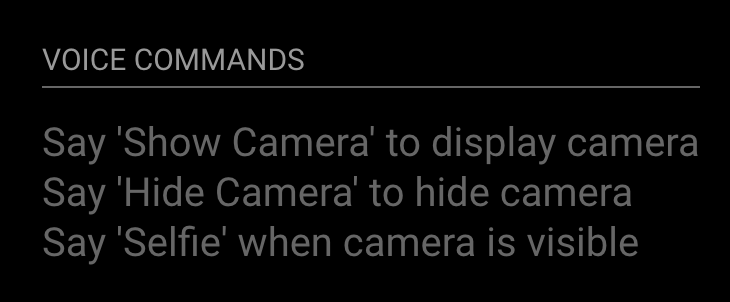
                                      0_1472851592256_Screen Shot 2016-09-02 at 5.23.53 PM.png

                                      [ card : alexyak/voicecontrol ]

                                      1 Reply Last reply Reply Quote 0
                                      • A Offline
                                        alexyak
                                        last edited by alexyak

                                        [card:alexyak/voicecontrol]

                                        1 Reply Last reply Reply Quote 0
                                        • B Offline
                                          brumoeller
                                          last edited by

                                          This is a really cool module. Does anyone know a good microphone that will work for the whole room? The mic I have only works when you are close.

                                          1 Reply Last reply Reply Quote 0
                                          • G Offline
                                            gismo2006
                                            last edited by

                                            Hi,

                                            @alexyak sorry, but i have a little Problem. Maybe you can help me.

                                            You write on Github in your Readme file, I have to put the code (notificationReceived: function(notification, payload, sender)…) into the module to use it. I like to controll the module Simple music player by @EoF so i clone your github files copy the code into the config.js File train and download a pmdl file. But where should i paste the code notificationReceived: function(notification, payload, sender)… In the config.js File or in the mmm-music-player.js file in folder modules simple music Player?

                                            Sorry i’m new in the coding world, and now a little bit confused :-D

                                            Greets gismo2006

                                            J 1 Reply Last reply Reply Quote 0

                                            Hello! It looks like you're interested in this conversation, but you don't have an account yet.

                                            Getting fed up of having to scroll through the same posts each visit? When you register for an account, you'll always come back to exactly where you were before, and choose to be notified of new replies (either via email, or push notification). You'll also be able to save bookmarks and upvote posts to show your appreciation to other community members.

                                            With your input, this post could be even better 💗

                                            Register Login

                                            • 1
                                            • 2
                                            • 3
                                            • 4
                                            • 1 / 4
                                            • First post
                                              Last post
                                            Enjoying MagicMirror? Please consider a donation!
                                            MagicMirror created by Michael Teeuw.
                                            Forum managed by Sam, technical setup by Karsten.
                                            This forum is using NodeBB as its core | Contributors
                                            Contact | Privacy Policy